login | register
Tue 09 of Feb, 2010 [20:44 UTC]

voip-info.org

History

Asterisk Cisco CallManager Integration

Created by: ajunge,Last modification on Wed 29 of Apr, 2009 [12:37 UTC] by mathieuparent
Why integrate Cisco CallManager and Asterisk?
  • Features: Asterisk provides features that CallManager by itself does not.
  • Migration: Allow a gradual migration from a closed source PBX to open source PBX.

There are two ways to accomplish this:

  1. Using H.323: In CCM Asterisk appears as a H.323 Gateway.
  2. Using SIP (only in CCM 4.X+):
    1. Open up the CallManager Administration web page.
    2. Since a SIP trunk requires MTP, make sure you have one:
      1. Service -> Media Resource -> Media Termination Point
      2. Normally your CallManager server should appear there if you do an empty query
      3. if not, go to the CallManager Serviceabilty web page, and activate the Cisco IP Voice Media Streaming App service
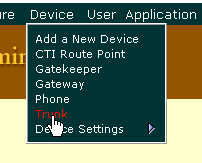
    3. Select Device->Trunk from the menu.
      Image
    4. Select the "Add a New Trunk" link from the upper right hand corner of the "Find and List Trunks" page.
      Image
    5. Select "SIP Trunk" as the "Trunk type" and "SIP" as the "Device Protocol". Click on the "Next" button.
      Image
    6. Enter a name in the "Device Name". Valid characters are letters, numbers, dashes, dots (periods), and underscores. The device name is only used internally in Call Manager so it can be anything you want.
    7. Enter a description in the "Description" field.
    8. Select a device pool.
    9. Enter the IP address of your Asterisk server in the "Destination Address" field.
    10. Select "UDP" as the "Outgoing Transport Type".
    11. Modify any other settings as needed for your ((CiscoCallManager|CallManager) installation.
    12. Click on the "Insert" button.
    13. Add route patterns in CallManager that send calls to Asterisk using the SIP trunk that you just created.
    14. In sip.conf:


[callman01]
type=friend
context=incoming
host=10.0.0.1
disallow=all
allow=ulaw
allow=alaw
nat=no
canreinvite=yes
qualify=yes

[callman02]
type=friend
context=incoming
host=10.0.0.2
disallow=all
allow=ulaw
allow=alaw
nat=no
canreinvite=yes
qualify=yes


It is important to use "qualify" in sip.conf since Call Manager does not support registration for SIP trunks.

Here is a simple example of how to send calls to Call Manager in extensions.conf:


[macro-dialout-callmanager]

exten => s,1,ChanIsAvail(SIP/callman02&SIP/callman01)
exten => s,2,Dial(${CUT(AVAILCHAN||1)}/${ARG1})
exten => s,3,Hangup

exten => s,102,Congestion

[outgoing]

exten => _XXXX,1,Macro(dialout-callmanager,${EXTEN})
exten => _9NXXXXXX,1,Macro(dialout-callmanager,${EXTEN})
exten => _91NXXNXXXXXX,1,Macro(dialout-callmanager,${EXTEN})

exten => i,1,Congestion


Cisco Call Manager Express 3.3

CCME can be configured as follows:


Configure a dial-peer pointing to your asterisk server on the CCME 3.3 router:

dial-peer voice 13 voip

extensions on asterisk

destination-pattern 22..

SIP Protocol

session protocol sipv2

Asterisk Server IP

session target ipv4:10.0.0.1

DTMF tones in RFC2833 for Voicemail integration

dtmf-relay rtp-nte

Allowed codecs

codec g711alaw


And configure asterisk exactly the same as above for Call Manager 3.2, except for voicemail to work add:

dtmfmode=rfc2833

Into your sip.conf entry.


Cisco Call Manager 6.1

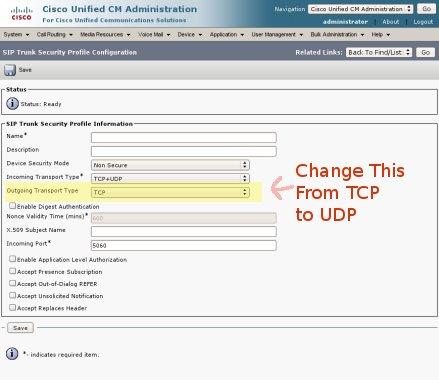
It' very simitar to 4.1, but you must change the UDP protocol of sip in this menu:

System > Security Profile > SIP Trunk Security Profile

Outgoing Transport Type: UDP
CM6SIPTrunkSecurityProfile2.jpg


Here is the step by step guide for h323 trunk to cisco call manager.
(valid for both for asterisk and trixbox)

First of all do this:

cp /etc/asterisk-1.2.8-samples/ooh323.conf /etc/asterisk
amportal stop
amportal start

Then apply the followings as stated.

A- Here is my working ooh323.conf file;

; Objective System's H323 Configuration example for Asterisk
; ooh323c driver configuration
;
; general section defines global parameters
;
; This is followed by profiles which can be of three types - user/peer/friend
; Name of the user profile should match with the h323id of the user device.
; For peer/friend profiles, host ip address must be provided as "dynamic" is
; not supported as of now.
;
; Syntax for specifying a H323 device in extensions.conf is

For Registered peers/friends profiles
; OOH323/name where name is the name of the peer/friend profile.
;

For unregistered H.323 phones
OOH323/ip:port OR if gk is used OOH323/alias where alias can be any H323
; alias
;
; For dialing into another asterisk peer at a specific exten
; OOH323/exten/peer OR OOH323/exten@ip
;
; Domain name resolution is not yet supported.
;
; When a H.323 user calls into asterisk, his H323ID is matched with the profile
; name and context is determined to route the call
;
; The channel driver will register all global aliases and aliases defined in
; peer profiles with the gatekeeper, if one exists. So, that when someone
; outside our pbx (non-user) calls an extension, gatekeeper will route that
; call to our asterisk box, from where it will be routed as per dial plan.


general
;Define the asetrisk server h323 endpoint

;The port asterisk should listen for incoming H323 connections.
;Default - 1720
port=1720

;The dotted IP address asterisk should listen on for incoming H323
;connections
;Default - tries to find out local ip address on it's own
bindaddr=10.1.23.101

;This parameter indicates whether channel driver should register with
;gatekeeper as a gateway or an endpoint.
;Default - no
gateway=no

;Whether asterisk should use fast-start and tunneling for H323 connections.
;Default - yes
;faststart=no
;h245tunneling=no


;H323-ID to be used for asterisk server
;Default - Asterisk PBX
h323id=ObjSysAsterisk
e164=100

;CallerID to use for calls
;Default - Same as h323id
callerid=asterisk

;Whether this asterisk server will use gatekeeper.
;Default - DISABLE
;gatekeeper = DISCOVER
;gatekeeper = a.b.c.d
gatekeeper = DISABLE

;Location for H323 log file
;Default - /var/log/asterisk/h323_log
;logfile=/var/log/asterisk/h323_log


;Following values apply to all users/peers/friends defined below, unless
;overridden within their client definition

;Sets default context all clients will be placed in.
;Default - default
context=default


;Sets rtptimeout for all clients, unless overridden
;Default - 60 seconds
;rtptimeout=60 ; Terminate call if 60 seconds of no RTP activity
; when we're not on hold
rtptimeout=3
;do not drop this below 3 nor increase much...other wise
;you will not able to call same number again for some time because
;it hangs.Now 3 seconds waiting is needed and it is acceptable.

;Type of Service
;Default - none (lowdelay, thoughput, reliability, mincost, none)
;tos=lowdelay

;amaflags = default

;The account code used by default for all clients.
;accountcode=h3230101

;The codecs to be used for all clients.Only ulaw and gsm supported as of now.
;Default - ulaw
; ONLY ulaw, gsm, g729 and g7231 supported as of now
disallow=all ;Note order of disallow/allow is important.
allow=gsm
allow=ulaw
allow=g729
allow=g723


; dtmf mode to be used by default for all clients. Supports rfc2833, q931keypad
; h245alphanumeric, h245signal.
;Default - rfc 2833
dtmfmode=rfc2833


User/peer/friend definitions
; User config options Peer config options
; ------------------ -------------------
; context
; disallow disallow
; allow allow
; accountcode accountcode
; amaflags amaflags
; dtmfmode dtmfmode
; rtptimeout ip
; port
; h323id
; email
; url
; e164
; rtptimeout

;

;Define users here
;Section header is extension
myuser1
type=user
context=context1
disallow=all
allow=gsm
allow=ulaw


mypeer1
type=peer
context=context2
ip=a.b.c.d ; UPDATE with appropriate ip address
port=1720 ; UPDATE with appropriate port
e164=101


myfriend1
type=friend
context=default
ip=10.0.0.82 ; UPDATE with appropriate ip address
port=1820 ; UPDATE with appropriate port
disallow=all
allow=ulaw
e164=12345
rtptimeout=60
dtmfmode=rfc2833


B-here is the trunk configuration to cisco call manager;

Dial rules:8XXXX
custom dial string:OOH323/$OUTNUM$@10.8.23.5:1720

C-here is outbond routes

Route name:h323trunk
Dial rules:8XXXX
OOH323/$OUTNUM$@10.8.23.5:1720

D-For cisco call manager

first create a h323 gateway with asterisk ip
then create route patern and route to this gateway
be carefull abaout regions codecs because you must allow these codecs in oh323.conf as i stated in the beginning conf file.

Brothers i recommend you update your trixbox to version 1.2.3
as described in update trixbox section in that way your addon versions will be change and you will have more stable h323 trunk in long term.(you will just change addon versions in the upper part.)


FOR SER & TRIXBOX INTEGRATION FOLLOW THE LINK BELOW:
http://www.trixbox.org/modules/newbb/viewtopic.php?topic_id=7786&post_id=30904&order=0&viewmode=thread&pid=30735&forum=2#forumpost30904


Brothers,
The addons used in trixbox 2.0 and trixbox 1.2.3 are causing the asterisk crash...
saying core dumped...

here is the solution;
on trixbox 1.2.3 (NOT TRIXBOX 2.0 !!!);

STEP 1:DELETE CURRENT ADDONS RPM ;
rpm -qa | grep asterisk-addons

rpm -e asterisk-addons-1.2.4_1.2.12.1-1.294


STEP2:LOAD ADDONS VERSION 1.2.3

rpm -i asterisk-addons-1.2.3-1.219.i386.rpm

(i put in the link->http://n.domaindlx.com/ergenay/rpms/asterisk-addons-1.2.3-1.219.i386.rpm)(sometimes page is under load so try your chance.)
(also same link on "http://www.ergenay.com" alüminyum korkuluk )

amportal stop

amportal start

then it works perfect.

on trixbox 2.0 it is NOTworking whatever you do...
so STAY on 1.2.3 and DO rpm change if you are using "ooh323".


Comments

Comments Filter
222

333i have a doubt to clear~~~

by chipmunks, Tuesday 16 of September, 2008 [06:50:51 UTC]
can anyone explain to me?? y is there callman01 and callman02? is it using 2 callmangers? or 2 ip phones using 1 callmanager? i don't get it..... & the extension looks so complicated to me..... can anyone pls explain to me...... thanx......
222

333Asterisk Cisco CallManager Integration using SIP trunk

by pamomens, Monday 07 of May, 2007 [07:28:42 UTC]
Hi, i am having a similar problems,
I have followed the steps on this page.
I can call from CCM4 to Asterisk but not from asterisk to CCM4.

I get messages like this when i call from asterisk

   — Executing Macro("SIP/perry-b7a05c38", "dialout-callmanager|1010") in new stack
   — Executing ChanIsAvail("SIP/perry-b7a05c38", "SIP/ciscoccm4") in new stack
   — Executing Cut("SIP/perry-b7a05c38", "AVAILCHAN=AVAILCHAN||1") in new stack
   — Executing Dial("SIP/perry-b7a05c38", "SIP/ciscoccm4/1010") in new stack
   — Called ciscoccm4/1010
   — SIP/ciscoccm4-09ac7f00 is circuit-busy
 == Everyone is busy/congested at this time (1:0/1/0)
   — Executing Hangup("SIP/perry-b7a05c38", "") in new stack
 == Spawn extension (macro-dialout-callmanager, s, 4) exited non-zero on 'SIP/perry-b7a05c38' in macro 'dialout-callmanager'
 == Spawn extension (macro-dialout-callmanager, s, 4) exited non-zero on 'SIP/perry-b7a05c38'

Has anyone gotten Asterisk to integrate fully with ccm 4 ?
kindly post your sip.conf, extensions.conf and sip trunk settings.
Thanks for the help in advance.

Thanks
222

333Asterisk & Cisco Call Manager h323 trunk

by ogulcan, Tuesday 27 of February, 2007 [10:26:53 UTC]
Here is the step by step guide for h323 trunk to cisco call manager.
(valid for both for asterisk and trixbox)

First of all do this:

cp /etc/asterisk-1.2.8-samples/ooh323.conf /etc/asterisk
amportal stop
amportal start

Then apply the followings as stated.

A- Here is my working ooh323.conf file;

; Objective System's H323 Configuration example for Asterisk
; ooh323c driver configuration
;
; general section defines global parameters
;
; This is followed by profiles which can be of three types - user/peer/friend
; Name of the user profile should match with the h323id of the user device.
; For peer/friend profiles, host ip address must be provided as "dynamic" is
; not supported as of now.
;
; Syntax for specifying a H323 device in extensions.conf is
For Registered peers/friends profiles
; OOH323/name where name is the name of the peer/friend profile.
;
For unregistered H.323 phones
OOH323/ip:port OR if gk is used OOH323/alias where alias can be any H323
; alias
;
; For dialing into another asterisk peer at a specific exten
; OOH323/exten/peer OR OOH323/exten@ip
;
; Domain name resolution is not yet supported.
;
; When a H.323 user calls into asterisk, his H323ID is matched with the profile
; name and context is determined to route the call
;
; The channel driver will register all global aliases and aliases defined in
; peer profiles with the gatekeeper, if one exists. So, that when someone
; outside our pbx (non-user) calls an extension, gatekeeper will route that
; call to our asterisk box, from where it will be routed as per dial plan.


general
;Define the asetrisk server h323 endpoint

;The port asterisk should listen for incoming H323 connections.
;Default - 1720
port=1720

;The dotted IP address asterisk should listen on for incoming H323
;connections
;Default - tries to find out local ip address on it's own
bindaddr=10.1.23.101

;This parameter indicates whether channel driver should register with
;gatekeeper as a gateway or an endpoint.
;Default - no
gateway=no

;Whether asterisk should use fast-start and tunneling for H323 connections.
;Default - yes
;faststart=no
;h245tunneling=no


;H323-ID to be used for asterisk server
;Default - Asterisk PBX
h323id=ObjSysAsterisk
e164=100

;CallerID to use for calls
;Default - Same as h323id
callerid=asterisk

;Whether this asterisk server will use gatekeeper.
;Default - DISABLE
;gatekeeper = DISCOVER
;gatekeeper = a.b.c.d
gatekeeper = DISABLE

;Location for H323 log file
;Default - /var/log/asterisk/h323_log
;logfile=/var/log/asterisk/h323_log


;Following values apply to all users/peers/friends defined below, unless
;overridden within their client definition

;Sets default context all clients will be placed in.
;Default - default
context=default


;Sets rtptimeout for all clients, unless overridden
;Default - 60 seconds
;rtptimeout=60 ; Terminate call if 60 seconds of no RTP activity
; when we're not on hold
rtptimeout=3
;do not drop this below 3 nor increase much...other wise
;you will not able to call same number again for some time because
;it hangs.Now 3 seconds waiting is needed and it is acceptable.

;Type of Service
;Default - none (lowdelay, thoughput, reliability, mincost, none)
;tos=lowdelay

;amaflags = default

;The account code used by default for all clients.
;accountcode=h3230101

;The codecs to be used for all clients.Only ulaw and gsm supported as of now.
;Default - ulaw
; ONLY ulaw, gsm, g729 and g7231 supported as of now
disallow=all ;Note order of disallow/allow is important.
allow=gsm
allow=ulaw
allow=g729
allow=g723


; dtmf mode to be used by default for all clients. Supports rfc2833, q931keypad
; h245alphanumeric, h245signal.
;Default - rfc 2833
dtmfmode=rfc2833

User/peer/friend definitions
; User config options Peer config options
; ------------------ -------------------
; context
; disallow disallow
; allow allow
; accountcode accountcode
; amaflags amaflags
; dtmfmode dtmfmode
; rtptimeout ip
; port
; h323id
; email
; url
; e164
; rtptimeout

;

;Define users here
;Section header is extension
myuser1
type=user
context=context1
disallow=all
allow=gsm
allow=ulaw


mypeer1
type=peer
context=context2
ip=a.b.c.d ; UPDATE with appropriate ip address
port=1720 ; UPDATE with appropriate port
e164=101


myfriend1
type=friend
context=default
ip=10.0.0.82 ; UPDATE with appropriate ip address
port=1820 ; UPDATE with appropriate port
disallow=all
allow=ulaw
e164=12345
rtptimeout=60
dtmfmode=rfc2833


B-here is the trunk configuration to cisco call manager;

Dial rules:8XXXX
custom dial string:OOH323/$OUTNUM$@10.8.23.5:1720

C-here is outbond routes

Route name:h323trunk
Dial rules:8XXXX
OOH323/$OUTNUM$@10.8.23.5:1720

D-For cisco call manager

first create a h323 gateway with asterisk ip
then create route patern and route to this gateway
be carefull abaout regions codecs because you must allow these codecs in oh323.conf as i stated in the beginning conf file.

Brothers i recommend you update your trixbox to version 1.2.3
as described in update trixbox section in that way your addon versions will be change and you will have more stable h323 trunk in long term.(you will just change addon versions in the upper part.)


FOR SER & TRIXBOX INTEGRATION FOLLOW THE LINK BELOW:
http://www.trixbox.org/modules/newbb/viewtopic.php?topic_id=7786&post_id=30904&order=0&viewmode=thread&pid=30735&forum=2#forumpost30904


Brothers,
The addons used in trixbox 2.0 and trixbox 1.2.3 are causing the asterisk crash...
saying core dumped...

here is the solution;
on trixbox 1.2.3 (NOT TRIXBOX 2.0 !!!);

STEP 1:DELETE CURRENT ADDONS RPM ;
rpm -qa | grep asterisk-addons

rpm -e asterisk-addons-1.2.4_1.2.12.1-1.294


STEP2:LOAD ADDONS VERSION 1.2.3

rpm -i asterisk-addons-1.2.3-1.219.i386.rpm

(i put in the link->http://n.domaindlx.com/ergenay/rpms/asterisk-addons-1.2.3-1.219.i386.rpm)(sometimes page is under load so try your chance.)
(also same link on href="http://www.ergenay.com")

amportal stop

amportal start

then it works perfect.

on trixbox 2.0 it is NOTworking whatever you do...
so STAY on 1.2.3 and DO rpm change if you are using "ooh323".


222

333Re: Asterisk & CCM recording

by pmachete, Monday 22 of January, 2007 [23:29:01 UTC]
Hi Alex,

I am also experiencing this problem when placing calls from Callmanager to Asterisk.
Did you ever find a answer for this question?

Regards, Pedro
222

333Trunk SIP Asterisk 1.2 <-> CCM 4.1(3) codec g729 not working

by alex4ever, Wednesday 22 of November, 2006 [19:35:37 UTC]
Hello

We have a trunk SIP between CCM 4.1(3) and Asterisk 1.2 working fine with codecs g711u/g711a.

We want to change the trunk's codec to g729 for WAN link.

Incoming calls (from asterisk to ccm) work fine with g729 throught trunk sip.

Outgoing calls (from ccm to asterisk) don't work with g729, only with g711.

Do you know if it's possible to place calls from ccm to asterisk throught trunk sip in g729 ?

Why work g729 on incoming calls and not in outgoing calls?

Thanks very much for your help
222

333Asterisk & CCM recording

by jpsullivan, Sunday 29 of October, 2006 [16:29:30 UTC]
Has anyone had any success using Asterisk to record / monitor endpoints on a CCM 4.X system? Any tips or advice would be appreciated.
222

333

by dereksmall, Friday 18 of August, 2006 [19:59:36 UTC]
Can someone who has sucessfully integrated CallManager Express and Asterisk post their complete configs for each? I'm pretty familiar with CCME, but have never used Asterisk, and can't get the two to talk. I see my CCME system trying to register all it's extensions and dial-peers with Asterisk, but Asterisk keeps saying there is a username/auth name mismatch. I've tried configuring matching credentials on each, and no credentials on each (as all the examples seem to show), but get the same error, whether I configure username/passwords on each, or not. I also get the following error on Asterisk:

   — Got SIP response 481 "Call Leg/Transaction Does Not Exist" back from 10.0.1.20

Where 10.0.1.20 is the IP for my CCME system. Any ideas what that is about it. I've got a dial-peer statement in CCME pointing to Asterisk
222

333Asterisk & CCM

by jwidel, Wednesday 12 of July, 2006 [21:05:52 UTC]
Connecting * and Cisco Callmanager 3.2(2c) via ooh323c and polycom ip500.

Had trouble with one-way audio using ooh323c from asterisk-addons. Audio would go from polycom to cisco, but not cisco to polycom.
ethereal traces indicated that the paths were:
  polycom --> ccm --> cisco phone (audio works) and 
  cisco phone --> ccm --> asterisk --> polycom (no audio)

ethereal also showed that the payload was reaching the polycom
turns out that the polycom by default blocked the rx stream since it was a different ip address than the tx stream. once i changed tcpIpApp.port.rtp.filterByIp="0" in the sip.cfg file it works.

in the ooh323.conf file i currently have gateway, faststart and h225tunnelling set to no and the callmanager set to peer.
in the ccm gateway i have the mtp box checked.

hope this helps someone

jw
222

333One Way calls

by sunilsuryavanshi, Thursday 29 of June, 2006 [07:59:42 UTC]
Hi All,
I am trying to integrate my CCM setup with an asterisk server. In doing so i created a SIP Trunk and Route Patterns on the CCM end and I am able to call up extensions registered with asterisk, but when calling extensions registered with CCM i am getting the following error:
+++++++++++++++++++++++++++++++++++++++++++++++++++++++++++++  — Executing Macro("SIP/500-d5a8", "dialout-callmanager|2445") in new stack
   — Executing ChanIsAvail("SIP/500-d5a8", "SIP/callman02&SIP/callman01") in new stack
   — Executing Cut("SIP/500-d5a8", "AVAILCHAN=AVAILCHAN||1") in new stack
   — Executing Dial("SIP/500-d5a8", "SIP/callman02/2445") in new stack
   — Called callman02/2445
   — SIP/callman02-3e4f is circuit-busy
 == Everyone is busy/congested at this time (1:0/1/0)
   — Executing Hangup("SIP/500-d5a8", "") in new stack
+++++++++++++++++++++++++++++++++++++++++++++++++++++++++++++ Pls help me if somebody is able to successfully integrate them. I need this info urgently as i have certain deadlines for this project ???
Thanks in anticipation..

222

333How to integrate Avaya 8700 CallManager using SIP or H.323

by daye, Thursday 01 of June, 2006 [17:29:52 UTC]
Does anyone know how to integrate Avaya 8700 CallManager with Asterisk using sip or H.323 ? I have the Asterisk-ooh323c driver loaded and running. Thanks.