


Introduction
The Aastra 480i CT is a version of the 480i that supports up to 4 cordless handsets and is currently only available in North America.
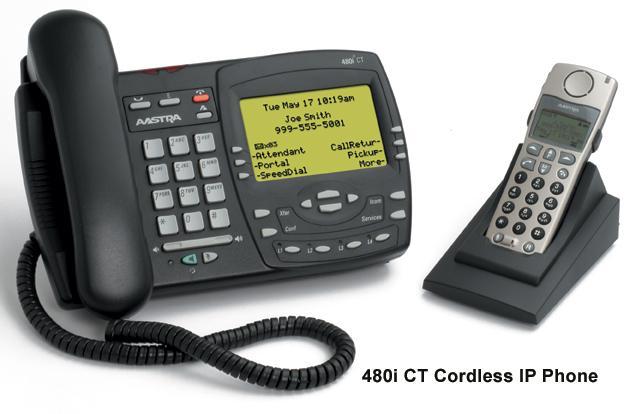
General Info & Latest Firmware:
For general information and details of the latest firmware for this phone see the Aastra 480i page.
Configuration
For configuring the Aastra 480i IP Phone see Aastra 480i Page
# Configuring the 480i Cordless phone is similar to configuring the
# 480i phone. The 480i cordless phone consists of a 480i base set
# and a cordless hand set. The cordless hand set can be associated
# to the base set by pairing the hand set with the base set. To
# pair the hand set with the base set go to the phone's options and
# use the option "Handset Pairing" and select the Option Pair.
# Simultaneously from the cordless hand set go to the Menu item
# "Hset pairing" and select Pair. After a couple of seconds the
# hand set should be paired with the base set.
# In addition to the configuration parameters that exist on the
# 480i phone, following are the parameters specific to the 480i
# Cordless phones' handset. These parameters can be defined either
# int the aastra.cfg or the <mac>.cfg files.

###########################################
#            Feature keys                 #
###########################################
# The feature keys are displayed when the user presses the F button
# on the cordless phone's hand set.
# If any chnages to the features keys are made using these
# parameters the feature keys that exist on the hand set have to be
# refreshed. To refresh the feature keys simply open a new line or
# press one of the feature keys that are available from the hand
# set. After a couple of seconds the cordless should get the new
# list from the base set.
# There are 15 feature keys that can be configured for the cordless
# hand set. Each feature key has the following settings. N
# corresponds to the feature key that is being configured for and
# ranges from 0-14.
# Feature key N En label: "String"
# Feature key N Fr label: "Fr-String"
# Feature key N Sp label: "Sp-String"
# Feature key N control: 1     #Takes an integer value
# Feature key N hs event: 1    #Takes an integer value
# Feature key N base event: 1  #Takes an integer value
############################################

########################
# The parameter value has to be incremented by one whenever the
# parameters that carry the feature keys change. The range is from
# 1-254. After reaching 254 start over from 1.
########################
key list version: 1

########################
# English label for the key. Displayed when the phone's language
# is set to use English
########################
Feature key 0 En label: "Line 1"

########################
# French label for the key. Displayed when the phone's language
# is set to use French
########################
Feature key 0 Fr label: "Fr-Line 1"

########################
# Spanish label for the key. Displayed when the phone's language
# is set to use Spanish
########################
Feature key 0 Sp label: "Sp-Line 1"

########################
# 1 - Make the key configurable by the user through the phone and
#     the phone's web client
# 2 - Locks the key from user modifications. User cannot modify
#     this key from the handset or the phone's web client.
# 4 - Hide this key. Do not show it in the Feature keys list in the
#     cordless handset
# 6 - Lock and hide this key. Do not show it in the Feature keys
#     list in the cordless handset and do not let the user modify
#     this key using the phone or the web client.
########################
Feature key 0 control: 1

########################
# These events are for handset specific events. Events can be local
# to the handset like directory/caller's list, intercom etc. or may
# be an event that is sent to the base set for fruther processing.
# When this key is configured as a base event then the base set
# will process the value of this key in conjunction with the value
# configured for the "Feature key N base event". Where N is the
# feature key is being configured for.
# In addition to the values listed below the valid values are
# [7-23]. The values [7-23] indicate generic handset events. If
# you are using values within this range make sure to use the value
# only once.
# The events local to the handset are as follows:
# 58 - Menu (Options)
# 59 - Feature Key
# 60 - Redial
# 61 - Directory
# 62 - Callers' list
# 63 - Services
# 86 - Icom
########################
Feature key 0 hs event: 7

########################
# Indicates a corresponding action to perform on the base set when
# the "Feature key N hs event" is set to any value between 7-23.
# 1 - Seize base set's line1
# 2 - Seize base set's line2
# 3 - Seize base set's line3
# 4 - Seize base set's line4
# 5 - Seize base set's line5
# 6 - Seize base set's line6
# 7 - Seize base set's line7
# 8 - Seize base set's line8
# 9 - Seize base set's line9
# 10 - Seize base set's line0
# 11 - Send the base set's transfer event
# 12 - Send the base set's conference event
# 13 - Make feature list public
########################
Feature key 0 base event: 1


#################################
#  Example configuration
#################################
key list version: 1

Feature key 0 En label: "Line 1"
Feature key 0 Fr label: "Fr-Line 1"
Feature key 0 Sp label: "Sp-Line 1"
Feature key 0 control: 0
Feature key 0 hs event: 7
Feature key 0 base event: 1

Feature key 1 En label: "Conf."
Feature key 1 Fr label: "Fr-Conf."
Feature key 1 Sp label: "Sp-Conf."
Feature key 1 control: 1
Feature key 1 hs event: 8
Feature key 1 base event: 12

Feature key 2 En label: "Xfer"
Feature key 2 Fr label: "Fr-Xfer."
Feature key 2 Sp label: "Sp-Xfer."
Feature key 2 control: 2
Feature key 2 hs event: 9
Feature key 2 base event: 11

Feature key 3 En label: "Icom"
Feature key 3 Fr label: "Fr-Icom"
Feature key 3 Sp label: "Sp-Icom"
Feature key 3 control: 1
Feature key 3 hs event: 86
Feature key 3 base event: 13

Feature key 4 En label: "Opt"
Feature key 4 Fr label: "Fr-Opt"
Feature key 4 Sp label: "Sp-Opt"
Feature key 4 hs event: 58
Feature key 4 control: 1
Feature key 4 base event: 13

Feature key 5 En label: "Callers"
Feature key 5 Fr label: "Fr-Callers"
Feature key 5 Sp label: "Sp-Callers"
Feature key 5 hs event: 62
Feature key 5 control: 1
Feature key 5 base event: 13

Feature key 6 En label: "Top"
Feature key 6 Fr label: "Fr-Top"
Feature key 6 Sp label: "Sp-Top"
Feature key 6 hs event: 17
Feature key 6 control: 1
Feature key 6 base event: 13

Feature key 7 En label: "Redial"
Feature key 7 Fr label: "Fr-Redial"
Feature key 7 Sp label: "Sp-Redial"
Feature key 7 hs event: 60
Feature key 7 control: 4
Feature key 7 base event: 13

Feature key 8 En label: "Dir."
Feature key 8 Fr label: "Fr-Dir."
Feature key 8 Sp label: "Sp-Dir."
Feature key 8 hs event: 61
Feature key 8 control: 2
Feature key 8 base event: 13

Feature key 9 En label: "Services"
Feature key 9 Fr label: "Fr-Services"
Feature key 9 Sp label: "Sp-Services"
Feature key 9 hs event: 63
Feature key 9 control: 1
Feature key 9 base event: 13 


 April 7, 2023
 Phone System