login | register
Tue 02 of Dec, 2008 [03:19 UTC]

voip-info.org

Alcatel 4400 via PRI

Created by: mdawson,Last modification on Thu 14 of Sep, 2006 [08:34 UTC]
This page explains how to connect Asterisk to an Alcatel PCX 4400 via a 30 channel ISDN E1 trunk. It might not be the only way or the best way of doing it as I have been figuring this out as I go along but could be a useful guide. Please update or comment if you know a better way of doing a particular thing.

This guide assumes you have already setup an Asterisk server and have an Alcatel 4400 connected to the PSTN.

Resources and current progress


A more upto date version of this document is at the forum here:


Hardware


You'll need the following:

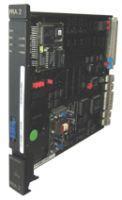
  • A PRA2 isdn card for the PCX 4400
  • A T1/E1 card for Asterisk, I've used a Sangoma a102u, an equivalent Digium card would do too
  • a cable to connect the two - I used a TY2 96PT at the Alcatel end which I patched into the back of a UTP socket and then used a normal UTP cable to connect to the Asterisk box. The connections are like so

Alcatel Asterisk
1 blue txb (tip) 1
1 red txa (ring) 2
2 blue rxb (tip) 4
2 red rxa (ring) 5


Asterisk Configuration


zaptel.conf:


span=1,1,0,ccs,hdb3,crc4

bchan=1-15,17-31
dchan=16


zapata.conf


trunkgroups
trunkgroup => 1,16
spanmap => 1,1,1

channels
language=uk
context=default
switchtype=euroisdn
signalling=pri_cpe
group=1
callgroup=1
pickupgroup=1
immediate=no

echocancel=yes
channel => 1-15,17-31


extensions.conf


; this needs improving as it only allows fixed length of extension numbers at present
exten => _0-24-8XX,n,Dial(zap/g1/${EXTEN}) ; internal calls
exten => _9XXXXXXXXXXX,1,Dial(ZAP/g1/${EXTEN}) ; 9 for external calls


Alcatel Configuration


1. Install the PRA2 card

  • Under Shelf/Board create a PRA2 object at the appropriate address
  • Plug the board in

2. Create a trunk group for Alcatel<->Asterisk

  • Under Trunk Groups, name it something like Asterisk
  • Q931 signal variant=ISDN all countries
  • Under Trunk Group:
    • B channel choice=yes
    • Under Access create an object:
    • If your card is in shelf 0, slot 4 the physical address will be 0-4-0
    • access type=T2

3. Set the physical link parameters

  • Under Shelf/Board/PRA2/Digital Access set
    • Network mode=yes
    • CRC4=yes

4. Set a route for calls from Alcatel->Asterisk

My Asterisk extensions begin with 3, so under Translator/Prefix plan

  • 3 - Open routing no.
  • Node number=the ID number of the Asterisk trunk group

5. Enable trunk to trunk dialling

This enables Asterisk->Alcatel->PSTN (thanks again Frank :)

  • Under Classes of Service/Connection COS/5 set Rights COS 5 to 1


Different Connection Types?


I have also tried setting both ends to QSIG instead of isdn all countries/euroisdn but haven't had any luck with this.


Comments

Comments Filter
222

333cannot call alcatel extension from SIP

by shwetajain, Wednesday 01 of November, 2006 [07:46:32 UTC]
Hi there

I have a TE110P card fitted in my linux box running :
Linux version 2.6.9-5.ELsmp (bhcompile@decompose.build.redhat.com) (gcc version 3.4.3 20041212 (Red Hat 3.4.3-9.EL4)) #1 SMP Wed Jan 5 19:30:39 EST 2005

I followed the installation steps on digium website...no errors reported.
The modules seem to have loaded...here's what lsmod shows:
Module Size Used by
wcte11xp 30496 31
zaptel 196740 67 wcte11xp

still the light on my card is off....does that mean the card has not initialised properly?

On loading Asterisk, I do not get any errors, but I do see these warnings:
Parsing '/etc/asterisk/zapata.conf': Found
Nov 1 11:57:21 WARNING3454: chan_zap.c:10874 setup_zap: Ignoring switchtype
Nov 1 11:57:21 WARNING3454: chan_zap.c:10874 setup_zap: Ignoring signalling

on running asterisk -cvvv . I do see Aterisk Ready at the end ...then What do these warnings mean?

Also, I DO NOT get these lines on asterisk startup:-
channel 0/1 successfully restarted on span 1
   — B-channel 0/2 successfully restarted on span 1
   — B-channel 0/3 successfully restarted on span 1
   — B-channel 0/4 successfully restarted on span 1
   — B-channel 0/5 successfully restarted on span 1
   — B-channel 0/6 successfully restarted on span 1

does that mean my channels are not available?
  • CLI> zap show status
Description Alarms IRQ bpviol CRC4
Digium Wildcard TE110P T1/E1 Card 0 OK 0 0 0

  • CLI> pri show span 1
Primary D-channel: 16
Status: Provisioned, Down, Active
Switchtype: EuroISDN
Type: CPE
Window Length: 0/7
Sentrej: 0
SolicitFbit: 0
Retrans: 0
Busy: 0
Overlap Dial: 0
T200 Timer: 1000
T203 Timer: 10000
T305 Timer: 30000
T308 Timer: 4000
T313 Timer: 4000
N200 Counter: 3


here's my extensions.conf:
general
static=yes
writeprotect=no

autofallthrough=yes

sip
exten => 9820,1,Dial(SIP/iyer)
exten => 9821,1,Dial(SIP/shweta)
exten => 9810,1,Dial(SIP/shashi)
exten => 9851,1,Dial(Zap/g1/851,20)
incoming
exten => s,1,Answer()
exten => s,2,Playback(hello-world)
exten => s,3,Hangup()
exten => 9821,1,Dial(SIP/shashi)
exten => 9851,n,Dial(Zap/g1/851)


here's zapata.conf
trunkgroups
trunkgroup => 1,16
spanmap =>1,1,1

channels
switchtype=euroisdn
signalling=pri_cpe
context=incoming
language=uk
group=1
callgroup=1
pickupgroup=1
echocancel=yes
immediate=no
channel => 1-15,17-31


usecallerid=yes
hidecallerid=no
callwaiting=yes
usecallingpres=yes
callwaitingcallerid=yes
threewaycalling=yes
transfer=yes
canpark=yes
cancallforward=yes
callreturn=yes
echocancelwhenbridged=yes

musiconhold=default


here's zaptel.conf:

span=1,1,0,ccs,hdb3,crc4
bchan=1-15,17-31
dchan=16

loadzone = us
defaultzone=us


Now the problem

I can call and talk SIP to SIP...here's what I see on asterisk CLI

-- Executing Dial("SIP/iyer-09326480", "SIP/shweta") in new stack
   — Called shweta
   — SIP/shweta-0932b9c0 is ringing

But when I call zap extension, here's what I get:
Executing Dial("SIP/iyer-09326480", "Zap/g1/851|20") in new stack
Nov 1 12:07:55 NOTICE3513: app_dial.c:1056 dial_exec_full: Unable to create channel of type 'Zap' (cause 34 - Circuit/channel congestion)
 == Everyone is busy/congested at this time (1:0/1/0)
 == Auto fallthrough, channel 'SIP/iyer-09326480' status is 'CONGESTION'

I have connected the PBX to digium card with the specified cable and done the settings in PBX specified at:
http://www.voip-info.org/wiki/view/Alcatel+4400+via+PRI

What am I doing wrong?

Any help would be greatly appreciated.

Thanks in advance....

Kind Regards
Shweta