login | register
Sat 17 of May, 2008 [09:35 UTC]

voip-info.org

Search with Google
Search this site with Google. Results may not include recent changes.
 
Google Ads
Shoutbox
  • Juan Ortega, Thu 15 of May, 2008 [10:33 UTC]: Hi everybody, I'm Juan, an ITCom student, and I need to know what basic elements I need to create a VoIP network. Can anybody helpme, please?,Thank you very much
  • gineta, Wed 14 of May, 2008 [03:58 UTC]: any here not fine the configuration of firewall juniper -screem for VOIP asterisk????
  • Anoop Prabhakaran, Tue 13 of May, 2008 [12:16 UTC]: I am developing Asterisk IVR, Whenever i make a internation call to the IVR system, the DTMF is not getting detected properly, this happens only for the first time, second call onwards system works fine. why this is happening
  • joe, Mon 12 of May, 2008 [04:27 UTC]: Is there an opensource browser based softphone, or a system like Busta where everything is not manages through their website?
  • Nick Barnes, Fri 09 of May, 2008 [11:36 UTC]: Christopher - yesterday I tried an Asterisk install on a CentOS 5.1 box with stock GUI and it all worked fine. Sorry I can't help.
  • aero, Fri 09 of May, 2008 [08:20 UTC]: can someone help me out on this, i tried to play some sound files on my asterisk box and this is the error message i got. WARNING[4429]: format_wav.c:169 check_header: Unexpected freqency 22050 May 8 11:17:39 WARNING[4433]: codec_gsm.c:194 gsmtolin_fra
  • Christopher Faust, Thu 08 of May, 2008 [14:15 UTC]: I beleive that I may have to change something in the xserver configuration. Please advise
  • Christopher Faust, Thu 08 of May, 2008 [14:14 UTC]: Everything was perfect. In the bios I have increased the memory allocated Still receive input not supported on my display.
  • Christopher Faust, Thu 08 of May, 2008 [14:13 UTC]: This would not be my main box. I am doing some testing to see if I can install zaptel and asterisk 1.4 on a full centos 5.1 box with development software Its bizzare, because before I went through the asterisk and zaptel installation everything was perfe
  • Nick Barnes, Thu 08 of May, 2008 [13:44 UTC]: Christopher - I can't see any way in which an Asterisk installation would muck your GUI, but remember that it is advised not to use a GUI on an Asterisk box anyway.
Server Stats
  • Execution time: 0.40s
  • Memory usage: 2.25MB
  • Database queries: 41
  • GZIP: Disabled
  • Server load: 1.91

Asterisk fxotune

fxotune

A utility for tuning the various settings on the fxo modules for analog cards.
Supported by Digium TDM400P and clones, TDM800P, TDM2400P, Xorcom Astribank FXO modules and probably some others. Not supported by X100P cards and clones.

fxotune tunes the module to generate less echo in the first place.

Using Fxotune

You need to train fxotune once using fxotune -i, see more below about that. The training will create the file /etc/fxotune.conf . In order to apply the same tuning next time, you need to run:

fxotune -s

after you have loaded the zaptel modules, but before you started Asterisk. Latest Zaptel init script should do that if /etc/fxotune.conf is present.

Fxotune Training

Zaptel 1.2

The version of fxotune included with zaptel 1.2 has a rather simple syntax. It is also slower and less effective than the version in 1.4.
  1. Stop asterisk
  2. Run: fxotune -i 4
  3. Restart asterisk

Asterisk must be stopped or otherwise fxotune would consider the line as busy (in fact, you could instead destroy the relevant zaptel channels, and restart asterisk in the end of the tuninng).

Zaptel 1.4

The rest of the page applies to the version of fxotune from zaptel 1.4 or newer.

From README.fxotune


Q. I have echo problems on my FXO modules and I've tried the different echo cancellation algorithms in zconfig.h, tried tweaking the gains, and still nothing works. What can I do?

A. Use the fxotune utility.

To use:
Just run the fxotune utility with the -i option. (`fxotune -i 4`) It should discover which zap channels are FXO modules and tune them accordingly. Be warned however, it takes a significant amount of time for EACH module to test, I would say somewhere around 2-3 minutes. But you only have to initialize it once for the line. It will write a configuration file to /etc/fxotune.conf. You will need to have your system run fxotune with the -s flag (`fxotune -s`) to set the module with the previously discovered values from fxotune.conf for it to take affect, so essentially if each time you reboot the machine you need to run `fxotune -s`. You might consider putting it in your startup scripts some time after the module loads and before asterisk runs.

NOTE: The digit after the -i option is the digit that will break dialtone on the line.

Matthew Fredrickson


Notes


Basically make sure asterisk isnt running and that zaptel and wctdm modules are loaded as fxotune needs direct access to the zap channel

In other words:
#amportal stop (Asterisk@Home)
or
CLI>stop now (just Asterisk)
followed by
#/usr/src/zaptel/fxotune -i 4

More info on fxotune:


fxotune optimizes the line characteristics of a TDM device to minimize the *source* of echo. This is generally referred to as 'balancing the hybrid' and is quite important in echo cancellation. Once the hybrid is properly balanced, software echo cancellers will work very nicely. To provide some hard numbers, the echo on lines at one site was about 15% with the default settings on the TDM. The software echo canceller actually did a fairly good job with this - but when we got the hybrid balanced properly, echo on the line dropped to 3%, and then the software echo canceller did a *fantastic* job. At another site, the echo on the line was 60% - this was well beyond what the software echo canceller could handle (it did work, but there was quite a bit of residual echo, etc...). Once we tuned the hybrid, echo dropped to 4%, and the echo canceller was able to work properly.

Note that fxotune does not do anything with the echo canceler algorithms themselves - instead, it optimizes the signal before it gets to the echo canceler, making it easier for the echo canceler to do it's work.

There are two types of tuning that can be performed on the TDM - adjusting line impedence, and adjusting echo coefficients in the digital filter that is part of the hybrid iteself. The current implementation of fxotune *only* balances the line impedence (which does not necessarily result in the best results).

Important Note: The current fxotune application in SVN has a bug that causes it to not properly clear the dialtone of the line during part of it's test. As a result, it measures the dialtone as part of the echo response, which can cause it to 'optimize' to the wrong line impedence.

There is a patch against fxotune that fixes the above bug, and revamps the calibration algorithm to optimize the echo coefficients in addition to the line impedence. It also adds tools for getting a numerical measure of the amount of echo on the line. We have seen echo levels of 60% after tuning only the line impedence, and 3% after doing the full opimization. In addition, due to some frequency domain trickery, the full optimization test actually runs faster than the old one.

To get the echo level of line 3 using the patched fxotune, stop asterisk, then run:

./fxotune -d -b 3

This will return the ratio of echo to input signal (the closer this number is to 0.0 the better. Imperically, we've found that getting this number below 5% is important for proper operation of the software echo cancellers).

The -d option also dumps input and output waveform information to ./fxotune_dump.vals - plotting these in a graph can be very instructive. For example, here is the plot for one of our lines without any tuning at all obtained using the following command (-w 1004 makes the test operate at a single frequency of 1004 Hz instead of multiple frequencies in a single test):

./fxotune -d -b 3 -w 1004

The pink line is the driving signal, the blue line is the measured response reflecting back from the CO into the untuned hybrid.
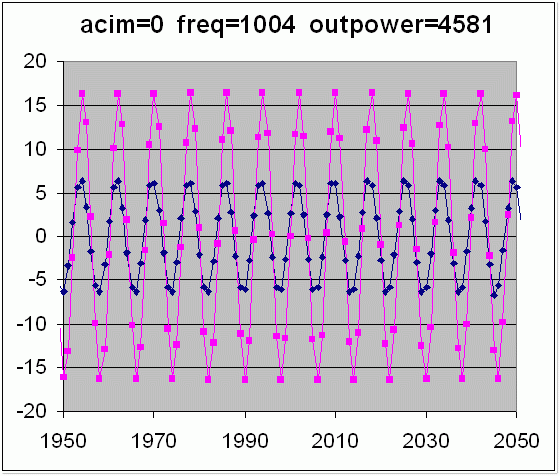


We then optimize using the *old* fxotune calibration algorithm using the following command ('-t 1' forces fxotune to use the old calibration type 1):

./fxotune -i 5 -t 1

We then re-run ./fxotune -d -b 3 -w 1004, and the results are:
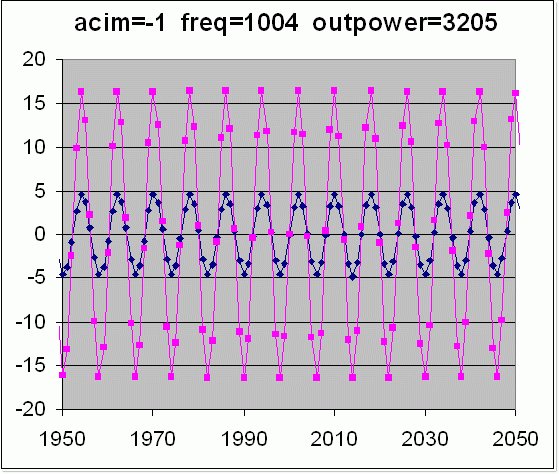


Things have improved, but we still have a bunch of echo - there is no way that the software echo cancellers can handle this.

Finally, we run fxotune using the new calibration:

./fxotune -i 5

The echo results are now:
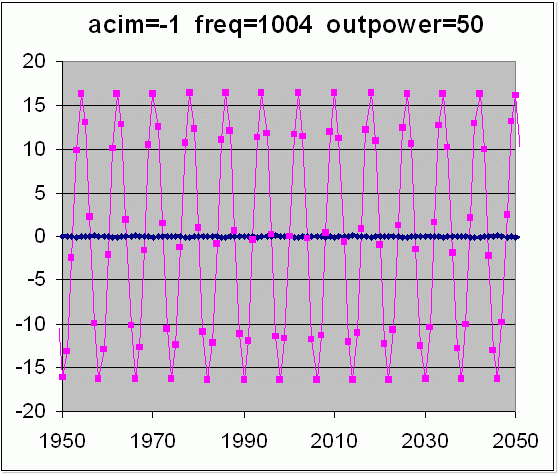


At this point, the hybrid is pretty well tuned, and the software echo cancellers can get of any residual echo.


In summary, tuning with the patched fxotune is the same as before - if '5' is the keypress that will clear the dialtone, you'd run:

./fxotune -i 5

To set the calibration during boot, run:

./fxotune -s


If the new fxotune helps you out, please be sure to add your comments to the bug tracker!
Created by SoloFlyer, Last modification by Tzafrir Cohen on Sun 03 of Jun, 2007 [17:56 UTC]

Comments Filter

could not fill input buffer

by Bill Gates on Thursday 31 of May, 2007 [03:16:15 UTC]
For anyone that gets the " could not fill input buffer " error message, try using fxotune -i xxxxxxx (where xxxxxxx is a phone number that will ring and no one will answer). Every time I tried the fxotune -i 4 (or any other number besides 4, it gave me the " could not fill input buffer " error message). Google had all of 5 results when searching for fxotune AND "could not fill input buffer", and 3 of those were copies of the script that produced that error message.

As I've always said, the guys that program this stuff are computer geniuses, but seem to lack the ability to document what they've done. It is Linux. It is free. You get what you pay for, so don't complain.

by Marco Passarinho Dias on Friday 13 of April, 2007 [16:24:32 UTC]

FXOTUNE: -i option

by Marco Passarinho Dias on Thursday 12 of April, 2007 [13:45:32 UTC]
I read that -i option is the digit that will break dialtone on the line.I have a TDM400P card with FXO 4 ports (one connected to a analogue phone, another to the PSTN and the other two are not in use).

I'm from Portugal and I would like to know how can I break the tone? I've been pressing all buttons on the analogue telephone but the dialtone is only absent for 5 seconds and then returns. The calibration of the hybrid takes about 3 minutes and I think the calibration isn't accurate because I cannot break the dialtone successfully.

I have a lot of echo (33%) so there must be something wrong!!!

Please HELP!!!!!

Best Regards...
Marco Passarinho

FXOTUNE: -i option

by Marco Passarinho Dias on Thursday 12 of April, 2007 [11:45:11 UTC]
I read that -i option is the digit that will break dialtone on the line.I have a TDM400P card with FXO 4 ports (one connected to a analogue phone, another to the PSTN and the other two are not in use).

I'm from Portugal and I would like to know how can I break the tone? I've been pressing all buttons on the analogue telephone but the dialtone is only absent for 5 seconds and then returns. The calibration of the hybrid takes about 3 minutes and I think the calibration isn't accurate because I cannot break the dialtone successfully.

I have a lot of echo (33%) so there must be something wrong!!!

Please HELP!!!!!

Best Regards...
Marco Passarinho

FXOTUNE: -i option

by Marco Passarinho Dias on Thursday 12 of April, 2007 [11:32:47 UTC]
I read that -i option is the digit that will break dialtone on the line.I have a TDM400P card with FXO 4 ports (one connected to a analogue phone, another to the PSTN and the other two are not in use).

I'm from Portugal and I would like to know how can I break the tone? I've been pressing all buttons on the analogue telephone but the dialtone is only absent for 5 seconds and then returns. The calibration of the hybrid takes about 3 minutes and I think the calibration isn't accurate because I cannot break the dialtone successfully.

I have a lot of echo (33%) so there must be something wrong!!!

Please HELP!!!!!

Best Regards...
Marco Passarinho

FXOTUNE: -i option

by Marco Passarinho Dias on Thursday 12 of April, 2007 [10:43:00 UTC]
I read that -i option is the digit that will break dialtone on the line.I have a TDM400P card with FXO 4 ports (one connected to a analogue phone, another to the PSTN and the other two are not in use).

I'm from Portugal and I would like to know how can I break the tone? I've been pressing all buttons on the analogue telephone but the dialtone is only absent for 5 seconds and then returns. The calibration of the hybrid takes about 3 minutes and I think the calibration isn't accurate because I cannot break the dialtone successfully.

I have a lot of echo (33%) so there must be something wrong!!!

Please HELP!!!!!

Best Regards...
Marco Passarinho

FXOTUNE: -i option

by Marco Passarinho Dias on Thursday 12 of April, 2007 [10:11:56 UTC]
I read that -i option is the digit that will break dialtone on the line.I have a TDM400P card with FXO 4 ports (one connected to a analogue phone, another to the PSTN and the other two are not in use).

I'm from Portugal and I would like to know how can I break the tone? I've been pressing all buttons on the analogue telephone but the dialtone is only absent for 5 seconds and then returns. The calibration of the hybrid takes about 3 minutes and I think the calibration isn't accurate because I cannot break the dialtone successfully.

I have a lot of echo (33%) so there must be something wrong!!!

Please HELP!!!!!

Best Regards...
Marco Passarinho

Re: Options either aren't passing or aren't displayed

by bender on Thursday 24 of August, 2006 [15:39:26 UTC]
Barry, this problem has now been fixed in zaptel trunk as of revision 1348. Check out: http://bugs.digium.com/view.php?id=7795 for details on the minor fix. You can download the patched version of fxotune.c from: http://svn.digium.com/view/zaptel/trunk/fxotune.c?rev=1348&view=markup

Re:

by Rick Neubauer on Tuesday 15 of August, 2006 [01:47:11 UTC]
I am pulling my hair out here!!!

I have 3 FXO ports on a TDM400P. I have ran the FXOtune acording to the above, and here are my results. I can;t get the first 2 lines below 10 percent. I have tried every fxotune.patch. and I can;t get it below that. any ideas? I am runnign aggressive cancellation, and I am running MG2. I have applied the bug fix to the fxotune file that stays with the default settings instead of allowing you to change them, AND I AM STILL HAVING THAT BUG. I am running zaptel 1.2.7: HELP!!!!

Should I try calling the 5 second tone then silence number on my switch?

./fxotune -d -b <zapchannel> -w 1004
Results:
Dumping module /dev/zap/3
echo ratio = 0.1107 (514.3 / 4645.1)
Done!
root@asterisk1 zaptel# ./fxotune -d -b 2
Dumping module /dev/zap/2
echo ratio = 0.1104 (512.7 / 4645.1)
Done!
root@asterisk1 zaptel# ./fxotune -d -b 4
Dumping module /dev/zap/4
echo ratio = 0.3259 (1513.9 / 4645.1)
Done!

Then I ran ./fxotune -i 5 -t 1
Results:
Dumping module /dev/zap/2
echo ratio = 0.1066 (1212.3 / 11367.0)
Done!
root@asterisk1 zaptel# ./fxotune -d -b 3 -w 1004
Dumping module /dev/zap/3
echo ratio = 0.1075 (1221.6 / 11367.0)
Done!
root@asterisk1 zaptel# ./fxotune -d -b 4 -w 1004
Dumping module /dev/zap/4
echo ratio = 0.0902 (1025.2 / 11367.0)
Done!
Finally ran fxotune -i 5 and here are the results....
root@asterisk1 zaptel# ./fxotune -d -b 2
Dumping module /dev/zap/2
echo ratio = 0.1093 (507.7 / 4645.1)
Done!
root@asterisk1 zaptel# ./fxotune -d -b 3
Dumping module /dev/zap/3
echo ratio = 0.1110 (515.8 / 4645.1)
Done!
root@asterisk1 zaptel# ./fxotune -d -b 4
Dumping module /dev/zap/4
echo ratio = 0.0414 (192.3 / 4645.1)
Done!


by Rick Neubauer on Monday 14 of August, 2006 [07:10:12 UTC]

Please update this page with new information, just login and click on the "Edit" or "Add Comment" button above. Get a free login here: Register Thanks! - support@voip-info.org

Page Changes | Comments

Sponsored by:

Terms of Service Privacy Policy
© 2003-2008 VOIP-Info.org LLC

Powered by bitweaver