


Atcom AT-320
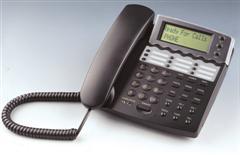
This is a cheap consumer grade phone based on the PA168S chip. Works good in both the office and at home.
Pros
- it’s cheap. About $79 for a dual port unit.
- Nice display
- Good status display while booting
- part of the phone design is available at the PA168 chip manufacturer
- The web configuration of the phone is user friendly if you have the instructions manual handy.
- 9 speed dial buttons on the phone.
- Includes FULL IAX2 support along with MGCP, H323 and SIP.
- Support Message Waiting notifications SIP mwi for waiting voicemails
Cons
- When you change the config from SIP to IAX2, you have to manually change some ports from 5060 to 4569.
- The phone can download its firmware only via FTP on Request. If you would have 50 of them, then you would have to go into the web page each, login, and select the Software upgrade option …
- There is no Message Waiting Indicator LED for voicemail (MWI text only shows in the LCD)
- LCD not backlit.
Not Pro, not Con
- The buttons “LocalIP”, “SerIP”, “Number”, “Mask”, “RouIP” make the phone talk. It says (!) the local IP address, the IP address of the service (e.g. Asterisk or SIP provider), the configured phone number, the netmask, the default gateway, Nice, but not strictly necessary.
Ringtones
-DTMF0- High pitched, medium length tone – annoying
-DTMF1- louder sounding european style ring
-DTMF2- softer sounding european style ring
-DTMF3- Long ring followed by shorter ring, soft sounding
-DTMF4- very short spaced medium pitched tone – annoying
-DTMF5- Two short pulse european ring sound
-DTMF6- Continuous Medium Pulse Ring – Annoying
-DTMF7- Higher Pitched two short pulses with longer spacing – not too bad
-DTMF8- Two short high pitched pulses, with long spacing – not that bad but not that good
-DTMF9- Very Long High Pitched Tone – Similar to ‘PLEASE EVACUATE THE BUILDING type of noise’ – very annoying
-NOT DISTURB- no ring at all heard – works as intended
-PCMRING- Preferred – Sound of a quick succession 4 ring tone – okay i guess
-USER DEFINE- ‘Click!’ noise heard – not working with PA-168S afaik.
Update: 4/8/05, under new firmware version 1.42.028, it’s reduced to 4 choice:
-dtmf- traditional US style ringtone, much better…
-not disturn- same as above
-user define- it comes with some sort of music, works
-advanced- it’s one of the old european style ring – annoying
How to Reset the phone to Factory Defaults
1)Unplug the power and wait for 10 seconds
2)Hold * Key on the phone
3)While holding the * key, Plug the power back in – You will see a * and two bars
4)Press #5*5 to reset it and reboot it.
Now all your system settings have been restored, except the Ips as you may be on DHCP.
How to reboot and aquire a new IP
1)Press SpeakerButton+12341+LocalIP Button – This will automatically
reboot the phone and gets a new local DHCP IP for the Phone.
Default Passwords
a. 1234 – Default User password
b. 12345678 – Default Super User password
Upgrading firmware Tips
1. It does not need to be successive with each version, skipping versions is fine
2. Make sure the debug option is set to ‘no check’ and saved to the phone before beginning to update with new firmware.
3. Wait until the phone has completely updated before rebooting or pulling power
4. Make sure to set the ip of the phone in Palm-Tool if you are using it, it comes preset at 192.168.1.100.
5. If HTTP upgrade fails, try Palm-Tool


 March 2, 2023
 Phone System