login | register
Sat 17 of May, 2008 [07:22 UTC]

voip-info.org

Search with Google
Search this site with Google. Results may not include recent changes.
 
Google Ads
Shoutbox
  • Juan Ortega, Thu 15 of May, 2008 [10:33 UTC]: Hi everybody, I'm Juan, an ITCom student, and I need to know what basic elements I need to create a VoIP network. Can anybody helpme, please?,Thank you very much
  • gineta, Wed 14 of May, 2008 [03:58 UTC]: any here not fine the configuration of firewall juniper -screem for VOIP asterisk????
  • Anoop Prabhakaran, Tue 13 of May, 2008 [12:16 UTC]: I am developing Asterisk IVR, Whenever i make a internation call to the IVR system, the DTMF is not getting detected properly, this happens only for the first time, second call onwards system works fine. why this is happening
  • joe, Mon 12 of May, 2008 [04:27 UTC]: Is there an opensource browser based softphone, or a system like Busta where everything is not manages through their website?
  • Nick Barnes, Fri 09 of May, 2008 [11:36 UTC]: Christopher - yesterday I tried an Asterisk install on a CentOS 5.1 box with stock GUI and it all worked fine. Sorry I can't help.
  • aero, Fri 09 of May, 2008 [08:20 UTC]: can someone help me out on this, i tried to play some sound files on my asterisk box and this is the error message i got. WARNING[4429]: format_wav.c:169 check_header: Unexpected freqency 22050 May 8 11:17:39 WARNING[4433]: codec_gsm.c:194 gsmtolin_fra
  • Christopher Faust, Thu 08 of May, 2008 [14:15 UTC]: I beleive that I may have to change something in the xserver configuration. Please advise
  • Christopher Faust, Thu 08 of May, 2008 [14:14 UTC]: Everything was perfect. In the bios I have increased the memory allocated Still receive input not supported on my display.
  • Christopher Faust, Thu 08 of May, 2008 [14:13 UTC]: This would not be my main box. I am doing some testing to see if I can install zaptel and asterisk 1.4 on a full centos 5.1 box with development software Its bizzare, because before I went through the asterisk and zaptel installation everything was perfe
  • Nick Barnes, Thu 08 of May, 2008 [13:44 UTC]: Christopher - I can't see any way in which an Asterisk installation would muck your GUI, but remember that it is advised not to use a GUI on an Asterisk box anyway.
Server Stats
  • Execution time: 0.38s
  • Memory usage: 2.21MB
  • Database queries: 35
  • GZIP: Disabled
  • Server load: 0.68

D-Link DPH-140S

Image

Dlink webpage for DPH-140S

Business IP Phone (SIP)

Product Features:
• Supports STUN and Outbound Proxy
• Works both on public IP or behind NAT
• Make VoIP Phone Calls over the Internet and Save on Long Distance Charges*
• Speakerphone for Hands-free Conferencing
• Large 2.5・LCD Screen* Displays Caller ID and Address Book Entries
• One-Touch Voicemail Indicator for Direct Access to Voicemail* and more

this is an unlocked VoIP devices that works with any SIP service providers

Image
Note:
  • You must choose an Internet (VoIP) Phone Service Plan and sign up for service. VoIP phone plans, rates, and features may vary depending on VoIP Phone Service Provider. D-Link Systems, Inc. is not a Telephone Service Provider or VoIP Phone Service Provider. Note that an electrical power outage or a broadband provider outage will prevent operation of the VoIP phone, including for emergency purposes (e.g. calling 911).
  • 2 2.25・diagonal actual viewing area.
  • 3 Feature must be supported by your Internet (VoIP) Service Provider.

Issues


While this phone works well with asterisk, we have had issues with the speakerphone and echoing. After spending quite a bit of time trying to sort out echo settings in Asterisk, we resorted to inserting foam in the phone to limit the amount of leakage from the phone's speaker into the microphone. This drastically increased the quality of the speakerphone function

Pre-Foam internals:
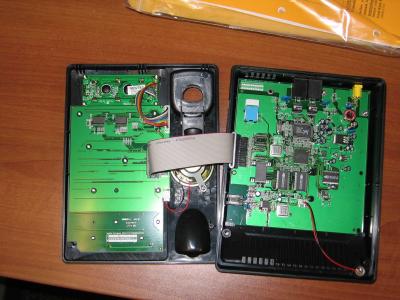


Foam used to deaden speaker echoing
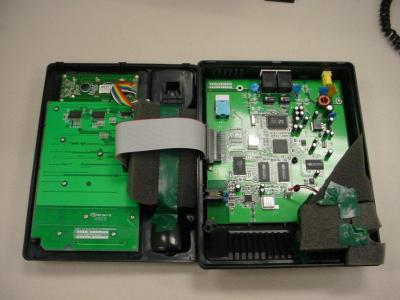


I'm sure we are out of warranty now... --mogmismo

Setup with Asterisk


The easiest way to configure it is through the web interface at http://device.ip.address:9999 there is no username or password set by default so clicking OK should be enough to log in.

Make sure you set your timezone and NTP server. I recommend time.nist.gov.

Under SIP Settings you should put your server ip where is required. MAKE SURE YOU USE *97@server.ip.address on the box labeled "Voice Message Account" otherwise you will get an error when you try to use the voicemail dedicated button.

Set all the other parameters depending on your server, reboot and enjoy!


Where to Buy


See Also:

Created by Michael Hsu, Last modification by Michael Evanisko on Wed 07 of Nov, 2007 [22:31 UTC]

Comments Filter

SIP Settings: IP vs. Domain Name

by logan on Sunday 04 of May, 2008 [18:08:10 UTC]
There appears to be a bug in the firmware (01.01.08) that if you use domain names for the sip settings and the dns server or voip server is not available at boot time it will send sip udp packets to random ip addresses (probably whatever is in some uninitialized buffer) and gives a ring then disconnect. If you use IP addresses then it will give the proper line unavailable sound when it cannot contact the voip server. So, for whatever it is worth I recommend using IP addresses for your SIP settings if you are using aforementioned firmware or at least adding these scenarios as test cases.

 - logan

DPH-120S issues

by Denis I. Morozov on Saturday 14 of April, 2007 [10:59:45 UTC]
- Voicemail authentication/navigation works if DTMF_KIND property set to SIP INFO, otherwise not
- MWI Account "msg_account" must be set to VoicemailMain number

http protocol commands for dph120 and dph140

by Igor Nikolaev on Tuesday 20 of June, 2006 [17:30:36 UTC]
<pre>
fwupd.htm
AP_HOST="FTP Server"
AP_USER="Login ID"
FTP_PWD="Login Password"
AP_FILE="Firmware Filename"

network.htm
DHCP="0=Static IP, 1=DHCP, 2=PPPoE"
adsl_id="PPPoE ID"
adsl_pwd="PPPoE Password"
ip="IP Address"
router="Router IP"
mask="Subnet Mask (255.255.255.0)"
dns="DNS Server"

normal.htm
web_name="User Name"
c_password="Password"
password="hidden password"
sntp="NTP Server IP"

tz="Time Zone, -12..+12"
day_li="Daylight Saving, 0=Disable, 1=Enable (0)"
useTftp="TFTP Server: 0="Disable, 1=Enable (0)"
useFtp="FTP Client: 0=Disable, 1=Enable (0)"
r_password="Remote Config Password (1234)"

phone.htm
tone1="Tone Setting: 2=us, 3=jp, 4=kr, 5=sg, 6=tw, 7=es, 8=de, 9=fr, 10=bg, 11=cn, 12=it, 14=uk (2)"
ring1="Ringer Type, 0=Type1, 1=Type2, 2=Type3, 3=Type4"
HOLD="Hold Tone: 0=Melody, 1=Tone (0)"
dnd="Do Not Disturb: 0=Disable, 1=Enable (0)"
wait="Call Waiting: 0="Disable, 1=Enable (1)"
cif="Anonymous Call, 0=Disable, 1=Full URI, 2=Display Name (0)"
rejncif="Anonymous Call Reject, 0=Disable, 1=Enable (0)"
pond_key="Pound Key Dial, 0=Disable 1=Enable (0)"
fwd_nc="No Answer"
fwd_n="No Answer Number"
fwd_bc="Busy"
fwd_b="Busy Number"
fwd_ac="Unconditional"
fwd_a="Unconditional Number"
sntp_cycle="Network Time Adjustment Period, sec. 0 - 60 0: Disable"
dialTo="Inter Digit Timer, sec. 0 - 60 0: Disable"
ansTo="Originating Not Accept Timer, sec. 0 - 600 0: Disable"
ringTo="Incoming No Answer Timer, sec. 0 - 600 0: Disable"
holdTo="Hold Recall Timer, sec. 0 - 600 0: Disable"
idleTo="Auto Speaker Off Timer, sec. 0 - 600 0: Disable"

pswd.htm
OldPwd="Old Password"
NewPwd="New Password"
ConfirmPwd="Confirm New Password"
sipAccount.htm
defAcc="Default Account 1,2,3,4 (1, в htm вÑ?е номера на 1 больше)"

my_name="Display Name 1"
my_tel="SIP User Name 1"
reg_name="Authentication User Name 1"
my_sip_pwd="Authentication Password 1"
regAct0="Account Active 0=Disable, 1=Enable (1)"

my_name1="Display Name 2"
my_tel1="SIP User Name 2"
reg_name1="Authentication User Name 2"
my_sip_pwd1="Authentication Password 2"
regAct1="Account 2 Active 0=Disable, 1=Enable (0)"

my_name2="Display Name 3"
my_tel2="SIP User Name 3"
reg_name2="Authentication User Name 3"
my_sip_pwd2="Authentication Password 3"
regAct2="Account 3 Active 0=Disable, 1=Enable (0)"

my_name3="Display Name 4"
my_tel3="SIP User Name 4"
reg_name3="Authentication User Name 4"
my_sip_pwd3="Authentication Password 4"
regAct3="Account 4 Active 0=Disable, 1=Enable (0)"

sip.htm
my_sip_port="SIP Phone Port Number (5060)"
reg_svr="Registrar Server Domain Name/IP Address"
reg_port="Registrar Server Port Number (5060)"
reg_to="Authentication Expire Time (3600 sec)"
pxy_svr="Outbound Proxy Domain Name/IP Address"
pxy_port="Outbound Proxy Port Number (5060)"
msg_svr="MWI Message Server Domain Name/IP Address"
msg_port="MWI Message Server Port Number (5060)"
msg_to="MWI Message Server Expire Time (3600)"
msg_account="Voice Message Account"
sess_to="Session Timer (1800)"
Rtp_Port="Media Port (41000)"
prack="Prack: 0=Disable, 1=Enable (1)"
sessref="Session Refresher: 0=None, 1=UAC, 2=UAS (0)"
sesstp="Session Timer Method: 0=Invite, 1=Update (0)"
sendreg="Register with Proxy 0=Enable, 1=Disable (0)"

spdial.htm
F1="Number 00"
F2="Number 01"
F3="Number 02"
F4="Number 03"
F5="Number 04"
F6="Number 05"
F7="Number 06"
F8="Number 07"
F9="Number 08"
F10="Number 09"

stun.htm
useStun="STUN: 0=Disable, 1=Enable (0)"
stun_ip="STUN Domain Name/IP Address"
upnp="UPnP: 0=Disable, 1=Enable (0)"

voice.htm
codec1="Codec1 1=ulaw, 2=alaw, 3=G723.1, 4=G729A (1)"
codec2="Codec2 0=n/a 1=ulaw, 2=alaw, 3=G723.1, 4=G729A (4)"
codec3="Codec3 0=n/a 1=ulaw, 2=alaw, 3=G723.1, 4=G729A (3)"
codec4="Codec4 0=n/a 1=ulaw, 2=alaw, 3=G723.1, 4=G729A (0)"

pt1="RTP Packet Length G.711-ulaw 0=10ms, 1=20ms, 2=30ms, 3=40ms (1)"
pt2="RTP Packet Length G.711-alaw 0=10ms, 1=20ms, 2=30ms, 3=40ms (1)"
pt3="RTP Packet Length G.729A 0=10,1=20,2=30,3=40,4=50,5=60,6=70,7=80ms (1)"
pt4="RTP Packet Length G.723.1 2=30ms, 5=60ms (2)"

VAD="VAD: 0=Off, 1=On (0)"

DTMF_KIND="DTMF Method: 0=OutBand, 1=InBand, 2=SIP_INFO (1)"
RTP_TOS="Voice TOS, 0-7, (5)"

vlan="VLAN 0=Disable, 1=Enable (0)"
vlanPri="VLAN Priority, 0 - 7 (4)"
VlanID="VLAN ID, 0 - 4094 (0)"

initcf.htm

restart.htm
</pre>

Please update this page with new information, just login and click on the "Edit" or "Add Comment" button above. Get a free login here: Register Thanks! - support@voip-info.org

Page Changes | Comments

Sponsored by:

Terms of Service Privacy Policy
© 2003-2008 VOIP-Info.org LLC

Powered by bitweaver