login | register
Sat 22 of Nov, 2008 [08:31 UTC]

voip-info.org

History

F3000

Created by: dischord,Last modification on Tue 14 of Oct, 2008 [20:40 UTC] by coryandrews

UTstarcom F3000 Wireless IP Phone
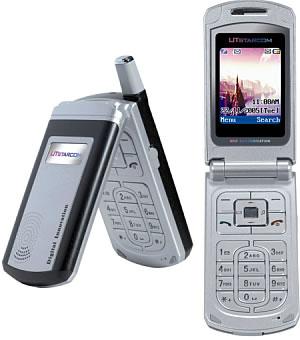

Image


Color LCD Screen (65000k)
802.11b/g Compatible
Protocols: SIP

Product Description

The UTstarcom F3000 is a clam shell style wireless IP phone that combines the power of Voice Over IP technology with the mobility of wireless networking. Wireless Voice Over IP is a revolutionary step for VoIP technology because it extends the reach and capabilities of your VoIP network. UTstarcom has become a respected leader the mobile VoIP industry by releasing quality handsets that use the flexible SIP protocol at an affordable cost. UTstarcom gained an innovative reputation in the marketplace by being one of the first manufacturers to release a 802.11g wireless IP phone which drastically increased sound quality and compatibility with modern wireless (WiFi) networks.

KEY FEATURES

  • Clamshell Type Design
  • 65K CSTN 1.8â€?, 128x160 pixels
  • 802.11b/g
  • VoIP Protocols Supported
    • SIP (Session Initiation Protocol)
    • SDP (Session Description Protocol)
    • RTP/RTCP
    • RFC 2833/Inband DTMF
  • Network Protocols Supported
    • DHCP (Dynamic Host Configuration Protocol)
    • TFTP/HTTP
    • NTP
  • Powerful Personal Information Management
  • Earphone supported
  • Polyphonic ringtones
  • Voicemail indication
  • Local Log/System Log

TECHNICAL PROFILE

  • Frequency: 2.4 GHz, Channel 1-14
  • Effective Range Indoor: 70m Outdoor: 110m
  • LCD: 65K CSTN Color LCD, 128×160
  • Dimension: 85 x 43 x 22 mm
  • Weight: 90g (Approx.)
  • Battery: Li-ion DC 3.7V 1100 mAh
  • Charger: Input 100~240 VAC 50~60Hz 120mA
  • Output: 5.2V DC 600mA
  • Charging Time: 2.5 hrs
  • Standby Time: Up to 75 hrs (Approx.)
  • Talking Time: Up to 3 hrs (Approx.)

CERTIFICATION

  • FCC ID:06Y-F3000
  • IC and CE

ADDITIONAL FEATURES

  • 802.11b/g
    • WEP (64 and 128 bit )/WPA
  • Call Features*
    • Three-way calling/Call waiting
    • Call rejection/redial/mute
    • Call transfer/Call forwarding
    • Caller ID blocking
    • Repeat dial
    • Reject anonymous callsv
    • Call hold/resume
  • Voice Processing*
    • Codec G.711, G.729av
    • Comfort noise generation (CNG)
    • Voice activity detection (VAD)
    • Adaptive jitter buffer
    • Echo suppression
  • Advanced Features*
    • Handover/Roaming between different AP and SSID
    • Net search
    • Auto scan
    • TFTP/HTTP provisioning
    • TFTP/HTTP firmware upgrade
    • Web configuration interface
    • STUN support, DNS SRV
    • AES encrypted provisioning
    • SIP server failover

* Requires network support

F3000 Specsheet

F3000 Instruction Manual

F3000 Quick Start Guide

Support Forum (requires free registration)

Firmware

Default Login
username "admin" password "psw"


LIST IN ABC ORDER OR BE REMOVED!
Where to buy

  • America - 8774e4VoIP.com - Asterisk Focus - Free Support to all...
  • America - RockBottomVoIP.com - Best prices for VoIP Hardware!
  • Belgium - NOVACOM Shop Delivery all over Europe. Very competitive prices.
  • Europe - MyPhoneCall Europe's largest distributor of VoIP products. (payment in GBP or EUR)
  • France - MyPhoneCall Europe's largest distributor of VoIP products.
  • France - NOVACOM Shop Delivery all over Europe. Very competitive prices.
  • Germany - MyPhoneCall Europe's largest distributor of VoIP products.
  • Italy - MyPhoneCall Europe's largest distributor of VoIP products.
  • Luxemburg - NOVACOM Shop Delivery all over Europe. Very competitive prices.
  • Netherlands - MyPhoneCall Europe's largest distributor of VoIP products.
  • Portugal - MyPhoneCall Europe's largest distributor of VoIP products.
  • Spain - MyPhoneCall Europe's largest distributor of VoIP products.
  • Switzerland - MyPhoneCall Europe's largest distributor of VoIP products.
  • UK - MyPhoneCall Europe's largest distributor of VoIP products.
  • UK & Worldwide - VoIPon
  • USA - .e4 Technologies FREE SHIPPING US
  • USA - VoipSupply.com
  • Ukraine Wildix in Ukraine


See Also

Reviews


Page Hits: 18288

Comments

Comments Filter
222

333Still angry with it !

by killminusnine, Tuesday 27 of November, 2007 [00:12:05 UTC]
I have successfully found an AP with which the F3000 deigns to connect, and then, I have successfully upgraded the firrmware from 5.60st to 5.91tt via 5.61st. Now, the F3000 succeeds to connect with any AP, but neither WEP or WPA works properly, for me ! This item works fine only on open APs. Then, it is a gadget, not a professional tool !

The second *BIG* problem with the F3000 is that the phone unconnects itself from the IPBX (or from the AP, I don't know) when I close the clamshell (and it stays unreachable, even I re-open it !) : when I attempt to call the F3000 when the clamshell is closed, my Asterisk switches automatically to the voicemail, and when the clamshell is kept open after the registering stage, it works fine : it can be called until I close the clamshell, for instance, to put it in my pocket. Do I have missed any configuration somewhere ?

In conclusion : it seems that the F3000 is designed to be connected to open hotspots (a good idea to have your phone IDs stolen) and to call, but not to be called ! :-(
A better solution consists to invest into a reliable professional hybrid SIP/GSM phone. I have bought a Nokia E61 and it works perfectly !
222

333Fuctional and happy with it

by higgs, Saturday 01 of September, 2007 [02:27:08 UTC]
F3000 with 1.92st firmware. Documentation is a little tricky to find but once I was in to the web interface it was easy to set up.
Have only had to cold start it twice. Audio quality is good. Audio delay is pretty minimal. Hops easily between my AP's.
Haven't tried it in WEP WPA mode.
My only problem is I can't get the DTMF working in asterisk's voicemail, but I need to look around some more for an answer before it annoys me.

222

333Pretty phone, but a pig to make it work

by adev, Sunday 19 of August, 2007 [13:45:28 UTC]
What to say about this 'phone....?

Well - first the good stuff: It's pretty enough, easy enough to make/receive calls, it even has a couple of daft games, just like a mobile.
Reception is reasonable, from what I can tell; I use this 'phone around my house and somewhat awkwardly the only dead spot is in one corner of the kitchen — maybe the microwave is causing grief.

And now the bad stuff: This phone is a NIGHTMARE to setup. You *must* run an open AP, as far as I can tell: there's just no way to make it talk WEP (haven't tried WPA; my F1000 and elderly laptop don't do WPA). Or, rather... it WILL connect to a WEP-enabled AP, but then it's completely unable to connect to your SIP service (and mine is an Asterisk server running on the same network - it's not like I was trying to make it talk to a remote provider). This leaves you dazed & confused, because it sort of looks like it's working, but doesn't Open the AP up, and everything works as expected.

The phone, as supplied to me (bought off eBay for <1/2 retail price), came with firmware v5.60st - which crashed nastily every time I tried to do anything with the WiFi setup, requiring a battery-off reboot. Downloading the 5.61st firmware brought more pain: Step 2 wouldn't start (which it was supposed to, from 5.60); step 1 also failed with an error *however*, having run step 1 (& got the failure), step 2 then DID work, although the 'phone never did tell the PC it was finished. Sheesh. I daren't try the 5.9 beta firmware.... now the damn thing actually works, I'm not touching it.

Finally, one last gripe (and this applies to the F1000 too) — the web interface is slow, and prone to not working. If it won't respond, dial a number on the 'phone, hang up, then try the web interface again - that usually gets it.


In summary: 2 of 5 stars: it lost 2 because it's a pig to get going, and another one because the web interface is so flakey.
222

333How to Deal with it?

by satboy, Friday 22 of June, 2007 [16:46:39 UTC]
I looked around and read everyones post about this phone. Now what I say is pretty much my own experience, and nor do I endorse the manufacture in anyway, shape, manner, or form. My father and I were looking for a phone that we could use to travel and with wifi access login to the server and connect back home. We had purchased 2 f3000's from VOIPSUPPLY and I must admit it was a disaster! within the first 24 hours, phone while charging died.. I mean it dies, turned off and would not come back on... then the second phone dies 2 days later with the same problem. Now these units were running the 5.6st version. It took about 4 weeks to get replacements, but this time, I notied the menu was slightly differ, I dont remember why, but it sure seems differ. Anyways first thing.. check the ios, now its 5.9st and since then I have not had any problems. I still get this thing where it logs off, but after a reset its fine.

yea strange. but hopefully they will have an update on the ios.

I never had any problems with the ap issue as others have. I opened it with internet as my ssid and it works, WEP works as well, no problem there either.
222

333F3000 is a bag of bugs (or how to loose $200)

by killminusnine, Friday 06 of April, 2007 [05:38:20 UTC]
Just purchased to connect it on my Asterisk PBX. My F3000 (firmware 5.60st) doesn't connect to any AP (D-Link, Cisco Aironet 1100, 3Com AP6000, Apple Airport Extreme, Philips ...) even if the AP is open. I have set up my DHCP server in debug mode to see if the F3000 does DHCP requests thru the WiFi AP during the association step : it does and seems to accept the IP@ sent to it : it means that the F3000 WiFi stack works properly but the TCP/IP stack don't because it doesn't store the DHCP config sent. Then it ALWAYS ends its association tries by a "Couldn't connect to AP". The big problem is that to upgrade the firmware and perhaps to fix this bug, the F3000 must be associated to a WiFi AP. UTStar.com shouldn't design a firmware update procedure thru an USB link (however, when the handset is off and connected to an USB port, it displays "engineering mode" and the upgrade software includes a disabled USB option) ?

I only can put this useless item to the trash !!! :-(

I can't understand how Frank, below, may say "Really solid phone" ... I will drop it to see if it is actually solid !

My conclusion : F3000 doesn't do what why it was designed because it was released too early without any really reliable upgrade procedure and a non-existing UTStarcom support ("An issue ? Call your dealer") !
222

333F3000 Review

by rkawski, Tuesday 27 of March, 2007 [01:08:41 UTC]
Purchased this phone to replace a cordless phone, I will be returning it for a few reasons. The call volume is pretty low even at it's highest setting. Seems as there is to much CNG. As others have posted it does not support WPA even though it claims to. I couldn't even get it to work correctly with WEP. Finally setup an open access point and that finally worked. Not really ideal. The lack of a screen on the outside is also disappointing.

If the above would be addressed it seems to be an okay phone. Just not with the above shortcomings
222

333F3000 wont connect to AP

by ilans1, Sunday 18 of March, 2007 [01:19:11 UTC]
Just got this f3000 phone and been trying to connect to my Netgear wireless router with no success. Ive tried everything, including opening up the connection but phone will not connect. Can anyone help???
222

333F3000 Guinea Pig

by eric_ozrelic, Friday 08 of December, 2006 [03:04:08 UTC]

Just got my F3000 in. It had 5.60st firmware out of the box. I'm using it with a Cisco 1231 802.11B/G AP, and Asterisk. I've run into the following frustrating issues:

-Cannot get the phone to do WPA1/TKIP for the life of me. After messing with settings on the phone and the AP for quite some time, I gave up and just ended up using WEP. I bought this phone instead of the F1000 specifically for the WPA security. The AP has almost no traffic on it, and it's been tested with a number of different WPA enabled clients, and appears to have no issues with them.

-The phone will not automatically register to the above mentioned AP on startup quickly. It tries to connect to it for a second, then polls through the list of other AP's, then eventually gives up with "Couldn't connect to AP". If I wait around for about 2 minutes, it will eventually associate to the AP.

-Calls made from a station in the office to the F3000 result in it no longer being registered in Asterisk shortly after the call has ended. You can still ping the phone, and the phone claims to be still registered, but Asterisk no longer can "see" it. At this point, you can no longer make outgoing calls with the F3000. The only way that I've found to resolve this issue is to power cycle the phone. The station phone continues to operate normally after this occurs.

-In the short time I've been writing this post, I've noticed yet another bug... the phone just mysteriously disassociated from the AP, now it's going through the same AP scan sequence it does on startup.

-The phone has some of the strangest power saving features I've ever seen in regards to the display turning on and off, seemingly at will.

I've updated to the newest firmware rev (5.61st) as well as a beta firmware offered by tech support and these issues still persist.

After browsing around some of the UTStarcom forum posts, it appears as though more then a few other owners are experiencing these issues as well; with little or no luck in getting them fixed. I will most likely be returning this phone as this product appears to be a "work in progress" and probably shouldn't have been released to the public just yet.
222

333hot or not?

by icke, Tuesday 12 of September, 2006 [09:29:42 UTC]
hi there,

i was just about to buy a F1000G but after reading that it heats up after 10-15 minutes talktime, i now have second thoughts.
i wonder actually if the F3000 heats up too? since the aerial is not close to the earpiece on the F3000 i imagine that it may not get as hot around the earpiece...

can anybody confirm this please?

cheers,
olaf
222

333

by aqlimited, Saturday 19 of August, 2006 [21:02:40 UTC]
This isn't meant to be a plug, but the aql VoIP network supports the SIP messaging on these phones brilliantly - you can even send SIP to GSM messages if you have an account -see aql.com