


General Info
This page will serve as a repository to help explain the functionality of custom idle screens, as well as document bugs and identify workarounds where possible.
Page Contents
Firmware Notes and Bugs
Firmware 1.1.1.14
Bugs
- FEATURE (Nov22/07) – Allow to refresh the idle screen via the web interface (even by toggling the download setting) this will at least permit ‘polling’ of the devices by a remote host to download a new screen, so that hotdesking updates can trigger a screen change.– Acumen
- FEATURE (Feb21/07) – Allow to automaticaly refresh the idle screen after a given secs e.g. for “queue viewing”,”news reeding” purposes.– WDTY
Firmware 1.1.1.9
Bugs
- MINOR (Aug18/06) – Random corruption on screen when using custom XML file. Noticeable as dots or lines on the extreme left and right of text blocks. – acabtp
- MINOR (Aug18/06) – The phone seems to always evaluate the “a1reg” as true, resulting in any <DisplayStr> that have “a1reg=false” never being displayed, and <DisplayStr> that do not have “a1reg=false” always being displayed, regardless of the Line 1 registration state. – acabtp
- FEATURE (Nov2/06) – Allow the display of the Account 1 “Account Name” via some format string — perhaps $N? – awint
Firmware 1.1.1.7
(JUL17,2006) Idle screen configuration functionality is introduced. – MikeB
Bugs
- MAJOR (Jul24/06) – Using custom bitmap with offset causes the phone to crash. Suspect chunks of memory are being overwritten by the offset routine. The problem reoccurs every reboot when the phone attempts to load the Custom SCR. To remedy this, I had to reboot the phone with the network cable disconnected, and clear the custom screen from the preferences menu before it could be loaded. – acabtp
- MINOR (Jul24/06) – Random corruption on screen when using custom XML file. Noticeable as dots or lines on the extreme left and right of text blocks. – acabtp
- MINOR (Jul24/06) – Using the $d variable reference causes the phone to display only the last digit of the day of the month, and the rest of the <DisplayStr> after the $d is truncated. – acabtp
- MINOR (Jul24/06) – The phone seems to always evaluate the “a1reg” as true, resulting in any <DisplayStr> that have “a1reg=false” never being displayed, and <DisplayStr> that do not have “a1reg=false” always being displayed, regardless of the Line 1 registration state. – acabtp
- FEATURE (Aug11/06) – Should be able to specify auto download of the XML file on boot-up, it’s odd you have to do this manually! – mattb
- FEATURE (Oct18/06) – Can change the name of the xml file, for example to use a php file, to generate a dynamic idle screen! – jorgeci
Variables
The following variables have been provided by Grandstream. When entered in a <DisplayStr> element, these strings will be replaced by their corresponding values.
$N: Configured Account 1 Display Name.
$X: Configured Account 1 SIP User ID.
$V: Configured Account 1 SIP Server.
$I: Configured System IP address.
$D: Current day of month with leading zero, possible values: 01, 02… 31
$d: Current day of month without leading zero, possible values: 1, 2… 31 – broken in 1.1.1.7, fixed in 1.1.1.9
$M: Current month in English, possible values: January, February… December
$o: Current month in number with leading zero, possible values: 01, 02… 12
$n: Current month in number without leading zero, possible values: 1, 2… 12
$Y: Current year in 4-digit number, for example: 2006, 2007 …
$y: Current year in 2-digit number, for example: 06, 07 …
$P: Current AM/PM status in upper case, possible values: AM, PM
$p: Current AM/PM status in lower case, possible values: am, pm
$H: Current hour of day in 24-hour representation with leading zero, possible values: 00, 02… 23
$h: Current hour of day in 12-hour representation with leading zero, possible values: 01, 02… 12
$m: Current minute of hour with leading zero, possible values: 01, 02… 59
$s: Current second of minute with leading zero, possible values: 01, 02… 59
$i: This variable is replaced with the current number of missed calls on the phone, possible values: 01, 02, 03…50.– new in 1.1.6.16
– acabtp
Excerpt from the Phone Manual
The feature will be activated when “Enable Idle-Screen XML Downloadࢀ? is set to YES (HTTP or TFTP) AND a valid “Idle-Screen XML Pathࢀ? is set. This feature does not automatically download the gs_screen.xml file in the path even when activated. Because the LCD is composed of 130*64 mono pixels, the resolution of the screen XML should be within this range. The following 2 options are added to the Preference LCD GUI submenu:
- Download SCR XML
- Erase Custom SCR
User will have to choose to Download SCR XML to start the download process. Once the XML is successfully downloaded it will be effective right away. The file will be saved and loaded automatically after reboot.
Example XML file of gs_screen.xml:
<?xml version="1.0"?>
<Screen>
<IdleScreen>
<ShowStatusLine>false</ShowStatusLine>
<DisplayBitmap>
<Bitmap>Put your customized screen file with bitmap format here</Bitmap>
<X>0</X>
<Y>0</Y>
</DisplayBitmap>
<DisplayString font="f8" halign="Right">
<DisplayStr>Doraemon</DisplayStr>
<X>130</X>
<Y>0</Y>
</DisplayString>
<DisplayString font="f10" halign="Left" valign="Bottom">
<DisplayStr>Call me:</DisplayStr>
<X>0</X>
<Y>54</Y>
</DisplayString>
<DisplayString font="f8" halign="Left" valign="Bottom">
<DisplayStr>$X@$V</DisplayStr>
<X>0</X>
<Y>64</Y>
</DisplayString>
</IdleScreen>
</Screen>
Note: The feature requires some expertise on XML. For more technical
details, please contact Grandstream.
ok, I was having some difficulty getting all this up and running so here is a braindump of what I’ve got so far.
Firstly ensure you are running the latest firmware, just telling it to update probably won’t work, go to the grandstream site, download the firmware host it and let the phone download it.
Also this fixes the issue needing that mod_rewite stuff mentioned below around 1.2 they allow you to use a “custom file name” and a name like 10.250.0.12/gxp/idle/2000.php?pid=9999 works
I have made a commented XML file that does some nice things like give you some debug info when not registered and pretty display when registered.
It turns out the a1reg=”false”/true tag works on bitmaps too ;->
(if it turns your country into a pile of radioactive slag eh i don’t care your dead you can’t sue me anyway)
<?xml version="1.0"?>
<Screen>
<IdleScreen>
<ShowStatusLine>true</ShowStatusLine>
<DisplayString font="f18c" halign="Right"> <!-- Time -->
<DisplayStr>$H:$m:$s</DisplayStr>
<X>130</X>
<Y>0</Y>
</DisplayString>

<!-- UNregistered -->
<DisplayString font="f10" halign="Right" a1reg="false"> <!-- Name -->
<DisplayStr>NAME : $N</DisplayStr>
<X>130</X>
<Y>18</Y>
</DisplayString>
<DisplayString font="f10" halign="Right" a1reg="false"> <!-- UserID -->
<DisplayStr>UID : $X</DisplayStr>
<X>130</X>
<Y>32</Y>
</DisplayString>
<DisplayString font="f10" halign="Right" a1reg="false"> <!-- IP Address -->
<DisplayStr>IP : $I</DisplayStr>
<X>130</X>
<Y>44</Y>
</DisplayString>
<DisplayString font="f10" valign="Bottom" halign="Right" a1reg="false"> <!-- Server -->
<DisplayStr> SRV : $V</DisplayStr>
<X>130</X>
<Y>65</Y>
</DisplayString>
<DisplayBitmap a1reg="false"> <!-- Picture -->
<Bitmap>Qk0eAgAAAAAAAD4AAAAoAAAAPAAAADwAAAABAAEAAAAAAOABAAANAwAADQMAAAIAAAACAAAA////AAAEAQAAAH///AAAAAAAf//+AAAAAAA///wAAAAAAAP/4AAAAAAAAf/AAAAAAAAB/8AAAAAAAAD/wAAAAAAAAP/AAAAAAAAA/+AAAAAAAAD/4AAAAAAAA8B4AAAAAAAfwD8HAAAAAH/AH8cAAAAA/8Af54AAAAP/4B//gAAAB//gH/+AAAAP/+Af/4AAAB//4A/zwAAAH//wD+HAAAA///AAAMAAAH//8A/gQAAAf//wB/xgAADg//AH/iAAAOB/+Af/MAAB4D/4B/8wAAHgP/gD/7AAAeAf+AP/uAAD4A/8A//5wAPAD/wD//nAA8AH/AP/+eADwDP8Af/74APAM/4B///gA8A5/gH//+ADwD3+Af//4AOAPP4A///wA4A+fAD///ADgH5gAAAP8AOAfwAAAA/wA4B/n/////ADAH+f///4AAEAf8////gAAQB/5///8AABgP/n///wAAGA//P///AAA8D/8f//4AADwP/5///AAAPg//z//8AAA/H//H//gAAD+f/+f/+AAAP9//8//wAAB////z/+AAAH////n/wAAAf///+P8AAAB/7//8/gABAP/j//x4AAAA/+D//vAAAAH/8B///AAAD///AH//gAAP//+A//+AAA///4B//4AAA=</Bitmap>
<X>0</X>
<Y>0</Y>
</DisplayBitmap>

<!-- registered -->

<DisplayString font="f13b" halign="Right" a1reg="true"> <!-- Date -->
<DisplayStr>$Y-$o-$D</DisplayStr>
<X>130</X>
<Y>18</Y>
</DisplayString>
<DisplayString font="f13b" halign="Right" a1reg="true"> <!-- UserID -->
<DisplayStr>$X</DisplayStr>
<X>130</X>
<Y>32</Y>
</DisplayString>
<DisplayString font="f13b" halign="Right" valign="Bottom" a1reg="true"> <!-- Name -->
<DisplayStr>$N</DisplayStr>
<X>130</X>
<Y>65</Y>
</DisplayString>
<DisplayBitmap a1reg="true"> <!-- Picture -->
<Bitmap>Qk0eAgAAAAAAAD4AAAAoAAAAKAAAADwAAAABAAEAAAAAAOABAAATCwAAEwsAAAIAAAACAAAAAAAAAP///wD//////wAAAP//////AAAA//////8AAAD//////wAAAPn/////AAAA+H////8AAAD4P////wAAAPwf////AAAA/B////8AAAD+D////wAAAP4P////AAAA/gf///8AAAD/B////wAAAP8D////AAAA/4H///8AAAD/wP///wAAAP/A////AAAA/+A//D8AAAD/8B/4HwAAAP/4B/gfAAAA//wB8B8AAAD//gAAfwAAAP//AAH/AAAA///gB/8AAAD//j///wAAAP/+H///AAAA//8Ph/8AAAD//weH/wAAAP//g4P/AAAA//+AA/8AAAD//4AD/wAAAP//wgH/AAAA///D4f8AAAD//8Pg/wAAAP//4/D/AAAA////+f8AAAD//////wAAAP//AAf/AAAA//4AAH8AAAD//gAAPwAAAP/8AAA/AAAA//gAAB8AAAD/8AQAHwAAAP/gDhgfAAAA/8AeGA8AAAD/wH48DwAAAP+A/n4HAAAA/wP+fgcAAAD+B///BwAAAPwP//8HAAAA/D///4cAAAD4f///hwAAAPD///+PAAAA4f///48AAADn////jwAAAM////+fAAAA3////z8AAAD//////wAAAP//////AAAA//////8AAAA=</Bitmap>
<X>0</X>
<Y>0</Y>
</DisplayBitmap>
</IdleScreen>
</Screen>
it swaps between
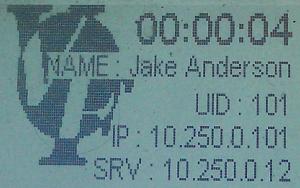
when unregistered and
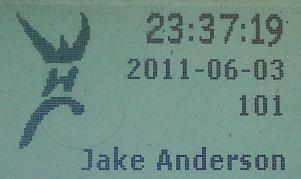
when registered
using linux i used gimp to make the image, saved it as a bitmap (24 bit, R8 G8 B8)
then converted it to 1 bit with mogrify
mogrify -colors 2 WHC.bmp
then base64 encoded it
base64 -w0 WHC.bmp
(the -w0 stops the line wrap)
For some additional awesome I have the above idle screen and accompanying scripting to display the username of a logged in user in devicesandusers mode.
IE when somebody logs into the system it will update the screen on their phone to show that they are logged in.
is the php file you point the phones at
i’m using auto provisioning to set the phones up and i use a link like 10.250.0.50/gxp/idle/2000.php?pid=9999 for the idlexml screen
you can replace the 9999 there with a suitable variable in the autoprovision section or enter it manually per phone if your keen.
I put this file in /var/www/gxp/idle/2000.php
then i added this to extensions_override_freepbx.conf
[app-userlogonoff]
include => app-userlogonoff-custom
exten => *12,1,Macro(user-logoff,)
exten => *12,2,System(/usr/bin/send_delayed_screen_refresh.sh ${CALLERID(num)})
exten => *12,n(hook_off),Hangup

exten => *11,1,Macro(user-logon,)
exten => *11,2,System(/usr/bin/send_delayed_screen_refresh.sh ${CALLERID(num)})
exten => *11,n(hook_on_1),Hangup

exten => _*11.,1,Macro(user-logon,${EXTEN:3},)
exten => _*11.,2,System(/usr/bin/send_delayed_screen_refresh.sh ${CALLERID(num)})
exten => _*11.,n(hook_on_2),Hangup
it overrides the default logon logoff stuff, mainly because i couldn’t figure out how to play nicely with it.
it behaves the same except for the lines calling send_delayed_screen_refresh.sh
I took the content of send_delayed_screen_refresh.sh from the code at the bottom here by gray
- !/bin/bash
ampuser=$1
sip_refresh(){
sleep 2
for x in $ampuser
do
/usr/sbin/asterisk -rx "sip notify grandstream-idle-screen-refresh $x"
done
}
sip_refresh &
echo $ampuser $x
and I think thats all thats needed.
Complete Bitmap example for GXP-2020
Because this is a little confusing, and poorly documented, I created and tested a complete example with a new GXP-2020. It includes Tux, the Asterisk Logo, IP, Date, and Time on the Idle screen. Copy, paste, enjoy! ~ Etamme
<?xml version="1.0"?>
<Screen>
<IdleScreen>
<ShowStatusLine>false</ShowStatusLine>
<DisplayBitmap>

<Bitmap>Qk0+BQAAAAAAAD4AAAAoAAAAggAAAEAAAAABAAEAAAAAAAAFAAASCwAAEgsAAAIAAAACAAAA////AAAAAAAAAAAAAAAAAAAAABwAADwAAAAAAAAAAAAAAAAAAAAA/gAA/gAAAAAAAAAAAAAAAAAAAAP/gAH/AAAAAAAAAAAAAAAAAAAAf5f9t9OAAAAAAAAAAAAAAAAAAAOtR///6IAAAAAAAAAAAAAAAAAABmAT//+AMAAAAAAAAAAAAAAAAAAFAEv7/4iIAAAAAAAAAAAAAAAAAAAkAAB/4QAAAAAAAAAAAAAAAAAAAgICAA+RQAAAAAAAAAAAAAAAAAAEaCgAB4gUAAAAAAAAAAAAAAAAAAUgYAABwEIAAAAAAAAAAAAAAAAAAAIAAAGgCAAAAAAAAAAAAAAAAAAAAEAAAMVAAAAAAAAAAAAAAAAAAAUiAAAAmhAAAAAAAAAAAAAAAAAAAEQgAAAfiAAAAAAAAAAAAAAAAAABogAAAN+AAAAAAAAAAAAAAAAAAAAQAAAAX8AAAAAAAAAAAAAAAAAAABQAAAAf4AAAAAAQAR+BQ8GAh8EDAAAAAB/wAAAAAHAHv8fP8YOf84eDgAAAH/AAAAAAOAd65975wZ57jx+AAAAf8AAAAAA4B3B3PDuDuDsODwAAAB/4AAAAADwPYOc4CcOYO54fgAAAH/gAAAAAH/4D5zgBwcD7vA8AAAAf+AAAAAAf/h/nP/3Dj/P4D4AAAB/4AAAAAA4cfwc//8Hfw/gHgAAAH/AAAAAADhx4BzgZwZwH8AeAAAAf8AAAAAAOPHDnODnjuDM8A8AAAB/wAAAAAAc4ef/eef+d95wDwAAAH/AAAAAABzg/38/x/d/zjwHgAAAf4AAAAAAHsB+fx8Gdh8MDAeAAAD/gAAAAAAPwAAcAAAAAA4AB4AAAP8AAAAAAA/AABwAAAAADgADwAAB/wAAAAAAB4AAHAAAAAAMAAPAAAH/AAAAAAAHgAAIAAAAAA4AAfAAA/4AAAAAAAAAH+AAAAAAAAAB4AAH/AAAAAAAAAD//AYAAAAAAADwAAf8AAAAAAAAAf//vgAAAAAAAHAAB/gAAAAAAAAD+B/8AAAAAAAAcAAH8AAAAAAAAAfAAewAAAAAAAA4AA/gAAAAAAAAD4AACAAAAAAAABwgD+AAAAAAAAAPAAAcAAAAAAAADPgfwAAAAAAAAB4AeB4AAAAAAAANrh/AAAAAAAAAHAB4DgAAAAAAAA9rP4AAAAAAAAAcCHiHAAAAAAAADoV/AAAAAAAAABwOeceAAAAAAAAOAb8AAAAAAAAAPB//w4AAAAAAAA8Q/wAAAAAAAAAcH//hwAAAAAAADgA/AAAAAAAAABwH/4HAAAAAAAANAT4AAAAAAAAAHAH+AcAAAAAAAA+bnwAAAAAAAAAMA/4B4AAAAAAAD/u+AAAAAAAAAA4P/4DgAAAAAAALO78AAAAAAAAABh//4OAAAAAAAA05PgAAAAAAAAAHH3fA4AAAAAAADPh+AAAAAAAAAAOOecHgAAAAAAAP/v4AAAAAAAAAAIh4gcAAAAAAAB///gAAAAAAAAAAYHgBwAAAAAAAD//+AAAAAAAAAAAweAPAAAAAAAAP//wAAAAAAAAAABgAA4AAAAAAAA///AAAAAAAAAAADgAPgAAAAAAAD//4AAAAAAAAAAADwB4AAAAAAAAH//gAAAAAAAAAAAD/+AAAAAAAAAP/8AAAAAAAAAAAAB+gAAAAAAAAAf/gAAAAAAAAAAAAAAAAAAAAAAAAfwAAAAAAAAA==</Bitmap>
<X>60</X>
<Y>50</Y>
</DisplayBitmap>

<DisplayString font="f13b" halign="Left">
<DisplayStr>$I</DisplayStr>
<X>40</X>
<Y>35</Y>
</DisplayString>
<DisplayString font="f13b" halign="Left">
<DisplayStr>$h:$m $p</DisplayStr>
<X>140</X>
<Y>35</Y>
</DisplayString>

<DisplayString font="f13b" halign="Left">
<DisplayStr>$W $M, $D, $Y</DisplayStr>
<X>40</X>
<Y>115</Y>
</DisplayString>

</IdleScreen>
</Screen>
Example
In this example, the company name is displayed at the top, the account name, the account number (in the largest font with a leading “x” for “extension”), and the current date. This may be more useful in an corporate or executive environment where the user will almost never need to know what IP address their phone is.
djr: there’s no point in having identical output conditioned by a1reg=”Yes” and also by a1reg=”No”. Just leave out the a1reg attribute completely and only include the output once.
tfb: look again, djr, and you will see that the formatting is different between those two strings, resulting in different output with the different account states
gs_screen.xml:
<?xml version="1.0"?>
<Screen>
<IdleScreen>
<ShowStatusLine>true</ShowStatusLine>
<DisplayString font="f10" halign="Center">
<DisplayStr>Company, Inc.</DisplayStr>
<X>64</X>
<Y>0</Y>
</DisplayString>
<DisplayString font="f13h" halign="Center" a1reg="false">
<DisplayStr>$N</DisplayStr>
<X>64</X>
<Y>11</Y>
</DisplayString>
<DisplayString font="f13b" halign="Center" a1reg="true">
<DisplayStr>$N</DisplayStr>
<X>64</X>
<Y>11</Y>
</DisplayString>
<DisplayString font="f16" halign="Center" a1reg="false">
<DisplayStr>x$X</DisplayStr>
<X>64</X>
<Y>23</Y>
</DisplayString>
<DisplayString font="f16b" halign="Center" a1reg="true">
<DisplayStr>x$X</DisplayStr>
<X>64</X>
<Y>23</Y>
</DisplayString>
<DisplayString font="f8" halign="Center">
<DisplayStr>$W, $M $D, $Y</DisplayStr>
<X>64</X>
<Y>40</Y>
</DisplayString>
</IdleScreen>
</Screen>
- acabtp
Adding Bitmaps to the XML file
Should you decide to place a custom bitmap in the SCR file there’s a few things to note:
First of all, the bitmap must be a 2 color(mono) bitmap that is exactly 130×64 pixels in size. You can do this quite easily in MS Paint. Personally I used fireworks to import whatever logo I was going to use, then did a black color fill on it. After that, I just copied and pasted into MS Paint and saved as a Mono BMP file. I’m not exactly sure why the image has to be exactly 130×64 but I assume Grandstream did not make a routine to check the headers of the bitmap image, either that or I’m missing a tag for the image size somewhere. If you use an image smaller than 130×64, the image will not come across properly. If you use a bigger image, the image will not come across at all.
Once you get your bitmap finished, you will need to convert the file to a Base64 string using uuencode or a similar program. Be sure to remove any headers, trailers or line feeds from the output of uuencode.
for instance:
then if you cat base64.txt you will get something like this:
Qk0BQAAAAAAAD4AAAAoAAAAggAAAEAAAAABAAEAAAAAAAAFAAAAAAAAAAAA
AAAAAAAAAAAAAAAAAP///wD/////////////////////wAAAAP//////////
///////////AAAAA/////////////////////8AAAAD/////////////////
////wAAAAP/////////////////////AAAAA/////////////////////8AA
AAD/////////////////////wAAAAPwAAAAA==
====
You then would need to remove the first and the last line, and then all line feeds to produce the following:
The short way to do all that is this command:
Now simply place the base 64 string (without any linefeeds or spaces) between <Bitmap> and </Bitmap> tags in your xml file
– ninthclowd
An easy way to get your .bmp into Base64 without having to download and install a port of uuencode is to just email it to yourself. View the source of the email, and you can copy out the data from the MIME container for the .bmp… it has been conveniently encoded in Base64 for you. – acabtp
– Beau Button
An even easier way to get your .bmp into Base64 is to use this online Base64 encoder
Script for BMP Conversion
Here is a short script for converting a 1-bit BMP to a string suitable for insertion to an idlescreen XML file.
Requires: PHP, uuencode, tr
Configuration: change $tmpdir to suit your system
Input: a file named logo.bmp in the same directory as the script
Output: a file name logo.64 in the same directory as the script
<?php
$tmpdir = "/tmp";

$execstr = "uuencode logo.bmp logo -m > ".$tmpdir."/tmp.64";
exec($execstr,$output);

$lines = file($tmpdir.'/tmp.64');
$lines_out = array();

for($a = 1; $a < count($lines) - 1; $a++) {
        $lines_out[$a-1] = $lines[$a];
}

file_put_contents($tmpdir.'/tmp2.64',$lines_out);

$execstr = "cat ".$tmpdir."/tmp2.64 | tr -d '\012' > logo.64";
exec($execstr,$output);
?>
– bshep
Create indivudual GXP2000 Idle screens using Apache2(mod_rewrite module), PHP and MySQL
- edit: 15 FEB 2009, for sip-notify to work well the GXP2000 requires Firmware 1.1.6.46
GXP2000 Firmware 1.1.5.15
Using the following apache mod_rewrite rule in http.conf any gs_screen.xml can be created from a database when requested.
The reason for a rewrite rule is Grandstream fix the file name for the idle screen to “gs_screen.xml” and can not be changed, but we can add to the path to make the path unique for each phone.
The result is www.mydomain.com/gxp/GXP0001/gs_screen.xml becomes www.mydomain.com/gxp/php/gs_screen.php?name=GXP0001
This rule assumes that the GXP2000’s “Idle Screen XML Server Path” is set to www.mydomain.com/gxp/GXP0001
Where GXP0001 matches the SIP user ID in this example of GXP0001
Also “Enable Idle Screen XML Download Yes,HTTP ” should be selected.
The end user still has to manually download the custom idlescreen through the use of the keypad, until Grandstream enable us to have some event to automatically do this.
The following is our test (be careful no error checking for records not found etc) PHP script to create a dynamc gs_screen.xml from a mysql database
/var/www/gxp/php/gs_screen.php
<?php
header(“Content-type: application/xml”);
$cid=$_GET[‘name’];
$username=”asterisk”;
$password=”asterisk”;
$database=”asterisk”;
mysql_connect(localhost,$username,$password);
@mysql_select_db($database) or die( “Unable to select database”);
$query=”SELECT * FROM pbx where cid_num like ‘$cid'”;
$result=mysql_query($query);
$num=mysql_numrows($result);
mysql_close();
$extension=mysql_result($result,0,”extension”);
$name=mysql_result($result,0,”name”);
$dnd=mysql_result($result,0,”dnd_state”);
$dndsm=mysql_result($result,0,”dndsm_state”);
$xml_output = “<?xml version=\”1.0\”?>\n”;
$xml_output .= “<Screen>\n”;
$xml_output .= “<IdleScreen>\n”;
//===== Always Display ===================
$xml_output .= “<ShowStatusLine>true</ShowStatusLine>\n”;
$xml_output .= “<DisplayString font=\”f8\”>\n”;
$xml_output .= “<DisplayStr>\$W, \$M \$d</DisplayStr>\n”;
$xml_output .= “<X>0</X>\n”;
$xml_output .= “<Y>0</Y>\n”;
$xml_output .= “</DisplayString>\n”;
//===== Display when not Registered ===================
$xml_output .= “<DisplayString font=\”f13h\” halign=\”Center\” a1reg=\”false\”>\n”;
$xml_output .= “<DisplayStr>\$N</DisplayStr>\n”;
$xml_output .= “<X>65</X>\n”;
$xml_output .= “<Y>12</Y>\n”;
$xml_output .= “</DisplayString>\n”;
$xml_output .= “<DisplayString font=\”f13h\” halign=\”Center\” a1reg=\”false\”>\n”;
$xml_output .= “<DisplayStr>\$X</DisplayStr>\n”;
$xml_output .= “<X>65</X>\n”;
$xml_output .= “<Y>26</Y>\n”;
$xml_output .= “</DisplayString>\n”;
$xml_output .= “<DisplayString halign=\”Center\” valign=\”Bottom\” a1reg=\”false\”>\n”;
$xml_output .= “<DisplayStr>\$I</DisplayStr>\n”;
$xml_output .= “<X>65</X>\n”;
$xml_output .= “<Y>48</Y>\n”;
$xml_output .= “</DisplayString>\n”;
//===== Display when Registered ===================
if ($dnd != ‘0’ ){
$xml_output .= “<DisplayString font=\”f13b\” halign=\”Center\” a1reg=\”true\”>\n”;
$xml_output .= “<X>65</X>\n”;
$xml_output .= “<Y>12</Y>\n”;
switch ($dndsm ){
case ‘5’:
$xml_output .= “<DisplayStr>IN A MEETING</DisplayStr>\n”;
break;
case ‘6’:
$xml_output .= “<DisplayStr>OUT TO LUNCH</DisplayStr>\n”;
break;
case ‘7’:
$xml_output .= “<DisplayStr>BE BACK SOON</DisplayStr>\n”;
break;
case ‘8’:
$xml_output .= “<DisplayStr>OUT OF OFFICE</DisplayStr>\n”;
break;
case ‘9’:
$xml_output .= “<DisplayStr>ON VACATION</DisplayStr>\n”;
break;
default:
$xml_output .= “<DisplayStr>DO NOT DISTURB</DisplayStr>\n”;
}
$xml_output .= “</DisplayString>\n”;
}
$xml_output .= “<DisplayString font=\”f13b\” halign=\”Left\” a1reg=\”true\”>\n”;
$xml_output .= “<DisplayStr>$name</DisplayStr>\n”;
$xml_output .= “<X>0</X>\n”;
$xml_output .= “<Y>26</Y>\n”;
$xml_output .= “</DisplayString>\n”;
$xml_output .= “<DisplayString font=\”f13b\” halign=\”Right\” a1reg=\”true\”>\n”;
$xml_output .= “<DisplayStr>$extension</DisplayStr>\n”;
$xml_output .= “<X>131</X>\n”;
$xml_output .= “<Y>26</Y>\n”;
$xml_output .= “</DisplayString>\n”;
$xml_output .= “</IdleScreen>\n”;
$xml_output .= “</Screen>\n”;
echo $xml_output;
?>
The mysql pbx table
o————-o————o——o—–o———o——-o
| Field | Type | Null | Key | Default | Extra |
o————-o————o——o—–o———o——-o
| extension | char(20) | NO | PRI | NULL | |
| name | char(20) | NO | | NULL | |
| cfa_state | tinyint(1) | NO | | 0 | |
| cfa_number | char(20) | NO | | NULL | |
| cfb_state | tinyint(1) | NO | | 0 | |
| cfb_number | char(20) | NO | | NULL | |
| cfna_state | tinyint(1) | NO | | 0 | |
| cfna_number | char(20) | NO | | NULL | |
| dnd_state | int(11) | NO | | 0 | |
| dndsm_state | int(11) | NO | | 0 | |
| vmenb_state | tinyint(1) | NO | | 0 | |
| channel | char(30) | NO | | NULL | |
| cid_num | char(30) | NO | | | |
o————-o————o——o—–o———o——-o
An example record;
o———–o————o————-o———o
| extension | name | channel | cid_num |
o———–o————o————-o———o
| 8522 | Alec Davis | SIP/GXP0001 | GXP0001 |
o———–o————o————-o———o
- FEATURE REQUEST (Mar27/08) Firmware 1.1.5.15 Ability to automatically refresh IdleScreen as already requested, many times, For DND status, Unavailable Status, Agent Login Status etc. etc. etc.
The refresh method could be one of the following;
Similar to GXP2020 SoftKeys action event
<Events>
<Event>ONHOOK></<Event>
<UseUrl><URL>mydomain.com/gxp/GXP0001/gs_screen.xml</URL>
</UseURL>
</Events>
</Action>
or a sip_notify message from the server, or a regular timed download, or a combination of them all.
Looking forward to Grandstream supporting this request. Until then something to start with.
- FEATURE REQUEST Update (May14/08) Firmware 1.1.6.16
These additions then conditionally display a string in the Idle Screen if the phone’s DND feature is used, the phone’s CALLFWD feature is used, and others.
Not yet a Refresh timer that can update an Idle Screen from a database, that could of course be changed by someelse other than the user. IE. Reception may change an extension’s DND status, or the same user from another extension can setup a FollowMe type of call forward.
- FEATURE SEMI SUPPORTED (Oct16/08) Firmware 1.1.6.37
• GXP2000/GXP2010/GXP2020: To allow XML Idle Screen download periodically or base on Notify
edit 18 Feb 09: Advised by Grandstream: It should actually read: GXP… To allow XML Idle Screen download periodically based on Notify.
file: /etc/asterisk/sip_notify.conf
Event=>x-gs-screen
Content-Length=>0
dialplan code:
I couldn’t get GXP2000 to update itself, example: updating my DND to On, would update database, dialplan issues a sip-notify. Which you seen go through, but as the phone has not yet hungup, the idle screen refresh isn’t done.
– alecdavis
I managed to create a bash script which fixes the refresh issue by putting a delay in before running the ‘sip notify’ command.
ampuser=$1
sip_refresh(){
sleep 2
for x in $ampuser
do
/usr/sbin/asterisk -rx “sip notify grandstream-idle-screen-refresh $x”
done
}
sip_refresh &
echo $ampuser $x
Dialplan code:
– jfergus
- FEATURE SUPPORTED? only while idle (Feb15/09) Firmware 1.1.6.46
Quote from 1.1.6.46 from grandstream fixes
“• Fixed GXP2000/2010/2020 ignores notify with x-gx-screen event when the phone is offhook”
However if the phone is active (off-hook and dialling, in a call, being rung), the x-gs-screen event request responds with 480 (Temporarily Unavailable), thus ignores the request.
I like to see the ‘x-gs-screen’ event handled the same way as the sip notify event ‘check-sync’ (which reboots the device), the phone accepts the event and will action it when next idle.
edit 18 Feb 09: Advised by Grandstream: They currently have no plans to change the x-gs-screen implementation
– alecdavis


 April 7, 2023
 Phone System