login | register
Sat 17 of May, 2008 [10:18 UTC]

voip-info.org

Search with Google
Search this site with Google. Results may not include recent changes.
 
Google Ads
Shoutbox
  • Juan Ortega, Thu 15 of May, 2008 [10:33 UTC]: Hi everybody, I'm Juan, an ITCom student, and I need to know what basic elements I need to create a VoIP network. Can anybody helpme, please?,Thank you very much
  • gineta, Wed 14 of May, 2008 [03:58 UTC]: any here not fine the configuration of firewall juniper -screem for VOIP asterisk????
  • Anoop Prabhakaran, Tue 13 of May, 2008 [12:16 UTC]: I am developing Asterisk IVR, Whenever i make a internation call to the IVR system, the DTMF is not getting detected properly, this happens only for the first time, second call onwards system works fine. why this is happening
  • joe, Mon 12 of May, 2008 [04:27 UTC]: Is there an opensource browser based softphone, or a system like Busta where everything is not manages through their website?
  • Nick Barnes, Fri 09 of May, 2008 [11:36 UTC]: Christopher - yesterday I tried an Asterisk install on a CentOS 5.1 box with stock GUI and it all worked fine. Sorry I can't help.
  • aero, Fri 09 of May, 2008 [08:20 UTC]: can someone help me out on this, i tried to play some sound files on my asterisk box and this is the error message i got. WARNING[4429]: format_wav.c:169 check_header: Unexpected freqency 22050 May 8 11:17:39 WARNING[4433]: codec_gsm.c:194 gsmtolin_fra
  • Christopher Faust, Thu 08 of May, 2008 [14:15 UTC]: I beleive that I may have to change something in the xserver configuration. Please advise
  • Christopher Faust, Thu 08 of May, 2008 [14:14 UTC]: Everything was perfect. In the bios I have increased the memory allocated Still receive input not supported on my display.
  • Christopher Faust, Thu 08 of May, 2008 [14:13 UTC]: This would not be my main box. I am doing some testing to see if I can install zaptel and asterisk 1.4 on a full centos 5.1 box with development software Its bizzare, because before I went through the asterisk and zaptel installation everything was perfe
  • Nick Barnes, Thu 08 of May, 2008 [13:44 UTC]: Christopher - I can't see any way in which an Asterisk installation would muck your GUI, but remember that it is advised not to use a GUI on an Asterisk box anyway.
Server Stats
  • Execution time: 0.36s
  • Memory usage: 2.24MB
  • Database queries: 29
  • GZIP: Disabled
  • Server load: 0.82

Grandstream Handytone-488

HandyTone-488


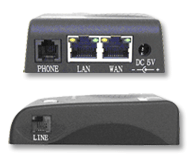
Image

Ports

  • 1 Power (5V)
  • 1 RJ45 WAN
  • 1 RJ45 LAN
  • 1 RJ11 FXS
  • 1 RJ11 FXO/PSTN

This is (mostly) a step up from the Grandstream Handytone-486


While unpowered, the PSTN RJ11 is directly connected to the FXS RJ11.

When powered, the analog phone is is disconnected from the PSTN line. Dialing "*00" (configurable) causes a relay to join the analog phone to the PSTN to force outgoing calls via PSTN. Plus, up to 5 dial patterns ("911") can be programmed which go out via PSTN. Otherwise dialing is done via the FXS VOIP.

When a call arrives via the FSX (VOIP) port or the PSTN port, the attached analog phone rings.

Bugs:
  • The "early dial" feature does not work. E.g. if you want it to pass each dialed key to the PBX as it is pressed rather than taking your whole number (followed by the '#" key or a 4-second timeout) before sending to the PBX, it doesn't work. Well known Grandstream bug in many of their products. With Asterisk, pressing the 2nd digit with early dial enabled, causes an instant dial failure.

Issues:
  • The HT-488, unbelievably, does not pass CallerID from the incoming PSTN call through to the PBX. It does pass the CallerID over to the FSX line and is visible on a CallerID-aware analog phone.
  • Unlike the HT-488, the "LAN" port is only NAT'd behind the WAN port. On the HT-486, one can choose to have the LAN port switched(bridged) to the WAN port or NAT'd.
  • For outgoing calls from PBX through the FXO port, the actual number dialed in the SIP INVITE is ignored. Instead the HT-488 "answers" the call itself and waits for an optional PIN followed by the destination PSTN phone number before actually taking the PSTN line off-hook and actually dial. Not a big deal for Asterisk. Use a the "D" flag to the Dial application. Don't forget to use a leading 'w' on the number to wait a bit before dialing.
  • The HT-488 does not support Disconnect Supervision. It only supports silence detection and disconnect tone detection. Grandstream is working on this: "We are working actively now to get the PSTN disconnect issues solved. We do detect polority reversal in our current firmware, but it is not working properly with the released firmware."
  • Incoming PSTN calls must ring the FXS port at least once before being forwarded to VoIP.

Nice features:
  • Unlike the HT-486, the analog phone connected to the FXS port can access the PSTN line with more than just the "*00" pattern. It allows for things like "911". In my mind this one feature makes the HT-488 useful for applications where you would have used the HT-486. Just ignore the FXO port of the HT-488.
  • The Voicemail Waiting Indicator works fine. The button on the top of the unit blinks green slowly.
  • Unlike the Digium T4xxP cards, the HT-486 returns a SIP BUSY status if there is no phone line connected to the FXO port, or if there is a call in progress already.


Grandstream's page about the HandyTone-488

Grandstream Support Forum

A configuration guide for Asterisk and HT-488

Other Grandstream products


Places to buy:


Go back to VOIP Gateways

Created by Mike Shoemaker, Last modification by ANTHONY BANDINELLI on Mon 03 of Mar, 2008 [17:10 UTC]

Comments Filter

won't reboot

by deluzion on Tuesday 15 of January, 2008 [21:36:48 UTC]
i had placed the HT-488 at a remote location. the FXO port works fine, whenever I dial the FXS port I get a busy response unless i dial by ip and bypass sip.conf. now i can't reboot from remote to update my changes. i've done nothing but fiddle with this device for the last two weeks and it always produces a different result. they should stop selling these devices, they're no good.


FXO -> FXS Ring-through suppresion; no Caller ID CID passthrough, ever

by NightMonkey on Saturday 07 of July, 2007 [02:47:15 UTC]
Ring-through from the FXO port to the phone attached to the FXS port has been solved with the latest firmware (version mentioned in my comment below). Set Basic Settings -> Number of rings: to zero ("0"). Tested, and appears to work fine.

Also, I sent an e-mail to Grandstream support regarding the Caller ID passthrough issue (and the ring-through issue, among other things). Their response to the Caller ID question:

"Unfortunately, as result from luck of resourses the CID information can not be transfered from the PSTN line to VoIP network. This feature will be available in our new generation HT-503 device." (not edited for spelling or grammar).

So, for my purposes, this device doesn't quite meet my needs (Caller ID CID info passthrough is the deal breaker). So, I've just ordered a Cisco/Linksys SPA3102, and probably going to use this device as an FXS somewhere else. :| The Budge Tone 200 phone I bought is pretty satisfactory, however.

Direct dial problem

by NightMonkey on Friday 06 of July, 2007 [01:31:19 UTC]
Firmware 1.0.3.86 appears to fix the direct dial on FXO ("SIP INVITE") problem, though this was verified with limited testing. The new firmware adds an option "FXO One Stage Dialing: ( ) No ( ) Yes (No-default, SIP UserID is used as PSTN number if set to Yes)" to the "Basic Settings" page. In asterisk, now "Dial(${TRUNK}/${EXTEN:1})" works (stripping the "9" I use for outbound dialing), however, I can hear the POTS dial tone and tone dialing, though that may be my newb-ness showing, and I'll see if I can correct that. ;)

The Caller ID forwarding problem doesn't appear to be fixed, however, and it is annoying.

One channel at a time

by kelvinvanderlip on Saturday 02 of June, 2007 [18:54:20 UTC]
I bought a Grandstream HT-488 to connect my home phones to my office Asterisk setup. I spliced the HT-488 between the telco line and the interior home extension wiring. Incoming home POTS calls connect to the HT-488 FXO port. The home's 3 extensions connect through the house wiring to the HT-488 FXS port. It has no trouble ringing 3 phones.

I assumed that the FXO port on the HT-488 would gab incoming calls on the 1st ring and forward them by SIP to Asterisk, and this works well. I have trained everyone not to answer on the 1st ring. I also assumed that I could call the separate SIP FXS account on the HT 488 from Asterisk and make all the phones in my house ring. This works too.

However, what makes this all worthless is that the HT-488 can only do one of these things at a time. When a home incoming call from the telco is forwarded by the HT-488 to Asterisk, I try to return the call back to the HT-488 FXS port to make the home phones ring. When I try to start a SIP connection to the FXS port I get a busy indication from the HT-488. This is a feature, I suppose. You've been warned.

So, while the HT-488 has 2 SIP accounts and registers as 2 peers, it can only use one of these at a time.

New firmware destroyed unit

by Dennis on Friday 04 of May, 2007 [16:40:59 UTC]
Mine was working great until I had to unplug it and then it went out and upgraded to the latest firmware. Now the unit doesn't do anything except blink red and orange. I can't log into it and I can't make or receive calls. Tried to contact granstream support, but all I got was an autoreply saying they were on vacation with no email. I seriously doubt I'll buy another grandstream because it doesn't look like they will be fixing it.

Update: The Grandstream tech support guy emailed me back. We have made a good bit of progress, but the unit is still non-functional. It thinks its registered, but its not. It was necessary to load version 77 of the firmware. The LED no longer blinks funny colors, but because its not registering with the asterisk box, its not working.

Product No Good

by Bruce Ide on Friday 16 of February, 2007 [01:22:42 UTC]
I got one of these things to test out with Asterisk on my Apple Mac. After about 8 hours of tinkering and a firmware upgrade it mostly worked except that calls were very unstable and would disconnect between 1 and 5 minutes of connection. I threw it in the garbage and ordered a Linksys SPA3102, which I had configured as the FXO gateway in about 5 minutes, only looking in the manual (Included with the product wonder of wonders!) to determine the default IP address of the configuration web page.

So if you're considering this product, stop and consider the SPA3102 instead. The extra $30 will more than pay for itself.

This device is not suitable for production

by Mindaugas Kezys on Thursday 13 of April, 2006 [19:42:11 UTC]
We bought 5 devices, 1 of them came broken from the start.

Upgraded 2 of them to newest 1.0.3.18 firmware. And put all 4 into company which were making a lot of calls.

Devices were used about 80-90% of the time (work hours). So almost all the time they were under heavy load.

Then it started. They began to die after different amount of time. Some of them kept working for all day, then die next day, some after 2-3 hours.

They just stop responding. Does not answer to ping. Nothing. Plain dead. Only restart could help them.

We played with them for 2 weeks! (Yes, we have a nice client and some backup solution for him). Power supply is ok, not a special PSTN line, nothing unusual. Searched Google till death, tried every possible combination of settings - nothing helped. 4 devices kept dying and dying and dying.

I believe it's a nice toy for persons who are receiving/making 5-10 calls per day, but for serious production it's totally unusable.

I strongly not recomend using these devices in production environment.

BTW: CallerID PSTN->VoIP is NOT working

PSTN pass through

by Chip Schweiss on Wednesday 15 of February, 2006 [13:23:33 UTC]
I'm trying to figure out the dial patters for PSTN pass through. I would like to have the PSTN line selected for all 7 digit dials (local), 411 and 911 and VoIP for all 10 digit dials. Is this possible?

Also when in PSTN pass through mode are the ports bridge via the interal relay or is the connection internally FXO -> VoIP -> FXS? I'm looking for a device that will enter PSTN pass through by physically bridging the ports so echo is not the resposibiity of the ATA.

Caller ID is working

by Frank Breedijk on Sunday 11 of December, 2005 [22:10:27 UTC]
I have the HT-488 for about a week now an it is working. Caller ID does get passed throug to my analogue phones. I have not tried passing callerID to a soft phone from an imcoming phone yet, but when I dail the softphone using the ATA I get the set caller ID so I have no reason te believe it does not work.

CallerID *may* come in the future

by mikemee on Thursday 17 of November, 2005 [17:58:16 UTC]
I contacted Grandstream about the callerid not being passed through to the voip side and they said they were considering it for a future firmware update. They did confirm that its not supported right now.

Please update this page with new information, just login and click on the "Edit" or "Add Comment" button above. Get a free login here: Register Thanks! - support@voip-info.org

Page Changes | Comments

Sponsored by:

Terms of Service Privacy Policy
© 2003-2008 VOIP-Info.org LLC

Powered by bitweaver