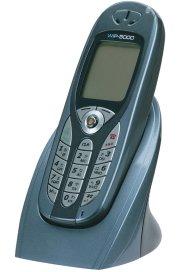
Hitachi WirelessIP5000
Created by: e42006,Last modification on Wed 19 of Mar, 2008 [06:45 UTC] by Hitachi_Cable
Please view the information under Hitachi Cable:
Hitachi Cable WirelessIP5000 Phones
The Hitachi Cable WirelessIP5000 SIP PhoneThe Hitachi Cable WirelessIP5000
http://www.wirelessip5000.com/
http://www.wirelessip-support.com
The Integration of IP and telephone networks start with a low-cost, easy to use wireless IP phone. The Hitachi Cable WirelessIP5000 is an all-round 802.11b/g wireless IP phone supporting the Session Initiation Protocol (SIP), which is essential for efficient wireless voice communications.
With support for the latest IP-PBX systems and existing PBX systems, including IP-Centrex offered by telecommunications service providers, you can painlessly and flexibly introduce the Hitachi Cable WirelessIP5000 making use of your existing office communications environment. Reduce communications costs, while at the same time greatly reducing the administrative cost and burden of your telephony equipment. Make your communications efficiency soar, both inside the company and out.
Wireless Security Protocols Supported
The Hitachi Cable WirelessIP5000 phone is designed to support the security requirements of wireless networks through both authentication and encryption. Offering one of the highest levels of commercially available wireless security, the Hitachi Cable WirelessIP5000 supports the following protocols:- WEP (64/128bits)
- WPA-PSK, WPA-EAP
- WPA2-PSK (supports AES encryption)
- IEEE 802.1x (MD5, EAP-TLS, EAP-TTLS, EAP-PEAP)
- UAM (Web Authentication)
- IEEE 802.11l (PMK cache)
Network Modifications that Improve Battery Life
Current Firmware Version
2.5.4What hardware variants of the phone are known to exist?
There are two different phone models: the Hitachi Cable WirelessIP5000 (gray phone body) and the Hitachi Cable WirelessIP3000 (white phone body). The Hitachi Cable WirelessIP5000 is designed for business environments, supports 802.11 b or g, and can optionally charge the phone battery through a PC USB connection. The key differences between the Hitachi Cable WirelessIP5000 and the WirelessIP3000 are listed below.- Hitachi Cable WirelessIP3000 Differences:
- WirelessIP3000 is 802.11b only
- WirelessIP3000 Phone battery cannot be charged via PC/USB cable
- WirelessIP3000 has no ear jack
Where do I download manuals and firmware updates for the Hitachi Cable WirelessIP5000?
http:www.wirelessip-support.comCan the Hitachi Cable WirelessIP Phones be used at Hotspots?
The Hitachi Cable WirelessIP phones can be used at free hotspots that do not require a user login. Free WiFi hotspots are becoming more common as as cities deploy WiFi networks, and as more coffee shops and eateries provide free WiFi access to entice customers to stop by their store and perhaps stay a little longer.Wireless Equipment Interoperability
Hitachi Cable WirelessIP5000 phones are compatible with all standard 802.11b/g Access Points and Wireless Switches, including:Meru, Aruba, AireSpace, Colubris, Symbol, 3COM, Trapeze, Linksys, and Netgear
SIP PBX Interoperability
Hitachi Cable WirelessIP5000 phones are interoperable with leading SIP PBXs including:3Com, NEC, Nortel, Avaya, Fujitsu, and Toshiba
SIP Server Interoperability
Hitachi Cable WirelessIP5000 phones are interoperable with leading SIP Servers including:Broadsoft, Persona, Tekelec, Sylantro, Hitachi, Ubiquity, Simplified SIP, and Avaya SES
Network Computing February 2007 Analysis: Voice Over Wireless LAN
Article and analysis by Network Computing evaluating three enterprise-class Vo-Fi handsets, including the Hitachi Cable WirelessIP5000.Voice over Wireless LAN, Past the Hurdles?
Where and how do I use the webserver?
Visit the phone's IP (make sure the Web server is enabled) port 8080. From at least version 2.0.1 of the firmware software, the default user password is "0000" whilst the default admin password is "000000". For older firmware, see the archived information at the bottom of the page. You can get to the basic information Web page without the username and password.
30819 Fri 31 of Mar, 2006 [15:15 UTC]
- .e4 VoIP Store - Hitachi Wireless IP 5000 - Worldwide shipping.
- ABP Technology - Excellent site, and excellent help from them.
- AccesIP - France & Europe
- ATAComm - USA Web store, good price, and ships on time.
- Digiumcards - Worldwide + Volume Discounts
- Hardware-Oasis - Europe's VoIP Distributor. Available with optional GSM codec, exclusive to Hardware-Oasis.
- My Phone Call UK Shop
- OSS Services AG - Swiss Shop fast delivery within Europe.
- PBXEQ.com VoIP solution made easy. Puchase asterisk hardware at great discounts.
- Siracom - Sole European Distributor.
- Telephonyware - US Web Store, Shipping Worldwide
- VeriLAN - USA Web store.
- VoIPIPBX.com USA based, ship international.
- VoIPGoods.com UK VoIP Goods, Services and Support
- VoIPon Solutions - UK & Worldwide
- VoIPsolutionsShipping All of Europ (Belgian Company) Reseller Prices Available
- 888VoipStore.com - Best Prices on Hitachi IP5000. Call for reseller pricing. 888-VOIPSTORE.
- Voipsupply.com - Largest, "VoIP-Specific" VAR in North America
- Voxilla Store - Hitachi Wireless IP 5000 - Worldwide shipping.
DO NOT LIST YOUR WEBSITE IF YOU DO NOT SELL THE HITACHI IP 5000, All list must be in alphabetic order.


Comments
333Re: Looking for bootrom.bin
To me it sounds like you might just need the firmware, not the bootrom. Does the phone startup when you press the left menu key and the power/on-hook button? And if so, do you get into a menu where you can choose to set network and upgrade firmware? That menu is the bootrom menu. If it works you can load new firmware from a tftp server. drop me line if you need the firmware package.
You can also upgrade the bootrom with the menu, but the procedure is not straightforward.
If the bootrom menu does not work, then I presume you;'re in trouble.
333Looking for bootrom.bin
333IP5000E Firmware and Bootrom
Also, can someone advise as to exactly what the bootrom is and as to the advantages (or necessity) to upgrading?
Current Config:
Firmware: v2.2.6 LA1 (recently upgraded from v2.0.1)
Bootrom: v1.0.3
Thanks.
333IP5000E Firmware and Bootrom
Also, can someone advise as to exactly what the bootrom is and as to the advantages (or necessity) to upgrading?
Current Config:
Firmware: v2.2.6 LA1 (recently upgraded from v2.0.1)
Bootrom: v1.0.3
Thanks.
333Good Experiences with IP5000
Firmware: v2.4.2
SIP Server: Asterisk
I recently purchased this phone as a replacement for the UTStarcom F3000 which I had horrible experiences with. So far my experience with the Hitachi has been excellent! Everything has been pretty easy to configure, and there are more settings available on this phone then any other VoIP phone I've used.
I found out despite the feature set only listing 802.11b compatibility, it apparently supports both B and G!! In the web menu I found a setting for B/G, and I turned it on and rebooted the phone. I checked my AP, and it tells me that it's associated at 54mbps!!!
The only issues we've had are WPA-TKIP compatibility with our Cisco 1200 series AP, however we didn't try very hard, and just ended up using WEP. We also had a very small problem with the phone converting the #<ext number> format that we use, to %23<ext number>. Asterisk didn't like this. We found that we had to disable the "Check Escape Of Call Number" the web admin under the SIP settings and then everything was ok.
Range is on par with F3000, we were able to go outside of the building and make calls from within 75 feet, as long as we didn't put any large obstructions between the phone and the AP. Call quality was excellent, even when the signal started getting bad. It would cut out a little, but the conditions were pretty extreme. So far we've been very impressed by this phone. The user interface, and general feel of the phone is very snappy. Everything is quick about it including wifi association, and SIP registration.
The phone has the look and feel of a polished, well designed product and would recommend it for anyone that's looking for a well built phone.
333WIP5000 GSM Codec supported only the phones of Hardware-Oasis.com
only the Hitachi Cable WIP3000 / WIP5000 phones of Hardware-Oasis.com suported the GSM Codec !
Hardware-Oasis.com have a special firmware with GSM Codec (Exclusiv Sales). If you buy this phone by other shop's it's not upgradable to GSM Codec, I have tested with the firmware of Hardware-Oasis. I buy me a new phone of this Distributor and analyse the firmware, the works with v2.2.6.
Notice: GSM Codec must order optional
Regards Voipling
333Does the WirelessIP5000E now support WPA or multiple SIP registrars?
1) Does anyone know if any of the latest (2.1.11, 2.2.1 and/or 2.2.6) WirelessIP5000E firmware releases support WPA encryption? This is the phone without the flower-shaped speaker cut out of the rear of the handset.
2) Similarly, do any of the above firmware releases allow registration with more than one registrar yet?
If anyone has this information, could they please update the WIP-5000 Limitations section, even if it's just to confirm the same limitations apply to the latest firmware.
Unfortunately, I don't have a suitable device with which to determine this.
Thanks,
Sam.