What is it:
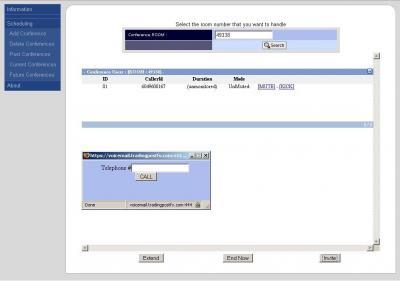
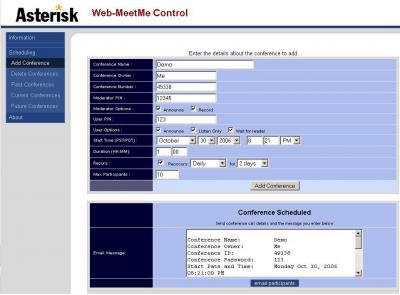
Web UI to manage asterisk conference rooms!
Add rooms and specify
- Moderator and user PINs
- Announce on/off
- Record on/off
- User listen only
- Start and End time
- Reoccurring
- Number of participants
- Mute/Unmute users
- Kick users
- Invite users (Will call the user from number in web form)
Download:
http://sourceforge.net/projects/web-meetme/
http://prdownloads.sourceforge.net/web-meetme/Web-MeetMe_v2.1.0.tgz?download
Contact:
E-mail : areski (@alt) gmail (.dot) com
You can find a usefull (but outdated) installation guide at
http://asteriskpr.blogspot.com/2005/09/guide-to-install-web-meetm_112614171575673316.html
You can download the user manual from Asterisk IT at:
http://www.asteriskit.com.au/Page/Web-MeetMe-User-Manual
Requirements:
mysql apache php pearDB postgresql-dev
for debian:
apt-get install mysql-server libmysqlclient12-dev apache-server libapache-mod-php4 php4-pear postgresql-dev
To Install:
NOTE! There are newer versions of WebMeetme. Go to the SourceForge site at http://sourceforge.net/projects/web-meetme/ to find them!
Download and extract to a web accessible directory
wget http://superb-west.dl.sourceforge.net/sourceforge/web-meetme/Web-MeetMe_v2.1.0.tgz
tar -zxvf Web-MeetMe_v2.1.0.tgz
compile app_cbmysql.so in web-meetme/cbmysql
make
make install
make install
copy cbmysql.conf to /etc/asterisk and edit with appropriate mysql settings
for debian sock is /var/run/mysqld/mysqld.sock
Setup your database, there is an example file in webmeet-me/cbmysql/db-table-create-v5.txt
Just take out the `DB_CDR`. and 'sequenceNo' and 'recurInternval' need to be replaced with ` backticks not single quotes.
load the module in asterisk
load app_cbmysql.so **note: module as of now does not support the reload command and sometimes restart asterisk when loading**
edit web-meetme/lib/defines.php
edit web-meetme/lib/database.php
edit web-meetme/phpagi/phpagi-asmanager.php so user name and secret for asterisk manager correspond to a user in /etc/asterisk/manager.conf
add cbmysql to dialplan
[defaults]
exten => 900,1,cbmysql()
exten => 901,1,cbmysql(901) ;where 901 is a valid room in the database
exten => 900,1,cbmysql()
exten => 901,1,cbmysql(901) ;where 901 is a valid room in the database
Go back to Asterisk cmd MeetMe
Page Changes
Easy way to get it working
It allows you to do moderated calls, scheduled conferences, record the conferences, announce attendees, all from the web based interface
Screenshots here:
http://www.adminsparadise.com/walkthroughs/phone-system/adminsparadise-voip-screenshots.html
Versions - url ????
what is the right version? 1.2? 2.0?
I found a 2.0 version there http://www.fitawi.com/Asterisk/ before the 1.2 was realeased.
What are the differences?
hmmmm not sure I took the right one...
Quite bad as I already i18n it....
Disable SELinux
Unable to connect to manager localhost:5038 (13): Permission denied
An easy fix for this problem is to disable SELinux. There is almost certainly a more SELinux-friendly way to work around this problem.
Asterisk CVS-HEAD
installation and usage information
it seems like the very easy steps mentioned on the webpage aren't really enough to use this web admin out of the box. there are some other things to make sure:
1) do what is mentioned on their webpage
2) make sure, "register_globals" is turend ON in your php.ini file (found in /etc/php or /etc/apache or anything like this)
3) edit /etc/asterisk/manager.conf and define a user to be used with this web-interface. mine looks like this:
[general]]enabled = yes
port = 5038
bindaddr = 0.0.0.0
[webmm]]
secret = webmmpw
;deny=0.0.0.0/0.0.0.0
permit=127.0.0.1/0.0.0.0
read = system,call,log,verbose,command,agent,user
write = system,call,log,verbose,command,agent,user
4) Edit /etc/asterisk/phpagi.conf and adopt to the manager.conf settings like this: (this is my asmanager section)
[asmanager]]
- server to connect to
server=localhost- default manager port
port=5038- username for login
username=webmm- password for login
secret=webmmpw5) now user your web-browser and open the web-control inteface and go to "Conference"
6) to see if everything is working enter to a conference and enter the conference number. you should then see yourself in there..
invite somone to the conference:
to invite others to the conference, you have to go to "outgoing operator"
while all the fields might not tell you too much (at least they didn't to me) you can find a documentation of the parameters in the Documentation of the Asterisk API Action Originate
this is what worked for me:
Channel: the channel of the person to invite. i.e. "SIP/phone1"
Exten: the extension of your conference: i.e. "1234" (assuming you have something like this in your extensinos.conf: "exten => 1234,1,MeetMe(1234||)"
Context: whatever your context is, i.e. "default"
Priority: i don't know what it is exactually used for, but it must be the same to all users you invite, otherwise they won't join the conference but rather call the first participant of the conference, so i always enter "1"
the rest seems to be not so important, so i leave it empty.
that works ;)
if anyone can explain this better, please do so! i'm still a newbie myself.
What other software does this need?
need more codes?
getpost_ifset(array('confno'));
getpost_ifset(array('action'));
getpost_ifset(array('user_id'));
maybe...that's right.