


Description
Ringtones integrated into the ST2030 use a RTTTL format. A ring with RTTTL format looks like the following example:
Halloween:d=4,o=5,b=180:8d6,8g,8g,8d6,8g,8g,8d6,8g,8d#6,8g,
8d6,8g,8g,8d6,8g,8g,8d6,8g,8d#6,8g,8c#6,8f#,8f#,8c#6,8f#,8f#,
8c#6,8f#,8d6,8f#,8c#6,8f#,8f#,8c#6,8f#,8f#,8c#6,8f#,8d6,8f#
These ringtones can be created by the user and they can be also downloaded for free on the Internet.
Make a melody
There is the software “Ringtone Converter”, which is free and easy to use, that we advise you.

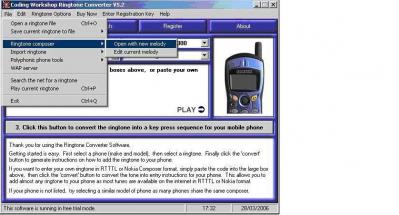
This software makes it possible to the users to create their own melodies directly with RTTTL format. In order to do that it is necessary to go in “File”, “Ringtone composer”, and finally “open with new melodie”
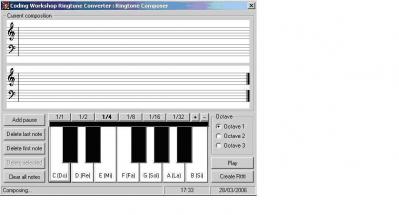
The following screen is displayed and will make possible to users to compose the melodies according to their choices.
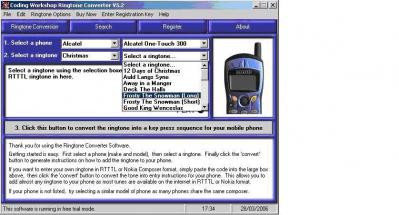
Moreover, a data base, already comprising a great number of melodies to RTTTL format, is integrated into this software. To reach these ringtones, it is necessery to carry out the handling which is presented to you on the screenshot below:
Note:
You can copy these melodies in a text file to integrate new ringtones into phone:
AbbaMammaMia:d=4,o=5,b=40:32f6,32d#6,32f6,32d#6,8p,32d#6,32d#6,32f6,32g6,32f6,32d#6,16p,16f6,32d#6,16p,
16g#6,32g#6,32g#6,32g#6,16g6,16d#6,16p,32f6,32d#6,32f6,32d#6,8p,32d#6,32d#6,32f6,32g6,32f6,32d#6,16p,16f6,
32d#6,16p,16g#6,32g#6,32g#6,32g#6,16g6,16d#6,16p,16a#.6,32a#6,32a#6,16a#6,16f6,16g6,16g#6,16p,32p,16g.6,32g6,
32g6,16g6,16d6,16d#6,16f6,16p,32p,16f6,16d#6,32p,16g#6,32g#6,32g#6,32g#6,32g6,32d#6,32f6,32d#6
BobMarleyNowomannocry:d=8,o=5,b=140:4c.6,b.,c.6,b.,4b.,2a.,2p,4p,p,16p,4e.6,f.6,e.6,d.6,2c.6,1p,4p,p,4c.6,b.,d.6,c.6,
2a.,1p,4p,p,4e.6,f.6,e.6,d.6,2c.6,1p,4p,p
DireStraitsSultans:d=8,o=6,b=160:f,a,f,a,f,g,f,g,4p,f,f,d,f,d,f,p,d,e,p,4a5,4p,1p,2p,a,a,a,a,g,g,g,g,g,4a,p,a,f,4e.,
1p,1p,p,f,a,c7,c7,a,c7,a,4p,p,a#,a,4g,4c.,2p,1p,p,d,f,d,4f,4p,f,d,f,d,f,4f,4d.,4p,1p,1p,p,f,g,4g,4g,4p,1p,g,4g,2a,2g,f,4d,4d.
Fugees-KillingMeSoftly:d=4,o=5,b=90:p,8e,f.,8g,a.,8g,d,g.,p,8a,g.,8f,e.,8f,c.,2p,8e,f.,8g,a.,8g,a,b,8b,c6,8b,a,g,2a
2PacCaliforniaLove:d=4,o=5,b=90:8g.6,16f6,8c#6,8d6,8f6,d.6,2p,8g,8a#,8d6,8d6,p,8p,8g,8g,16g,8f.,
8g,2p,8g,16a#,16g,8d6,2d6,16g,8g.,g,2p,8g,8a#,8d6,2d.6,16g,16g,8g,8f,8g,p,8g,8c6,8c6,8a#,8a,g,p,8g,
c6,8a#,8a,2g,
GorillazClintEastwood:d=4,o=5,b=90:16d#6,8c#6,8d#6,a#,8p,16f#,16g#,8a#,8a#,16d#6,8c#6,8d#6,a#,8p,
16f#6,8g#6,8a#,16a#,16a#,16p,8a#,8a#,8p,8g#,8g#,16g#,8g#,8g#,8f#,8d#,8c#,8c#,16d#,8d#.,8d#,8c#,16d#,
8d#.,8d#,8c#,16d#,8d#.,8d#,8c#,16d#,8d#.,
Bond:d=4,o=5,b=320:c,8d,8d,d,2d,c,c,c,c,8d#,8d#,2d#,d,d,d,c,8d,8d,d,2d,c,c,c,c,8d#,8d#,d#,2d#,d,c#,c,c6,1b.,
g,f,1g.
Friends:d=8,o=5,b=100:16d,g,a,c6,b,a,g.,16g,d,g,a,2a,p,16p,16d,g,a,c.6,16b,16a,g.,16c6,b,a,g,2d6,p,16p,16c6,c6,c6,
c6,c6,c6,c.6,16c6,b,2b,p,16a,16a,16b,16c6,c6,c6,c6,c.6,16b,a.,16g,g.,16d,16g,16a,b,4a,4g,p
Ringtones’s integration
In order to be able to integrate new ringtones, with RTTTL format, in phones; users must start by recopying all these ringtones with RTTTL format in a file with a .txt extension. It is thus necessary to use a software like “NotePad”.
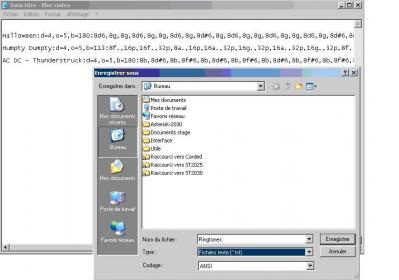
Next, we need ti find the phone IP address. So:
If MGCP phone:
- Press on the key menu of the phone
- Press on the softkey admin
- Press on the button OK of the phone
- Select Network configuration while going down with the arrows
- Select IP address and note the address indicated
If SIP phone:
- Press on the key menu of the phone
- descend the cursor using the low button until Information
- Select Information and note the IP address indicated
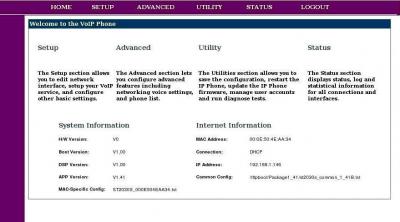
IP address, that we recovered, must have returned in an Internet navigator (Mozilla, Internet explorer, etc.) in the following way: adresseIPduTelephone/admin.html
So this screen is displayed:
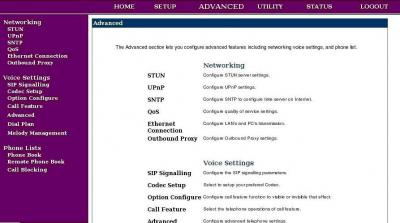
Next, we must click on “Advanced”:
Lastly, it is necessary to select “Melody management” and to enter the name of the file (extension .txt) which contains the ringtones while clicking on browser.
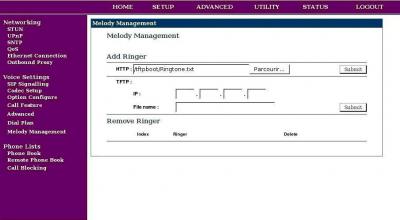
When you click on “Submit”, the ringtones are usable
Note:
Soon the APS will be operational to update the ringtones via TFTP or HTTP


 April 7, 2023
 Phone System