


Page Contents
The GSM gateway MV-370 is manufactured by http://www.portech.com.tw/.
It’s main interest in comparison with other gateways is that it is GSM to SIP (not FXS), so voice quality is very good.
Another point of interest is the price
With that gateway properly configured, you are able to receive calls from GSM to Asterisk (including DISA) and to give calls from Asterisk to GSM network.
Here the configuration for MV-370 device is discussed. Below, some interesting information about the routing features achieved by the MV-372 device, which manage 2 SIMs.
Usage
A typical usage of such a gateway is to be able to give a call with your normal mobile to any destination at voip cost :
Your mobile <—-gsm network—-> MV-370 <–lan–> Asterisk <–internet–> VOIP provider <–magic–> landline
To do such a call, you just call your MV-370 number (it has its own simcard), then you get an invitation tone, then you dial the number which is handled by Asterisk.
If you have some special deals with your mobile operator, like free special number, you can call your MV-370 for free.
You can then call all around the world from your mobile at voip cost 🙂
MV-370 Configuration
The first thing to do with the MV-370 is to flash the latest firmware.
Any firmware dated before 2006/09/26 is totally unstable, making the box very difficult to parameter and to work with.
Once you’ve configured everything in the box, one good advice is to unplug the power and to restart it.
By this way you sould have all the parameters taken into account.
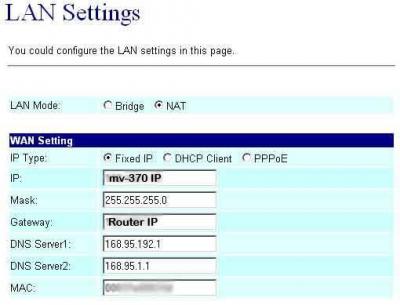
To have the MV-370 to work with Asterisk, you need first to configure the box.
Here are some screen shots showing all the important parameters.
You have to note that in all the configuration process, the MV-370 is considered as extension ‘103’ of the IPBX.
In Bold are the parameters depending on your installation
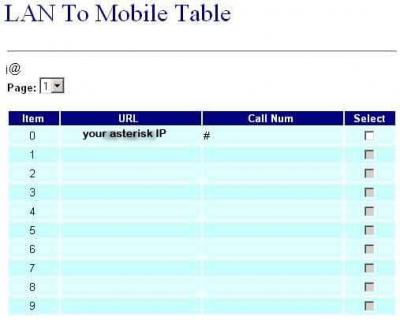
Here the ‘#’ is important to avoid the two stage dialing when you give a call from Asterisk to GSM.
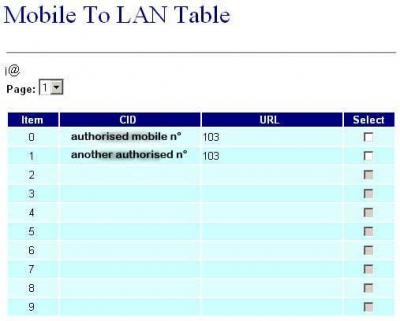
The mobile number you give in that page are the authorised mobile which can call GSM to Asterisk.
These mobile number must be defined as your GSM provider displays the number.
If you don’t know how it is displayed, just give a call to the box and check the number given in the ‘Incoming Mob’ field of the ‘Mobile Status’ page.
Any number which is not in that list won’t have acces to the LAN side, so to Asterisk.
If you want to allow any number, just set ‘*’ in that field … but beware of the bill 😉
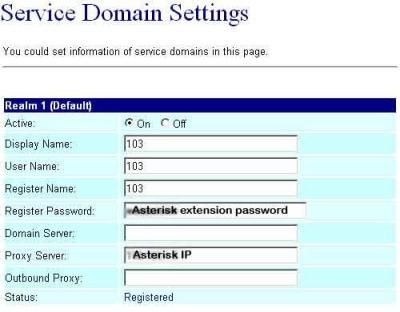
Once Asterisk configuration is made, you should get ‘Registered’ on the Realm1.
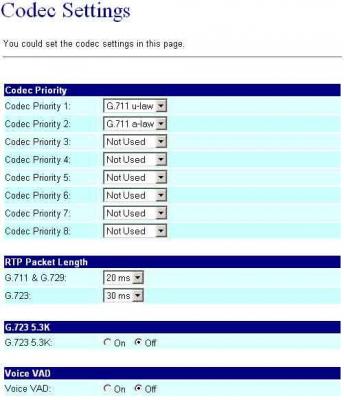
It is very important to use only ulaw or alaw as all DTMF is inband.
So if you want to be able to do some DISA when you call from GSM to Asterisk, it has to be one of these 2 codecs.
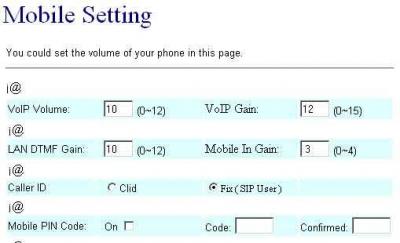
These settings seem to be ok, just adjust …
Antenna position
Another important thing is to properly place the provided antenna.
If your gsm reception is good, you should get around 18 or 19 as Signal Quality in the “Mobile Status” page.
With that level of signal quality, your audio quality will be very good.
On the other end, I’ve experienced that with a signal quality down to 11, audio becomes very jerky.
So, maximum signal quality = maximum audio quality.
Asterisk configuration
Once the MV-370 is set, you have to configure Asterisk.
On that side, you have to setup files as follow :
sip.conf
; GSM VOIP Gateway MV-370
[103]
type=friend
username=103
fromuser=103
regexten=103 ; When they register, create extension 401
secret=xxxxxxx ; Asterisk extension password
context=gateway ; Incoming calls context
dtmfmode=inband ; Very important for DISA to work
call-limit=1 ; Limit to 1 call max
callerid=GSM Gateway <103>
host=dynamic
nat=no ; Gateway is not behind a NAT router
canreinvite=no ; Typically set to NO if behind NAT
insecure=very
qualify=yes
disallow=all
allow=ulaw ; prefered codec for DTMF detection
allow=alaw
extensions.conf
; ******* GSM Gateway incoming calls **********
[gateway]
exten => _103,1,Answer()
exten => 103,2,Set(TIMEOUT(digit)=3) ; give enough time to do second stage dialing
exten => 103,3,Set(TIMEOUT(response)=5)
exten => _103,4,DISA(no-password|outgoing) ; here ‘outgoing’ is the normal context to deal with the dial plan
[outgoing]
…
; example of LAN to GSM call
; call the MV-370 sim card mail box thru GSM
exten => _888,1,SetCallerID(“xxxxxxxxxx”)
exten => _888,2,Dial(SIP/${EXTEN}@103,60,r)
exten => _888,3,Hangup()
Here you can see that all my dialplan is defined in the [outgoing] section.
As a conclusion, MV-370 is a very nice toy to save lot of GSM bills, but it is a hell to setup as the documentation is really, really poor.
That’s it … hope it works for you 🙂
Connection to TRIXBOX 2.0
Well – i have got it working after a while. The problem was that the MV-370 did forward calls from gsm to trixbox, but not the other way. I changed, in the lan to mobile section of the mv-370, the “#” to “#d0a0” to cut of the trailing “0” and the add it again. For me this works since all numbers start like this.. I added a trunk, configuration only in “peer Details” like this :
allow=ulaw&alaw
canreinvite=no
context=from-pstn
disallow=all
dtmfmode=inband
fromuser=61
host=dynamic
insecure=very
nat=no
qualify=yes
secret=61
type=friend
username=61
Firmware upgrade
Upgrading firmware could couse some problems. Portech technical help advises to use Internet Explorer on Windows to perform firmware upgrade.
After upgrade you should go to Update > Default Settings and click a button to restore default settings. (This button might be not visible in Mozilla Firefox).
Users have reported that firmware image should be saved in an empty directory – otherwise update fails.
MV-372 configuration for route calls properly
MV-372 manage 2 SIMs, so it can manage up to 2 conversation. Often, it’s interesting to put SIMs of different GSM providers to be able to route outgoing calls using Least Cost Routing.
In the following example we configure MV-372 to have:
- SIM1 with number 3331234567, associated with SIP account 101
- SIM2 with number 3481234567, associated with SIP account 102
so we would like that calls from SIP/101 will be routed to SIM1, calls from SIP/102 will be routed to SIM2.
Please note that the default IP number of portech devices is 192.168.0.100 if not already specified, username voip and password 1234.
- Route -> Mobile To Lan Settings
- Insert record with Item 0, CID *, URL 3331234567
- Insert record with Item 10, CID *, URL 3481234567
- Route -> Lan To Mobile Settings
- Insert record with Item 0, CID *, Call Num #
- Insert record with Item 10, CID *, Call Num #
- Mobile -> Settings
- Assure that each SIM has PIN request disabled
- SIP From: Tel/Tel, to permit CallerID passing to Asterisk
- Under “Mobile 1” select “Routing Range” 0 ~ 9
- Under “Mobile 2” select “Routing Range” 10 ~ 49
- To improve echo cancellation, you should write in the Init AT Cmd the string
at+echo=28000,20,3,0;+echo=28000,20,3,1
- SIP Settings -> Service Domain
- Select Mobile 1 then insert in Realm1 the extension number into User Name and Register Name, password into Register Password and PBX IP number into Domain Server and Proxy Server; remeber to select Active ON
- Select Mobile 2 then insert in Realm1 the extension number into User Name and Register Name, password into Register Password and PBX IP number into Domain Server and Proxy Server; remeber to select Active ON
- SIP Settings -> SIP Responses
- Response on port busy: 503 Service Unavailable
- SIP Responses: check both items ON
- Network -> WAN Settings
- Network Mode: Bridge , so both LAN and WAN port has the same IP assigned by the WAN interface
In the asterisk file sip.conf insert the configuration as follows:
;sip.conf
; first GSM channel
[101]
type=friend
secret=REGISTERPASSWORD
host=dynamic
port=5060
context=default
call-limit=1
insecure=port,invite
; second GSM channel
[102]
type=friend
secret=REGISTERPASSWORD
host=dynamic
port=5062
context=default
call-limit=1
insecure=port,invite


 July 26, 2017
 Phone System