


SIEMENS Gigaset C450 IP
This is the first mass market DECT / SIP phone. It started shipment in mainland Europe during summer 2006. It sells over the internet for less than €85 ( £58, $109) including shipment.
Note that simliar HW is available without the IP connection (model C450). Be careful when you order your unit.
Page Contents
- Highlights
- QoS
- Bugs – Missing key features in firmware version 00 / 034.00 (EEPROM version 70)
- Update Firmware from local Webserver
- C450IP and info.gigaset.net info feature???
- Configuring YaTE and C450IP to work together (aka C450IP behind the Fritz!box)
- Configuring Asterisk and C450IP to work together
- How to use IP 450 with Firefox 3.x IE 7 and 8, slow loading configuration webpage
- Enabling call transfer feature
- Available From
- See Also
The UK variant of this phone is the C460IP. It is the same thing, and even says C450IP in the web interface.
The cheap clone Targa DIP450 can easily be flashed with C450IP firmware versions.
The phone is based on the Siemens Chagall Platform.
Siemens provides detailled documentations (including user manuals in various languages) over the Web.
Highlights
- Dual mode: Easy switch from VoIP calls to fixed line calls by single keypress
- Easy configuration of internet telephony (VoIP) without a PC (from handset) or with a PC via the integrated Web server
- 1 VoIP call and 1 fixed line call in parallel with multiple handsets
- Convenient handsfree talking
- STUN/NAT support
- DHCP or fixed IP address allocation
- Port allocation fully configurable
- Dialing by directory numbers and IP addresses
- Support of DECT repeater for extended Wireless range.
- Multiple language support
- GAP compliant (support up to 6 DECT phone connected to a single base)
The Gigaset C450 is an entry phone in the Siemens Gigaset product line, the addition of IP connectivity via a standard Ethernet 10/100 BaseT interface and SIP protocol within a reasonable price bracket, opens large applications where wireless operation and SIP are required.
The Ethernet connectivity allows the unit to work without a PC.
The dual mode (SIP/PSTN) enables incoming call on legacy interface with existing directory number and safe emergency outgoing calls.
The presentation of the unit with an independent base and a dedicated phone charger/support will simplify cabling.
Integration with well known VoIP operators is preset. Alternative configurations can be entered directly via the handset or the integrated Web server. Multiple languages support is also provided for the integrated Web server.
Simple debug (SIP message status display) can be activated on the handset for a debug without PC. This function is very useful in case of professional application where remote user support is required.
Configuration in Asterisk is straightforward and interworking with other asterisk phone is transparent.
Under Asterisk the following codecs can be activated on the phone G726, G729 , G711 aLaw and uLaw
The Gigaset C450IP is based on an Open Source SIP stack which can be requested for free from Siemens. A future version which will support PPPoE is announced for later.
Note : The support for Direct Dial In DDI to multiple handset registered on a single base, is not described in the manual and likely not available neither for SIP or PSTN incoming calls.
There is another Siemens VoIP DECT Phone named Siemens Gigaset S450IP, which seems to share a common base station with the C450IP but uses a different Handset.
NOPE, by comparing PCB images I found that they’re definitely NOT the same base (well, at least in the case of my Targa DIP450 which I assume to have identical hardware as C450IP).
S450IP uses:
69.000 quartz near power supply
Samsung K6R4016 (four times the size of C450IP)
Spansion S29AL008D70TF102 (two times the size of C450IP)
Quartz ???? (not 10.368?) near Philips CPU
Big fat PCB print label “A1”
Targa DIP450 (C450IP?) uses:
25.000 quartz near power supply
Samsung K6R1016
Spansion S29AL004D70TF102
Quartz 10.368 near Philips CPU
Big fat PCB print label “B1”
However the PCB layout itself actually looks like its the same. So, whip out your soldering irons ;))
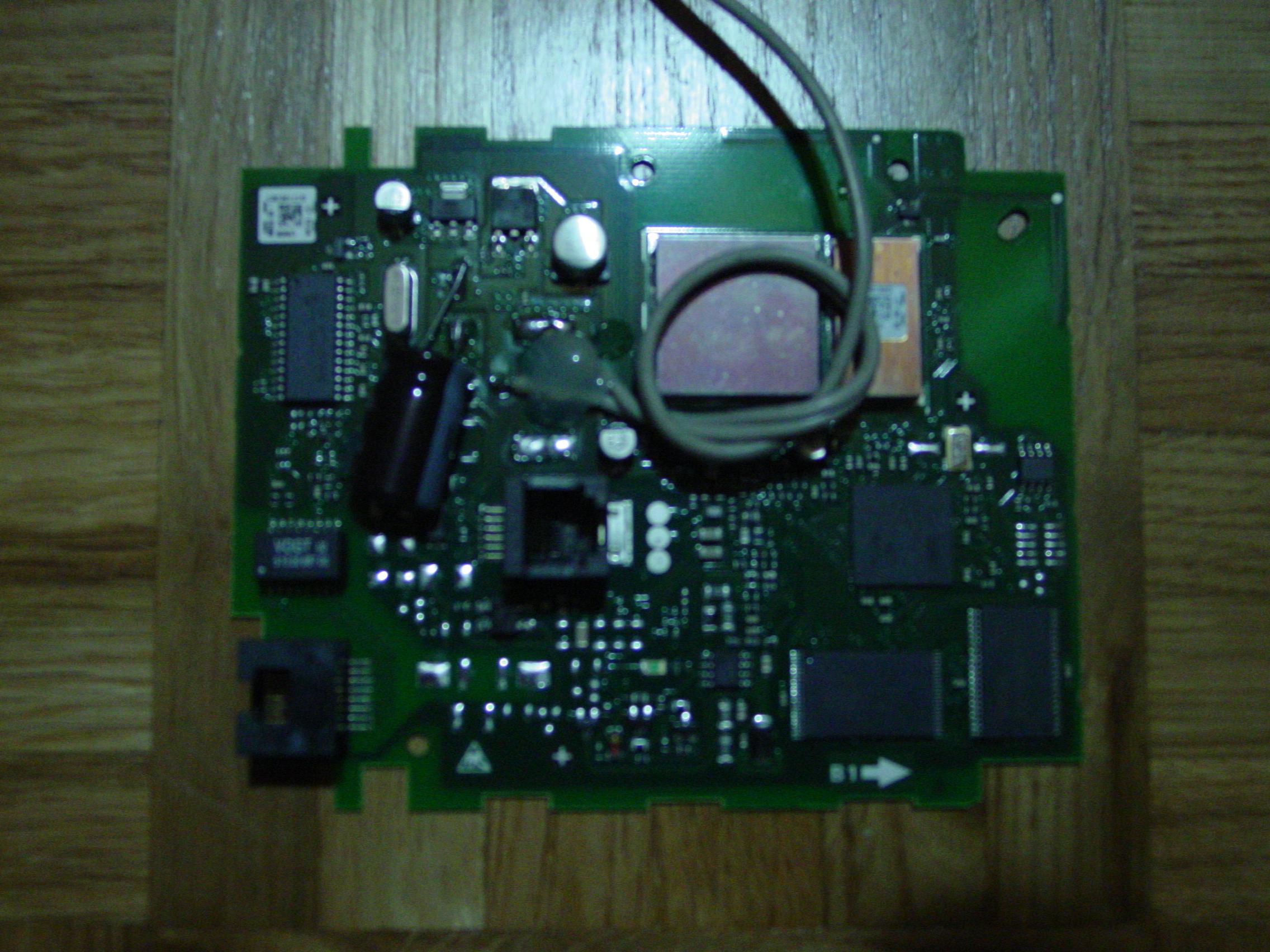
(sorry for bad picture quality, will do better next time)
Thus I guess the only way to make a C450IP into a sort-of-S450IP is via SIP stack SDK. But not sure whether anyone would want to go to such great lengths… (however that would perhaps give us individual SIP peers per handset, paging via SIP answer-after=0, etc. if done with care to not overflow the smaller amount of ROM/RAM)
QoS
RTP data: Class Selector 5, Differentiated Service Code Point 46
Resulting DiffServ value: 0xB8
SIP data: Sent with standard 0x00
Older firmware versions used Class Selector 6 for RTP, DiffServ 0xC0
Bugs – Missing key features in firmware version 00 / 034.00 (EEPROM version 70)
- The “R” key, which is the hook flash button when used in PSTN mode, does nothing in VOIP mode, so I cannot put a call on hold and transfer it. I am using Asterisk and DTMF signalling via SIP info. Siemens are working on this feature currently for S450IP hopefully also in C450IP too
- UPDATE Dec/06: This bug is still present even in the latest releases.
- Alert_Info is not supported for distinctive ring. This would not be a big problem if there was not a side effect. Using Asterisk and ring groups for example, it is desirable to use Alert_info for external call distinctive ring. Then, when the C450IP receive the Alert_Info message it simply does not ring ! There is no simple way inside Asterisk to solve this problem, except manually editing configuration files to allow for selective Alert_Info. But it is a nightmare with FreePBX as the main files are updated at each GUI refresh…
- EDIT: Actually, there is a way to have alert_info work with other phones and still have the C450IP work with the same configuration. Even though the C450IP will not have a discinctive ring. Just make sure that you set your alert_info variable in the following way: exten => s,1,SetVar(_ALERT_INFO=<something>). Note the < and > in the command. The C450IP will still ring, and at least the other phones I have tried with will accept that syntax.
- Website Display problems in current Browsers resulting unuable pages (no menu, no css style, no image). In Firefox your can fix this by setting network.http.max-persistent-connections-per-server to a lower value.
Update Firmware from local Webserver
You will most likely have wondered, whether you will require “siemens.gigaset.com” to be available and resolveable by your DNS for updating your C450IP’s firmware.
Obviuosly, you will need to get the files from “siemens.gigaset.com” before you can supply them on your local webserver (e.g. if you have more devices in a small business or if you’re just a freak like me). You will need to setup a directory on your webserver which is accessible from within your network. It doesn’t matter how you call it and how the url will look to the phone BUT you need to observe the following:
Where /~ is the root directory for the webserver-directory you want your C450IP to look for the new Firmware, you need to have a directory /~/0.
If you copy & paste the following PHP-script to /~ and execute it, it will get all the files that are needed for a successfull firmware update:
<?php
/* This script is designed to get firmware files for Siemens Gigaset
C450IP from Siemens’ server and copy them to a local directory
for possible re-supplying within a small home/business network.
This script is freely useable but please remember to inform
author Kai Michael Poppe at [email protected] about any
of your changes if you find it appropriate to do so.
GNU Public License applies.
Version 0.1 as of December, 28th 2006 00:30 UTC +0000
- /
$baseurl = “https://gigaset.siemens.com/chagall/1/0/”;
$basedir = “0/”;
function returnFilenames($file) {
$baseurl = “https://gigaset.siemens.com/chagall/1/0/”;
$fcont = file_get_contents($baseurl.$file);
preg_match_all(“/(\.\.\/)?([a-z0-9_]*\.bin)/”,$fcont,$fhits);
return($thits[0]);
}
$getFilenames = Array(“master.bin”,”../baselines.bin”);
$x = returnFilenames(“../baselines.bin”);
$getFilenames[] = $x[0];
foreach($getFilenames as $fil) {
$fp = fopen($basedir.$fil,”w+”);
fputs($fp,file_get_contents($baseurl.$fil));
fclose($fp);
}
?>
You are welcome to test this script and report your findings and possible suggestions for extensions to [email protected]
C450IP and info.gigaset.net info feature???
At http://www.mgraves.org/voip/2008/08/dect-wars-snom-m3-vs-siemens-s685ip/ , there is the request.do ruby script
which can be placed on a fake info.gigaset.net DNS web server (directory info/). It might just be that this works with C450IP also, given that it supports gigaset.net “features”. I haven’t tried this for lack of an immediately ruby-capable OpenWrt setup, does anyone have success with this?
Configuring YaTE and C450IP to work together (aka C450IP behind the Fritz!box)
After setting “use random ports” to yes on the advanced configuration page, the phone could register with YaTE.
Configuring Asterisk and C450IP to work together
Although it seems very strange, you need to set the following options in the C450IP configuration to the IP (or DNS name if you have a DNS server) of your asterisk server:
- Domain
- Proxy-Server
- Registrar-Server
Furthermore, the Realm-option needs to be _empty_!
In sip.conf, the user you choose for your phone, needs to have (besides all the neat stuff) at least this parameters:
- host=dynamic (even though you might have given the phone a static IP address. If you set host=[IP Address] asterisk and phone will work together, but both will show registration errors)
- dtmfmode=inband (which is, if you want to have a voice/dtmf controlled menu working when the phone calls a specific extenstion)
warning: on 1.2.1 on OpenWrt 200MHz, dtmfmode=inband caused >> 80% “system” load value and full lockup during calls. Use with caution.
These information apply for: Asterisk 1.0.7-BRIstuffed-0.2.0-RC7k and Phone Firmware 00 / 034.00
For firmware version 038.00
- host=dynamic
- dtmfmode=rfc2833 ;more stable solution
How to use IP 450 with Firefox 3.x IE 7 and 8, slow loading configuration webpage
The max number of connections between a browser and the device is limited. With the following settings you can fix the problem:
Internet Explorer:
Chance the following entry in the Windows Registry “HKEY_CURRENT_USER\Software\Microsoft\Windows\CurrentVersion\InternetSettings\MaxConnectionsPerServer” to value “2”. Stop the Internet Explorer and start it again. Info! There is another problem if this entry is not available.
Opera:
Select from the menu the options „Extra“- Settings“. Select in the dialog “Settings” the option “Advanced” and the “Network”. Change “Max. Server connections” to “2” and click on OK. Restart the Opera Browser.
Firefox:
Enter in the address bar “about:config” and press „Enter“. Enter “connection” in the filter list and select “network.http.max-persistent-connections-per-server” in the settings list. Right mouse click and select „Change“in the menu. Change the value to „2“in the dialog. Restart the Firefox Browser.
Enabling call transfer feature
Although C450IP has a “R”, it seems Siemens is not willing to make it work over IP.
However, it is possible to take advantage of asterisk’s builtin transfer capability. Here is how:
- make sure chan_local.so is loaded (e.g. checkout modules.conf)
- edit features.conf and have at least something like this (of course you can change key mappings as you like):
[general]
featuredigittimeout = 999 ; default of 500 is short
transferdigittimeout => 5 ; default of 3 is short
[featuremap]
blindxfer => #1
atxfer => #2
With firmware version 038.00 no changes to extensions.conf where needed!
- change your dialplan (extensions.conf) to make sure that each Dial() entry has the ‘t’ or ‘T’ option active (the lowercase ‘t’ permits the called party to initiate the transfer by pressing ‘#’, the uppercase ‘T’ permits the calling party to initate the transfer; for instance, you will set a ‘T’ for outgoing calls and a ‘t’ for incoming calls, while a’tT’ is recommended for calls between internal extensions)
[extensions]
exten => 210,1,Dial(SIP/210,,oTt)
[outgoingtrunk]
exten => _XXX.,1,Dial(Zap/g1/${EXTEN},,T)
- make sure your C450IP configuration has dtmf tones sent via SIP INFO (optionally also via inband audio)
That’s it, it works on Asterisk 1.2.x (never tested on 1.4.x but there should be no difference at all)
See Also
- Configure the Siemens Gigaset C460 IP VoIP Phone to Work with Localphone’s VoIP Service
- Configure the Siemens Gigaset C450IP with Blueface


 March 2, 2023
 Phone System