


A list of products that can be used to connect non-PC devices to the Skype network. Skype itself is available for Windows, Mac OSX, Linux and Pocket-PCs, but for many of the products only windows drivers available.
Page Contents
- Opensource and non-commercial
- SipToSis: Skype To SIP integration software gateway/bridge/proxy/converter using Java (Linux, Mac OS, Windows)
- SiSky – Business Skype Solution
- iPPi.com Free Skype/Google Hangouts to SIP server gateway.
- Commercial software
- Commercial software gateways
- Super Skype Gateway
- PORTech Skype GSM Gateway / Skype Gateway build in PC
- Skype GSM Gateway : SkyTrunk ST-1004~4 ports Skype, FXO, FXS, GSM
- See also
Opensource and non-commercial
Most Gateways are commercial. Please move opensource tools here
SiSky – Business Skype Solution
SiSky is 100% software based, Generate up to 30 Skype trunks!
Nowadays, Skype is very popular and you may found many customers are Skype users. Let your customers who are used to Skype to contact with you quickly and conveniently is becoming the main job of your Asterisk/IPPBX system. SiSkyEE is the best solution for you to connect PBX to the Skype world.
Features:
- SkypeIn: Receive calls from the public telephone network using standard phone numbers
- SkypeOut: Make calls to landline and mobile numbers
- Works with Asterisk/Trixbox/Elastix/VoIPSwitch/Cisco Call Manager(CCM)/VPS and other SIP PBX.
- Can be used as a Multi Channel Skype trunk.
- Call time limiting features.
- Daily call limitig features.
IVR for Skype – Open Source – No Hardware Required
See IVR for Skype Open Source C#
Demonstrates remote calling from mobiles and landlines or Skype name to
Skype name using the Skype public API with Skype4COM to process voice
data via a Asynchronous TCP port interface to call Skype names and
telephone numbers with and without speeddial numbers using both Skype
call transfer methods for inbound calls and Skype conference calls for
outbound (“Call Me Back”) mode calls as well as playback Skype voicemails
by using DTMF command recognition methods while providing limited access
ability on what Skype names or telephone numbers (“PSTN Caller Id’s”) are
allowed to use these remote calling services using Microsoft C# and no
managed threads.
Features incuded (“And much more”):
- Skype inbound/outbound Skype call processing including: Skype to Skype calls, PSTN to Skype calls, Skype to PSTN calls
- Skype conference calls using both PSTN to Skype and Skype to Skype
- Skype call transfer
- Skype speed-dial numbers
- Calling Skype users Home, Mobile and Office numbers
- Deny Skype calls that are not free
- Playback Skype voicemails in calls
- Use Skype Speed-Dial Numbers
- Asynchronous TCP port processing using Skype public API methods
- DTMF recognition for both inbound and outbound calls using the Goertzel algorithm
- Same call recovery logic for DTMF commands. No need to hang up and try again
- “Call Me Back” mode
iPPi.com Free Skype/Google Hangouts to SIP server gateway.
iPPi.com is a free server gateway that connects Skype and gTalk/Google Hangouts calls to SIP devices. It also provides DIDs to many countries, free inum support, Web callback, SMS support and dial out plans at competitive prices.
SIP to Skype calls:
1. Create a free account at iPPi and register your SIP device with these account details.
2. Log into your iPPi account and go to the My AccountSettingsPhonebook area. Enter a name for your contact in the “Name” field. Enter the “Skype_Name” of the contact you want to call in the “Number” field, in the form [email protected]. Enter a two digit number in the speed dial field e.g. 01. Click “Add” and you should see the new entry appear in the phonebook below.
3. The Skype user that you want to call must first add in his Skype contacts the user “skype2ippi” from within Skype.
4. Use your SIP device to make an outgoing call using the ippi account and dial 01#. You MUST terminate the speed dial number with the “#” key! Your contact’s Skype phone will now ring showing an incoming call from the “skype2ippi” contact.
Skype to SIP calls:
1. To receive a Skype call on your SIP device, the Skype contact must first add in his Skype contacts the user “skype2ippi” from within Skype.
2. The Skype contact places a call to skype2ippi and immediately gets a chat message back. In the chat window inserts your “iPPi username” OR your “iPPi SIP number” OR your iNum number and presses Enter.
3. Your SIP device now rings.
SIP to gTalk/Google Hangouts calls
1. Create a free account at iPPi and register your SIP device with these account details.
2. Log into your iPPi account and go to the My AccountSettingsPhonebook area. Enter a name for your contact in the “Name” field. Enter the “Google_User_Name” of the contact you want to call in the “Number” field, in the form [email protected]. Enter a two digit number in the speed dial field e.g. 02. Click “Add” and you should see the new entry appear in the phonebook below.
3. The gTalk/Google Hangouts user that you want to call must first add in his gTalk/Google Hangouts contacts the user “[email protected]” from within the Google web interface or the gTalk/Google Hangouts app.
4. Use your SIP device to make an outgoing call using the ippi account and dial 02#. You MUST terminate the speed dial number with the “#” key! Your contact’s gTalk/Google Hangouts phone will now ring showing an incoming call from the “[email protected]” contact.
gTalk/Google Hangouts to SIP calls:
1. To receive a gTalk/Google Hangouts call on your SIP device, the gTalk/Google Hangouts contact must first add in his Google Hangout contacts the user “[email protected]” from within the Google web interface or the gTalk/Google Hangouts app.
2. The Google Hangout contact places a call to gtalk2ippi and immediately gets a chat message back. In the chat window inserts your “iPPi username” OR your “iPPi SIP number” OR your iNum number and presses Enter.
3. Your SIP device now rings.
This is a two step process required from both ends to complete a call. It does not however require any intermediate software or hardware as it is server based.
Skype forwarding can be setup in your Skype account to redirect calls to your International Number (iNum +883) associated with your iPPi account at a charge. In this case a Skype call from another Skype user to your Skype name is free for the caller but the called user that receives the call in his SIP device pays for the incoming call at Skype rates for International Networks (+883). This is a direct connection and no intermediate steps are required for this type of call.
Why wait? Build your own for Asterisk
Nerd Vittles has a HowTo for FreePBX and SipToSis
Nerd Vittles latest: The Incredible PBX: Adding a Free Skype Gateway to Asterisk
Commercial software
Overview
- 3CX Gateway for Skype (Windows – Free)
- FaxIP for Skype from NetGen Communications, Inc.
- ngSkype – Next Generation Skype Gateway
- PrettyMay Call Center for Skype
- Skip2PBX (Skype gateway)
- Uplink (Windows only)
3CX Gateway for Skype
3CX Gateway is a Windows based Skype gateway that makes it possible for 3CX Phone System or indeed any SIP PBX to make and receive up to 8 calls via the Skype network.
The gateway is available free of charge and will work with both 3CX Phone System Free Edition as well as 3CX Phone System commercial edition
Features
- Multi-line: Make up to 8 simultaneous calls
- Runs on Windows
- SkypeIn: Receive calls from the public telephone network using standard phone numbers
- SkypeOut: Make calls to landline and mobile numbers
- Shows Skype credit balance
- Free of charge
FaxIP for Skype from NetGen Communications, Inc.
FaxIP for Skype allows users to send real-time (machine-to-machine) faxes anywhere in the world for free. The initial release requires that the two parties have FaxIP installed. FaxIP is comprised of a hardware component that converts the fax terminal’s RJ-11 to the PC’s USB port. The FaxIP software interfaces with the converter on one side and Skype on the other. Future versions will include support for software-only configurations and faxing to non-Skype users.
If you have interest, please contact us.
NetGen Communications, Inc.
1225 Northmeadow Pkwy
Roswell, GA 30076
770-449-7704 Phone
770-242-7050 Fax
[email protected]
PrettyMay Skype PBX Gateway
Skype Gateway to PBX solution from PrettyMay enables business of all sizes to make and receive Skype calls without breaking the existing phone systems, simply use it as a Skype trunking solution for your existing office PBX system, then save money on the cheap Skypeout calls.

With Sangoma analog (FXS/FXO) cards supported, PrettyMay Skype PBX Gateway supports up to 24 simultaneous lines on one server PC with Windows Xp/Server 2003/Vista/Server 2008 installed.
With a FREE demo version of the software, and 30-day “no questions asked” return policy on the hardware, it is 100% risk free during your 30 days trial period.
A Skype Gateway to PBX solution offers numerous benefits:
- Lower phone bills for employees and callers.
- Rapid return on investment.
- Works with any Analog/IP PBX.
- Free branch office connection.
Learn more at: https://www.talkhelper.com/
Uplink (Windows only)
- Uplink SIP-to-Skype software adapter/gateway (Windows, requires a Skype installation)
Commercial software gateways
PSTN to Skype Services
- DID World Wide forwards international numbers from more then 50 countries to Skype.
Commercial hardware
Cordless Phone Gateways
Connects a phone device, but has no FXS port.
- http://stores.ebay.com/VOIP-Phones Siemens Gigaset M34, C340 and S430 available at ebay stores
- Philips VOIP 841 combined DECT & Skype wireless phone
- Siemens Gigaset M34 USB
- Connects Internet Skype service to your Gigaset S645, Gigaset S440/445 or Gigaset C340/345. So you can make calls with your Gigaset S44 or Gigaset C34 handset instead of a headset.
- VOIP-Phones Siemens Gigaset M34, C340 and S430 available at ebay stores
- Znet Article about this device
- Newsfactor Artlicle talks about DECT connection
- These Gigasets are DECT phones, so adaptor may with with other DECT phones.
- It will most probably not, since this adapter does not act as a DECT base station, but a DECT client.
- This is at the time a Windows only solution.
- Vtech VTech usb7100 Skype(TM) cordless phone
- Connects the Skype service to one or two PSTN phones via USB
- Yamamoto Skype Hardware Phone (USB)
- USB hardware device for Skype calling
Single Analog FXS/FXO Gateways
Connects a phone device and has FXS port too. One can switch between a FXS call and a skype call by pressing a * or #)
- ActionTec
- Internet Phone Wizard: 1 FXO, 1 FXS, 1 USB port. Windows 2000/XP only FXS and FXO device allows you to integrate Skype with your existing landline.
- Atcom: AU-600 1 fxs 1 fxo,forward skype to your mobile phone, make skypeout call with your mobile phone
- Ipmate
- S-90: 1 FXO, 1 FXS, 1 USB port. Recieve and make normal and skype calls on/from your current inhome telephone network. ( at the time Windows only)
- GW-90: Route incoming skype calls (via USB) to a FXO or a FXS port. + Route incoming FXS calls to Skype (via USB) or FXO port. ( at the time Windows only)
- Plextel USB Skype Gateway with 1FXS connect to phone/cordless phone/PBX/PABX and 1 FXO to telephone line, allow forward skype call to normal phone/PABX
Enterprise level: Multi-channel skype gateways
- IndustryDynamics. VoiceGear Connect Skype Gateways with up to 24 FXS/FXO/mixed analog ports, ISDN PRI and SIP connectivity. Complete integration of Skype into any corporate PBX. More info.
- PrettyMay Skype PBX Gateway supports Sangoma A200/B600 series cards with up to 24 FXS/FXO ports, works on Windows Xp/Server 2003/Vista/Server 2008 system.
IndustryDynamics VoiceGear Connect Standalone Skype Gateways
VoiceGear Connect is a revolutionary standalone Skype Gateway that allows for complete integration of existing PBX systems with Skype network. VoiceGear Connect combines parallel Skype calling into a highly scalable package targeted towards large organizations and enterprise users. These gateways support most existing PBX connectivity options including up 24 FXS/FXO/mixed analog ports, ISDN E1/T1, or SIP connectivity to Asterisk or any other SIP PBX.
- Skype Trunking
VoiceGear Connect allows business of all sizes to leverage Skype, the world’s largest VoIP network, as a trunking solution for their existing office PBX systems. Utilizing Skype trunking as an alternative to the PSTN, businesses can substantially save on both domestic long-distance and international calls.
- SIP and ISDN PRI Connectivity to the PBX
VoiceGear Connect offers SIP connectivity to most IP and hybrid PBX systems utilizing SIP G.711 codec. Native support for SIP connectivity extends the ability of VoiceGear Connect to work with Asterisk based PBX systems by delivering high quality voice for up to 60 Skype channels.
- Extension-side (FXS)/Trunk-side (FXO) and Mixed Connectivity to the PBX
VoiceGear Connect offers a variety of connectivity options to any PBX system with available extension-side (FXS) or trunk-side (FXO) ports. We also support mixed connectivity option by utilizing both FXS and FXO ports available on the PBX. Mixed FXS/FXO connectivity is unique to VoiceGear Connect products and is essential to implementing advanced calling features. Dual FXS/FXO connectivity also simplifies installation and lowers your costs if all ports are in use by allowing the addition of line cards instead of more expensive trunk cards.
- Multi-site PBX Communication and Toll-bypass
Employees in multiple branch offices equipped with VoiceGear Connect gateways can communicate with each other completely free using Skype. Calls between all extensions in branch offices equipped with VoiceGear Connect are carried over the Skype network without incurring any fees.
- Global Call Transfers over Skype
All incoming landline and Skype calls can be transferred to any phone number or Skype ID, inside or outside the company office. Calls can be transferred at no cost to employees in branch offices equipped with VoiceGear Connect gateway, or to employee’s mobile phones and landline numbers at low SkypeOut rates. (requires extension side connectivity to the PBX).
- Web Click-To-Call
VoiceGear Connect brings you Click-To-Call feature, which allows customers to call your company PBX directly from your Website. Customers browsing your Website can reach Customer Service, Sales or Support departments absolutely free over the Skype network with a simple click of a button added to your Website.
Other Features…
- Easily scalable to support up to 60 concurrent Skype calls per gateway
- Complete integration of Skype into your existing office PBX system allowing for handling incoming/outgoing Skype calls via your existing phones
- Works with existing office PBX system to provide other telephony features such as Call Transfer, Call Hold, Call Waiting, Call Pickup, Conference Call and more… (PBX dependent)
- Completely free Skype-to-Skype calls over existing phones and compelling long-distance services with SkypeOut
- Call recording in MP3 format
- Skype conferencing
- Web user interface for complete system administration and Phonebook management
- Complete set of Web-based management tools including call log and line status monitoring
- Enhanced security with a built-in firewall and central administration of all Skype services. No need to run Skype clients on individual office PCs
- Intelligent call routing with a single corporate Skype hunt-group for automatic distribution of all incoming Skype calls
- Skype contact speed-dials for easy dialing of Skype users from regular desk phones
- User authentication via Web interface and DTMF tones
- Role-based user settings and custom dial plans
- Incoming Caller ID Generation
- Automatically finds a free line/port for the incoming and outgoing Skype call
- Call and line monitoring with busy tone generation and detection to prevent line locking
- Automatically detects On-hook and Off-hook signals
- Programmable voice prompts to allert callers
- Excellent sound quality with hardware based echo cancellation and noise reduction
- Hardware monitoring and configuration via Web interface
- Call control via DTMF tones, allows to place calls on hold, resume, record, create conference
- Complete call logging and reporting on per authenticated user basis
- Regular system updates delivered via the Web
Visit IndustryDynamics for more info
Super Skype Gateway
The Best Solution to Take the advantages of Skype Unlimited Calls to Landlines
PORTech Skype GSM Gateway / Skype Gateway build in PC
PORTech Communications Inc. Is a manufacturer in Taiwan. PORTech major in GSM Gateway, GSM Fixed Wireless Terminals (1,4,8 ports), VOIP GSM Gateway(1,2 ports), E1 GSM Channel Bank, Skype GSM gateway and Remote power switch by PSTN and Web.
http://www.portech.com.tw
SkyTrunk ST-1004~4 ports Skype, FXO, FXS, GSM
- Skype to PBX, PBX to Skype free,
- Skype to GSM, GSM to Skype
- Skype to PSTN,PSTN to Skype
- GSM Frequency: Dual band: 900 / 1800MHZ, Tri band: 900 / 1800 / 1900MHZ
You can set ST-1004’s route as follws:
Skype to FXO,Skype to FXS,Skype to GSM
FXO to skype,FXO to FXS
FXS to skype,FXS to FXO,FXS to GSM
GSM to Skype,GSM to FXS
When GSM or PSTN or Skype call in,you both can set 2 stage dialing or transfer specific number
Example:
When GSM in,you can choose
(1) PBX or Phone ring
(2)2-stage dialing: provide dial tone,you can enter skype id or any phone number(phone number) or PBX
(3) transfer to specific phone number via skype out
St-1004 preferences:
1. Use skype service combines with your existing pabx / pbx system that is already in place.
2. Use the pabx / pbx extension, so you can dial skype out and receive skype in.
3. Skype to pbx or pbx to skype is free service.
4. Corporate users may have multiple skype connections meaning you can have more users online.
5. One company with one dial in number, skypbx automatically switches from a busy line to a free line. Works like a traditional pbx, centrall office lines.
6. Our staff may use the pbx system to dial out using skype for free.
7. You can manage skype accounts into one system.
8. Skypbx can appoint an user to manage the entire system. As to prevent any network intrusion and avoid any possibility of security concerns.
9. One pc can run 4 skype accounts meaning that at any time on one pc you have 4 lines available.
10. Skypbx provides you with the use of skype, fxo, fxs, gsm and interface router.
Product specification:
1. Communication agreement: complies with skype.
2. Firewall / nat agreement: complies with skype.
3. Interface: 4 FXS connections to the pbx system, 4 FXO connections to the telco lines and 4 mobile trunk connections for gsm interface.
4. USB port: 2. 0 USB port to pc.
5. LED indicator: every line from the skypbx has its own LED display.
6. Voltage: itu standard of 48 volts.
7. Dialing tone: standard busy, ringing and dialing tones.
8. Dtmf: auto detection and auto generate.
9. Managemetn tools: console setup of management software.
10. Input: dc12v, 2a.
11. Case size: 1u 228 (d) *437. 6 (w) *44 (h) mm.
Skype Gateway-SkyTrunk: Skype to PBX free, PBX to Skype free
SkyTrunk ST-1004~4 ports skype,FXO,FXS,GSM
GSM Frequency :Dual band:900/1800MHZ,Tri band:900/1800/1900MHZ

SkyTrunk ST-2004 ~4 ports Skype,FXS
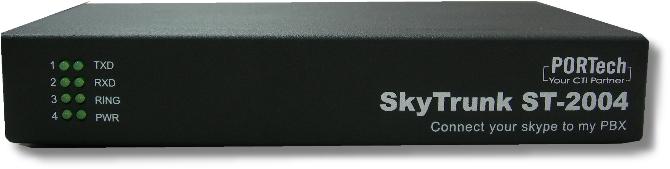
SkyTrunk ST-3004~4 ports skype,FXO,FXS

SkyServer:~4 ports Skype,FXS (Build in pc)
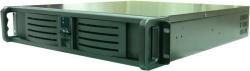
If you have interest,please contact us
PORTech Communications Inc.
150 Shiang Shung N.Rd,Taichung,Taiwan
http://www.portech.com.tw
E-mail:[email protected]
PORTech Communications Inc. Is a manufacturer in Taiwan. PORTech major in GSM Gateway,GSM Fixed Wireless Terminals (1,4,8 ports), VOIP GSM Gateway(1,2 ports), E1 GSM Channel Bank, Skype GSM gateway and Remote power switch by PSTN and Web.
http://www.portech.com.tw
Skype GSM Gateway : SkyTrunk ST-1004~4 ports Skype, FXO, FXS, GSM
- Skype to PBX, PBX to Skype free,
- Skype to GSM, GSM to Skype
- Skype to PSTN,PSTN to Skype
- GSM Frequency: Dual band: 900 / 1800MHZ, Tri band: 900 / 1800 / 1900MHZ
You can set ST-1004’s route as follws:
Skype to FXO,Skype to FXS,Skype to GSM
FXO to skype,FXO to FXS
FXS to skype,FXS to FXO,FXS to GSM
GSM to Skype,GSM to FXS
When GSM or PSTN or Skype call in,you both can set 2 stage dialing or transfer specific number
Example:
When GSM in,you can choose
(1) PBX or Phone ring
(2)2-stage dialing: provide dial tone,you can enter skype id or any phone number(phone number) or PBX
(3) transfer to specific phone number via skype out
St-1004 preferences:
1. Use skype service combines with your existing pabx / pbx system that is already in place.
2. Use the pabx / pbx extension, so you can dial skype out and receive skype in.
3. Skype to pbx or pbx to skype is free service.
4. Corporate users may have multiple skype connections meaning you can have more users online.
5. One company with one dial in number, skypbx automatically switches from a busy line to a free line. Works like a traditional pbx, centrall office lines.
6. Our staff may use the pbx system to dial out using skype for free.
7. You can manage skype accounts into one system.
8. Skypbx can appoint an user to manage the entire system. As to prevent any network intrusion and avoid any possibility of security concerns.
9. One pc can run 4 skype accounts meaning that at any time on one pc you have 4 lines available.
10. Skypbx provides you with the use of skype, fxo, fxs, gsm and interface router.
Product specification:
1. Communication agreement: complies with skype.
2. Firewall / nat agreement: complies with skype.
3. Interface: 4 FXS connections to the pbx system, 4 FXO connections to the telco lines and 4 mobile trunk connections for gsm interface.
4. USB port: 2. 0 USB port to pc.
5. LED indicator: every line from the skypbx has its own LED display.
6. Voltage: itu standard of 48 volts.
7. Dialing tone: standard busy, ringing and dialing tones.
8. Dtmf: auto detection and auto generate.
9. Managemetn tools: console setup of management software.
10. Input: dc12v, 2a.
11. Case size: 1u 228 (d) *437. 6 (w) *44 (h) mm.
Skype Gateway-SkyTrunk: Skype to PBX free, PBX to Skype free
SkyTrunk ST-1004~4 ports skype,FXO,FXS,GSM
GSM Frequency :Dual band:900/1800MHZ,Tri band:900/1800/1900MHZ
SkyTrunk ST-2004 ~4 ports Skype,FXS
SkyTrunk ST-3004~4 ports skype,FXO,FXS
SkyServer:~4 ports Skype,FXS (Build in pc)
If you have interest,please contact us
PORTech Communications Inc.
150 Shiang Shung N.Rd,Taichung,Taiwan
http://www.portech.com.tw
E-mail:[email protected]


 April 7, 2023
 Phone System