Page Contents
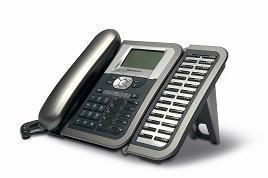
- Thomson ST2030 an IP Phone for Enterprise Market
- Features available in both SIP and MGCP versions
- Additional detailed information:
- ST2030 MGCP Features
- ST2030 SIP Features
- ST2030 SIP Firmware Versions
- ST2030 Tips and Tricks
- ST2030 Where to Buy
- ST2030 Configuration HowTo
- ST2030 APS HowTo
- ST2030 non-working features
- ST2030 feature wishlist
- ST2030 FAQ
- Flexible and powerful autoprovisionning system (DHCP + TFTP or HTTP).
- Downloadable RTTTL melodies for ST2030.
Thomson ST2030 an IP Phone for Enterprise Market
Phone presentation here!wwww.thomsontelecompartner.com


Comments
333ST-2030 Problem with upgrade firmware
I have several phones here in my work ST-2030 (Im not sure about release SIP or MGCP)
All phones in version like this.
H/W Version: V3 MAC Address: 00:0E:50:4E:69:A0
Boot Version: V1.08 Connection: DHCP
DSP Version: V1.00 IP Address: 10.205.255.173
APP Version: V1.19 Common Config: GenConf2030MEX_050101.txt
MAC-Specific Config: st2030m_000E504E69A0.txt
Could somebody tell me how can i upgrade this phone to the newer version.
Now If I'm trying to upload v2030SG.070516.1.54.2.zz across http I'm getting an error
HTTP File upload buffer overflow
Regards
Artur
333ST-2030 Problem with upgrade firmware
I have several phones here in my work ST-2030 (Im not sure about release SIP or MGCP)
All phones in version like this.
H/W Version: V3 MAC Address: 00:0E:50:4E:69:A0
Boot Version: V1.08 Connection: DHCP
DSP Version: V1.00 IP Address: 10.205.255.173
APP Version: V1.19 Common Config: GenConf2030MEX_050101.txt
MAC-Specific Config: st2030m_000E504E69A0.txt
Could somebody tell me how can i upgrade this phone to the newer version.
Now If I'm trying to upload v2030SG.070516.1.54.2.zz across http I'm getting an error
HTTP File upload buffer overflow
Regards
Artur
333Re: older firmware
you must upgrade first to firmware 1.52 and after to 1.61.
best regards
Francesco
333older firmware
I've tried to install the new firmware versions 1.59 and newer, but both fail to install with error message "No such file or format error. Please check if the path and file is valid" I tried already with ftp server and from http server and from local pc, but always fail. Can the older versions still be downloaded somewhere besides thomson website (they don't appear on it).
thanks
best regards
steven
333older firmware
I've tried to install the new firmware versions 1.59 and newer, but both fail to install with error message "No such file or format error. Please check if the path and file is valid" I tried already with ftp server and from http server and from local pc, but always fail. Can the older versions still be downloaded somewhere besides thomson website (they don't appear on it).
thanks
best regards
steven
333MGCP to SIP?
I have tried and the firmware seems to install without error (as well as the DSP and boot firmware) but I can not get it to connect to anything.
I am running 1.59 (upgraded from a very low original version and V0 (?) hardware)
everything at its latest but no luck with 2 voip providers (all of which work fine with my SPA-3000)
(BTW, connectivity is fine from the phone to the net both local and voip provider using phones built in ping test)
333Re:
333Automatic reboot
#!/bin/bash WAIT="5" username="administrator" password="784518" function th2030_reboot { # Thomson ST2030 IP IP="$1" WGET="wget -q" COOKIES=`mktemp` ADMIN=`mktemp` # Get "seed" for login # <input type="hidden" name="nonce" value="c0a800010000058e"> $WGET --save-cookies $COOKIES --keep-session-cookies "http://$IP/admin.html" -O $ADMIN nonce=`grep -m1 'name="nonce"' < $ADMIN | sed 's/^.*value="\(.*\)".*$/\1/'` WGET="wget -q --load-cookies $COOKIES -O -" # encoded = username + ":" + md5(username + ":" + password + ":" + "c0a8000100000330"); md5=`echo -n "$username:784518:$nonce" | md5sum | head -c32` encoded="$username:$md5" post="encoded=$encoded&nonce=$nonce&URL=%2F&goto=Log+On" # Login $WGET "http://$IP/admin.html" --post-data "$post" &> /dev/null # Reboot $WGET --read-timeout $WAIT -t 1 "http://$IP/reboot.html" --post-data "" &> /dev/null rm -f "$COOKIES" "$ADMIN" } for i in $*; do echo "reboot $i" th2030_reboot $i & doneJust call it with the IP addresses of the phones to reboot:
./st2030-reboot 192.168.0.100 192.168.0.101 192.168.0.102 ...
PS: sorry for the formatting but I've not found the way to insert pre-formatted text in a comment
333ALERT INFO
not working here, only default ringer sounds regardless the setting.
i want to set distincive ringing on groups, so that the frontdoor, incoming calls and local calls will be distinct from each other.
thnx
Antoon
Netherlands
333ALERT INFO
not working here, only default ringer sounds regardless the setting.
i want to set distincive ringing on groups, so that the frontdoor, incoming calls and local calls will be distinct from each other.
thnx
Antoon
Netherlands