


Page Contents
- Voice Broadcasting Systems and Services
- Contact Database Systems Corp.
- VoiceXML and Voice Broadcasting
- Droid Voice Broadcast App
- Voice Broadcasting Services
- Voice Broadcast Systems
- Outbound IVR Systems
- Voice Blast Reports and Simulation
- Voice Broadcast Applications
- Voice Broadcast Demonstration
- Database Systems Corp. Information
Voice Broadcasting Systems and Services
Database Systems Corp. (DSC) provides a voice broadcasting phone system, which is a specialized autodialer incorporating CTI technology that broadcasts phone messages to hundreds or thousands of call recipients at once. Voice broadcast systems use traditional analog and digital phone lines as well as VOIP connectivity. This computer telephony technology has both commercial and community applications. Companies can contact employees and customers instantaneously. Communities can likewise be contacted by emergency response centers. Voice broadcast phone software manages a database of phone lists as well as digitized phone messages. Using analog, digital or VOIP telephony components, these computers can simultaneously broadcast thousands of phone messages. Personalized information can be included in the phone messages through the integration of text to voice software.
Advanced systems include telephony boards or voice broadcasting software that can detect the difference between an answering machine and a ‘live’ person answering the call. These voice blast systems employ the logic to properly play a unique message to answering machines without message truncation.
Contact Database Systems Corp.
Contact DSC at (602) 265-5968 or use the following Contact Form. To enroll in our voice broadcasting services, please use our convenient Online Registration web page.
VoiceXML and Voice Broadcasting
Phone messaging systems and services with VoiceXML messaging automatically send phone messages from a computer system to a remote phone systems using XML push logic. For example, alerts can be broadcast to tenants in a building if there is a fire or disaster. Heat sensors with IP connectivity that are installed in the tenant building can initiate an emergency voice broadcast by sending a VoiceXML message . Other applications may be as simple as wakeup calls or weather alerts that are triggered automatically from a computer system or websites.
Droid Voice Broadcast App
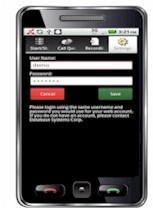
DSC now lets you manage your voice broadcasting campaigns using your Droid and iPhone smartphones. The following easy to use functions are available to smartphone users.
- Login to your account
- Select a list of phone numbers to call
- Select saved recordings to broadcast
- Record messages by calling our service
- Start and Stop a voice broadcast
- Monitor the voice broadcast in progress
The Droid voice broadcasting App now lets you manage any number of voice broadcasts using simple phone commands. Contact DSC to learn more about this simple way to control your voice broadcasting and to obtain a copy of this smartphone application.
Voice Broadcasting Services
Besides offering voice broadcasting systems, DSC provides voice broadcasting services. DSC offers an online registration capability that allows both commercial and non-profit organizations such as churches and schools to register for voice broadcast services on the internet. This voice broadcast registration form provides significant savings over normal fees.
Voice Broadcast Systems
DSC has installed voice broadcasting systems throughout the U.S. and in Canada. These systems provide emergency and non-emergency phone notifications. Voice broadcast systems communicate over digital and analog phone lines and include a simple Wizard to assist users in managing call campaigns.
Outbound IVR Systems
Voice broadcasting systems can send messages to call recipients who are presented with a greeting and a menu of selection items from which to choose using IVR technology. This type of calling campaign and the technology is often referred to as an Outbound IVR. In many of these voice broadcast campaigns, the IVR software is designed to provide the user with an option to speak with a live operator.
Voice Blast Reports and Simulation
Reports showing the results of a calling campaign are critical when analysing the performance of a dialing campaign. Our voice broadcast reports demonstrate the reporting capability. DSC also provides a voice broadcast simulation model to assist users in estimating the resource requirements of their voice blast campaigns.
Voice Broadcast Applications
Voice broadcasting applications can include emergency alerts, school and church notifications, and commercial customer and prospect contacts.
- Telephone Reassurance Phone System – calls seniors and elderly at home ensuring they are OK (RUOK). Additional information can be found on the voice message broadcasting web page.
- Voice broadcast outsourcing – Hosted voice broadcasting services and outsourcing.
- Emergency Notification Systems – Community alert service and emergency broadcasting systems.
- Phone Reminders – Employ voice broadcasting for call reminders
Voice Broadcast Demonstration
A sample Voice broadcasting demonstration provides a view of how an automated voice messaging system can be managed online.
Database Systems Corp. Information
- Phone broadcast systems
- Predictive Dialer – Predictive Dialer
- ACD – Automatic call distribution
- Autodialer Software Simulation – Model and project autodialing resources
- Text Messaging – SMS ( Short Message Services) and text messaging
- Voice broadcasting from EasyIVR outsourcing center


 April 7, 2023
 Phone System