FOOD FOR THOUGHT Enable HTTPS with Let's Encrypt

Appears they got it fixed, it's not pushed to edge yet, but the current module in git works OK in my testing.
 
LetsEncrypt will ONLY provision HTTP-01 over http on port 80, tls-alpn-01 can do it over 443 but a world of hurt there,
It is however trivial for 99%+ of all of us to use DNS-01 and then there is absolutly no need to open any ports ever, you just need your nameservers appropriate auth. (you have a DNS name service, right?)
 
Last edited:
It is however trivial for 99%+ of all of us to use DNS-01 and then there is absolutly no need to open any ports
Preaching to the choir. Dns-01 is the way to go.

I looked at the edge module mostly out of curiosity. Quickly discovered it broke things if the firewall module was not loaded (AND enabled), so filed the bug report.

To Sangoma's credit they fixed it quickly, but Gupta having just made a blog post may have influenced the rapidity of the fix.

Still, dns-01 is an extra layer of complexity for the average user. It would be convenient if the certman module made it easier to automate for non-distro use.
 
Unfortunately the ChoirMasters have so far totally ignored this obvious solution

If copying and pasting a relevant 'key' and context is too complicated for the 'average user', They probably shouldn't be allowed to run a well secured VOIP server ;-)

Choirmasters please, anything to, say or just continually promote blindly punching unnecessary holes in firewalls?
 
Last edited:
I took a different approach which works well if your pbx is behind a pfsense firewall.
1) Turn off / dismantle all firewalling from freepbx/asterisk. Managing cascading firewalls is a nightmare and there is nothing that freepbx's firewall does that pfsense cannot do.
2) Install Letsencrypt/Acme on pfsense. It comes as a standard, well polished module. I started with the http mode but switched to dns when Letsencrypt introduced it. Very easy to install and manage. pfsense provides a hook that you can use to "push" the updated certs downstream to other servers (I don't use it). Or you can use the "fetch/pull" approach as explained in 3).
3) Write a simple shell script on your pbx (and all other servers on your lan) to go fetch the certificates from your pfsense router/firewall, copy them to the right location on your pbx, and restart the service. Run your script in cron once a day or every couple of days.
I've been running it like this for several years now, I can't remember the slightest glitch.
 
Excellent post. So easy, no ip rules involved, just try it if you haven't.

NeilPang's acme.sh has built in scripts to deploy your issued certs (DNS-01 or HTTP-01) to mikrotik, pfsense and any number of other "well knowns" if the certs properly belong on your point of ingress and not necessarily on your PBX for those of us that can walk and chew gum simultaneously
 
Last edited:
for those of us that can walk and chew gum simultaneously

The problem though is too many can't.

Imagine the support calls - why doesn't it support xyz DNS, I can't make it work with abc DNS, confusion between Google Cloud and Google Domains DNS, etc, etc.
 
The updated module has been pushed to edge now.

Again, no real benefit if not using the distro, but at least edge won't break us.
 
no benefit not using it, but perhaps no advantage either
 
Here's a little write-up on what we've done for HTTPS with Let's Encrypt:

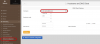
1) You need to have a fully qualified domain, so we'll call our company gsmcallpbx.com - and we'll create our PBX on Vultr and call it pbx1.gsmcallpbx.com - the first thing I like to do is go into settings and set the reverse DNS = pbx1.gsmcallpbx.com

1592414842654.png

2) Set your hostname = your FQDN - in our case pbx1.gsmcallpbx.com ... probably the easiest way to do this is via webmin - with incrediblepbx 2020 - we would go to our ip: 96.30.192.108:9001 - then go to Networking -> Network Configuration -> Hostname and DNS Client and update Hostname with our FQDN - pbx1.gsmcallpbx.com

1592415537401.png

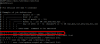
3) Install and run Certbot

Code:
# dependencies required
yum install epel-release
yum install certbot python2-certbot-apache mod_ssl

# obtain and install SSL for our domain
certbot --apache -d $HOSTNAME
This will then create your certs if all is set properly, and you'll now be able to https: to your pbx.

4) Verify SSL operational
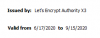
If you go to https:// to your new PBX, you can click on the nice lock icon, select certificate and be presented with your certificate validation information showing among other things, the date it will be valid for:
1592417448291.png

5) Now ... we'll want to have this cert available for FreePBX as well, because some things require it such as my favorite phone, the Clearly IP 270 for doing some fun work with their ClearlyIP PBX app that can only be done with Clearly IP phones.

Https://pbx1.gsmcallpbx.com .. and then go to Admin -> Certificate Management -> New Certificate -> Upload Certificate
1592417778297.png
For the Private key, we will copy the contents from the file /etc/letsencrypt/live/pbx1.gsmcallpbx.com/privkey.pem and paste that in.

For the Certificate, we will copy the contents from the file /etc/letsencrypt/live/pbx1.gsmcallpbx.com/cert.pem and paste that in.

For the Trusted Chain, we will copy the contents from the file /etc/letsencrypt/live/pbx1.gsmcallpbx.com/fullchain.pem and paste that in

1592421779012.png

This will now allow us to select this cert for ClearyIP devices.
Make sure to mark this new certificate as "Default"

6) Verify FreePBX cert is set properly:
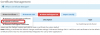
We can look on freePBX and see how long the cert will be valid for:
1592421926533.png

7) Cron job:
Now what happens after 89 days? Our cert will expire, so we need to know how to automate the process to regenerate a new cert and have it pushed across automatically. Luckily, certbot has provisions that allow us to do this without touching the system, but we will need to have "shields down" shutting down IPtables while generating the new cert. We'll make the following changes to the system:

Edit /etc/crontab to call certbot (we'll do ours at 00:45am each day) ... note ... certbot will only renew and give new cert if less than 30 days remain on validity of your cert.
1592423067612.png

8) Let's make sure it copies updates to FreePBX:
Inside /etc/letsencrypt/renewal-hooks you'll find 3 directories:
pre - this tells certbot what to do before processing (we'll put shields down/ firewall here)
let's create a file /etc/letsencrypt/renewal-hooks/pre/pre

Code:
#!/bin/bash

systemctl stop iptables
wait
systemctl stop fail2ban
wait

deploy - this tells certbot what to do upon successfully generating a new key - putting items in for FreePBX
let's create a file /etc/letsencrypt/renewal-hooks/deploy/new

Code:
#!/bin/bash

mv /etc/asterisk/keys/LEncrypt.key /etc/asterisk/keys/LEncrypt.key.old
mv /etc/asterisk/keys/LEncrypt.crt /etc/asterisk/keys/LEncrypt.crt.old
mv /etc/asterisk/keys/LEncrypt.pem /etc/asterisk/keys/LEncrypt.pem.old

mv /etc/asterisk/keys/integration/webserver.key /etc/asterisk/keys/integration/webserver.key.old
mv /etc/asterisk/keys/integration/webserver.crt /etc/asterisk/keys/integration/webserver.crt.old
mv /etc/asterisk/keys/integration/certificate.pem /etc/asterisk/keys/integration/certificate.pem.old

srv=$HOSTNAME

cat /etc/letsencrypt/live/"$srv"/privkey.pem > /etc/asterisk/keys/LEncrypt.key
cat /etc/letsencrypt/live/"$srv"/cert.pem > /etc/asterisk/keys/LEncrypt.crt

cat /etc/letsencrypt/live/"$srv"/privkey.pem > /etc/asterisk/keys/LEncrypt.pem
cat /etc/letsencrypt/live/"$srv"/cert.pem > /etc/asterisk/keys/LEncrypt.pem

cat /etc/letsencrypt/live/"$srv"/privkey.pem > /etc/asterisk/keys/integration/webserver.key
cat /etc/letsencrypt/live/"$srv"/cert.pem > /etc/asterisk/keys/integration/webserver.crt

cat /etc/letsencrypt/live/"$srv"/privkey.pem > /etc/asterisk/keys/integration/certificate.pem
cat /etc/letsencrypt/live/"$srv"/cert.pem > /etc/asterisk/keys/integration/certificate.pem

chmod -R 600 /etc/asterisk/keys/integration
chown -R asterisk:asterisk /etc/asterisk/keys/integration

chmod 600 /etc/asterisk/keys/LEncrypt.key
chown asterisk:asterisk /etc/asterisk/keys/LEncrypt.key

chmod 600 /etc/asterisk/keys/LEncrypt.crt
chown asterisk:asterisk /etc/asterisk/keys/LEncrypt.crt

chmod 600 /etc/asterisk/keys/LEncrypt.pem
chown asterisk:asterisk /etc/asterisk/keys/LEncrypt.pem

post - this tells certbot what to do upon completion (we'll re-enable firewall here)
let's create a file /etc/letsencrypt/renewal-hooks/post/post

Code:
#!/bin/bash
iptables-restart
wait

That's it - now your system will have SSL certs and auto renew without having to touch anything.
 
An alternate take:

07/26/2020
EDIT: I reworked the script and replaced incrond with direvent. See https://github.com/jerrm/fpbx-lewatch for more details. Upgrading is highly recommended, the CentOS7 version of incrond has some troublesome bugs.


I cleaned up a script I had tested at a couple of boxes and posted to github.

It monitors the folders freepbx uses to generate le certs and temporarily opens port 80 just for the generation/renewal process:
  1. Download and setup the script:
    Code:
    cd /root
    git clone https://github.com/jerrm/fpbx-lewatch.git
    cd fpbx-lewatch.git
    ./lewatch.sh install
    cd -
    
    # Do not delete the fpbx-lewatch folder - leave it in place.
    # The file monitor entry will look for the script in the original location.
    # If you prefer to move the script to another location, re-run the script
    # with the install parameter from the new location.
  2. Generate a LetsEncrypt Cert in the FreePBX Certman GUI (make sure dns is configured for the requested name).
  3. Make the LE Cert the default certificate (click the appropriate row's "Default" column in list view).
  4. Edit /etc/httpd/conf.d/ssl.conf to use the FreePBX cert:
    Code:
    sed -i 's|^SSLCertificateFile .*$|SSLCertificateFile /etc/asterisk/keys/integration/certificate.pem|g' /etc/httpd/conf.d/ssl.conf
    sed -i '/^SSLCertificateKeyFile/ s/^#*/#/' /etc/httpd/conf.d/ssl.conf
  5. Restart apache:
    Code:
    systemctl restart httpd

FreePBX handles the certificate renewal, but does not know to reload apache. The script sets up a nightly cron job to update apache if needed.
 
Last edited:
Just updated above lewatch script on github. Update only needed if you were attempting to use on the distro. The distro's older version of incrond treats quoted parameters differently.
 
cat /etc/letsencrypt/live/"$srv"/privkey.pem > /etc/asterisk/keys/LEncrypt.pem
cat /etc/letsencrypt/live/"$srv"/cert.pem > /etc/asterisk/keys/LEncrypt.pem

cat /etc/letsencrypt/live/"$srv"/privkey.pem > /etc/asterisk/keys/integration/certificate.pem
cat /etc/letsencrypt/live/"$srv"/cert.pem > /etc/asterisk/keys/integration/certificate.pem

[/CODE]

I liked your writeup here on how to us LetsEncrypt certs.

Have one question/comment though. In the two quoted lines above are you intending to concatenate the contents of privkey.pem and cert.pem in one file *.pem file in each of the referenced directories? If that is the case I believe at least the second "cat" command would need the ">>" redirector rather the single ">" as this just stomps on the contents of the file replacing the existing contents with the new contents.

Is my understanding correct about what you are attempting?
 
would need the ">>" redirector rather the single ">" as this just stomps on the contents of the file replacing the existing contents with the new contents.

You are correct, nice catch
 
I posted a "major" update to the above script on githib. Net functionality is essentially the same, but replaces incrond to avoid potential bugs. The apache reload check is also scheduled as a nighty cron job by default. See the README for more details.

Unlike the FreePBX Distro solution, this has actually been tested for both new certs and renewals.

At this point there have been over a thousand FreePBX certificate renewals without a glitch. A half dozen installs, each with 10+ LE certs defined, with a test certman hacked to force a renewal every 2 days.

It seems solid.

Updating is easy, just run the new script with the "install" parameter:
Code:
./lewatch.sh install
 
I will block the upgrade for Incredible PBX 2020 servers and lock certman to 15.0.23 for the time being.
Probably need to unblock this. The firewall issue was resolved months ago, and the latest edge 15.0.35 has my fixes for fwconsole cli le generation and adding alternative name support for le certs.
 
@wardmundy - I know your busy with the Debian work, but another reminder to remove the certman version lock. Certman 15.0.37 has been pushed to stable by the Sangoma folks and includes my firewall, cli cert generation, alternative name and cosmetic fixes.

I assume it will flow through to the ClearlyIP repos soon.
 
An alternate take:

07/26/2020
EDIT: I reworked the script and replaced incrond with direvent. See https://github.com/jerrm/fpbx-lewatch for more details. Upgrading is highly recommended, the CentOS7 version of incrond has some troublesome bugs.


I cleaned up a script I had tested at a couple of boxes and posted to github.

It monitors the folders freepbx uses to generate le certs and temporarily opens port 80 just for the generation/renewal process:
  1. Download and setup the script:
    Code:
    cd /root
    git clone https://github.com/jerrm/fpbx-lewatch.git
    cd fpbx-lewatch.git
    ./lewatch.sh install
    cd -
    
    # Do not delete the fpbx-lewatch folder - leave it in place.
    # The file monitor entry will look for the script in the original location.
    # If you prefer to move the script to another location, re-run the script
    # with the install parameter from the new location.
  2. Generate a LetsEncrypt Cert in the FreePBX Certman GUI (make sure dns is configured for the requested name).
  3. Make the LE Cert the default certificate (click the appropriate row's "Default" column in list view).
  4. Edit /etc/httpd/conf.d/ssl.conf to use the FreePBX cert:
    Code:
    sed -i 's|^SSLCertificateFile .*$|SSLCertificateFile /etc/asterisk/keys/integration/certificate.pem|g' /etc/httpd/conf.d/ssl.conf
    sed -i '/^SSLCertificateKeyFile/ s/^#*/#/' /etc/httpd/conf.d/ssl.conf
  5. Restart apache:
    Code:
    systemctl restart httpd

FreePBX handles the certificate renewal, but does not know to reload apache. The script sets up a nightly cron job to update apache if needed.

Hello @jerrm , I just followed the above steps and have install this. My LE cert expires in 7 days, so I am hoping that it auto renews and installs.

Just want to make sure that once I have done the above steps 1 thru 5, there is nothing else I need to do other than sit back and hope it renews and installs automatically correct?

Thank you
 
Last edited:
nothing else I need to do other than sit back and hope it renews and installs automatically correct?
That's the goal.

I'd suggest testing with
Code:
fwconsole cert --updateall --force
but @wardmundy has certman locked to an old version that doesn't support --force.
 

Members online

Forum statistics

Threads
26,724
Messages
174,637
Members
20,286
Latest member
lluis.riera
Get 3CX - Absolutely Free!

Link up your team and customers Phone System Live Chat Video Conferencing

Hosted or Self-managed. Up to 10 users free forever. No credit card. Try risk free.

3CX
A 3CX Account with that email already exists. You will be redirected to the Customer Portal to sign in or reset your password if you've forgotten it.
Back
Top