TUTORIAL BulkVS SMS Reception/Transmission Gateway - php code

I think I saw that before, the curl library needs to be configured with the proper CAs. I need to dig into my system and find out.
Meanwhile, if you are running this locally, or even if it's over the WAN, for now proceed with http instead of https and see if you can get everything else to work.
Ultimately you should run it with SSL but since you're still at the config phase bypass that issue for now and you'll fix it later.

Hello @Halea ,

I tried what you suggested, with http instead of https and here is what I got:

So then I ran this command and it's output:

root@pbx1:~ $ curl -k http://mydomain.tld/sms-tx.php
WARNING: Always run Incredible PBX behind a secure firewall.
root@pbx1:~ $

and nothing else happens, ie. sms text does not arrive and the reply/outbound email is still sitting in it's email box.

my system is still:

Incredible PBX/FAX 2020.1 for CentOS 7

Asterisk: UP Apache: UP MySQL: UP
SendMail: UP IPtables: UP SSH: UP
LAN port: UP Fail2Ban: UP Webmin: UP
UCP Dmon: UP PortKnock: UP NR VPN: UP
FaxGetty: DN IAX Modem: DN HylaFax: DN

RAM:94MB CentOS Rel. 7.8.2003 Disk:8.2GB

Asterisk 16.12.0 Incredible GUI 15.0.12.40

Private IP: <hidden>

Public Info: <hidden>
 
Ok, So this is good for making Sms to email and back, but how do you get it to work with a DID in IncrediblePBX, linked with Linphone to do sms? That is the piece of the puzzle I am looking for :)
 
Has anyone tried to get MMS working as well? On Bulkvs.com, I see that it says SMS/*MMS is supported. I can't seem to find the asterisk for the conditions they support MMS.
 
Has anyone tried to get MMS working as well? On Bulkvs.com, I see that it says SMS/*MMS is supported. I can't seem to find the asterisk for the conditions they support MMS.
Yep, I that is basically what I was asking in the post before yours.
 
You probably noticed that BulkVS has changed the way it sends the sms messages downstream from HTTP GET to HTTP POST. The old scheme still works, but if you try to create a new/additional webhook, the sms will come in a JSON payload in HTTP POST format. If you want your new/additional webhook to work the old way (with GET) you can open a ticket and ask them to set it the old way.

If you have been using the scripts I posted in this thread, I have a new one for the sms reception part of it. It's called sms-rx-json.php and it is attached to this post. (Just decompress and remove the .txt extension)
 

Attachments

You probably noticed that BulkVS has changed the way it sends the sms messages downstream from HTTP GET to HTTP POST. The old scheme still works, but if you try to create a new/additional webhook, the sms will come in a JSON payload in HTTP POST format. If you want your new/additional webhook to work the old way (with GET) you can open a ticket and ask them to set it the old way.

If you have been using the scripts I posted in this thread, I have a new one for the sms reception part of it. It's called sms-rx-json.php and it is attached to this post. (Just decompress and remove the .txt extension)
I need more info regarding where to place scripts. I do not have the vision to see the whole picture. I would appreciate more info or maybe a youtube video showing the installation of the scripts in asterisk and the best email client that you use.
Thanks
 
@James Young : You can install these basic php scripts in /var/www/html/ too.
Regarding the email client I use yahoo mail on various web browsers to send or reply to those sms messages. On my desktop I also use Thunderbird.
The email client is not critical. On portable devices like iphone and android the default email clients do a good job.
Several of my colleagues are Mac users and they have been successfully using the sms gateway with the basic Mac email tools. The scripts were also tested with gmail, citadel and zoho mail.
As for a broad view of how theese two scripts work, please spend a moment reviewing the narrative that accompanies the php files.
 
Last edited:
@James Young : You can install these basic php scripts in /var/www/html/ too.
Regarding the email client I use yahoo mail on various web browsers to send or reply to those sms messages. On my desktop I also use Thunderbird.
The email client is not critical. On portable devices like iphone and android the default email clients do a good job.
Several of my colleagues are Mac users and they have been successfully using the sms gateway with the basic Mac email tools. The scripts were also tested with gmail, citadel and zoho mail.
As for a broad view of how theese two scripts work, please spend a moment reviewing the narrative that accompanies the php files.
I would like to hire you to install your scripts on a asterisk(Wazo) pbx and help intergrate it with Bulkvs.
 
Any suggestions on how to receive texts if my server (incredible pbx 2020 on a raspberry pi) on an internal network. My public IP is dynamic and I know that I can sign up for a dynamic DNS service, but how would I have the request go through my router without a security risk?
EDIT: So based on previous posts in this thread I see that the correct way would be to forward TCP port 80 to my PBX and configure the PBX to accept requests only from the BulkVS IP addresses. Can someone please confirm that this would both work and be secure?
By the way I'm running Merlin firmware on an Asus RT-AC68U is there a way to block all other IP addresses from being forwarded as opposed to blocking it only on the PBX? From what I can tell I would put the BulkVS Ip address in the "source target" section of the port forwarding setup, therefore allowing connections only from that IP address. If someone can confirm I would appreciate it. Problem is, it seems limited to one IP address and BulkVS list 2 addresses.
Thanks
 
Last edited:
My public IP is dynamic
That really does not matter. As long as you do an outgoing client registration authentication as opposed to IP address authenication, then you will always get incoming calls, or texts. You really only need a Dynamic DNS service when you are expecting incoming connections such as a remote desk phone, or a VoIP app on a cell phone.
 
That really does not matter. As long as you do an outgoing client registration authentication as opposed to IP address authenication, then you will always get incoming calls, or texts. You really only need a Dynamic DNS service when you are expecting incoming connections such as a remote desk phone, or a VoIP app on a cell phone.
Inbound texts are via a webhook, so you need to provide a URL. This is in their instructions and also detailed here https://nerdvittles.com/another-bargain-sip-provider-for-incredible-pbx-platforms/.
 
A public server is just a way of getting the message from BulkVS since they need a URL. AS you can see earlier in this thread a server behind a router will work so long as ports 80 and 443 are forwarded on the router and the server is not blocking access (as opposed to Incredible PBX which by default block access hence the need to whitelist the BulkVS IP addresses).
 
I have 20 BulkVS DID's that can send SMS to my IncrediblePBX. It in turn, emails them to me. On a small scale, you can receive them into your PBX and forward them as you require. So long as port 80 on your router is redirected to your IncrediblePBX and you whitelist these BulkVS IP addresses: 199.255.157.195, 69.12.88.195 for web access you can receive the sms.

You must have a DNS address defined to the external IP address of your router. My router supports updating DDNS entries when my IP address changes. If yours does not, do some Googling for a Linux based DDNS client to update your DDNS entry automatically. I don't know the capabilities of your router but it is unlikely a stock router will allow you to whitelist certain IP addresses. You have to rely on the IncrediblePBX firewall since you are forwarding all port 80 requests to that server.

In the /var/www/html directory, place a PHP file containing code similar to what is below and modify it to suit you.
Code:
<?php
// Let's determine the IP address of the gateway which rallied this SMS to our server:
// whether ip is from share internet
if (!empty($_SERVER['HTTP_CLIENT_IP']))
{
$ip_address = $_SERVER['HTTP_CLIENT_IP'];
}
// whether ip is from proxy
elseif (!empty($_SERVER['HTTP_X_FORWARDED_FOR']))
{
$ip_address = $_SERVER['HTTP_X_FORWARDED_FOR'];
}
// whether ip is from remote address
else
{
$ip_address = $_SERVER['REMOTE_ADDR'];
}

$email_headers = "From: <[email protected]>";
$email_to = "<[email protected]>";
$email_subject = $_GET['from']." TO:".$_GET['to'];
$email_text = $_GET['message'];
mail($email_to,$email_subject,$email_text,$email_headers);
echo "OK";
?>

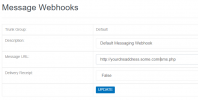
If you name the file above sms.php, you would set Bulkvs message webhook to look like this: There is a slash "/" between the .com and sms.php.
1627521532422.png
 
I have 20 BulkVS DID's that can send SMS to my IncrediblePBX. It in turn, emails them to me. On a small scale, you can receive them into your PBX and forward them as you require. So long as port 80 on your router is redirected to your IncrediblePBX and you whitelist these BulkVS IP addresses: 199.255.157.195, 69.12.88.195 for web access you can receive the sms.

You must have a DNS address defined to the external IP address of your router. My router supports updating DDNS entries when my IP address changes. If yours does not, do some Googling for a Linux based DDNS client to update your DDNS entry automatically. I don't know the capabilities of your router but it is unlikely a stock router will allow you to whitelist certain IP addresses. You have to rely on the IncrediblePBX firewall since you are forwarding all port 80 requests to that server.
Thanks for the detailed reply. The router actually does support whitelisting ip addresses when port forwarding, although I have seen a post claiming that when using the whitelist in effect even clients on the whitelist were blocked. I will need to check that out. I have a dynamic dns service running, and I also have the sms script from the beginning of this thread, so all I have left is to update iptables on the pbx.
I would appreciate it if someone can provide the correct syntax using "./add-ip" to allow the mentioned ip addresses access to ports 80 and 443. Would the following be correct
./add-ip BulkVS 199.255.157.195
./add-ip BulkVS 69.12.88.195
(technically it would be allowing access to all ports and not just 80 and 443 but since only 80 and 443 are forwarded from the router I imagine that's not an issue).

On a side note, while my DID's with BulkVS work for calls I've had issues that I could never fully resolve since porting to them. After problem's with Chan SIP I have a PJSIP trunk and it occasionally stops connecting (I think it always stays down if I have to reboot my router) and usually will take some time before it just reconnects. Do you mind posting your configuration?
Thanks
 
Make it a text file. Then tar and gzip it and post it.

From a different context/topic, I remeber that
lgaetz recommended .. ... ... " I recommend you put it on github as a gist with license details, as I do for the code I share:
https://gist.github.com/lgaetz

Then share the link with a forum post 'here' asking for users to test and comment. Once it’s well tested, consider contributing it formally to the the FreePBX (edit iPBX if appropriate ) project. "

Well it does seem like a plan.
 
Last edited:
When you do ./root/add-ip, you cannot name two things the same. Try ./root/add-ip sms1 and sms2, for example.

Also, if you need more than one webhook on BulkVS, the first will work with the script above. The second or more webhooks are using a different protocol that I have not worked out yet. Their default webhook uses GET protocol and any additions us POST protocol. I haven't figured out POST protocol yet.

As to your router, I have found issues with many home routers. Be sure you do not have SIP ALG turned on. I have had to abandon several routers that simply could not handle the amount of NAT's required for my devices.
 
When you do ./root/add-ip, you cannot name two things the same. Try ./root/add-ip sms1 and sms2, for example.

Also, if you need more than one webhook on BulkVS, the first will work with the script above. The second or more webhooks are using a different protocol that I have not worked out yet. Their default webhook uses GET protocol and any additions us POST protocol. I haven't figured out POST protocol yet.

As to your router, I have found issues with many home routers. Be sure you do not have SIP ALG turned on. I have had to abandon several routers that simply could not handle the amount of NAT's required for my devices.
Thanks. I realized I would probably need a different name for the second rule, and I appreciate your confirming that. Right now only one SMS.
My main issue is to figure out why my registration drops periodically. Yesterday I rebooted my router after calling my ISP and requesting a public ip so I could get dynamic dns to work. Before that they had me behind their NAT. After rebooting my other trunks work fine but with BulkVS I'm getting the following
WARNING[10781] res_pjsip_outbound_registration.c: No response received from 'sip:sip.bulkvs.com:5060' on registration attempt to *****************@sip.bulkvs.com:5060', retrying in '60'"
I hope to get the sms working today.
 
... any additions us POST protocol. I haven't figured out POST protocol yet. ...
@kenn10 : It's quite straight forward. It's simply a JSON structure past to the target machine with a POST instead of a URL construct passed through GET. My additional php script posted here handles it much like the GET variance. Download the file, unzip it and glance through, it's painless to understand the code.
 

Members online

Forum statistics

Threads
26,724
Messages
174,637
Members
20,286
Latest member
lluis.riera
Get 3CX - Absolutely Free!

Link up your team and customers Phone System Live Chat Video Conferencing

Hosted or Self-managed. Up to 10 users free forever. No credit card. Try risk free.

3CX
A 3CX Account with that email already exists. You will be redirected to the Customer Portal to sign in or reset your password if you've forgotten it.
Back
Top