
You are using an out of date browser. It may not display this or other websites correctly.
You should upgrade or use an alternative browser.
You should upgrade or use an alternative browser.
TIPS Suddenly could not log in to ipbx admin. Now navigating admin section is weird.
- Thread starter JFrost
- Start date
Hey now, thanks.Sounds like you have not changed or added any admin users and changed the session id, so that session id is still unlocked and does not need you to enter any user id or password to log in
So I tried that and now on your suggestion tried it again twice more.
I can get to User Manager. I can see the Users tab but I can't switch to any other tab (Gropus, Directories, etc).
If I click 'Add' I get the Add User page and again, I can see the first tab (Login Details) but cannot switch to any other tabs (User Details, Advanced, etc.)
I tried creating a user on the first tab and when I hit submit it takes it but I never see the red Apply Config at top right I expect, I see no user added to the User Manager and (ofc) I cannot login with that user.
The weird behaviors INSIDE the web UI are weirding me out. No idea what could cause this kind of behavior.
At the suggestion of another users I have done yum updates, I've updated the modules from command line and I tried going to Advanced settings to check/change the version number (per a recent thread about module issues) and when I try to submit that page (Advanced settings) nothing happens. No reaction from the UI and no red 'Apply Config' at top right as one expects.
At a loss here.
EDIT -
I tried adding users. Idk how I would clear/change the session ID.and changed the session id,
EDIT 2 -
Maybe I should add that I see NO users in User Manager. (see screencap)
Additionally the search bar cannot be made to go away (in case that means anyth to anyone)
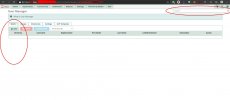
Last edited:
Tried that. Still no joy.Well, then you may want to try to do the system updates. I have come across many cases where updated modules stopped functioning properly until I did I ran system updates., and restarted the web server
Bump.
Any help diagnosing this?
After unlocking the session I cannot add a user, I can't navigate to the subtabs in "main" page (e.g user manager, etc.). See screencaps above.
Please. This is maddening. I have no idea where to look further. Only ideas I have left are nuke from orbit and rebuild from scratch (which, obv, I *really* don't want to do)
Any insights here are very appreciated.
Any help diagnosing this?
After unlocking the session I cannot add a user, I can't navigate to the subtabs in "main" page (e.g user manager, etc.). See screencaps above.
Please. This is maddening. I have no idea where to look further. Only ideas I have left are nuke from orbit and rebuild from scratch (which, obv, I *really* don't want to do)
Any insights here are very appreciated.

Halea
Well-Known Member
- Joined
- Aug 12, 2016
- Messages
- 1,164
- Reaction score
- 917
It's probably not what you would want to hear but at this point maybe you are better off rebuilding your system from scratch.
To help you properly reconfigure your new setup you might want to export your current configuration data (or at least some of it like DIDs and extensions,) using the backup function under admin, which seems to be accessible if I'm reading your message (#22) and the screenshot that you posted correctly.
If (or when) you go that route consider empowering your PBX with "snapshotting" capability, which would be a life saver in the future for situations like this. The quick and easy way is to use a virtualizer like Virtualbox and use its built in capability. Or if you absolutely want to go bare metal then install a lightweight GUI desktop (like xfce) to your already-installed PBX to which you add Timeshift which is an rsync based snapshot management software.
Of course if you are running your PBX on the cloud you can use your VPS provider's integrated backup capability, assuming that they offer one.
To help you properly reconfigure your new setup you might want to export your current configuration data (or at least some of it like DIDs and extensions,) using the backup function under admin, which seems to be accessible if I'm reading your message (#22) and the screenshot that you posted correctly.
If (or when) you go that route consider empowering your PBX with "snapshotting" capability, which would be a life saver in the future for situations like this. The quick and easy way is to use a virtualizer like Virtualbox and use its built in capability. Or if you absolutely want to go bare metal then install a lightweight GUI desktop (like xfce) to your already-installed PBX to which you add Timeshift which is an rsync based snapshot management software.
Of course if you are running your PBX on the cloud you can use your VPS provider's integrated backup capability, assuming that they offer one.
Hye now. Thanks. You are on the money - that is NOT what I want to hear lol.It's probably not what you would want to hear but at this point maybe you are better off rebuilding your system from scratch.
To help you properly reconfigure your new setup you might want to export your current configuration data (or at least some of it like DIDs and extensions,) using the backup function under admin, which seems to be accessible if I'm reading your message (#22) and the screenshot that you posted correctly.
If (or when) you go that route consider empowering your PBX with "snapshotting" capability, which would be a life saver in the future for situations like this. The quick and easy way is to use a virtualizer like Virtualbox and use its built in capability. Or if you absolutely want to go bare metal then install a lightweight GUI desktop (like xfce) to your already-installed PBX to which you add Timeshift which is an rsync based snapshot management software.
Of course if you are running your PBX on the cloud you can use your VPS provider's integrated backup capability, assuming that they offer one.
I'm on Vultr and do have snapshots but not anything recent enough.
I also have backups (weekly but they only keep 2) so I'm going to restore the 10/1 backup (oldest avail) before I go thermonuclear warfare on the box and we'll see what happens.
What's truly maddening is the not knowing what happened (and therefore how to not happen again.) I made no changes so I can't fathom what caused it. I can accept having to rebuild if I know x or y is truly FUBAR, but w/o even a clue? Ugggh.
Add'ly, it seems like it's something stupidly simple (though obviously deceptive) that shouldn't require a full NUKE event and I hate just resorting to the option without knowing WHY. Something a bit like the old adage about problems that go away by themselves tending to come back by themselves.
Without an answer (or at least clue) as to why I'm nuking, I get no warm and fuzzy from it.
EDIT - Restored the 10/1 backup and behaves the same.
Big big sad ....
Last edited:

hawk#1
Well-Known Member
- Joined
- Nov 3, 2015
- Messages
- 716
- Reaction score
- 308
There is really not much else that can be done. Can't even go back and see what happened and when it happened. Hope you keep a better eye on your new system, log on frequently, keep it up to date, and most importantly, keep a backup of a working system.
Yeah, I think I've reached that conclusion too. Feels so defeatist to just throw in the towel with so little sweat on it but it seems that's where I'm at.There is really not much else that can be done. Can't even go back and see what happened and when it happened. Hope you keep a better eye on your new system, log on frequently, keep it up to date, and most importantly, keep a backup of a working system.
Thx for tryin' all.
Perhaps the 'application notes' inYeah, I think I've reached that conclusion too. Feels so defeatist to just throw in the towel with so little sweat on it but it seems that's where I'm at.
Thx for tryin' all.
Sangoma Documentation
might be pertinent to your situation.
Perhaps you even have it in /etc/amportal.conf
Thanks but sadly, no.Perhaps the 'application notes' in
Sangoma Documentation
wiki.freepbx.org
might be pertinent to your situation.
Perhaps you even have it in /etc/amportal.conf
Base on the (seemingly innocuous) error I get at the cli when unlocking the session I'm currently suspecting a php issue
This is the error
And this forum post leads me to believe it might be php relatedSession save path is undefined. This can cause undefined unlocks. Please set a 'session.save_path' in your php.ini file. It should match the same path that is set for the web portion of PHP. We have defaulted to [/var/lib/php/session]
https://community.freepbx.org/t/no-longer-able-to-login-to-freepbx-administration/37289
As far as I can tell, my server (PBX2020) is running PHP 5.6. Not sure if that's right as afaik, 5.6 is woefully out of date.
As so much of the UI is dynamically generated, php could be the culprit.
Addly' as with the poster in that thread, it seems I'm missing my all my users (which, maybe THAT's the issue and not PHP??) but unlike the poster I do not have a mirror system to compare my tables too.
However it might be worth it to try to figure out if I can manually/forcibly insert a user record in the DB since I'm basically barreling towards no choice but nuking...
Yay.
Can anyone confirm what version of php should be installed/running on ipbx2020?
thx.

KNERD
Well-Known Member
- Joined
- Mar 9, 2014
- Messages
- 2,133
- Reaction score
- 836
That is a possibility. If you are using a user which has access to the admin log in, then you cannot log in with that user since your users seem to be missing. When the system first was installed, you should of created an administrator account when you first visited the PBX web page. Are you using that one, or a user granted access?Addly' as with the poster in that thread, it seems I'm missing my all my users (which, maybe THAT's the issue and not PHP??) but unlike the poster I do not have a mirror system to compare my tables too.
However it might be worth it to try to figure out if I can manually/forcibly insert a user record in the DB since I'm basically barreling towards no choice but nuking...
hawk#1
Well-Known Member
- Joined
- Nov 3, 2015
- Messages
- 716
- Reaction score
- 308
I believe that it was ver 5.3 but I can't actually confirm it since all my systems have been updated.Can anyone confirm what version of php should be installed/running on ipbx2020?
thx.
I am using the original Admin user account. Mine is a small pbx with a handful of extensions but only one user (hi!)That is a possibility. If you are using a user which has access to the admin log in, then you cannot log in with that user since your users seem to be missing. When the system first was installed, you should of created an administrator account when you first visited the PBX web page. Are you using that one, or a user granted access?
I have never had need to creat an add'l login. That ALL users in both User Manager AND the (older?) Admins section show no users weirds me out a bit. SOME kind of "bomb" went off somewhere and it smells more and more (to my untrained nose) like what happened to that user in the linked thread above.
At the moment inbound and outbound seems unaffected so I will persevere a bit towards finding an "amicable" solution before going "Wargames" on it..
OOOOOO. THAT'S interesting. The user in the linked thread said smth about upgrade from 5.3 to 5.6.I believe that it was ver 5.3 but I can't actually confirm it since all my systems have been updated.
Sidebar - Isn't PHP v5 long past EOL?
I'm going to try to find some more related to that thread when I have some more time.
ty.
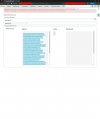
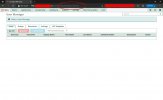
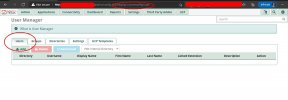
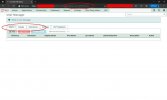
Tried and tried.Then maybe unlock the login again, and check the Administrator's tab to see if the account still exists.
Tell me please if there's a clue here I'm missing..
hawk#1
Well-Known Member
- Joined
- Nov 3, 2015
- Messages
- 716
- Reaction score
- 308
No names or passwords for admin screen. No users listed under user management - users screenTried and tried.
Tell me please if there's a clue here I'm missing..
Last edited:
And cannot add them as "submit" from those screens doesn't function.No names or passwords for admin screen. No users listed under user management - users screen
Yay technology. lol.
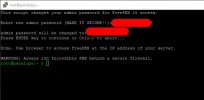
Had not but just did. Script appears to succeeded (see screencap).Curious, have you tried to run the admin-pw-change script in the root directory? If so, do you remember what the results were?
Then checked Admins and User Manager again. I still see no users.
ofc, I cannot try to log in with it as I cannot get a login form.
More and more this is surely a php fk up. What else explains that the pbx continues to function w/o issue yet the web ui is FUBAR in more ways than one?
So now I think I'm on to a cause. How to remediate? Damned if I know...
I think it's time to crack open the DB and see if the users are ACTUALLY there.
Tried mysql from the cli
Code:
mysql -uroot -pWent back to my build notes and I see that I set a bunch of passwords (cli root, pbx admin, apache admin...) but I do not see one for MySQL admin.
Is that known (or how can I check/retrieve it), and/or how else can I log in to mysql db?
EDIT - Missed the screencap..
Last edited:


Forum statistics
Get 3CX - Absolutely Free!
Link up your team and customers  Phone System Live Chat Video Conferencing
Hosted or Self-managed. Up to 10 users free forever. No credit card. Try risk free.

Verify your Email
Check your inbox!
We’ve sent you an email. Click on the button in the email body to verify your email address – (if you can not find it, check your spam folder).
Upon verification you will be directed to the 3CX setup wizard.