GOOD NEWS VPN/Router with OpenVPN

kenn10

Well-Known Member
Joined
Dec 16, 2007
Messages
4,659
Reaction score
3,023
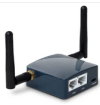
This little gizmo is fantastic: https://www.amazon.com/dp/B07794JRC5?psc=1&ref=ppx_yo2ov_dt_b_product_details
1670275511642.png
I've uploaded my .ovpn file and it ties right into my OpenVPN network so I can attach an ATA at a remote location. I'm impressed with the flexibility and price point. It can be connected to wifi or via ethernet and has a LAN port as well. Not the fastest device but more than adequate for some voice communications.
 
Great for travel or, for my case, to use for an elderly person in assisted living where the multi-NAT'd WiFi is pretty hard to navigate around. I'll be testing this there to see how it does.

It does not come with a power supply but any cellphone USB charger will be OK. It needs 5V, 1 amp. I got this one because it is UL listed:
 
I have the GL-MT300N-V2 with the internal antenna. The signal range with it is not very good. That one with the external antennas would seem to be better. I write seem because I got a Chinese job with an LTE modem and has six external antennas. Two for each spectrum, and it has horrible signal.
 
So this device will allow any device to have a front end OpenVPN so that it doesn't matter if the desired device has VPN ability or not, this puts it as a front end to it, correct?
 
So this device will allow any device to have a front end OpenVPN so that it doesn't matter if the desired device has VPN ability or not, this puts it as a front end to it, correct?
That is correct. It is really designed as a travel router. It also allows remote provisioning if you register it with the manufacturers goodcloud.xyz cloud management tool which looks very much like Grandstream's GDMS tool. It can be a wifi bridge, usb tether, wifi repeater, or router. You could put a small ethernet switch behind it and run several devices but if you aren't using the ethernet WAN port, it can be changed to another LAN port making two available LAN ports. I'm only getting about 17mb throughput when I connect to my own wifi network so I don't think this is a good solution for a larger installation. I'm sure I could hook up a couple of phones and ATAs without issue.

It is running OpenWRT and supports DDNS as well but that isn't needed if you're using the VPN. Not a bad gizmo for $32. This may be my workaround if the HT801/HT802 OpenVPN doesn't work like it should.

The unit is quite small. I left it running for about 24 hours now and it does not heat up at all. I'll update with anything else I find as I experiment.
 
Last edited:
Sounds wonderful, I was going to use it to test in Egypt, but just found this:The Egyptian regime is blocking the OpenVPN protocol in the same way that they blocked the PPTP and L2TP protocols earlier in the year: Deep Packet Inspection (DPI) technology. Using this technique, it is possible for them to identify when data has come through the OpenVPN (or PPTP or L2TP) protocols and so block it. I know NordVPN works, I need better options.
 
Sounds wonderful, I was going to use it to test in Egypt, but just found this:The Egyptian regime is blocking the OpenVPN protocol in the same way that they blocked the PPTP and L2TP protocols earlier in the year: Deep Packet Inspection (DPI) technology. Using this technique, it is possible for them to identify when data has come through the OpenVPN (or PPTP or L2TP) protocols and so block it. I know NordVPN works, I need better options.
Not sure now, but maybe four years ago, we sent a Yealink telephone to Egypt with OpenVPN set up on it. It worked fine. Just in case of a problem, I was looking up how to set up Obfsproxy. However, I understand that is now an abandoned project.
 
OK. Note to anyone who gets one of these: DO NOT UPGRADE THE FIRMWARE!!! For whatever reason, if you load the latest firmware, the things wifi will not allow a wifi client to stay connected. It probably doesn't matter if you're using the ethernet ports but its really annoying when I'm connected by wifi to it.
 
Keep an eye on them, great products and well built


wifi router, LAN and WAN rj45's , LTE modem, (GPS if your 'Wardish' and a rs485 if you are even more nerdish)

For $99 it works fine for me with a google-fi data only sim card., I get about 24MBs down a little more up.

Data Cost is $0 as I have Google-fi for my phones

And for us nerds, the front-end is based on bloody OpenWRT so hack away !!!

In my case it acts as a mobile gateway for a bunch of meshtastic lorawan nodes
 
Last edited:
OK. Note to anyone who gets one of these: DO NOT UPGRADE THE FIRMWARE!!! For whatever reason, if you load the latest firmware, the things wifi will not allow a wifi client to stay connected. It probably doesn't matter if you're using the ethernet ports but its really annoying when I'm connected by wifi to it.
Same issue on my AXT1800, pings to the router when on wifi keep dropping.
 
Long press (11 seconds) reset button. Restore your backup if you got clever.

opkg install luci for a vanilla openwrt ui.
 
Long press (11 seconds) reset button. Restore your backup if you got clever.
There is an actual menu item to revert to factory default as well.

The other issue was if it loses power and reboots, the VPN does not restart. The solution to that problem is to use the menu option to program the slide switch to turn the VPN on and off and leave it in the "on" position. Then when the unit reboots,, it re-initializes the VPN.

This really is a slick device.
 
Got mine today. :wub:
Have fun! I have one question though. I've set up OpenVPN in the cloud as per the Nerd Vittles article but when the VPN is enabled on Windows 11 laptop, I lose the ability to surf or access anything outside the 10.8.0.0 net. Likewise with this travel router, it loses access to the rest of the internet when the VPN is active. I suspect this can be overcome with modifications to the .ovpn files but don't know how.
 
@kenn10: Here's what we add to the .ovpn file to access external sites:
Code:
pull-filter ignore redirect-gateway
route-nopull
route 10.8.0.0 255.255.255.0
 
DO NOT UPGRADE THE FIRMWARE!!! For whatever reason, if you load the latest firmware, the things wifi will not allow
Did you mean DON'T upgrade to the latest firmware 3.215 beta42022-09-21
Did yours come with the 3.212 stable2022-04-29 or something earlier?
 
Mine came with the 3.212 version and when I let it do automatic upgrade to the 3.215, the wifi became undependable.
 

Members online

Forum statistics

Threads
26,724
Messages
174,631
Members
20,286
Latest member
lluis.riera
Get 3CX - Absolutely Free!

Link up your team and customers Phone System Live Chat Video Conferencing

Hosted or Self-managed. Up to 10 users free forever. No credit card. Try risk free.

3CX
A 3CX Account with that email already exists. You will be redirected to the Customer Portal to sign in or reset your password if you've forgotten it.
Back
Top