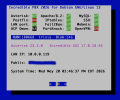
NEW IncrediblePBX 2026-Debian13

is it helpful?
is it productive?
is it urinating downwind?
In the words of Will Rogers:

There are three kinds of men: ones that learn by reading, few who learn by observation, and the rest of them have to pee on the electric fence and find out for themselves. Good judgment comes from experience, and a lot of that comes from bad judgment.
I suspect Sangoma is in for an eventful few months peeing on the electric fence. :cowboy:
 
The question is, why hasn't Sangoma managed to do this for themselves while FS PBX and FusionPBX already ported to Debian-13? The small guys with limited resources are leading well ahead of the mega corporation.
What you call negativity I call being practical (though I admit to the negative tone and I apologize). Here's the thing. Sangoma has already answered this question a few times. FreePBX 18 will run on Debian 13. FreePBX 17 was written for Debian 12 and PHP 8.2. You can work on making FreePBX 17 run on Trixie but the value isn't there. Debian 12 is still supported and you still have to load PHP 8.2 anyway. I ask my question again, what's the motivator?

Would you rather Sangoma work on FreePBX 18 on Debian 13 or work on FreePBX 17 on Debian 13? Keeping in mind limited resources, I think the answer is obvious.
 
@billsimon: The only thing missing from your comment was a timeline for delivery of FreePBX 18. I recall Elon Musk promising that Full Self-Driving would be available by the end of the year. That was 10 years ago. As I noted above, it's going to require some major plumbing changes to support Debian 13 and Ubuntu 26.04. So "the motivator" for my efforts was to provide folks the ability to actually use a modern Linux distribution now rather than switching to Fusion PBX or FS PBX, both of which already support the latest Debian platform.
 
Did I mention that Asterisk 23 won't install with FreePBX 17 either? Doesn't Sangoma support its flagship product??

And here's the way to get there after you install Incredible PBX 2026:

Code:
cd /root
wget https://filedn.com/lBgbGypMOdDm8PWOoOiBR7j/IncrediblePBX2026/upgrade-asterisk
chmod +x upgrade-asterisk
./upgrade-asterisk

Screenshot 2026-05-20 at 4.32.55 PM copy.png
 
Last edited:
What you call negativity I call being practical (though I admit to the negative tone and I apologize). Here's the thing. Sangoma has already answered this question a few times. FreePBX 18 will run on Debian 13. FreePBX 17 was written for Debian 12 and PHP 8.2. You can work on making FreePBX 17 run on Trixie but the value isn't there. Debian 12 is still supported and you still have to load PHP 8.2 anyway. I ask my question again, what's the motivator?

Would you rather Sangoma work on FreePBX 18 on Debian 13 or work on FreePBX 17 on Debian 13? Keeping in mind limited resources, I think the answer is obvious.
Bill, it took only a couple of weeks to work through the myriad of Debian and FreePBX issues. I admit I threw my hands up after fighting with it but Ward moved along and solved the issues in very little time. We all know how mangled and outdated the FreePBX internals are so since Debian-12 support will run out before Sangoma manages to spit out FreePBX-18, Debian will already be moving on. Debian is already up to 13.5 and will likely move on to version 14 before we see a FreePBX-18 release.

There are many shops who insist on maintaining the latest operating systems under the guise of better security. I'm not sure I support that theory but IncrediblePBX-2026 gives such organizations an option that Sangoma is not providing. I have reached the point using FS PBX and FusionPBX that I have replicated most features offered by FreePBX without all the drama and headache from Sangoma. That should be of concern to Sangoma. There are now viable open-source alternatives.

So I understand your thoughts of "Why bother?" and had almost given up myself until Ward managed to break through with a working solution. And yes, I want to see Sangoma concentrate on releasing FreePBX-18 but their open-source house is burning and some of their best programmers have run out, rather than fight the fire.
 
Just a reminder on Debian-12:

Regular security support for Debian 12 (Bookworm) ends on June 10, 2026, after which it will transition to Long Term Support (LTS). The official LTS phase will continue for an additional two years, providing security updates until June 30, 2028.
 
The install went fine but when I run the add-ip script I get this message at the end:

The following iptables rules now are in effect for ...... .
Usage: grep [OPTION]... PATTERNS [FILE]...
Try 'grep --help' for more information.
WARNING: Always run Incredible PBX behind a secure firewall.
 
The install went fine but when I run the add-ip script I get this message at the end:

The following iptables rules now are in effect for ...... .
Usage: grep [OPTION]... PATTERNS [FILE]...
Try 'grep --help' for more information.
WARNING: Always run Incredible PBX behind a secure firewall.
I can't reproduce this. Works fine for me. Please document what your add-ip command line looked like. Thanks.

The syntax in the script is iptables -nL | grep $2 which should list matching entries for your specified IP address.
 
Last edited:
I can't reproduce this. Works fine for me. Please document what your add-ip command line looked like. Thanks.

The syntax in the script is iptables -nL | grep $2 which should list matching entries for your specified IP address.
Might be something wrong with the default debian 13 install on the ovh vps because I installed on crowncloud with no issue. For now I will just use the install on crowncloud.
 
Might be something wrong with the default debian 13 install on the ovh vps because I installed on crowncloud with no issue. For now I will just use the install on crowncloud.
Sadly, the distributions can vary by VPS provider. I've run across similar problems with different vendors.
 
Sadly, the distributions can vary by VPS provider. I've run across similar problems with different vendors.
technically you can mitigate that by running the dietpi-installer and choosing virtual machine to install a clean Debian 13.

main issues with DietPi is it uses Dropbear instead of OpenSSH, and the incrediblepbx installer is not aware of DropBear, so if you run the installer and do not change the SSH client, you cannot login via SSH, because you have two conflicting SSH clients.
 
A new Proxmox image (2.9GB) is now available for our Proxmox fans. Default credentials are root:password.
Code:
cd /var/lib/vz/dump
wget https://filedn.com/lBgbGypMOdDm8PWOoOiBR7j/IncrediblePBX2026/vzdump-qemu-ipbx2026d.vma.zst
# create new virtual machine with unique VM number, e.g. 777
qmrestore vzdump-qemu-ipbx2026d.vma.zst 777

After starting up the new VM from the Proxmox console, issue the following commands to enable SSH:
Code:
dpkg-reconfigure openssh-server
systemctl restart ssh
 
Last edited:
I have installed successfully the new IncrediblePBX 2026 on a CrownCloud VPS. However, when launching the FreePBX GUI, I get a notification that "Memory Limit Changed" ... and when expanding that message, it says "Your memory_limit, 128M, is set too low and has been increased to 256M. You may want to change this in you php.ini config file".
However, the php.ini file already shows "memory-limit = 256M".
Is this something that I should be concerned about ... is the message related only to the GUI or does it impact the performance of iPBX2026?
/Pete./
 
It should be good since the php.ini file has been updated by the program.
 
It should be good since the php.ini file has been updated by the program.
Not entirely true. The install script for Debian 13 now includes installing php-fpm because that's what the Debian 13 documents recommend for PHP. However, FreePBX is built around mod_php and due to the nature of FreePBX the benefits of php-fpm never apply. There are now conflicting Apache PHP modules running.

So now under this install script you end up with:
/etc/php/8.2/apache2/php.ini <-- mod_php web requests
/etc/php/8.2/fpm/php.ini <-- php-fpm web requests
/etc/php/8.2./cli/php.ini <-- CLI based requests
The install script only updates the mod_php web requests php.ini which means if PHP is called on through php-fpm or the CLI the memory_limit is still 128M.

Finally, because both mod_php and php-fpm modules are enabled for Apache2 it can become a race condition on which one will be used to serve up the web requests. So yes, /etc/php/8.2/apache2/php.ini is set to 256M but /etc/php/8.2/fpm/php.ini memory_limit is 128M so when php-fpm wins the race, you'll get those notices.
 

Members online

No members online now.

Forum statistics

Threads
26,686
Messages
174,406
Members
20,257
Latest member
Dempan
Get 3CX - Absolutely Free!

Link up your team and customers Phone System Live Chat Video Conferencing

Hosted or Self-managed. Up to 10 users free forever. No credit card. Try risk free.

3CX
A 3CX Account with that email already exists. You will be redirected to the Customer Portal to sign in or reset your password if you've forgotten it.
Back
Top