GOOD NEWS 100GB Cellular Backup plus battery $10/$20 Spectrum

yes monday ill bring the battery/cellular router in to see if they can look at it
The "Invincible WiFi" feature may not be fully active on your account.
You can check this in the My Spectrum App, log in with your Spectrum username, go to Services -> Router -> Invincible WiFi details.
If you only see "regular router" info there, the 5G Invincible WiFi internet backup service might not be provisioned correctly yet, chat with or contact Support.
 
The "Invincible WiFi" feature may not be fully active on your account.
You can check this in the My Spectrum App, log in with your Spectrum username, go to Services -> Router -> Invincible WiFi details.
If you only see "regular router" info there, the 5G Invincible WiFi internet backup service might not be provisioned correctly yet, chat with or contact Support.
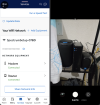
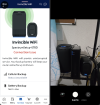
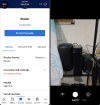
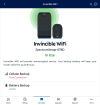
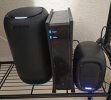
i spoke with them in store twice last month and over the phone 5 times and told them the sim/esim might not be provisioned.... they really dont seem to care. ill go monday again but bring the router and battery with me and also call again tonight - thats help desk for you. screenshot of all 3 devices connected showing spectrum app and camera app at the sametime. i really think its the sim card / esim
 

Attachments

  • 3.png
    3.png
    161.1 KB · Views: 4
  • 2.png
    2.png
    174.1 KB · Views: 4
  • 1.png
    1.png
    156.2 KB · Views: 4
Just spoke with Spectrum. They said that, based on what he and his team were told, customers can’t just unplug the modem and battery to try to force a cellular backup. The Spectrum node has to detect an outage in my area and send a signal to the router to activate cellular.

He thinks the eSIM/SIM isn’t provisioned (which has been my theory this whole time, and none of them listened). He also discovered that when they sent the second router, they didn’t send a replacement battery—they had me reuse the same one. So the battery also wasn’t tied to the account.

Which is kind of stupid. Apparently, you need the battery serial number tied to the router for it to function, or at least to show on the account when it’s in use. I think the battery outputs a different amperage than the power plug, so the system knows which power source is being used unless the serial number is tied to something like a LoRa mesh or another chip inside the battery that communicates with the router to indicate when it has switched over.

I’m on hold now, waiting to see what he can do. I guess you really do have to keep calling until you find a help desk support rep who knows what they’re doing. The other rep I spoke with had to keep asking the person next to them.

3:44pm pst as i write this and power goes out at 10pm pst, to 4am pst, i also bought a power station to have my tech work while power goes out and moved all websites over to cloudflare tunnel so i hope they work over cellular.

rep said he has to put in a suppport ticket 1 to 3 dayseingers, $3 credit for the wait time
 
This might help:
They say go to the "Reset it" button to troubleshoot the router?

Also, they explain how to enable push notifications in a certain way, so that their notification will appear in your phone when they detect a power outage or a fiber outage affecting your address. So you can verify that they correctly detect an outage, and therefore are supposed to have sent a signal to your router to enable the 5G connection.
 
  1. had a Scheduled Outage last night with power company and once again spectrum backup wifi failed me for the 2nd time or was it 3rd? anyway got a $3 credit. also i discover my UmbrelOS and cloudflare works good on wifi when i dont wanna power the switch. also i need to write an app to auto change Umbrel App Ips from eth to wifi when eth isnt detected and auto update cloudflare and Nginx Proxy Manager

  2. but power station did power modem so i was still connected
  3. didnt goto spectrum to wait... they said 1 to 3 days so ill wait. (they also said this last month) starting to think the node connect sensor isnt in my area
got to thinking.... if i can just unplug to test if cellular works... how do i know it works till i have to wait hours, days, weeks, months for an outage?
 
Last edited:
got to thinking.... if i can just unplug to test if cellular works... how do i know it works till i have to wait hours, days, weeks, months for an outage?
Exactly. The time to test the 5G auto switchover is now, well before there's a real power outage or fiber outage. Because when there's an outage and it fails to do its job, they can say, you should've tested it by pulling the power and pulling the fiber, before a real outage happened.
 
If anyone thinks Spectrum is monitoring local outages around the country to trigger failovers, please forward details on what you are smoking. :sailor:
 
If anyone thinks Spectrum is monitoring local outages around the country to trigger failovers, please forward details on what you are smoking. :sailor:
I'd like to know what you're smoking to think Spectrum can trigger the failover remotely when the Internet is down.
 
O_O they did it - Mr Hammond, I Think We're Back in Business!! The Phones Are Working. also cloudflare tunnels no issues. I unplugged the RJ45, and it switches to cellular even while the battery still has outlet power. As soon as the modem is unplugged or loses connection, cellular turns on. So all that nonsense they kept telling me about a node checking for an outage and sending a phantom signal was false.

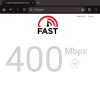
Also, does this router get better speeds than my Spectrum mobile phone service? I’m assuming it has a priority connection. In my town, you don’t really reach 1 Gbps or even 500 Mbps on cellular unless you have a higher-tier plan. You’d usually have to go about 20 minutes, like to a larger nearby city rather than a rural area, to see speeds like 500–700 Mbps on Spectrum Mobile or other carriers. So I’m guessing in the city this router could get… 1 Gbps or more?
 

Attachments

  • 1.png
    1.png
    135.9 KB · Views: 4
  • 2.png
    2.png
    98 KB · Views: 4
  • 3.jpg
    3.jpg
    642.6 KB · Views: 4
Last edited:
O_O they did it - Mr Hammond, I Think We're Back in Business!! The Phones Are Working. also cloudflare tunnels no issues. I unplugged the RJ45, and it switches to cellular even while the battery still has outlet power. As soon as the modem is unplugged or loses connection, cellular turns on. So all that nonsense they kept telling me about a node checking for an outage and sending a phantom signal was false.

Also, does this router get better speeds than my Spectrum mobile phone service? I’m assuming it has a priority connection. In my town, you don’t really reach 1 Gbps or even 500 Mbps on cellular unless you have a higher-tier plan. You’d usually have to go about 20 minutes, like to a larger nearby city rather than a rural area, to see speeds like 500–700 Mbps on Spectrum Mobile or other carriers. So I’m guessing in the city this router could get… 1 Gbps or more?
Nice job! Did the Spectrum store emplyees get the 5G Invincible WiFi working? Please share details of what exactly was the cause of the problem, and what they had to do to make it work for you!
 
Nice job! Did the Spectrum store emplyees get the 5G Invincible WiFi working? Please share details of what exactly was the cause of the problem, and what they had to do to make it work for you!
Nope. Last Sunday, I was told it could take 1 to 3 days, so I figured I would give them the benefit of the doubt, even though it was the second time they had told me that (but its help desk//// what you gonna do?). So I waited. It ended up taking them almost the whole week to get it working behind the scenes.

Each day, I would open the Spectrum app to check. Then Saturday I opened it and saw that cellular was ready green status, no red text. So I unplugged the power from the modem and battery, and cellular came on within 1 minute. It changed from blue to white, just like you said above.

Then I plugged the power back into the battery to see if cellular would turn off, thinking maybe the battery and router communicated with each other, since I thought it was odd that the serial number on the account had to match. But cellular still worked.

Since then, though, I’ve been having Wi-Fi issues and random router reboots. Hours after I tested cellular, I was lying in bed watching the Wi-Fi on my phone turn on and off. I went and stood in front of the router and watched it reboot, turn red, reboot again, and switch to cellular even though the modem was working fine with no issues. It almost seemed like someone at Spectrum was testing my cellular connection behind the scenes to make sure it was working. That’s the only thing I can think of.

Then all day Saturday, I kept having Wi-Fi issues. But so far today, no issues.

oh right i didnt do anything just wait, no one from spectrum contacted me like they said they would to let me know if they got it working or not and also i dont know what they did, but from the convo i had last sunday, it was esim/sim provisioning issues
 

Members online

Forum statistics

Threads
26,733
Messages
174,699
Members
20,292
Latest member
Sunnysideup
Get 3CX - Absolutely Free!

Link up your team and customers Phone System Live Chat Video Conferencing

Hosted or Self-managed. Up to 10 users free forever. No credit card. Try risk free.

3CX
A 3CX Account with that email already exists. You will be redirected to the Customer Portal to sign in or reset your password if you've forgotten it.
Back
Top