TIPS Intermittent one-way voice on hosted system w old-ish phones

iasm3j59s

New Member
Joined
Oct 28, 2021
Messages
18
Reaction score
20
Last November 2024 I updated a friend's small business (4 handset) from on-premises PBXinaflash system to a Vultr hosted IncrediblePBX 2024 (it has asterisk-21, freepbx-17 and peeking in the shell script, it downloaded Debian12/incrediblepbx-17.0.0.tgz).

While I was physically there for a few days, it all seemed to work well with their Aastra 6755 phones running through an AT&T ARRIS BGW210-700 gateway with default settings.

However, now I'm told they have had problems "all the time" (but not "every time") with:
  • calling out, no ringing tone, but person picks up and they can both talk
  • person calling in can't hear person in office
  • person in office can't the person who called (but maybe when it was an outbound call?)
  • call quality is sometimes poor (chiefly dropouts), but calling back usually fixes it
I've asked them to log the problems and times so I can look for patterns in the call logs (but "they're busy").

I wonder if anyone has any thoughts on how I might best proceed to log this? Or knobs I might tweak.

It's a pretty vanilla pjsip installation, where I adjusted pretty much nothing, on the assumption that modern defaults can handle the usual NAT/SIP issues that used to be such a pain long ago (after confirming no double NATing in the office or similar). Using flowroute (finally leaving telasip & voipstreet!).

I've supported them through 15+ years from on-prem Trixbox & VM-based IncrediblePBX, so I'd like to make it work for them. But I barely touch VOIP these days. I'm remote, and they're short staffed. I'm also happy to throw a few hundred dollars at it, e.g. updated phones, or go back to on-prem with an appropriate appliance (such as??), if that's likely to fix things and persist with pretty much no ongoing intervention (but almost zero calls are in-office - all in/outbound).

Any tips on how I might proceed are much appreciated. (I will have a pair of "remote tech hands" on site next week to help me through this, though they're not voip/pbx knowledgeable).

Ironically I did a similar upgrade (from on-prem to Vultr-hosted) for a different friend with 20+ extensions a couple of years ago and I've never really touched their system since! I was really hoping this would be the same.

Thanks!
 
Your problems smell of router and NAT issues. Make sure SIP ALG is turned off in the Arris. Next, I'd take a hard look at the quality of your internet connection: actual speed, Jitter, dropouts, etc. VDSL can be problematic. I assume it is using AT&T so don't expect everything to be great. Also that modem has two voice ports. If they are active, they could be intercepting traffic on port 5060 from your cloud PBX.

As an aside, I have always hated Arris modem/routers because they typically cause problems and are pretty inflexible in the settings of options. You might need to get your own router and put the Arris in Bridge mode if you can't isolate the problem.

Be sure you have Flowroute properly set up as a PJSIP trunk with their IP's in the MATCH = field on the trunk.

IncrediblePBX-2024 works just fine otherwise. I have it on Vultr right now with no issues.
 
Last edited:
Thanks! Yes, that's my inclination too (router/NAT) but without the specific experience of Arris/AT&T. My other IncrediblePX (probably circa 2020 at this point) has been solid also at Vultr.

I had seen a note about SIP ALG elsewhere and have confirmed is turned off. Yes, this office *does* have an active voice port (ironically that line forwards directly to the voip so it is unused, but I haven't ported the number as a safety feature for this medical office, though I was planning to once this transition was successful).

Hmm, bridge mode. Now that you mention it, we did have a 15yo(!) pfSense box in there previously when the voip was nominally working on-prem. That firewall died when we logged into it last Nov to check settings as part of this transition. Although it died while researching, it seemed it had been double-NAT'ing through the Arris because of some earlier mis-configuration (and there were two unused cable modems in the rack too - one live & plugged in! LOL). So I cleaned up and switched to the Arris as the "DNS provider of record" to get everything back online. With the firewall went the physically separated VOIP (QoS!) and computer LAN, and dedicated guest WiFi port,

Anyone have recommendations of solid firewalls these days? I've had surprising luck with consumer grade gear like Netgear and Tp-Link, but the models vary and they have increasing cruft, plus not in an office. But bridging one of those is a great place to start.

Hoping that bridging won't confused the active voice port at all …. Surely AT&T has that all isolated on a VLAN or similar.

Thanks again for those comments. Several ideas there.
 
From Google:
If you're experiencing VoIP issues with an Arris BGW210-700 router, the most common culprit is a feature called "SIP ALG" which is often enabled by default and can interfere with VoIP calls; disabling SIP ALG within the router's settings is usually the first step to resolve VoIP problems with this device; you may also need to check your DNS settings and ensure they are configured properly.

Key points about Arris BGW210-700 and VoIP issues:
  • SIP ALG:
    This feature is designed to help with certain internet protocols but can disrupt VoIP calls when enabled; always disable it in the router settings if you're experiencing call quality problems.

  • Accessing router settings:
    To access the router settings and change SIP ALG, open a web browser and navigate to the router's IP address (usually 192.168.1.254) and log in with your credentials.

  • DNS settings:
    Verify that your DNS servers are properly configured in the router settings. If you're experiencing registration issues, consider using public DNS servers like Google DNS (8.8.8.8, 8.8.4.4).

Other potential causes of VoIP issues with Arris BGW210-700:
  • Network congestion: If you have a large number of devices connected to the network, it could impact call quality.

  • Outdated firmware: Check for and install any available firmware updates for your router.

  • Cabling issues: Poor quality or damaged cables connecting your VoIP phone to the router could cause issues.

What to do if you're experiencing VoIP problems:
  • Check your VoIP phone settings: Ensure that your phone is properly configured with the correct SIP server details.

  • Restart your router and VoIP phone: Sometimes a simple reboot can fix temporary issues.

  • Contact your internet service provider: If the problem persists after checking your router settings, contact your ISP to rule out any issues on their network.
 
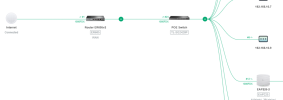
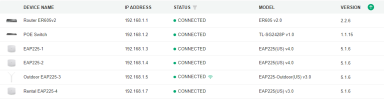
I am happy with very affordable TP-Link Omada enterprise gear. I have:

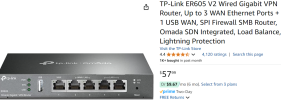
Router ER605v2
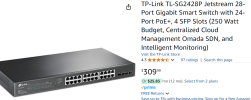
28 port POE Gigabit switch with 2 optical fiber ports TL-SG2428P
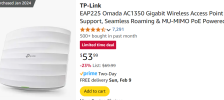
Wireless Access Points EAP225 with mesh support.

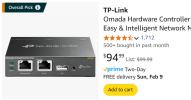
I run the Omada controller software on a VM although you can run it on your laptop. It does not have to be online all the time.

This combination allows auto failover to a backup WAN connection if needed. It provides DHCP, VPN, VLANs, etc. and is very inexpensive to purchase. My IP phones are on a VLAN at a higher priority than the PC data.

1738971057367.png
1738971085681.png
 
Dang, I hadn't seen that gear before. Very nice. I hate having to mess with a controller, especially given how much this closet is updated who knows if the controller will run on anything I have handy in 5 years. But as you say, using a VM mitigates that and the priority VLAN would be nice. Guessing I could keep the dumb POE switch and regular switch already there.
 
Dang, I hadn't seen that gear before. Very nice. I hate having to mess with a controller, especially given how much this closet is updated who knows if the controller will run on anything I have handy in 5 years. But as you say, using a VM mitigates that and the priority VLAN would be nice. Guessing I could keep the dumb POE switch and regular switch already there.
Not sure you could get VLAN and DHCP without using the TP-Link gear. The router is a firewall and gateway. The smart-switch is where a lot of the features reside. The controller is just a piece of software or hardware you use to set up the network and modify or monitor if needed. You can alaso buy a hardware controller for about $99 instead.

1738974411452.png
1738974492003.png
1738974601848.png1738974537898.png
 
Such shiny things. . Thanks for taking the time to put that together!

I come here wanting to fix an old/new phone system, and might walk away with a "let's just clear out that entire closet and start over" Then if the phones still hiccup afterwards, at least I can confidently say "Well, it's not the office network", plus "It needed updating anyway!" Gigabit to all the things.

Have to say, I did make a call into the office today and did get a personal example of "bits of call dropping everywhere" (though, interestingly not the classic "robot voice" of ye old voip times). I remember the good old days where we could always say "Well at least voip isn't as bad as cellular."

Hmm, if I'm going to redo all the things, I wonder if I should add an FXO ATA adapter and actually use that direct line coming in from AT&T's ARRIS box as intended. I used to have it rigged that way when we had low internet bandwidth, so we'd make maximal use of the (then truly) landline. Anyone have a favourite FXO SIP ethernet adapter? My last one was a nice little 4-port Sangoma PCI card with little red or green daughter cards (FXO/FXS) if I remember correctly. But obviously I don't want a machine to put that into.
 
Grantdstream devices are good. Depending on whether you want it as a trunk or as a direct connection to a FAX, there are various models that are good (and cheap.) Even as a trunk, the connection would still be going back to the cloud and if your network isn't great, it won't work much better. If you want to bypass the PBX and use the Arris port for faxing, that would be a good choice.
 
Last edited:
Do you have no better choice for broadband connectivity at that location? I seriously doubt that the cloud VM is at fault. If you want to go back on-prem, for that few phones this will be more than you need for the host processor:

There are many other Beelink mini-pc's with more power that can be a VirtualBox host for multiple apps. Crappy internet connectivity will still haunt your on-prem system regardless.
 
Yeah, I feel like the Arris router might be the key here. The prior on-prem system was using the same broadband connection but NAT'd to another router for the local LAN (!!!) and didn't have these issues.

I could go back to on-prem, thanks for that hardware link, but as the vast majority of traffic is calls outside (essentially zero interoffice), going on-prem adds exposure to poor connectivity for the IVR and voicemails for not much benefit. Oh, hang on. Then I could use a Grandstream ATA for most calls (there is rarely >1 trunk active). I see what you're thinking. Hmm, I'll have to ponder that. Another machine to care for (or run it in a VM on the existing Windows file server), but going back to the "good old days" of "landline".

I'm going to try bridging to an alternative router on Tuesday and we'll see how that goes. No, unfortunately, there are not a great range of internet options in this commercial building.

Thanks again @kenn10 for your ongoing input. It's thought provoking, on point and useful!
 
Last edited:
New data: The IVR recording is often garbled when I reach it - the same sort of "breaking up" sounds I was getting on a direct call the other day. Even when it's ringing, it sometimes "crackles". (The office is closed on the weekend, so I can mess around a lot more!).

This shouldn't be happening, because the recording is (obviously) coming directly from the Vultr-hosted machine and thus has nothing to do with the on-prem internet. Where do I start? The connection to the machine at Vultr, or the Flowroute DID service, or ??? I guess it is easiest to try a different DID provider temporarily. But Flowroute has been working flawlessly at my other friend's location :(

Any vultr settings I should be aware of? The virtual host Vultr details are:

1024.00 MB AMD High Performance
vCPU/s: 1 vCPU
vCPU Usage: 7%
RAM: 1024.00 MB
Storage: 25 GB NVMe
Bandwidth Usage: 0.64GB
OS: Ubuntu 24.04 LTS x64

Server is in LA. Flowroute is connecting via flowroute-us-west-or

Seems like there's plenty of free memory:

$ free -m
total used free shared buff/cache available
Mem: 955 524 133 34 505 430
Swap: 2399 365 2034
 
Last edited:
OK. Here's a test to try. In the office, have them call extension to extension several times at different times and see if there is any static or dropouts in the conversation. That will eliminate the possibility of a bad internet connection. The fact the IVR has issues does point to either Vultr or your Flowroute trunks.

If you have access to a linux server other than the Vultr instance, you can run the mtr commd:

Bash:
mtr 111.123.234.123  <-- The Vulrt public IP address
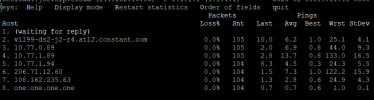
If you can't run the mtr command locally, ssh into your Vultr instance and run the mtr command pointing to the public ip address of your Arris modem. If you don't have mtr on the Vultr instance then apt install mtr to get it. Let it run for a while and if there are errors to or from the Vultr instance, they will show up in the output as loss and long ping times.
1739059919523.png
I had a similar issue with Vultr in Atlanta and they ended up moving me to a different server bay due to issues with the particular server I was on.

If you aren't seeing any errors to Vultr, run another mtr command to the IP address of your Flowroute server. You can leave an mtr running for as long as you like and watch the averages. The Loss% will obviously be concerning.
 
Last edited:
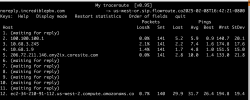
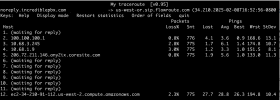
Hmm, already seeing losses from the vultr instance to flowroute and it's only been a few minutes …

Screenshot 2025-02-08 at 4.42.21 pm.png
 
Ten minutes later …What is normal? 2% loss seems large when it is apparently still bouncing around inside vultr (the 10.68.x.x addresses):

Screenshot 2025-02-08 at 4.52.56 pm.png
 
Not necessarily a show stopper but it could be a sign of dropped packets. Run from Vultr to your Arris modem also for comparison to see if there is a dropout between the sites.
 
Tracoute and ping (mtr) are not a good measure of the quality of a voip network, I suggest you use from the asterisk cli


rtp set debug {ip|on|off}

to see the data packets as they arrive in asterisk. if the streams seem broken then tshark or wireshark would be my next suggestion to see if they are in your network at all.
 
Get 3CX - Absolutely Free!

Link up your team and customers Phone System Live Chat Video Conferencing

Hosted or Self-managed. Up to 10 users free forever. No credit card. Try risk free.

3CX
A 3CX Account with that email already exists. You will be redirected to the Customer Portal to sign in or reset your password if you've forgotten it.
Back
Top