NEW OSS EPM for FreePBX 16 & iPBX 2027

Excellent, let me know and I'll include your mods. I also plan to add the latest Grandstream GXP HDC phones and the Yealink V.80 as default. Then we need to accomodate for PJSIP automatically instead of manually like I do now.
https://github.com/billsimon/endpointman branch release/16.0

No support or guarantees; it might set your PBX on fire; etc.
 
Thanks, @billsimon.

To install on Incredible PBX 2027. Log into your server as root and issue these commands. Do NOT use the GUI.

Code:
cd /var/www/html/admin/modules
wget http://incrediblepbx.com/ossepm16.tgz
tar zxvf ossepm16.tgz
rm -f ossepm16.tgz
rm -f /tmp/*
fwconsole ma install endpointman
fwconsole reload

Once installed, open FreePBX GUI and navigate to Settings -> OSS Endpoint Manager.

Click on Settings and enter http://provision.lol/ for Package Server.

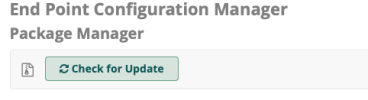
Click on Options icon and choose Package Manager. Once it opens, click Check for Updates button.

Once it is loaded, click on Install buttons beside Brands you wish to enable.
 
Last edited:
Thanks, @billsimon.

To install on Incredible PBX 2027. Log into your server as root and issue these commands. Do NOT use the GUI.

Code:
cd /var/www/html/admin/modules
wget http://incrediblepbx.com/ossepm16.tgz
tar zxvf ossepm16.tgz
rm -f ossepm16.tgz
rm -f /tmp/*
fwconsole ma install endpointman
fwconsole reload

Once installed, open FreePBX GUI and navigate to Settings -> OSS Endpoint Manager.

Click on Options icon and choose Package Manager. Once it opens, click Check for Updates button.

Once it is loaded, click on Install buttons beside Brands you wish to enable.
Thank you, Ward and Bill! I'll give it a go.
 
To load additional brands, download desired .tgz to your desktop from SourceForge.
In FreePBX GUI, choose Settings -> End Point Manager
Click Options icon choose Settings -> Package Import
Choose Brand Package file from your desktop and click Import

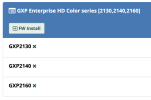
Here are Grandstream additions courtesy of @krzykat:
View attachment 4653

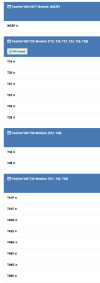
Here are Yealink V80 additions courtesy of @krzykat:

View attachment 4654
Thanks, Ward! Do you know if you can you use the T46S for the T46U?
 
I'm not planning on using OSS EPM but if you guys are working with it and find it to be working correctly, let me know and I'll submit the changes to the FreePBX contributed repo. If not, let me know about the bugs.
 
So far, it works - for certain better than what exists there.
I would like to tweak it some in the future with langaugages and such. - some defaults to spanish - LOL
 
@billsimon Think I spoke too soon. I only installed, didn't try to use. Not sure if a code error or setup issue on my side, but when I add a new device, I get: Error Returned From Provisioner Library: A non-numeric value encountered /var/www/html/admin/modules/_ep_phone_modules/endpoint/base.php line 633
 
Last edited by a moderator:
Error Returned From Provisioner Library: A non-numeric value encountered /var/www/html/admin/modules/_ep_phone_modules/endpoint/base.php line 633
OSS EPM comes in two parts, the FreePBX module and the "provisioner library" which are the parts from https://github.com/provisioner/Provisioner. But in fact the module doesn't pull the provisioner library from github, it gets it from the FreePBX mirror server: (see the Settings page)

1674445778214.png

The version mirrored there has the bug you found even though it was fixed on github.

I mirrored the mirror, applied the fix, and added your Yealink V80 package while I was at it. Set your Package Server address to "http://provision.lol/" (include the ending slash)

1674445903898.png

and then go to the Package Manager and Check for Update:

1674445942352.png
 
OK, I cut a release (16.0.0.1) with the alternate provisioner repo location (http://provision.lol/) preloaded and a couple little fixes.

You can install or upgrade with:

Bash:
fwconsole ma downloadinstall https://github.com/billsimon/endpointman/archive/refs/tags/v16.0.0.1.tar.gz
 
The debian package needs to be fixed. The t*f*t*p install is still for cent os.

I changed to this code:

Bash:
echo "Installing t*f*t*p-server..."
apt install tftpd-hpa
echo '# /etc/default/tftpd-hpa

#TFTP_USERNAME="t*f*t*p"
TFTP_USERNAME="asterisk"
TFTP_DIRECTORY="/tftpboot/"
TFTP_ADDRESS=":69"
TFTP_OPTIONS="--ipv4 --secure --create"
' > /etc/default/tftpd-hpa2
chown root:asterisk /tftpboot
chmod 775 /tftpboot
service tftpd-hpa restart
echo "t*f*t*p installation completed."
echo " "
echo " "

echo "********** READ THIS CAREFULLY **********"
echo " "
echo "For service outside your private LAN, VPN, and whitelisted IP addresses,"
echo "issue this command to temporarily expose t*f*t*p resources to the Internet:"
echo " "
echo "iptables -I INPUT -p udp --dport 69 -j ACCEPT"
echo " "
echo "When you are finished using t*f*t*p, close this port by restarting IPtables:"
echo " "
echo "iptables-restart"
echo " "
echo "********** READ THIS CAREFULLY **********"
echo " "
 
Not sure the policy on here about reviving threads. I went through this got OSS installed, had a few hangups that I've dealt with. FPBX16

Http header failure with provision.lol/master.json, some braces changes in includes/json.inc, changing a function call to fix a naming issue, etc.
Currently I am stuck trying to get the Template Manager to allow me to edit the configuration files. The error is in /admin/assets/endpointman/js/epm_templates.js on line 85.
TypeError: ValueSel is undefined
Now I don't know js that well so I spent some time on it and managed to have the function get the name of the template file to be edited but I can't seem to actually get it to edit the configuration files.

Honestly even if someone could just point me in a direction I'd appreciate it I've tried several things but I am at my limit of capabilities.
 
Last edited:
I went through this got OSS installed, had a few hangups that I've dealt with. FPBX16
Need more info to help you out. What OS are you using? What PHP? Which OSS EPM version and what repo did you use?
 
Hmm... not sure why you'd use Centos7 on a new build as its soon to be EOL, but ... let me try to help out. What brand of phone are you using? I've not gotten that error before, but I think I did make a change on something. Let me try to figure out what change I made ... the the minimum, I need to report any changes to Bill Simon so that he can update his repository.
 
Since it seems to be very uniquely my setup I am going to pause this and shift away from my current setup. I'm going to a different OS and see if this is all due to quirks from CentOS7 or my previous install. I appreciate the feedback and I will respond if I find my issues solved by this.
 
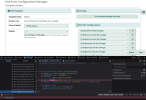
Debian 11, IPBX 2027, PHP 7.4, coming off a clean install. After downloading a package for a phone, cloning a template from that, and then attempting to edit the SEP$mac.cnf.xml or any other file by clicking the button on the right this error pops.
/admin/assets/endpointman/js/epm_templates.js on line 85.
TypeError: ValueSel is undefined
 

Attachments

  • EditConfig.png
    EditConfig.png
    211.4 KB · Views: 17
Debian 11, IPBX 2027, PHP 7.4, coming off a clean install. After downloading a package for a phone, cloning a template from that, and then attempting to edit the SEP$mac.cnf.xml or any other file by clicking the button on the right this error pops.
/admin/assets/endpointman/js/epm_templates.js on line 85.
TypeError: ValueSel is undefined
OK - did you "download package" or "install" the package from package manager?

I have a package that I think came with the install for Cisco/Linksys dated 2016-02-23 ... and I installed it (already had it installed on this test), and then went to settings / product configuration editor - selected the Cisco SIP 69xx/79x1/79x5/99xx Ver 9.x Models, then pulled up file under locla file configs, and selected SEP file and edited and saved it without issue.

Are those the steps you took? If so, then I've got something different on mine and I can look to see what differences I've made.
 

Members online

No members online now.

Forum statistics

Threads
26,688
Messages
174,412
Members
20,258
Latest member
RandomPerson
Get 3CX - Absolutely Free!

Link up your team and customers Phone System Live Chat Video Conferencing

Hosted or Self-managed. Up to 10 users free forever. No credit card. Try risk free.

3CX
A 3CX Account with that email already exists. You will be redirected to the Customer Portal to sign in or reset your password if you've forgotten it.
Back
Top