
Hello guys,
PBX: IncrediblePBX 2021.01 for Debian 10.9 Buster. Asterisk 18.2.1. Incredible GUI 15.0.22.33.
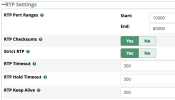
Is it enough to make the RTP port range through the GUI, or do I need to run anything else in the server terminal?
I've experienced some calls that when picked up, I can't hear anyone on the other side. It's not as frequent, however it's not like it doesn't happen at all. I've tried reading the logs at the moment these calls happen however, I cant notice anything out of the ordinary from PBX, or Twilio.
I had made some changes for the RTP port range as Twilio updated them to 10000-60000. I had made this change in my firewall, but did not make it in my PBX. I just did this change through the GUI in the hopes to solve this problem.
If anyone has any suggestions on what to look for regarding this problem it'd be appreciated.
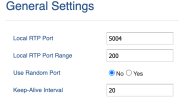
I use Grandstream GXP2170 phone. Under Settings/General Settings there is a section for Local RT port and range. The default is 5004 which is outside my range of 10000-60000, and I have at least 30 phones with the same local rtp port 5004 which comes as default, could this be causing the issue?
PBX: IncrediblePBX 2021.01 for Debian 10.9 Buster. Asterisk 18.2.1. Incredible GUI 15.0.22.33.
Is it enough to make the RTP port range through the GUI, or do I need to run anything else in the server terminal?
I've experienced some calls that when picked up, I can't hear anyone on the other side. It's not as frequent, however it's not like it doesn't happen at all. I've tried reading the logs at the moment these calls happen however, I cant notice anything out of the ordinary from PBX, or Twilio.
I had made some changes for the RTP port range as Twilio updated them to 10000-60000. I had made this change in my firewall, but did not make it in my PBX. I just did this change through the GUI in the hopes to solve this problem.
If anyone has any suggestions on what to look for regarding this problem it'd be appreciated.
I use Grandstream GXP2170 phone. Under Settings/General Settings there is a section for Local RT port and range. The default is 5004 which is outside my range of 10000-60000, and I have at least 30 phones with the same local rtp port 5004 which comes as default, could this be causing the issue?
Last edited:


 Phone System