@AndyInNYC : As long as the PBX is not trans/re-encoding the media layer, increasing the number of cores or the amount of RAM will have minimal effect. But there are other things in Proxmox that you have to be careful about when it comes to (any version of) IncrediblePBX.
For instance, these are the memory and CPU settings for my home PBX on a very modest Proxmox server:

As you can see I allocated only 1+1/4 GiB of RAM. The PBX also has 2GiB of swap space on a consumer grade SSD which hardly gets used.
With some applications memory ballooning doesn't work as the signalling between the host and the VM is not optimal. To be safe I don't use it.
When it comes to CPU cores, 2 actual cores are a must. But, if on your host the core count includes also the threads go for an odd number of allocation like 3, because with 2 there is a high probability that you are going to get actually 1 core with 2 threads. That entirely depends on your Proxmox/KVM host. Then you can limit the core utilization with cpulimit. In my case I am allocating 2 actual cores (there is no threading on my host CPU) to ensure that multiple task threads run simultaneously (without time slicing), yet I limit the overall CPU load factor to 1+1/4 CPU load. That's something that Proxmox (actually QEMU/KVM underneath) handles very well.
The next thing you need to be careful about with the CPU settings is the CPU model selection:
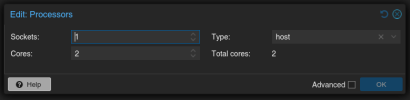
Just make sure that the CPU type is set to 'host' rather than any specific CPU model. This is to avoid QEMU kicking in to emulate the 'missing' target CPU mnemonics (which might or not be overbearing). Otherwise the overhead would take a significant toll on your performance. Unfortunately for some obscure reasons Proxmox doesn't default to 'host' as it should.
Now, for PBX's storage I have the following:

The best performance you get on a low-end Proxmox host (like mine) is with an NVME type storage set in a 'directory' type storage resource. That also allows you to run snapshots at will.
'writethrough' caching protects better against unforeseen failures (especially power outage in case you have no UPS attached to your Proxmox box) as opposed to for instance 'writeback' which is a tad faster but much riskier. To limit wear and tear on the NVME make sure that the 'ssd' mode is enabled.
'iothread=1' is a tremendous help in low-end servers as it separates the input/output actions into a centralized io thread separate from the main application thread and doing so it prevents the main application thread from being tied-up while data is written to or read from storage. You will get noticeably better responsiveness of the desktop if you run a GUI on the PBX OS for instance.
For your actual use conditions you can monitor the CPU and RAM pressure through the Proxmox console and fine tune your CPU and RAM settings.
Ideally you will see a CPU load of 1 to 2% at rest and an additional 1 to 2% per call. The memory use should be in the 50% range and Proxmox will dynamically adjust it and keep it optimal through the virtual machine's memory allocation calls. If it goes much higher then allocate more memory. If it falls way too low then reduce the amount allocated to avoid resource waste. But as I said don't activate ballooning with the PBX.


 Phone System