
You are using an out of date browser. It may not display this or other websites correctly.
You should upgrade or use an alternative browser.
You should upgrade or use an alternative browser.
FYI Endpoint Manager for IncrediblePBX 2020
- Thread starter Starburst
- Start date
- Status
- Not open for further replies.

Twilight Sparkle
Active Member
- Joined
- Jul 21, 2013
- Messages
- 496
- Reaction score
- 73
good question, i keep trying to use the " OSS PBX End Point Manager " but told " This is not the same at the commercial EPM and It is NOT supported by FreePBX or Sangoma Technologies inc. If you are looking for a Commercially supported endpoint manager please look into the Commercial Endpoint Manager by Sangoma Technologies inc "
i wonder if their is away to turn this on... or something... i am sure i asked or saw and answer to this before but i cant recall right now.... but i used to love this
i wonder if their is away to turn this on... or something... i am sure i asked or saw and answer to this before but i cant recall right now.... but i used to love this

wardmundy
Nerd Uno
- Joined
- Oct 12, 2007
- Messages
- 20,420
- Reaction score
- 6,140
Easiest solution without migrating to FreePBX Distro and commercial modules would be to activate a ClearlyIP device and use their endpoint management software.
Introducing Plug-and-Play Incredible PBX IP Phones
Introducing Plug-and-Play Incredible PBX IP Phones

krzykat
Telecom Strategist
- Joined
- Aug 2, 2008
- Messages
- 3,208
- Reaction score
- 1,288
i wonder if their is away to turn this on... or something... i am sure i asked or saw and answer to this before but i cant recall right now.... but i used to love this
Does it not work? What do you mean by "turn it on" ? I'm going to work with this today and verify if it works properly.
Twilight Sparkle
Active Member
- Joined
- Jul 21, 2013
- Messages
- 496
- Reaction score
- 73
dose not have options to do anything - thought i read something before about having to turn on edge or something i dont recallDoes it not work? What do you mean by "turn it on" ? I'm going to work with this today and verify if it works properly.
Attachments

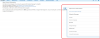
It's all hiding under the pop out menu on the right.dose not have options to do anything
OSS EPM is buggy as heck. I've been spending some time with it trying to get it functional under newer php releases. Trying to determine bugs that have always been there and what's new with php7.x is a major headache.
The templates are all very old as well.
Still, it can be useful of you can tolerate the glitches and take the time to mod the templates.
Twilight Sparkle
Active Member
- Joined
- Jul 21, 2013
- Messages
- 496
- Reaction score
- 73
is it this pop out.... wow ... all this time it was their and i never once noticed that.... i feel like a moronIt's all hiding under the pop out menu on the right.
OSS EPM is buggy as heck. I've been spending some time with it trying to get it functional under newer php releases. Trying to determine bugs that have always been there and what's new with php7.x is a major headache.
The templates are all very old as well.
Still, it can be useful of you can tolerate the glitches and take the time to mod the templates.
- thank you for pointing this out... i am going to start checking every tab i see now.... mind blow... just exploding all over the place
Attachments

Starburst
Member
- Joined
- Jun 4, 2020
- Messages
- 86
- Reaction score
- 21
Will the Commercial Endpoint Manager by Sangoma Technologies inc work on Incredible PBX?good question, i keep trying to use the " OSS PBX End Point Manager " but told " This is not the same at the commercial EPM and It is NOT supported by FreePBX or Sangoma Technologies inc. If you are looking for a Commercially supported endpoint manager please look into the Commercial Endpoint Manager by Sangoma Technologies inc "
i wonder if their is away to turn this on... or something... i am sure i asked or saw and answer to this before but i cant recall right now.... but i used to love this
I like and choose Granstream phones, I'm coming from 3CX which has support built in for all major manufactures.
I like the built in AvantFax, but am finding out FreePBX looks to have the same option as well.
I went onto Clearly IP's site, and didn't see any module anywhere. Unless someone can tell me where they are hidden.
Also I only see a bundle of 3 phones for $299 currently, not individually.
I'm going to login as well and look for that pop-out.
Last edited:
Starburst
Member
- Joined
- Jun 4, 2020
- Messages
- 86
- Reaction score
- 21
I've started replacing grandstream phones with ClearlyIP phones (only 3 out of 50 so far), but their endpoint management software does make my life easier.
Just have to ask why you are swapping out the Grandstreams?
In another one of my posts in this thread I mentioned they are my preferred phone. (Use to by LinkSys years ago)
Twilight Sparkle
Active Member
- Joined
- Jul 21, 2013
- Messages
- 496
- Reaction score
- 73
i dont know.... thats also a good question...Will the Commercial Endpoint Manager by Sangoma Technologies inc work on Incredible PBX?
I like and choose Granstream phones, I'm coming from 3CX which has support built in for all major manufactures.
I like the built in AvantFax, but am finding out FreePBX looks to have the same option as well.
I went onto Clearly IP's site, and didn't see any module anywhere. Unless someone can tell me where they are hidden.
Also I only see a bundle of 3 phones for $299 currently, not individually.
I'm going to login as well and look for that pop-out.
krzykat
Telecom Strategist
- Joined
- Aug 2, 2008
- Messages
- 3,208
- Reaction score
- 1,288
Will the Commercial Endpoint Manager by Sangoma Technologies inc work on Incredible PBX?
I like and choose Granstream phones, I'm coming from 3CX which has support built in for all major manufactures.
I like the built in AvantFax, but am finding out FreePBX looks to have the same option as well.
I went onto Clearly IP's site, and didn't see any module anywhere. Unless someone can tell me where they are hidden.
Also I only see a bundle of 3 phones for $299 currently, not individually.
I'm going to login as well and look for that pop-out.
Commercial - Probably will work
Why not GS? Their firmware and quality have long been known for being buggy. I migrated from GS to Yealink to ClearlyIP.
What ClearlyIP now has, is pretty impressive on what the phones can do.
They only offer their EPM for their phones (they're in that business, so I understand it). I wish they allowed with all phones, and just have better options for the ClearlyIP - or open it to allow others to add to it.
The clearlyIP module only works properly on the newer FreePBX setup. You can get details here on how to install.
Twilight Sparkle
Active Member
- Joined
- Jul 21, 2013
- Messages
- 496
- Reaction score
- 73
i got a ClearlyIP account and testing it and love the auto configuration, sms mms my mind is also exploding more that i dont think their is much more to explode... but im sure... i this forum can find away to.... so far i am liking ClearlyIPCommercial - Probably will work
Why not GS? Their firmware and quality have long been known for being buggy. I migrated from GS to Yealink to ClearlyIP.
What ClearlyIP now has, is pretty impressive on what the phones can do.
They only offer their EPM for their phones (they're in that business, so I understand it). I wish they allowed with all phones, and just have better options for the ClearlyIP - or open it to allow others to add to it.
The clearlyIP module only works properly on the newer FreePBX setup. You can get details here on how to install.
i need to get ClearlyIP phone
krzykat
Telecom Strategist
- Joined
- Aug 2, 2008
- Messages
- 3,208
- Reaction score
- 1,288
Does it not work? What do you mean by "turn it on" ? I'm going to work with this today and verify if it works properly.
I got the OSS EPM working with a nice setup for GXP2160 if any needs it, let me know.
I had some AJAX issues, and this fixed it:
Part that I was missing can be found here: https://issues.freepbx.org/browse/F...ssuetabpanels:comment-tabpanel#comment-151208
Code:
# cp /var/www/html/admin/modules/endpointman/install/setup.php /var/www/html/admin/modules/_ep_phone_modules/

But... if you go to "Package Manager" and hit "Check for Update", it will "install" the broken version of this file; just repeat the above command to fix again.
wardmundy
Nerd Uno
- Joined
- Oct 12, 2007
- Messages
- 20,420
- Reaction score
- 6,140
Getting OSS End Point Manager to work has been nothing short of water torture for most folks. So... to ease the pain, we've built a BETA CONFIGURATOR FOR INCREDIBLE PBX 2020 SYSTEMS ONLY. It assumes that you have never used OSS EPM before so all of your existing OSS EPM settings will be overwritten. MAKE A BACKUP OF SERVER BEFORE PROCEEDING. Current Incredible PBX 2020 backup script is here.
Log into the Linux CLI as root and issue the following commands:
In the FreePBX GUI, login as admin, and you now should be able to access OSS Endpoint Manager in Settings. Click on the Options bar on the right and choose Package Manager. DO NOT CLICK Check for Update. There aren't and probably never will be any. All available phone setups should now appear and be ready for use.
Holler if it smokes.
Log into the Linux CLI as root and issue the following commands:
Code:
cd /
wget http://incrediblepbx.com/endpointman.tar.gz
tar zxvf endpointman.tar.gz
rm -f endpointman.tar.gz
cd /root/endpointman
mysql -u root -ppassw0rd asterisk < epm-tables.sql
fwconsole reload
fwconsole restart
In the FreePBX GUI, login as admin, and you now should be able to access OSS Endpoint Manager in Settings. Click on the Options bar on the right and choose Package Manager. DO NOT CLICK Check for Update. There aren't and probably never will be any. All available phone setups should now appear and be ready for use.
Holler if it smokes.
Last edited:
Starburst
Member
- Joined
- Jun 4, 2020
- Messages
- 86
- Reaction score
- 21
I got the OSS EPM working with a nice setup for GXP2160 if any needs it, let me know.
I had some AJAX issues, and this fixed it:
Part that I was missing can be found here: https://issues.freepbx.org/browse/F...ssuetabpanels:comment-tabpanel#comment-151208
Code:# cp /var/www/html/admin/modules/endpointman/install/setup.php /var/www/html/admin/modules/_ep_phone_modules/ But... if you go to "Package Manager" and hit "Check for Update", it will "install" the broken version of this file; just repeat the above command to fix again.
Got
Project Does Not Exist
Starburst
Member
- Joined
- Jun 4, 2020
- Messages
- 86
- Reaction score
- 21
Getting OSS End Point Manager to work has been nothing short of water torture for most folks. So... to ease the pain, we've built a BETA CONFIGURATOR FOR INCREDIBLE PBX 2020 SYSTEMS ONLY. It assumes that you have never used OSS EPM before so all of your existing OSS EPM settings will be overwritten. MAKE A BACKUP OF SERVER BEFORE PROCEEDING. Current Incredible PBX 2020 backup script is here.
Log into the Linux CLI as root and issue the following commands:
Code:cd / wget http://incrediblepbx.com/endpointman.tar.gz tar zxvf endpointman.tar.gz rm -f endpointman.tar.gz cd /root/endpointman mysql -u root -ppassw0rd asterisk < epm-tables.sql fwconsole reload fwconsole restart
In the FreePBX GUI, login as admin, and you now should be able to access OSS Endpoint Manager in Settings. Click on the Options bar on the right and choose Package Manager. DO NOT CLICK Check for Update. There aren't and probably never will be any. All available phone setups should now appear and be ready for use.
Holler if it smokes.
Thank you, I'm sure if Clearly offered it as a Commercial Module, people would buy it, just for the time savings on larger installs.
krzykat
Telecom Strategist
- Joined
- Aug 2, 2008
- Messages
- 3,208
- Reaction score
- 1,288
Got
Project Does Not Exist
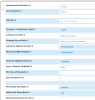
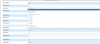
Sorry - Doing what gave you this message? If you do the Beta Configurator that Ward mentions, you should be able to have OSS EPM installed. Then if you want a more comprehensive template for GXP21xx it will allow you to have more options than their current setups:

Starburst
Member
- Joined
- Jun 4, 2020
- Messages
- 86
- Reaction score
- 21
Sorry - Doing what gave you this message? If you do the Beta Configurator that Ward mentions, you should be able to have OSS EPM installed. Then if you want a more comprehensive template for GXP21xx it will allow you to have more options than their current setups:
View attachment 2804
View attachment 2805
View attachment 2806
Weird, I tried from Thunderbird and it gave that error, tried the link above and it was OK.
My bad.
- Status
- Not open for further replies.


Forum statistics
Get 3CX - Absolutely Free!
Link up your team and customers  Phone System Live Chat Video Conferencing
Hosted or Self-managed. Up to 10 users free forever. No credit card. Try risk free.

Verify your Email
Check your inbox!
We’ve sent you an email. Click on the button in the email body to verify your email address – (if you can not find it, check your spam folder).
Upon verification you will be directed to the 3CX setup wizard.