

big charlie
Active Member
- Joined
- Aug 20, 2013
- Messages
- 115
- Reaction score
- 30
Setting up a fax on a 2020 (non-raspi) using the Big 30 guide : http://nerdvittles.com/?p=32014#app12
I ran incrediblefax2020.sh , rebooted. But I see no fax tab in the inbound routes. What am I missing??
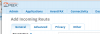
EDIT:
Tooling around I found in Admin > module admin. The fax configuration setting was disabled. I enabled and got this.
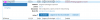
With the latest release of Incredible PBX 2020, fax recognition is supported on incoming calls. Edit each of your Inbound Routes and enable Detect Faxes with Detection Type=SIP, Fax Ring=Yes, Fax Detection Time=4, and Fax Destination=Custom Destination:Fax (HylaFax) in the Fax tab.
I ran incrediblefax2020.sh , rebooted. But I see no fax tab in the inbound routes. What am I missing??
EDIT:
Tooling around I found in Admin > module admin. The fax configuration setting was disabled. I enabled and got this.
Last edited:



 Phone System