SOLVED One way audio issue on random calls

vchohan

Member
Joined
Sep 20, 2019
Messages
52
Reaction score
6
Hi Team, We are getting one-way audio on random incoming/outgoing calls, however, if we call the same person twice or thrice we get the audio. I already added session-timers = refuse and nat = yes under chan SIP setting. SIP ALG is already disabled on Sophos firewall and we are using Incredible PBX server version 13.0.197.21. This issue is happening with users using hard phones as well as softphones. We even tried to restart the PBX server and Firewall but the issue still persists. Could you please help us with this?
 
Definitely a firewall problem.

Do you have UDP port 10-20000 open on the firewall to your PBX?
What about iptables on the PBX itself?
 
We have 20003 - 20999 UDP port open at firewall as well as on iptables. Is this range not enough for 150 agents to call?
 
We have 20003 - 20999 UDP port open at firewall as well as on iptables. Is this range not enough for 150 agents to call?
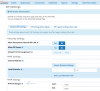
Have you also changed IncrediblePBX to limit to that reduced RTP range? Check Settings > Asterisk Sip Settings. If Asterisk is still trying to use ports 10000-20000, Firewall settings alone will not keep it from launching talk paths into the range it has defined. If the firewall blocks 10000-20002, and Asterisk tries to use the blocked ports, you get no audio.
1593702083454.png
 
Last edited:
Also remember that FreePBX 13 is due for end-of-life soon. I would recommend that you migrate your system to IncrediblePBX 2020 which is using FreePBX 15 and Asterisk 16.
 
Last edited:
Also remember that FreePBX 13 is due for end-of-life soon. I would recommend that you migrate your system to IncrediblePBX 2020 which is using FreePBX 15 and Asterisk 16.

Completely agree. We've started to create a new Incredible 2020 template. We have a few PBX on the new setup and will probably by end of summer - end of year at latest, convert everyone across from Incredible13 to Incredible 2020. It was a good platform for quite a while, but now its time to step up.
 
Don't know if this helps, but worked for me with a remote extension that had audio issues:

Extension-> advanced -> NAT Mode = YES-(force_rport,comedia)
 
Have you also changed IncrediblePBX to limit to that reduced RTP range? Check Settings > Asterisk Sip Settings. If Asterisk is still trying to use ports 10000-20000, Firewall settings alone will not keep it from launching talk paths into the range it has defined. If the firewall blocks 10000-20002, and Asterisk tries to use the blocked ports, you get no audio.
View attachment 2858

I have configured the same range 20003 - 20999 on asterisk SIP setting. But, I don't know it seems like we need to increase the range like 20000 - 30000. Do we need to restart the PBX if make these changes on the iptables as well as under asterisk SIP setting? I know we need to restart the iptables but not sure about the complete PBX server.
 
Completely agree. We've started to create a new Incredible 2020 template. We have a few PBX on the new setup and will probably by end of summer - end of year at latest, convert everyone across from Incredible13 to Incredible 2020. It was a good platform for quite a while, but now its time to step up.
We will surely try to plan this.
 
Don't know if this helps, but worked for me with a remote extension that had audio issues:

Extension-> advanced -> NAT Mode = YES-(force_rport,comedia)
I have already applied this setting to all my extensions.
 
I have configured the same range 20003 - 20999 on asterisk SIP setting. But, I don't know it seems like we need to increase the range like 20000 - 30000. Do we need to restart the PBX if make these changes on the iptables as well as under asterisk SIP setting? I know we need to restart the iptables but not sure about the complete PBX server.

The carriers sometimes don't respect ports outside 10000 - 20000 for RTP. I'd be inclined to test it with the setting that allows for that standard configuration and see if the one way audio issues go away. You don't need to restart the PBX for iptables changes to take effect.
 
Issue resolved after rebooting firewall....Thank you all for your comments...
 
Get 3CX - Absolutely Free!

Link up your team and customers Phone System Live Chat Video Conferencing

Hosted or Self-managed. Up to 10 users free forever. No credit card. Try risk free.

3CX
A 3CX Account with that email already exists. You will be redirected to the Customer Portal to sign in or reset your password if you've forgotten it.
Back
Top