TUTORIAL How To: Native Android SIP client with Incredible PBX

w1ve

Guru
Joined
Nov 15, 2007
Messages
842
Reaction score
223
Hey Folks,

Here I've been messing with third-party SIP clients on my Android phone, and I've been very unhappy with any of them.
Come to find out, there has been a NATIVE SIP CLIENT built into Android since Version 6.0.
I'm currently on a Pixel 4XL with Version 10.0, so YMMV, and the menu locations may be slightly different, but I've tested this with a few
Friends, including some Samsung Galaxy phones, and same.

What's nice about the native client?
- As many SIP accounts as you want.
- SIP-to-SIP dialing, no need for registration
- Receiving calls works fine.
- Calls are in the native Call Log on Android -- so you can call back automatically.

This is awesome to integrate corporate PBX extension with your regular cell.
It is calling over 4G or Wifi, but I seem to be having great luck with it. I'd like to hear others feedback.

How to:

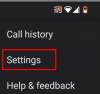
- Go to the native dialer on android, and click the three-vertical-dot menu:
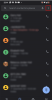
1598815640430.png1598815640430.png

- Select Settings:
1598815683859.png

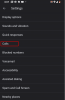
- Select Calls
1598815739392.png

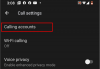
- Select Calling Accounts:

1598815814673.png

Here, you see I already have a SIP account, and my Visible regular 4G SIM-based cellular account.
Notice the Make Calls With setting. If you select "Always ask", when you dial a number it will prompt you to select the Account (see later picture).

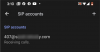
To set up a new SIP Account, select SIP Accounts.

If you want to receive incoming calls on the SIP account, check the selection. This will register with the PBX.
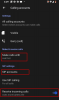
1598815904174.png

- Setting up new SIP Account:
1598816136914.png

Click the + in the upper right to create a new account:
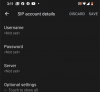
1598816171480.png

Your username is your extension on the PBX.
Your password is the password for your extension on the PBX.
The server is your FQDN of your PBX.

Under Optional Settings:
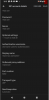
1598816294108.png
I put in my extension as the autenticated username
Display name is your name (as you want it to be displayed)
Outbound Proxy Address is the FQDN of your PBX.
Port and transport per your PBX Configuration.

As I said,if you select "Always Ask" for "Make Calls With" setting, the dialer will prompt you for the account:

Here's what I see when I dial a pbx extension and press the call button:
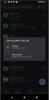
1598816504834.png

Simply tap the account you want to use!!

As I said, it is integrated, works over 4G or Wifi, and is seemless. YMMV.

Gerry
 
I always wanted to do this when I had Android phones but my carrier blocked this setting. Now I’m on iOS and there are no native SIP options. Nice to see you got it working.
 
Many phones with Android 9 and beyond no longer include the unlocked SIP/VOIP stack. I was not willing to unlock the bootloader, root the phone, and then enable the VOIP stack since it voids the warranty. The more "genuine" Android loads like the Pixel, One Plus, and some Samsung phones still allow access.
 
I always wanted to do this when I had Android phones but my carrier blocked this setting. Now I’m on iOS and there are no native SIP options. Nice to see you got it working.
Many phones with Android 9 and beyond no longer include the unlocked SIP/VOIP stack. I was not willing to unlock the bootloader, root the phone, and then enable the VOIP stack since it voids the warranty. The more "genuine" Android loads like the Pixel, One Plus, and some Samsung phones still allow access.

In almost all cases the software is there in its entirety, what's being blocked is the access link.
With help from a little utility app called "Quick Shortcut Maker" found in the android app store you can re-establish the link. It simply puts a shortcut on your screen.

After installing "Quick Shortcut Maker", open it up and go find "Phone Services" under the "Activities" tab of the app. There will be several with subtitles, one will show "Sip Settings". Try it if it works then press the create shortcut button at the bottom right.

What I described above works with Android version 9. The same app can create shortcuts for older versions too but SIP may be under other main entries. Among my notes from some time ago I found that in one case the link was under "com.android.phone.settings.PhoneAccountSettingsActivity". So, look around you'll find it.
I only know of one instance the voip calling app was completely dismantled, and that was probably to save memory space on a first generation tmobile 4G smartphone with only 8GB or storage.
 
Great tip but on my Moto G7, the SIP account won't work once input and activated. I remember reading that a number of manufacturers were not loading the SIP stacks in Android anymore. I know nothing is blocked on the network because my other softphone client works.
 
Great tip but on my Moto G7, the SIP account won't work once input and activated. I remember reading that a number of manufacturers were not loading the SIP stacks in Android anymore. I know nothing is blocked on the network because my other softphone client works.
It's good to know. I'm myself on a Moto g6 and I was toying with the idea of getting a g7 as the battery of my g6 started to show signs of wear and tear.
My g6 came originally with Android 8 and this app worked fine with it. Then I upgraded it to Android 9 and it worked again.
Maybe with g7 they started to tighten things up.
 
It's good to know. I'm myself on a Moto g6 and I was toying with the idea of getting a g7 as the battery of my g6 started to show signs of wear and tear.
My g6 came originally with Android 8 and this app worked fine with it. Then I upgraded it to Android 9 and it worked again.
Maybe with g7 they started to tighten things up.
I have a Moto G6 from Verizon but recently bought an unlocked G7. The G7 is a lot faster and better in many respects. Of course on Verizon, if you don't buy the phone from them, the wifi calling won't work. I'm trying out T-Mobile and the wifi calling works just fine with them but the SIP calling seems not to. I can put all the settings in but the phone never attempts to hit the PBX. It could be that the SIP is communicating over cellular only. I'll continue to experiment.
 
Can confirm that SIP calling fails on Moto G8+ even though QuickShortcutMaker lets you add a SIP account. Moto landlords have apparently ripped out the SIP functionality and hardwired the phone to the SIM cards.

Google Pixel 4a works fine without having to resort to QuickShortcutMaker.

Moto G7 Play works using QuickShortcutMaker and WiFi as long as you have a cell connection. A SIM is not required since the phone always finds a tower for emergency calls. But, if there's no cell tower, WiFi alone will not let you make SIP calls.

Correction: On Moto G7 Play, it was my TextNow (free) account that was intercepting the calls and making them. So the G7 Play is locked out just like the G7 and G8+.
 
Last edited:
Yeah. It doesn't work on my G6+ or G7 Power. Google search reveals a lot of Lenovo stupidity around the sip stack not being included on the devices. Definite language barrier when people have supported bug reports.
 
Amazing that carriers are so afraid of SIP. Can confirm Verizon Galaxy S10 works, as does Telus Galaxy S9, with the aforementioned software to enable configuration. I wonder if SIP was enabled on some odd port if this would work. They can't disable RTP, as that would break many things. So, perhaps signaling on some odd port would work?
 
Amazing that carriers are so afraid of SIP. Can confirm Verizon Galaxy S10 works, as does Telus Galaxy S9, with the aforementioned software to enable configuration. I wonder if SIP was enabled on some odd port if this would work. They can't disable RTP, as that would break many things. So, perhaps signaling on some odd port would work?

Looks like Moto forces a search for an active SIM card as part of the dialing initialization. Then it ignores any SIP option you choose and forces the calls out the SIM card.
 
I wonder if SIP was enabled on some odd port if this would work
Pretty sure this has nothing to do with blocking of IP traffic, considering you could load a SIP app on the phone and it would work fine.
 
Can you explain how they are afraid of SIP? I am curious to hear the reasoning.

The reasoning is that most cellphone makers receive money from the major carriers so making it more difficult to circumvent carrier services adds more revenue to their bottom line.
 
The reasoning is that most cellphone makers receive money from the major carriers so making it more difficult to circumvent carrier services adds more revenue to their bottom line.

This doesn't answer the actual question at all.
 
This doesn't answer the actual question at all.

Doesn't It ?? Make it easy to circumvent, then AT&T or T-Mobile won't push your phones, because your phones can then work without them.
 
Can you explain how they are afraid of SIP? I am curious to hear the reasoning.
"Afraid" is probably the wrong choice of words. As Bill explained, you can run third-party SIP clients and they do work. They probably disable the SIP stack because they would end up.supporting it, and it widens the security footprint. Certainly, Google seems to have done a good job with the client. Since much, if not all, of cellular backhaul is SIP, I do not see the big deal. Since voice calling is revenue neutral, I would not think SIP calling is a revenue threat, except perhaps for International calling. It's all conjecture on my point, I'm just a consumer and don't work for the carriers.
 
Doesn't It ?? Make it easy to circumvent, then AT&T or T-Mobile won't push your phones, because your phones can then work without them.

No. A carrier telling, let's say Samsung, "don't install a SIP client for our OS build" is a response to the fear not the reason they are afraid. Doing something because you're afraid doesn't answer why you are afraid.
 
This doesn't answer the actual question at all.

Of course it does, but it requires you to make a logical connection. If you can run a SIP stack natively on your phone, then you could make all your overseas long distance calls using your sip server instead of your phone quite easily. Corporations could deploy it simply onto corp phones to extend the company PBX, when the carriers could get rid of PBX's all together and just have everyone in the company issued a cell phone. Imagine getting $25 -$40 per employee in revenue instead of $1 or less if they're on a PBX?

Further it follows logically that they don't like SIP because you can see them manipulate it at the wire line level sometimes; they make sure their SIP ALG's are pretty broken on their cable modems most of the time historically.
 

Members online

Forum statistics

Threads
26,689
Messages
174,419
Members
20,260
Latest member
danielg4
Get 3CX - Absolutely Free!

Link up your team and customers Phone System Live Chat Video Conferencing

Hosted or Self-managed. Up to 10 users free forever. No credit card. Try risk free.

3CX
A 3CX Account with that email already exists. You will be redirected to the Customer Portal to sign in or reset your password if you've forgotten it.
Back
Top