
You are using an out of date browser. It may not display this or other websites correctly.
You should upgrade or use an alternative browser.
You should upgrade or use an alternative browser.
QUESTION Inbound Destination
- Thread starter Batman
- Start date

ostridge
Guru
- Joined
- Jan 22, 2015
- Messages
- 1,816
- Reaction score
- 630
These destinations (mostly) have a further drop down box that gives further options such as Extensions/705anything that explains what each destination does/means such as "Incoming Route", "Extensions", "Trunks", etc.
The clue to the dropdown is the downward carat 'v' on the right end of the box.
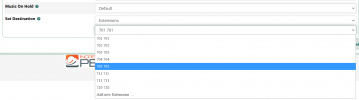
If click on the '?' icon you get 'Destination for route' (succinct but perhaps not very helpful)
I can see that you might get confused about the extent of the destinations list.
I assume that the list is all encompassing for use for inbound or outbound calls, and the direction will make some of these options to be irrelevant. Especially that you may not wish an inbound caller to be pointed to a trunk where she could dial out again on your $.
Last edited:

dallas
Well-Known Member
- Joined
- Oct 21, 2007
- Messages
- 1,034
- Reaction score
- 332
Not so. This is inbound only.I assume that the list is all encompassing for use for inbound or outbound calls
I get that.The destination is where you want the call to go. Extension number, Ring Group, Announcement, IVR etc.
I have not found anything that explains what each destination does/means such as "Incoming Route", "Extensions", "Trunks", etc.
In other words: if I send to Trunk or Incoming Route or Extensions or IVR, etc. - what happens? Where does the call go?
dallas
Well-Known Member
- Joined
- Oct 21, 2007
- Messages
- 1,034
- Reaction score
- 332
As @ostridge said... for the handling of incoming calls you define the parameters DID Number and/or CallerID Number and decide where you want this call answered. The type of answering point is defined in Set Destination and then the second box lets you select a device of that type to route the call to.
Incoming Route - a path to a destination.
Extension - a telephone.
Trunk - a connection to a service provide for receiving and/or making calls.
Set Destination is self explanatory - where do you want this call answered.
If these names are not intuitive you need to look for tutorials to explain these basic concept.
Incoming Route - a path to a destination.
Extension - a telephone.
Trunk - a connection to a service provide for receiving and/or making calls.
Set Destination is self explanatory - where do you want this call answered.
If these names are not intuitive you need to look for tutorials to explain these basic concept.

kenn10
Well-Known Member
- Joined
- Dec 16, 2007
- Messages
- 4,731
- Reaction score
- 3,116
FreePBX is the GUI that front-ends Asterisk administration in the IncrediblePBX. This documentation on FreePBX administration may help you understand all the elements and how they fit together for inbound routes. Not all portions of FreePBX shown in the document are included in the IncrediblePBX implementation so don't be surprised if the guide shows something that you can't find.
 wiki.freepbx.org
PBX GUI - PBX GUI - Sangoma Documentation
Last edited:
kenn10
Well-Known Member
- Joined
- Dec 16, 2007
- Messages
- 4,731
- Reaction score
- 3,116
For a short primer:
1) Extensions are devices you create in the PBX to which you connect IP phones on the premise.
2) Trunks are devices that connect the PBX to outside lines or SIP providers for inbound and outbound connections with the outside world.
3) IVR is an auto-attendant that provides a caller choices for what they need to connect, typically by pressing a digit on the phone.
4) Ring groups are collections of extensions which can be rung together, rung in order, or rung randomly based on setup.
5) Outbound Routes provide a way for numbers you dial to reach the outside world via the trunks
6) Inbound routes accept calls from the outside world and route them to one or more extensions, or other services of the PBX.
1) Extensions are devices you create in the PBX to which you connect IP phones on the premise.
2) Trunks are devices that connect the PBX to outside lines or SIP providers for inbound and outbound connections with the outside world.
3) IVR is an auto-attendant that provides a caller choices for what they need to connect, typically by pressing a digit on the phone.
4) Ring groups are collections of extensions which can be rung together, rung in order, or rung randomly based on setup.
5) Outbound Routes provide a way for numbers you dial to reach the outside world via the trunks
6) Inbound routes accept calls from the outside world and route them to one or more extensions, or other services of the PBX.

hawk#1
Well-Known Member
- Joined
- Nov 3, 2015
- Messages
- 716
- Reaction score
- 308
You may also find a lot of the basic information found in the hundreds of tutorials Ward has posted on Nerdvittles.com. He has posted tutorials specifically explaining terms and basics. You may also want to take a look at Ward's wiki page. You can also find that link when you visit nerdvittles.com. Welcome to this forum and don't be afraid to read, there is a ton of information available.
ostridge
Guru
- Joined
- Jan 22, 2015
- Messages
- 1,816
- Reaction score
- 630
see incredible Tiki Wikiwiki page
Further down that page are the incredible Getting Started Tutorials
Yep its incredible what you can get for free.
hawk#1
Well-Known Member
- Joined
- Nov 3, 2015
- Messages
- 716
- Reaction score
- 308
Yep its incredible what you can get for free.
Yes, I'm retired and have not had enough time to read it all, but my other major issue I have is not being able to remember all the free information, lol


Forum statistics
Get 3CX - Absolutely Free!
Link up your team and customers  Phone System Live Chat Video Conferencing
Hosted or Self-managed. Up to 10 users free forever. No credit card. Try risk free.

Verify your Email
Check your inbox!
We’ve sent you an email. Click on the button in the email body to verify your email address – (if you can not find it, check your spam folder).
Upon verification you will be directed to the 3CX setup wizard.