
You are using an out of date browser. It may not display this or other websites correctly.
You should upgrade or use an alternative browser.
You should upgrade or use an alternative browser.
SOLVED Anyone else's Module Admin confused this morning?
- Thread starter tbrummell
- Start date



kenn10
Well-Known Member
- Joined
- Dec 16, 2007
- Messages
- 4,731
- Reaction score
- 3,116
Yes. I did the following instead of using the web interface in FreePBX:
Log into your system and at the Linux command prompt do this:
It may not be necessary, but just for housekeeping, I also did:
Log into your system and at the Linux command prompt do this:
Code:
fwconsole ma upgradeall
fwconsole reload
It may not be necessary, but just for housekeeping, I also did:
Code:
fwconsole restart
hawk#1
Well-Known Member
- Joined
- Nov 3, 2015
- Messages
- 716
- Reaction score
- 308
I just follow the instuctions in Ward's nerdvittles articles
fwconsole ma upgradeall
rm -f -r /tmp/*
fwconsole reload
/root/sig-fix
/root/sig-fix
it works and I have not had any issues with tampered files warnings or unsigned modules. Copy, paste, enter, and done.
Keeping FreePBX 15 Modules Current
We strongly recommend that you periodically update all of your FreePBX modules to eliminate bugs and to reduce security vulnerabilities. From the Linux CLI, log into your server as root and issue the following commands:fwconsole ma upgradeall
rm -f -r /tmp/*
fwconsole reload
/root/sig-fix
/root/sig-fix
it works and I have not had any issues with tampered files warnings or unsigned modules. Copy, paste, enter, and done.
Last edited:

mainenotarynet
Not really a Guru - Just a long time user
- Joined
- May 29, 2010
- Messages
- 754
- Reaction score
- 156
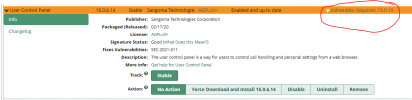
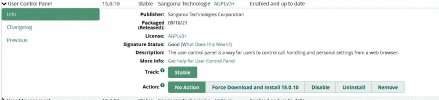
Did Module Admin and UCP stuck at 15.0.6.14 - so read all this thread and did command line next fwconsole ma upgradeall -- this came back all up to date. Well it's not -- still stuck at 15.0.6.14 -- so did specific fwconsole ma upgrade ucp -- says it's up to date -- still nope. Oh well -- I'll be vulnerable until my system gets a clue.
kenn10
Well-Known Member
- Joined
- Dec 16, 2007
- Messages
- 4,731
- Reaction score
- 3,116
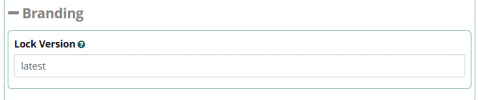
@mainenotarynet, in your Settings > Advanced Settings, check the branding field and make sure it is not set to a specific version of FreePBX. Mine systems were not updating until I changed the setting. To get all updates, it generally requires that you set it like this:

krzykat
Telecom Strategist
- Joined
- Aug 2, 2008
- Messages
- 3,208
- Reaction score
- 1,288
Yep - excellent advice@mainenotarynet, in your Settings > Advanced Settings, check the branding field and make sure it is not set to a specific version of FreePBX. Mine systems were not updating until I changed the setting. To get all updates, it generally requires that you set it like this:
View attachment 3611
hawk#1
Well-Known Member
- Joined
- Nov 3, 2015
- Messages
- 716
- Reaction score
- 308
I never had to touch this setting and it seems to work fine for me.
15.19.11.001
KEYWORD:MIRROR_BRAND_VERSION
Version to set this brand to
Wonder why it works correctly on default system installs, and others have to go into settings and make changes to the settings. Maybe some changed the setting from default and forgot they changed it?
Branding
Lock Version15.19.11.001
KEYWORD:MIRROR_BRAND_VERSION
Version to set this brand to
Wonder why it works correctly on default system installs, and others have to go into settings and make changes to the settings. Maybe some changed the setting from default and forgot they changed it?
kenn10
Well-Known Member
- Joined
- Dec 16, 2007
- Messages
- 4,731
- Reaction score
- 3,116
At one point when there was a scare about some FreePBX modules possibly being compromised, Ward had advised us to lock it to a specific version so that the suspect modules would not download. I suspect that if you ever put something in there, unless you change it, it stays locked on that one version. Perhaps on a clean install where no one messes with the lock, FreePBX will default to most current.I never had to touch this setting and it seems to work fine for me.
Branding
Lock Version
15.19.11.001
KEYWORD:MIRROR_BRAND_VERSION
Version to set this brand to
Wonder why it works correctly on default system installs, and others have to go into settings and make changes to the settings. Maybe some changed the setting from default and forgot they changed it?
It took me forever to figure out what was wrong when I wasn't getting updates to my modules.
hawk#1
Well-Known Member
- Joined
- Nov 3, 2015
- Messages
- 716
- Reaction score
- 308
Thanks for clarification. I guess that is why the default on mine was set for ver 15.19 (probably won't get there since 16 already in beta). I guess I should set mine to latest also. Hopefully that will prevent a problem when I upgrade to ver 16At one point when there was a scare about some FreePBX modules possibly being compromised, Ward had advised us to lock it to a specific version so that the suspect modules would not download. I suspect that if you ever put something in there, unless you change it, it stays locked on that one version. Perhaps on a clean install where no one messes with the lock, FreePBX will default to most current.
It took me forever to figure out what was wrong when I wasn't getting updates to my modules.

Halea
Well-Known Member
- Joined
- Aug 12, 2016
- Messages
- 1,164
- Reaction score
- 917
@kenn10 : How on earth did you figure this one out? I'm speechless!@mainenotarynet, in your Settings > Advanced Settings, check the branding field and make sure it is not set to a specific version of FreePBX. Mine systems were not updating until I changed the setting. To get all updates, it generally requires that you set it like this:
View attachment 3611
My Debian install had a version number in it and I removed it long ago, but without entering "latest" in that field it doesn't seem to make any difference.
kenn10
Well-Known Member
- Joined
- Dec 16, 2007
- Messages
- 4,731
- Reaction score
- 3,116
I could not find the forum post where Ward had recommended we lock the version number but I did find an arcane reference in the FreePBX forums. I tried "latest" and it worked!@kenn10 : How on earth did you figure this one out? I'm speechless!
My Debian install had a version number in it and I removed it long ago, but without entering "latest" in that field it doesn't seem to make any difference.
mainenotarynet
Not really a Guru - Just a long time user
- Joined
- May 29, 2010
- Messages
- 754
- Reaction score
- 156

ostridge
Guru
- Joined
- Jan 22, 2015
- Messages
- 1,816
- Reaction score
- 630
Is the /root/sig-fix (bis) needed?/root/sig-fix
/root/sig-fix
kenn10
Well-Known Member
- Joined
- Dec 16, 2007
- Messages
- 4,731
- Reaction score
- 3,116
Only if the dashboard is complaining about non-signed modules.Is the /root/sig-fix (bis) needed?

wardmundy
Nerd Uno
- Joined
- Oct 12, 2007
- Messages
- 20,451
- Reaction score
- 6,172
The Incredible PBX branding module from ClearlyIP lets us manage versions of every FreePBX module. UCP was erroneously set to a specific version rather than the latest release. We have fixed it. Ordinarily, you are much safer leaving the Branding option in Advanced Settings set to 15.19.11.001 which lets us protect your platform from a dangerous module if one should appear down the road. The downside is what happened here where I forgot to unblock a locked version of UCP because the next version caused folks problems that were later fixed in a subsequent release. My apologies.@kenn10 -- Thanks, that was my issue. I never touch Advance settings so how it was set to 15.19.11.001 I don't know.
Maybe I saw the post from Ward and just forgot, but the UCP is now correct at 15.0.10 as it should be.


Forum statistics
Get 3CX - Absolutely Free!
Link up your team and customers  Phone System Live Chat Video Conferencing
Hosted or Self-managed. Up to 10 users free forever. No credit card. Try risk free.

Verify your Email
Check your inbox!
We’ve sent you an email. Click on the button in the email body to verify your email address – (if you can not find it, check your spam folder).
Upon verification you will be directed to the 3CX setup wizard.