TIPS Suddenly could not log in to ipbx admin. Now navigating admin section is weird.

JFrost

Active Member
Joined
Oct 1, 2016
Messages
356
Reaction score
95
Need help here please!

On an install fo ipbx 2020 that's been running for a while now and all has been normal and good:

Tried to login to my pbx admin today and when I click the icon on the admin page to log in (the computer and monitor icon) I get no response at all. No login form, no error, nothing (see screenshot.)

I can click the UCP icon and get a login prompt and the Get Help icon takes me to the forum but Admin icon does nothing.
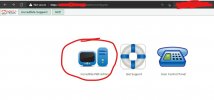
Screenshot 2021-10-08 154105.jpg
I do not necessarily log in daily so not sure exactly when this went sideways but it worked the last time I logged in which was maybe a week ago (?).


EDIT - I should add, shell/putty access is fine. I can log in to the server CLI without issue.
I also restarted the server from the cli to see if it made any diff. No joy.
Also, I did try different browser and private session. Also no joy.
 
Last edited:
When was the last time that you updated your pbx?
Others were having issues about a week or so ago. You might want to ssh and log in as root and run the following

fwconsole ma upgradeall
rm -rf /tmp/*
fwconsole reload
/root/sig-fix
/root/sig-fix
 
I also noticed that you tried logging in using https, do you have certificates set up etc. I do not have certificates installed on my system and I can't connect /log-in if I try to use https.
 
When was the last time that you updated your pbx?
Others were having issues about a week or so ago. You might want to ssh and log in as root and run the following

fwconsole ma upgradeall
rm -rf /tmp/*
fwconsole reload
/root/sig-fix
/root/sig-fix
I saw that and tried that. No change..
 
I also noticed that you tried logging in using https, do you have certificates set up etc. I do not have certificates installed on my system and I can't connect /log-in if I try to use https.
I do not but I never have and it's never been a problem.

Though if it were the problem, I'd expect to be precluded from even seeing the landing page, not stopped from accessing just one link on it.

=-=-=
I tried HTTP. Same biz, no joy.
 
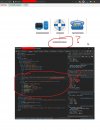
So getting a little desperate here I inspected the HTML on the landing page and found this weird text hidden (white text on white background) (see screencap)
The HTML <div> ID is "key", which, without knowing what this is, it's definitely suspicious.
Screenshot 2021-10-08 170050.jpg
@wardmundy can you weigh in on this? Is this "key" thing normal or is this indication of a compromise/problem?


EDIT ----
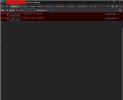
Just noticed these errors in the console implicating ```config.php```

Clipboard02.jpg

Also, conspicuously missing from the HTML is any kind of login form or text fields. Something's def. off here.
 
Last edited:
So getting a little desperate here I inspected the HTML on the landing page and found this weird text hidden (white text on white background) (see screencap)
The HTML <div> ID is "key", which, without knowing what this is, it's definitely suspicious.
View attachment 3667
@wardmundy can you weigh in on this? Is this "key" thing normal or is this indication of a compromise/problem?


EDIT ----
Just noticed these errors in the console implicating ```config.php```
That "key" is for disabling the admin web login. You enter it into the CLI.

Code:
fwconsole unlock <key here>
 
Last edited:
Thanks but I don't fully follow..

Are you suggesting somehow my web admin got "locked" and I should run that command at CLI?

How could the admin get locked like that? Pretty sure it wasn't me.

Thanks
You asked what is was, and I explained it. You can try disabling it and see if it will allow you in. However, I first suggest you try restarting the web service httpd.
 
You asked what is was, and I explained it. You can try disabling it and see if it will allow you in. However, I first suggest you try restarting the web service httpd.
Ok thanks. I wasn't sure.
I have restarted the whole server already and that did not help. I will try running the command at CLI.
 
There you go! Thank you @KNERD. The unlock was it, got me right in!

Is there any docs you know of on this "key" thing? (I'll go elbow deep in Google but if you know where it's at and can share...) I'd like to understand how it works and maybe why I got locked out in the first place.

Thanks for all help :)
 
There you go! Thank you @KNERD. The unlock was it, got me right in!

Is there any docs you know of on this "key" thing? (I'll go elbow deep in Google but if you know where it's at and can share...) I'd like to understand how it works and maybe why I got locked out in the first place.

Thanks for all help :)

I don't use Google manipulated,. and heavily censored searches, but ..

 
All the above is well and good and gets me into the web admin however -

I cannot log out.
If I clear all the cookies and try to login fresh, I get the same behavior (Admin icon/link does nothing)

Thanks to knerd for getting me in but I still feel like something is off. I definitely USED TO be able to click the Admin icon and get in / log in
 
All the above is well and good and gets me into the web admin however -

I cannot log out.
If I clear all the cookies and try to login fresh, I get the same behavior (Admin icon/link does nothing)

Thanks to knerd for getting me in but I still feel like something is off. I definitely USED TO be able to click the Admin icon and get in / log in
Try it with a private window?
 
Try it with a private window?
More than once. Private session, diff profile, diff browsers (and private sessions in diff browsers.) No joy.

Something's off I just have no clue where to look for it.
 
More than once. Private session, diff profile, diff browsers (and private sessions in diff browsers.) No joy.

Something's off I just have no clue where to look for it.
Then you may want to look in the httpd error_log and/or access_log to see what you get after clicking the icon
 
Then you may want to look in the httpd error_log and/or access_log to see what you get after clicking the icon
Nothing. In either log.

'tail'd them both and no reaction at all

Last entry in the error log was like 3 hours and does not appear even remotely related.
 
Have you yet tried any system updates? yum/apt?
 
Have you yet tried any system updates? yum/apt?
No.

And since I hadn't since the last time it worked I really didn't wanna introduce those variables (unless I have reason/evidence to believe it will fix something)

I'm trying to find this "config.php" file. Not sure where the IPBX web files are located (not overly fluent in Linux) but I'm trying to hunt them down. Maybe that got damaged/corrupted somehow.

No real other leads to go on atm..
 
Well, then you may want to try to do the system updates. I have come across many cases where updated modules stopped functioning properly until I did I ran system updates., and restarted the web server
 

Members online

No members online now.

Forum statistics

Threads
26,696
Messages
174,454
Members
20,266
Latest member
ro-fi
Get 3CX - Absolutely Free!

Link up your team and customers Phone System Live Chat Video Conferencing

Hosted or Self-managed. Up to 10 users free forever. No credit card. Try risk free.

3CX
A 3CX Account with that email already exists. You will be redirected to the Customer Portal to sign in or reset your password if you've forgotten it.
Back
Top