NEW T-Mobile 5G Home Internet Service & Home Automation

Another open source project is MagucMirror where you can build Amazon Echo Show like devices using the Raspberry Pi. There are even modules for speech control, and no need to use Amazon or Google.

All the magicmirrors that I have built all have you download software that comes from Alexa developer web sight. Please provide a link to one that does not use any software or code that comes from github. All the ones I found on github were created on Alexa Developer site.
 
All the magicmirrors that I have built all have you download software that comes from Alexa developer web sight. Please provide a link to one that does not use any software or code that comes from github. All the ones I found on github were created on Alexa Developer site.
I have not seen any not on Gthub as Github has become the Google for open source projects as it is free, and has security.

I set up one fro the Raspberry Pi Zero and there was nothing about using Alexa Dev.

 
Umm...those devices still need access to their home servers. They still need access to your account on the third party site. Once the servers go down, the device will be useless. Amazon, or not.
If one server goes down, just use a different host server. They only need to connect on a compatible server, if that company disappears, then download and install app to a compatible site. Easy to do, just download the app to a compatible device host, click on add devices, and it scans and locates all the devices on my smart device network. Yes, I do have to create an account to log into the website to download the app. But I never said that an account was not needed. I used Amazon Aleza App to install, configure and control all the gosund wall switches in my house without ever installing or using the gosund app or host site. If Amazon goes down, I can use google or gosund or treatlife, or smartlife or any of the other compatible smart device hosts. And no, the devices are not useless if the server goes down. All that is needed is the device needs to be detected on my local network by what ever app being used to add smart devices. How many smart devices do you have any experience with? From what you have said it must be between 0 and 2, and must have required a working hub. I don't use a hub.
 
Last edited:
I have not seen any not on Gthub as Github has become the Google for open source projects as it is free, and has security.

I set up one fro the Raspberry Pi Zero and there was nothing about using Alexa Dev.

Thanks, I'll look at code when I get a chance.
 
Not sure how this thread became t-mobile un-related but, choose the right hardware and there are libraries that 'don't call home' .

I like and use these for lights switches and plugs and cameras, no internet or alexa needed, home automation integration easy though.


Last edited:
I see that the meaner comments have been removed from this thread. We all have different opinions of things and this forum allows for civil discourse. We all tend to have strong opinions of our own but sometimes need to just back off and agree to disagree. This is a VOIP forum and we probably should start new topics when we stray off the topic of the thread instead of polluting something like this one. We certainly don't need to get nasty at each other under any circumstance. A lot of you are very intelligent and have great ideas so we need to stay positive and respect each other.
 
Looks like T-Mobile is blocking SIP; however, IAX2 works fine with excellent voice quality using a VoIP.ms IAX2 subaccount with a registered FreePBX IAX2 trunk on a Raspberry Pi:

View attachment 3723
View attachment 3724

If you'd like to try a test call, dial 843-606-0555 and enter a U.S. zip code for a Nerd Vittles Weather Report.
Are they blocking specific SIP ports such as 5060? I have a friend that bought a Polycom phone so that he could connect to Google Voice and to an Asterisk server, then he switched to T-Mobile and could not connect to the Asterisk server after that, but Google Voice still works for him. If using a port other than 5060 would work, there is a slim chance he might be able to do that, but those Polycom phones don't support IAX2.
 
I like and use these for lights switches and plugs and cameras, no internet or alexa needed, home automation integration easy though.
Thanks for the info posted above. Your post made me start investigating what is available on github. Now I will be able to speech control the smart devices without needing to use Alexa.
 
I have not seen any not on Gthub as Github has become the Google for open source projects as it is free, and has security.

I set up one fro the Raspberry Pi Zero and there was nothing about using Alexa Dev.

I had a chance to look at it and coming to find out, it does not even have the speech modules needed. If you know of any speech modules for it that does not use API to Amazon Alexa Developer site, please post a link.
 
I had a chance to look at it and coming to find out, it does not even have the speech modules needed. If you know of any speech modules for it that does not use API to Amazon Alexa Developer site, please post a link.


For a limited vocab speech to text engIne perhaps


Use the 'small model' , it does not need an internet connection.
 
We received our T-Mobile 5G Home Internet unit today (and a TV widget).

150 Mbps down, 65 Mbps up - a 4x improvement on our uplink compared to cable.

If you are skeptical of apps or just don't want to install one, you can manage the device with an ethernet cable and log in using the credentials printed on the bottom of the device - no app download needed.

1635274086776.png

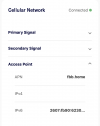
It appears to be IPv6-only. I am thinking there's NAT46 happening on this end and NAT64 on T-Mobile's side if you are trying to reach the IPv4 internet. Of course you can use native IPv6 -- I got a globally routable IPv6 address and ssh'd to one of my servers over IPv6. Can't ssh or ping6 inbound though; it's firewalled.

Ping times are all over the place. I look forward to testing VoIP over it.

Bash:
$ ping6 www.google.com
PING6(56=40+8+8 bytes) 2607:fb90:xxx --> 2607:f8b0:4004:83f::2004
16 bytes from 2607:f8b0:4004:83f::2004, icmp_seq=0 hlim=115 time=43.166 ms
16 bytes from 2607:f8b0:4004:83f::2004, icmp_seq=1 hlim=115 time=113.973 ms
16 bytes from 2607:f8b0:4004:83f::2004, icmp_seq=2 hlim=115 time=52.216 ms
16 bytes from 2607:f8b0:4004:83f::2004, icmp_seq=3 hlim=115 time=49.691 ms
16 bytes from 2607:f8b0:4004:83f::2004, icmp_seq=4 hlim=115 time=39.347 ms
16 bytes from 2607:f8b0:4004:83f::2004, icmp_seq=5 hlim=115 time=101.980 ms
16 bytes from 2607:f8b0:4004:83f::2004, icmp_seq=6 hlim=115 time=58.884 ms
16 bytes from 2607:f8b0:4004:83f::2004, icmp_seq=7 hlim=115 time=55.411 ms
16 bytes from 2607:f8b0:4004:83f::2004, icmp_seq=8 hlim=115 time=130.188 ms
16 bytes from 2607:f8b0:4004:83f::2004, icmp_seq=9 hlim=115 time=86.038 ms
16 bytes from 2607:f8b0:4004:83f::2004, icmp_seq=10 hlim=115 time=55.722 ms
16 bytes from 2607:f8b0:4004:83f::2004, icmp_seq=11 hlim=115 time=40.373 ms
16 bytes from 2607:f8b0:4004:83f::2004, icmp_seq=12 hlim=115 time=114.058 ms
 
Last edited:
Glad it is set for IPv6. Hopefully it should be usable for a couple years
 
We received our T-Mobile 5G Home Internet unit today (and a TV widget).

It appears to be IPv6-only. I am thinking there's NAT46 happening on this end and NAT64 on T-Mobile's side if you are trying to reach the IPv4 internet. Of course you can use native IPv6 -- I got a globally routable IPv6 address and ssh'd to one of my servers over IPv6. Can't ssh or ping6 inbound though; it's firewalled.

[/CODE]

Does showmyip.com not show IPv4 and IPv6 addresses for your device??

Screen Shot 2021-10-27 at 7.17.37 AM.png
 
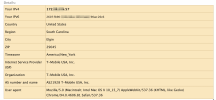
It does, but I should have been more clear. Locally, the device does not have an IPv4 address. The 172.58.x.x address you see is part of a pool of "exit IPs" for their 464XLAT. Your IPv4 traffic is converted to IPv6 at the T-Mobile cylinder, sent by IPv6 to their remote gateway, and converted back to IPv4 for routing over the internet. This pretty much guarantees no inbound connections. I don't know a lot about this; I just learned of it yesterday. I am looking for a way to make this work nicely with my router and act as a seamless load-balance/failover with my cable connection. I haven't figured that out yet.
 
It does, but I should have been more clear. Locally, the device does not have an IPv4 address. The 172.58.x.x address you see is part of a pool of "exit IPs" for their 464XLAT. Your IPv4 traffic is converted to IPv6 at the T-Mobile cylinder, sent by IPv6 to their remote gateway, and converted back to IPv4 for routing over the internet. This pretty much guarantees no inbound connections. I don't know a lot about this; I just learned of it yesterday. I am looking for a way to make this work nicely with my router and act as a seamless load-balance/failover with my cable connection. I haven't figured that out yet.
Would VPN solve this?
 
It does, but I should have been more clear. Locally, the device does not have an IPv4 address. The 172.58.x.x address you see is part of a pool of "exit IPs" for their 464XLAT. Your IPv4 traffic is converted to IPv6 at the T-Mobile cylinder, sent by IPv6 to their remote gateway, and converted back to IPv4 for routing over the internet. This pretty much guarantees no inbound connections. I don't know a lot about this; I just learned of it yesterday. I am looking for a way to make this work nicely with my router and act as a seamless load-balance/failover with my cable connection. I haven't figured that out yet.
Is the ipv6 address both public and static?
Can you route through it?
 
Is the ipv6 address both public and static?
Can you route through it?
I haven't seen the prefix change yet, so it might be "mine." It's usable, but the T-Mo gateway firewalls off incoming connections.

On other testing...

SIP/TLS works fine and so does SCCP. RTP works by symmetric path. These tests are all IPv4. VPN connections work fine over this, too.

I assume @wardmundy plain SIP is blocked due to ALG or DPI.

What you get from this service for $50/mo., no contract, is impressive. The only thing in my opinion that you cannot expect from it is to run servers (which is probably against their TOS anyway).
 
I haven't seen the prefix change yet, so it might be "mine." It's usable, but the T-Mo gateway firewalls off incoming connections.

On other testing...

SIP/TLS works fine and so does SCCP. RTP works by symmetric path. These tests are all IPv4. VPN connections work fine over this, too.

I assume @wardmundy plain SIP is blocked due to ALG or DPI.

What you get from this service for $50/mo., no contract, is impressive. The only thing in my opinion that you cannot expect from it is to run servers (which is probably against their TOS anyway).
Can internal hosts get DHCP6 addresses?
 

Members online

No members online now.

Forum statistics

Threads
26,708
Messages
174,549
Members
20,274
Latest member
CONNXTA
Get 3CX - Absolutely Free!

Link up your team and customers Phone System Live Chat Video Conferencing

Hosted or Self-managed. Up to 10 users free forever. No credit card. Try risk free.

3CX
A 3CX Account with that email already exists. You will be redirected to the Customer Portal to sign in or reset your password if you've forgotten it.
Back
Top