TIPS IPBX Rasberry Pi and iptables - How to manipulate

geekas

New Member
Joined
Oct 1, 2020
Messages
5
Reaction score
2
I am looking to get t*f*t*p working using dnsmasq on my behind-nat RPi4 installation of Incredible PBX. I have turned on t*f*t*p in dnsmasq’s config but so far I get timeout from anywhere including a t*f*t*p-hpa client I installed on the RPi itself pointed at localhost. I suspect the request is being binned by iptables and have tried following the advice at http://nerdvittles.com/incredible-pbx-2020-application-users-guide/#app7 but it appears the RPi installation does not have the management scripts mentioned in that guide.

So before I delve into the murky waters of hand-editing iptable configs (rules.v4 and iptables-custom), is there any easier way?
 
Use add-ip or add-fqdn and choose option 7 to enable TFTP from specific sites.
 
but it appears the RPi installation does not have the management scripts mentioned in that guide.
So which scripts are you missing?

Bash:
/root/add-ip ip-nameexample xxx.xxx.x.x  #where xxx etc is for your provider's ip address
/root/add-ip ip-myexternalIP xxx.xxx.x.x  #where xxx etc is for your provider's ip address
/root/add-fqdn fq-myfqdn voip.ms # where voip.ms is just an example providers actual fqdn
/root/add-fqdn fq-myfqdn name.dyndns.org # where name.dyndns.org is just an example account you may have

/root/ipchecker #This command checks whether installed FQDNs have changed & updates  IPtables

which iptables-restart   # which command tells you where to look for iptab......
/usr/local/sbin/iptables-restart  # this is the location of said bash script

which iptables
/usr/sbin/iptables  # dont bother looking for this one its just a symlink that points somewhere_else. You may need to use the command -
iptables -nL # this echoes the iptables 'chains' to stdout (the console)
You won't need to know the path to scripts or binaries that are already on your PATH environment variable. The which command will find commands that are on your PATH.

Hope this helps.
 
Last edited:
Thank you for your prompt and comprehensive replies. Cause: looking for the right command in the wrong place. But t*f*t*p still times out. The relevant extracts:
dnsmasq.conf extract:
------------------
# Enable dnsmasq's built-in t*f*t*p server
enable-t*f*t*p

# Set the root directory for files available via FTP.
t*f*t*p-root=/var/ftpd

# Do not abort if the t*f*t*p-root is unavailable
t*f*t*p-no-fail

# Make the t*f*t*p server more secure: with this set, only files owned by
# the user dnsmasq is running as will be send over the net.
#t*f*t*p-secure

# This option stops dnsmasq from negotiating a larger blocksize for t*f*t*p
# transfers. It will slow things down, but may rescue some broken t*f*t*p
# clients.
t*f*t*p-no-blocksize
-----------------------
It appears dnsmasq is listening:
root@incrediblepbx:~# netstat -aunp | grep ":69 "
udp 0 0 0.0.0.0:69 0.0.0.0:* 27831/dnsmasq
udp6 0 0 :::69 :::* 27831/dnsmasq

Test file in test t*f*t*p directory:

root@incrediblepbx:~# ls -l /var/ftpd
total 4
-rw-r--r-- 1 root root 22 Jan 26 20:19 test

It appears my addition using add-ip has come into effect:

root@incrediblepbx:~# iptables -nL | grep ":69"
ACCEPT udp -- 127.0.0.0 0.0.0.0/0 udp dpt:69
ACCEPT udp -- 192.168.1.25 0.0.0.0/0 udp dpt:69

But result:
root@incrediblepbx:~# t*f*t*p
(to) localhost
t*f*t*p> verbose
Verbose mode on.
t*f*t*p> trace
Packet tracing on.
t*f*t*p> get test
getting from localhost:test to test [netascii]
sent RRQ <file=test, mode=netascii>
Transfer timed out.

t*f*t*p> quit

Same result from my desktop at 192.168.1.25.
So there is something else I am missing. Any ideas?
 
You can temporarily turn off IPtables and see if the result is the same. If it is, then it's not an IPtables problem.

Code:
systemctl stop netfilter-persistent

Don't forget to restart: iptables-restart
 
Thanks Ward, the result:
root@incrediblepbx:~# systemctl stop netfilter-persistent
root@incrediblepbx:~# t*f*t*p localhost
t*f*t*p> verbose
Verbose mode on.
t*f*t*p> trace
Packet tracing on.
t*f*t*p> get test
getting from localhost:test to test [netascii]
sent RRQ <file=test, mode=netascii>
Transfer timed out.

t*f*t*p> quit

So it appears iptables is not the culprit.
I read through the dnsmasq man pages (..zzzz) The --enable-t*f*t*p says "Without an argument, the t*f*t*p service is provided to the same set of interfaces as DHCP service." Given the DHCP service is disabled I tried adding =eth0 to the enable-t*f*t*p line in dnsmasq.conf.
Tested through localhost - nada, timed out. Tested from desktop - it worked! Ka? Undid the =eth0 stipulation above and retested from desktop - timeout. Put it back as =eth0,lo and both worked.
Next I turned on iptables-restart. Still works.
THE LEARNING: If you use dnsmasq ONLY as a t*f*t*p server, the interface(s) have to be nominated in the enabling statement in dnsmasq.conf.

Now this whole exercise has alerted me to how many extraneous entries there are in the iptables configs for an Australian site, so I will do some pruning using the commands you good fellows have introduced me to.
I have more info to present about using Polycom VVX's and their dial plan idiosyncrasies too, but its not ready yet.
Thank you Ward and your helpers.
 
@geekas You can do judicious pruning of the iptables by editing the /usr/local/sbin/iptables-custom file. I like to prune out providers I have no intention of using. First copy the file to a backup version in case you mess something up.

I like to reorganize the file with comment headers to indicate which IP addresses belong to what.

Once you are done with edits, do an iptables-restart command to load in the changes.
 
Thanks kenn10, I did that and added the provider I am using without breaking anything. Development continues...:smilewinkgrin:
 
t*f*t*p-root=/var/ftpd
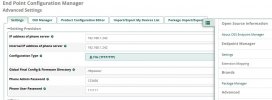
Just that the oss-epm module points elsewhere:-
OSS-EPM_config.JPG
Code:
# Set the root directory for files available via FTP.
#t*f*t*p-root=/var/ftpd
t*f*t*p-root= /tftpboot/
TFTP-root= /tftpboot/
Oh, and I must be a bit dazed - why do I keep seeing those stars; even when I put it in code-tags?
\[ code=bash] this is in code-tags (escaped) \[ code]
 

Attachments

Last edited:
It's a forum feature. Simple workaround is to put the t and f in italics.
Nah - that only works without the code-tags - it even changes the upper case to lower case.
Would it make any sense if its to prevent somebody from TFTP ing to dowwnload from the site?
 

Forum statistics

Threads
26,831
Messages
175,390
Members
20,381
Latest member
kalilinux
Get 3CX - Absolutely Free!

Link up your team and customers Phone System Live Chat Video Conferencing

Hosted or Self-managed. Up to 10 users free forever. No credit card. Try risk free.

3CX
A 3CX Account with that email already exists. You will be redirected to the Customer Portal to sign in or reset your password if you've forgotten it.
Back
Top