Command line to set up extensions, ring groups, trunks, routes

dwight

New Member
Joined
Aug 30, 2010
Messages
1
Reaction score
0
I upgrade my Incredible PBX about once per year. I do this with a fresh installation on Vultr or Linode. My setup is small and for family use. Occasionally errors creep in when doing the re-setup using the GUI. I would like to script most or all of the setup to cut down on errors. My setup consists of:

Extensions: 12 (including one voicemail)
Ring groups: 7
Trunks: 1
Inbound routes: 3
Outbound routes: 3

Is there a command line interface I can use to setup the above on a fresh install of Incredible PBX?
 
Extensions: 12 (including one voicemail)
Ring groups: 7
Trunks: 1
Inbound routes: 3
Outbound routes: 3

Is there a command line interface I can use to setup the above on a fresh install of Incredible PBX?
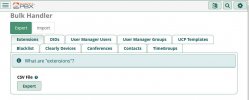
Maybe you already are aware of the Bulk Handler module:
Go to Admin > Bulk Handler which enables exporting / importing .csv files for:Admin-BulkHandler.JPG
 
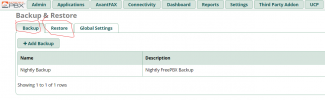
Or simply use the FreePBX backup/restore. Take a copy of the old and restore to the new. Works like a charm.

1649444372307.png
 
Last edited:

Members online

No members online now.

Forum statistics

Threads
26,686
Messages
174,406
Members
20,257
Latest member
Dempan
Get 3CX - Absolutely Free!

Link up your team and customers Phone System Live Chat Video Conferencing

Hosted or Self-managed. Up to 10 users free forever. No credit card. Try risk free.

3CX
A 3CX Account with that email already exists. You will be redirected to the Customer Portal to sign in or reset your password if you've forgotten it.
Back
Top