TIPS For those who got IncredibePBX 2021 working out on Oracle Cloud...

KNERD

Well-Known Member
Joined
Mar 9, 2014
Messages
2,133
Reaction score
836
I FINALLY basically have this set up on an Ampere w/ 1OCPU and 6GB RAM. Very fast I must say.

However after running the /add-ip and ./add-fqdn I cannot connect a SIP device as it times out.

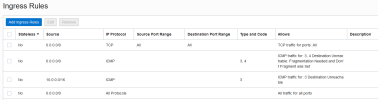
Ingress rules are also set up allowing connections for sure.
1669577731479.png

In addition, I set up a trunk for voip.ms. The PBX is showing connected, but on the VoIP.ms side, it is showing no connection from that sub account. I have a test I can do which will call a number, and play "hello world!" when answered, but that fails also.

Anyone got some clues?
 
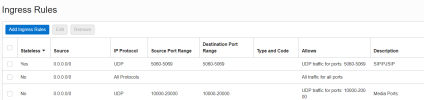
Is this public facing? Mine is not and my Ingress Rules look like this.
1669585269268.png
 
I changed the ingress rules to like yours and nothing has changed.
Those ingress rules virtually turn off the Oracle firewall and leave everything to the Incrediblepbx firewall. Also check your egress rules match those in the tutorial.

It might be time to look at logs for the registration attempts.
I'll defer to others to help you further. Unfortunately my brain is fried by Covid at the moment and can't think straight.:(
 
I was watching the CLI andf nothing is coming up. I think Ward's firewall setup is a bit too strict, even though I have it set up to accept my IP adress range.
 
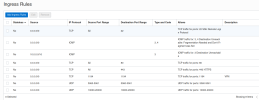
That's weird. I have an A1 (1 processor 6gb memory) running Ubuntu 20.04 and another running Ubuntu 22.04 and they don't have that issue. They are both in the AD-3 location. I have pretty loose ingress and egress rules although in theory, the Ingress 0.0.0.0 rule should leave it wide open.
1669603601494.png
1669603637870.png
 
even though I have it set up to accept my IP adress range.
Have you modified the pbx firewall in any way outside of add-ip and add-fqdn?
Have you checked what IP addresses are permitted by the firewall?
as @kenn10 says it's a weird one.
 
I have not touched the firewall at all besides those two items.

I can access the GUI via both IP address and domain name.
 
I can access the GUI via both IP address and domain name.
Interesting... my server doesn't have a FQDN. hostname --fqdn returns the unqualified hostname I set when I built the server. Consequently I can only access it via the public IP address or the OpenVPN IP.
 
Interesting... my server doesn't have a FQDN. hostname --fqdn returns the unqualified hostname I set when I built the server. Consequently I can only access it via the public IP address or the OpenVPN IP.
I just put in an A record
 
Update: I set up a Vanilla PBX on another instance. It is for sure a firewall issue as I can connect fine to it. I do see in IPtables my IP address in there to accept
 
There is no indication ufw is running
Just to be sure, and to nail down the ufw question
Bash:
service ufw status
● ufw.service
     Loaded: masked (Reason: Unit ufw.service is masked.)
     Active: inactive (dead)
also in /etc/ufw/ufw.conf
Bash:
cat /etc/ufw/ufw.conf
# /etc/ufw/ufw.conf

# Set to yes to start on boot. If setting this remotely, be sure to add a rule
# to allow your remote connection before starting ufw. Eg: 'ufw allow 22/tcp'
ENABLED=no

# Please use the 'ufw' command to set the loglevel. Eg: 'ufw logging medium'.
# See 'man ufw' for details.
LOGLEVEL=low
 
Yes, I see ufw is in fact running. I would of thought that would of been taken care of with Ward's installer script. I
uninstalled UFW, and just in case try to start it, and responds with "Masked...."

With that, still cannot connect.
 
Mine says "active (exited)"
Yes, I see ufw is in fact running. I would of thought that would of been taken care of with Ward's installer script. I
uninstalled UFW, and just in case try to start it, and responds with "Masked...."

With that, still cannot connect.
Try ssh into your instance and try this code from the Linux CLI
Bash:
systemctl disable ufw.service
echo "ENABLED=no" >> /etc/ufw/ufw.conf
systemctl status ufw.service
 
What's the state of UFW on your 'Vanilla' install? Mine says "active (exited)".
Mine says (cannot say its vanilla but I had to disable at time of or before script install)
Code:
systemctl disable ufw.service
# Synchronizing state of ufw.service with SysV service script with /lib/systemd/systemd-sysv-install.
# Executing: /lib/systemd/systemd-sysv-install disable ufw
# Unit /etc/systemd/system/ufw.service is masked, ignoring.

 systemctl status ufw.service
# ● ufw.service
#    Loaded: masked (Reason: Unit ufw.service is masked.)
#    Active: inactive (dead)
meaning its dead and not afecting or rejecting anything

UFW, or Uncomplicated Firewall, is a simplified firewall management interface that hides the complexity of lower-level packet filtering technologies such as iptables.

It is not used by IncrediblePBX which is locked down with the linux iptables that block 'everything' other than the trusted providers. And except for anything you added with /root/add-ip or /root/add-fqdn, and a few items found in /usr/local/sbin/iptables-custom. It clearly adds another layer that you may not need. If you have ufw as active then its up to you to make it pass what you need.
 
Last edited:
Get 3CX - Absolutely Free!

Link up your team and customers Phone System Live Chat Video Conferencing

Hosted or Self-managed. Up to 10 users free forever. No credit card. Try risk free.

3CX
A 3CX Account with that email already exists. You will be redirected to the Customer Portal to sign in or reset your password if you've forgotten it.
Back
Top