TIPS Oracle Cloud - Forced password change but won't process

KNERD

Well-Known Member
Joined
Mar 9, 2014
Messages
2,051
Reaction score
792
So I am presented today with a forced password change.

It appears to meet all the criteria for their password requirements.
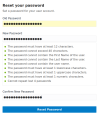


1671569928307.png


Then when I click on the "Reset Password" button, it changes color to indicate I pressed it
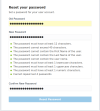

1671570148363.png

After that it's NOTHING.

I would try their support, but the ironic things is you seem to need to be logged in to contact them!

Anyone else having such an issue?
 
I had the same thing happen a while ago. I think I had to close the browser and try to login again. I was then able to change to password.
 
I had the same thing happen a while ago. I think I had to close the browser and try to login again. I was then able to change to password.
Just tried it and same result.
 
That happened to me too a while back - trouble that page fails to give proper feedback when the submit button is faded.
 
Yes, no kidding.

I thought Oracle Cloud was something recent with all the problems it has, but I saw a post on their forum where someone wanted to upgrade from Oracle Linux 6 to 7.

RHEL has been EOL for a few years now.
 
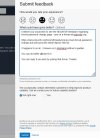
I have submitted some Feedback from my OracleCloud Dashboard by click on the '?' icon.
See screenshot but don't hold your breath.

Feedback to OracleCloud.JPG
 

Members online

No members online now.

Forum statistics

Threads
26,695
Messages
174,448
Members
20,264
Latest member
TRENT310
Get 3CX - Absolutely Free!

Link up your team and customers Phone System Live Chat Video Conferencing

Hosted or Self-managed. Up to 10 users free forever. No credit card. Try risk free.

3CX
A 3CX Account with that email already exists. You will be redirected to the Customer Portal to sign in or reset your password if you've forgotten it.
Back
Top