TIPS Clearlyanywhere module

cmjr.

New Member
Joined
Dec 26, 2020
Messages
16
Reaction score
5
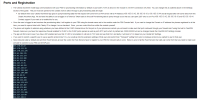
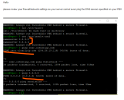
I have a crown cloud install using the Debian 10 powered IncrediblePBX 2021 Template. I bought a clearly anywhere seat license and followed: https://nerdvittles.com/migrating-incredible-pbx-2021-to-a-public-facing-cloud-pbx/ I am now trying to enter my API settings using a FQDN pointing to my PBX ip address. I am using the default port 2267. I have whitelisted port 2267. 1673293445227.pngWhen I enter the settings I get a message that says the API is unreachable. I reached out to Clearly IP and here is the response. Any help would be appreciated.
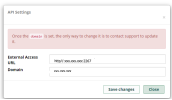
1673292635490.png
 
Last edited:
I'm not familiar w/ crown cloud, but do they have a firewall blocking outbound internet access?
 
Interesting ... I just looked at this on a Debian11 on Vultr and can't ping either even with firewall down. Have you found the answer yet?
 
I think the answer is in the public-facing setup. Let me see if I can isolate the issue.
 
I think the answer is in the public-facing setup. Let me see if I can isolate the issue.
Could be. From my home network:

#ping razr.clearlyip.com
PING razr.clearlyip.com (104.26.10.116) 56(84) bytes of data.
64 bytes from 104.26.10.116 (104.26.10.116): icmp_seq=1 ttl=59 time=35.9 ms
64 bytes from 104.26.10.116 (104.26.10.116): icmp_seq=2 ttl=59 time=37.1 ms
64 bytes from 104.26.10.116 (104.26.10.116): icmp_seq=3 ttl=59 time=35.9 ms
64 bytes from 104.26.10.116 (104.26.10.116): icmp_seq=4 ttl=59 time=35.9 ms
64 bytes from 104.26.10.116 (104.26.10.116): icmp_seq=5 ttl=59 time=35.8 ms
^C
--- razr.clearlyip.com ping statistics ---
5 packets transmitted, 5 received, 0% packet loss, time 4004ms
rtt min/avg/max/mdev = 35.775/36.139/37.128/0.497 ms
 
Yes, its not a DNS issue, but an ICMP issue. From you server, I bet you can't ping ANYTHING. Not 8.8.8.8, not your gateway, not the internal IP.
 
I have a crown cloud install using the Debian 10 powered IncrediblePBX 2021 Template. I bought a clearly anywhere seat license and followed: https://nerdvittles.com/migrating-incredible-pbx-2021-to-a-public-facing-cloud-pbx/ I am now trying to enter my API settings using a FQDN pointing to my PBX ip address. I am using the default port 2267. I have whitelisted port 2267. When I enter the settings I get a message that says the API is unreachable. I reached out to Clearly IP and here is the response. Any help would be appreciated.
Your issue is going to be IPtables. Can you post sanitized rules.v4
 
Looking at Ward's public facing firewall, I'm betting that you have a line around row 18 of:

-A PREROUTING -p icmp -j DROP

If so, this will not allow your ping packets get through the firewall.
 
I have a crown cloud install using the Debian 10 powered IncrediblePBX 2021 Template. I bought a clearly anywhere seat license and followed: https://nerdvittles.com/migrating-incredible-pbx-2021-to-a-public-facing-cloud-pbx/ I am now trying to enter my API settings using a FQDN pointing to my PBX ip address. I am using the default port 2267. I have whitelisted port 2267. View attachment 4625When I enter the settings I get a message that says the API is unreachable. I reached out to Clearly IP and here is the response. Any help would be appreciated.
Did you get this resolved and is clearly anywhere working on your Debian implementation of IncrediblePBX?
 
Yes, thankyou for your help - It is greatly appreciated - It is now working great even though I am not sure that all the steps I took are necessary - I haven't tested

1. Changed -A PREROUTING -p icmp -j DROP to -A PREROUTING -p icmp -j ACCEPT

2. Opened ports 10000-20000 for RTP

3. Whitelisted all the IP's as listed here: https://kb.clearlyip.com/FreePBX/Configuring-Clearly-Anywhere-Module.html

1673448035317.png

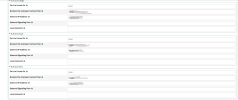
4. Changed the PJSip port to 5060 and added the FQDN and External IP address in Sip settings for PJsip

1673448593339.png

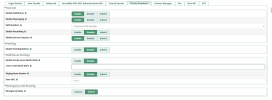
5. Went to user management and made sure that the clearlyanywhere tab looks like this

1673448835126.png

After these steps the phone app provisioned perfectly - make sure you have your codecs where you want them in the pbx before you provision - you cant change them in the app after you provision using QR - you will need to re-provision if you want to change codecs

Here is a write up of how clearly ip uses codecs: https://kb.clearlyip.com/FreePBX/Configuring-Clearly-Anywhere-Module.html#Codec_Setup_and_Flow
 
Last edited:

Members online

Forum statistics

Threads
26,687
Messages
174,410
Members
20,257
Latest member
Dempan
Get 3CX - Absolutely Free!

Link up your team and customers Phone System Live Chat Video Conferencing

Hosted or Self-managed. Up to 10 users free forever. No credit card. Try risk free.

3CX
A 3CX Account with that email already exists. You will be redirected to the Customer Portal to sign in or reset your password if you've forgotten it.
Back
Top