SOLVED CDR Reporting - Not Reporting...

AndrewStock

New Member
Joined
May 8, 2023
Messages
23
Reaction score
4
Hello All,

I have another issue with my IncrediblePBX 2027-U install. The system has been up and running for about 2 months now, I know calls are being received and originated in the system. However, when I run a CDR report from the Reports Menu, they come up empty. Is there an issue/bug with the software? Or is it something I need to tweek in order to get it working?

Any help would be greatly appreciated.

Thanks.

Andrew Stock
 
I am having exactly the same problem. My CDR reports are blank. Did you ever solve this?
[edit I have just extended the dates back to long before this PIAF was built (2016) and I now have 10 results show up but all internal (701 type numbers) and dates between 15 Oct 22 & 8th Jan 23 and all on PJSIP but nothing on SIP. Note I have just tried calling the 702 extension and it doesnt show up in CDR logs ]

lcsneil
 
Last edited:
I was able to fix the issue by turning on CDR collection in, ADVANCED SETTINGS at this spot in the settings:

1691498972452.png

Under Enable CDR Logging make sure it is set to YES.

I hope that helps you out.
 
I was able to fix the issue by turning on CDR collection in, ADVANCED SETTINGS at this spot in the settings:

View attachment 5103

Under Enable CDR Logging make sure it is set to YES.

I hope that helps you out.

Yes, I tried that (it was set to No so I changed it applied changes) and rebooted but doesnt seem to work still.
 
Last edited:
Hello All,

I have another issue with my IncrediblePBX 2027-U install. The system has been up and running for about 2 months now, I know calls are being received and originated in the system. However, when I run a CDR report from the Reports Menu, they come up empty. Is there an issue/bug with the software? Or is it something I need to tweek in order to get it working?

Any help would be greatly appreciated.

Thanks.

Andrew Stock

Do a test call and watch the logs to see if there is an error with putting the call into the database
 
So just for clarification I presume I am looking in /var/log/asterisk/full ?
I dont see any errors but then the only reference to cdr are as follows:-

[2023-08-09 08:34:16] VERBOSE[19729][C-00000002] pbx.c: Executing [6123456@from-trunk:7] Set("SIP/6123456e0-00000002", "CDR(did)=6123456") in new stack [2023-08-09 08:34:16] VERBOSE[19729][C-00000002] pbx.c: Executing [s@macro-user-callerid:52] Set("SIP/6123456e0-00000002", "CDR(cnam)=FL:07700900356") in new stack [2023-08-09 08:34:16] VERBOSE[19729][C-00000002] pbx.c: Executing [s@macro-user-callerid:53] Set("SIP/6123456e0-00000002", "CDR(cnum)=07700900356") in new stack [2023-08-09 08:34:26] VERBOSE[19729][C-00000002] pbx.c: Executing [s@macro-hangupcall:3] ExecIf("SIP/6123456e0-00000002", "0?Set(CDR(recordingfile)=)") in new stack

Is that the right place to look. Do I need to alter any logging settings?

TIA
lcsneil
 
I would look in the database to see if they are being stored there
 
I would look in the database to see if they are being stored there
OK thanks, any quick pointers as to where the database is located and how I interrogate it? is it going to have to be SQL commands? (My SQL is rather rusty to say the least. )

TIA
lcsneil
[Sorry this sounds like me being asked to be spoon fed which it really isnt]
 
An easy way is to install webmin on the server. It has tool where you just have to click and see stuff on the server.
 
An easy way is to install webmin on the server. It has tool where you just have to click and see stuff on the server.
OK thanks, taking a look. I thought that Incredible PBX 2027 database was using SQLite3 but I am seeing MariaDB Server. is that correct??

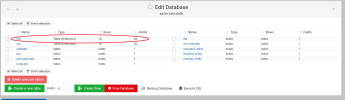
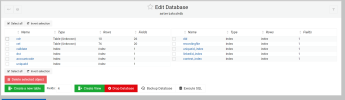
So that aside looking in the datase Table cdr the answer is NO the calls don't appear to be logged there - just the same ones that show up in the report. As you can see only 10 rows.

1691996667935.png

Any ideas on further faultfinding? Where in the logs should I see the values being written to the database?

TIA

lcsneil
 

Attachments

  • 1691996637268.png
    1691996637268.png
    125.4 KB · Views: 7
Last edited:
Just click on "cdr" then below you will see a menu item of "view data."

It should show the same thing as what you would normally see in the PBX menu for looking up CDRs.
 
Last edited:
If he still isn't getting CDR, either his install was hosed or something has been changed. He's confirmed that CDR logging is already turned on in Asterisk Settings. If Asterisk is not writing to the the DB, that would seem to point to a compromised installation. Reinstall is recommended.
 
If he still isn't getting CDR, either his install was hosed or something has been changed. He's confirmed that CDR logging is already turned on in Asterisk Settings. If Asterisk is not writing to the the DB, that would seem to point to a compromised installation. Reinstall is recommended.
It is possible there is an issue with the database tables and repairing them might solve the issue.
 
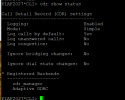
From the asterisk CLI start with these variants of CDR

cdr show status
module show like cdr
cdr set debug on

For mysql records you will need the 'adaptive ODBC' backend to be registered and active
 
Last edited:
See also this thread.

What versions of Framework and CDR Reporting are running on your server??
 
Last edited:
So to recap.
  • CDR reporting (wasnt switched on since an update earlier in the year but has been from the start of this thread)
  • Calls arent being logged even in the database
  • I cant see any errors in the logs when it tries to post a call log to the database
  • I have now tried the show status and get the following (all looks OK)
  • CDR Reports - 16.0.38
  • FreePBX Framework - 16.0.40.4

1692085184284.png


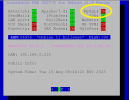
Is the MySQL not running in the status page an issue? (If so how do I correct)
1692085527939.png

So to summarise

1) Is it an issue MySQL isnt running?
2) If it is a re-install is that just the CDR module or the whole thing from scratch
3) If full re-install then is a backup and restore advisable or might that break the new install?


TIA
lcsneil
 
@lcsneil I still don't think this is a clean install of IncreiblePBX-2027. Did you have an old system you backed up and restored over the new 2027 system? You can restore a FreePBX backup from an old system to a new but you cannot restore an Incrediblebackup from old to new.

More detail is needed regarding what hardware or cloud the installation is on and what version of Ubuntu. People are trying to troubleshoot in the dark and the discussion has run too long. Your screen shot shows IncrediblePBX-2027 DEBIAN and your post says you installed on Ubuntu. The two install scripts are not the same, depending on the underlying operating system.

I stand by my recommendation to blow it away and run a clean install of Debian 11 and IncrediblePBX-2027D. I'm not even sure a FreePBX backup of the current system will work well since the DB seems to have issues. It would probably be safer to use the Bulk Handler tool and save various parts of the system to import into a new system.

All I can say is that many people have run the installs on both Debian 11 and Ubuntu 22.04 without issue. Therefore, rather than try to clean up a mess, it will be more expedient to wipe out what you have done and start over while carefully following the instructions from the http://nerdvittles.com article.


or

 
Last edited:
So has the actual database and/or tables (cdr and cel) been checked for issues? Because mysql/mariadb can be running and working fine for the other database or other tables within a database but certain tables not work because they need to be repaired.

Here's a question, does the Call Events Logging work? Are there things being added to the cel table that are not being added to the cdr table? It just seems there troubleshooting being skipped over to get to the "reinstall everything" conclusion.
 
If MySQL/MariaDB isn't running, you won't get CDR entries since the entries are stored in a MySQL table.

systemctl restart mysql
systemctl status mysql
 
If MySQL/MariaDB isn't running, you won't get CDR entries since the entries are stored in a MySQL table.

systemctl restart mysql
systemctl status mysql
And most of the GUI wouldn't work since it uses the database backend to pull the information it displays. There would be errors when getting to the admin GUI that the database couldn't be reached.
 
Get 3CX - Absolutely Free!

Link up your team and customers Phone System Live Chat Video Conferencing

Hosted or Self-managed. Up to 10 users free forever. No credit card. Try risk free.

3CX
A 3CX Account with that email already exists. You will be redirected to the Customer Portal to sign in or reset your password if you've forgotten it.
Back
Top