SOLVED IncrediblePBX for Raspberry Pi 4

sparis573

New Member
Joined
Aug 13, 2023
Messages
3
Reaction score
1
Hello everyone. New to this group. I recently installed, and successfully configured, IncrediblePBX for Raspberry Pi 4. After getting everything set up, and phones working, I executed Module updates. Since doing this, I'm getting an error at my Dashboard: "sysadmin rpm not up to date, or not a known os. file:/var/www/html/admin/modules/synologyabb/synologyabb.class.php:134%0d%0a"

I'm also noticing that the System Overview isn't showing any info., and states "There was an error asking for Overview. Check the error logs for more information."

Any ideas on what went wrong? The system functions fine...but my this is tripping my OCD :).
 
It sounds like it installed from the FrePBX module store rather than the one for IncrediblePBX. Go to Admin > Module Admin and uninstall sysadmin and synology backup. Those should not be there. That will likely resolve the errors.
 
Sysadmin is used for the FreePBX distro that enables commercial (paid) modules and should never be loaded into IncrediblePBX. I don't understand how those got there but @wardmundy can take a look at it to make sure the install is pointed at the correct repository.
 
Another note is that in the module admin, just because something shows up as available (blue) does not mean you should install it. IncrediblePBX uses only fully open-source modules whereas FreePBX has some proprietary stuff that will not work with IncrediblePBX. When you do a module upgrade, look for the ones in RED that indicate a new version is available. The blue ones aren't needed and likely should not be installed. You may have to reinstall the whole system to clear out garbage if commercial modules got in.

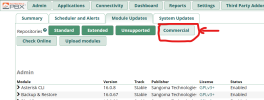
Never select the Commercial Modules on this screen. I think that is what you did and just installed everything.

1691938413881.png
 
Last edited:
You can't install commercial modules in the OSS, it skips over them when doing something like `fwconsole ma installall` or `upgradeall`. In other words, it skips the Commercial repo even when checked.
 
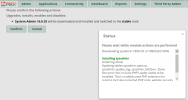
@Samot I beg to disagree. It does download stuff and they give an error.

1691939562463.png

And then you get this:

1691939683581.png
 
@Samot The test system I just did that on is now somewhat screwed up so I'll see what I have to do to fix it.
 
It sounds like it installed from the FrePBX module store rather than the one for IncrediblePBX. Go to Admin > Module Admin and uninstall sysadmin and synology backup. Those should not be there. That will likely resolve the errors.
Only the synology backup was installed, so I uninstalled it. That fixed it. Thank you for the info. on module admin. updates. That is something that isn't clear, and good to know. Thanks again!
 
Get 3CX - Absolutely Free!

Link up your team and customers Phone System Live Chat Video Conferencing

Hosted or Self-managed. Up to 10 users free forever. No credit card. Try risk free.

3CX
A 3CX Account with that email already exists. You will be redirected to the Customer Portal to sign in or reset your password if you've forgotten it.
Back
Top