
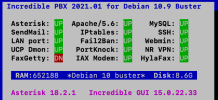
IncrediblePBX 2021.01
Asterisk 18.2.1
Incredible GUI 15.0.22.33
Debian 10
Using vmware version.
Hello everyone, I have an issue with one of my IncrediblePBX servers.
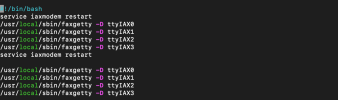
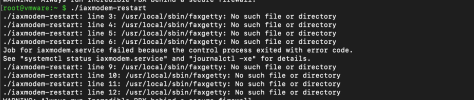
This one specifically has FaxGetty DOWN. When I run ./iaxmodem-restart I get an error saying that certain lines do not exists

Under /usr/local/sbin/faxgetty there's the following:
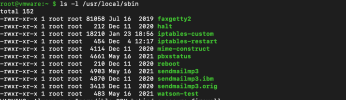
The first thing that came to my mind was changing the file iaxmodem-restart entries to faxgetty2 to match what is in that path. The issue persists.
I've found a workaround which is to go directly to the path /usr/local/sbin and run the commands directly:
faxgetty -D ttyIAX0
faxgetty -D ttyIAX1
faxgetty -D ttyIAX2
faxgetty -D ttyIAX3
I would like to be able to run ./iaxmodem-restart instead of doing the workaround. Thank you for your help! And I hope the prior helps people who want to get FaxGetty UP and rruning
Asterisk 18.2.1
Incredible GUI 15.0.22.33
Debian 10
Using vmware version.
Hello everyone, I have an issue with one of my IncrediblePBX servers.
This one specifically has FaxGetty DOWN. When I run ./iaxmodem-restart I get an error saying that certain lines do not exists
Under /usr/local/sbin/faxgetty there's the following:
The first thing that came to my mind was changing the file iaxmodem-restart entries to faxgetty2 to match what is in that path. The issue persists.
I've found a workaround which is to go directly to the path /usr/local/sbin and run the commands directly:
faxgetty -D ttyIAX0
faxgetty -D ttyIAX1
faxgetty -D ttyIAX2
faxgetty -D ttyIAX3
I would like to be able to run ./iaxmodem-restart instead of doing the workaround. Thank you for your help! And I hope the prior helps people who want to get FaxGetty UP and rruning


 Phone System