TIPS Yealink t54w is registered but loses connection and the extensions become "unavailable".

kmcdaniel

Member
Joined
Jan 23, 2008
Messages
483
Reaction score
23
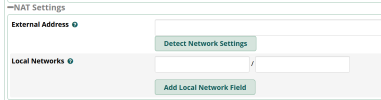
Running Incredible PBX 2027D on Vultr. Phones register no problem from static ip address. However, they become unavailable after some time. From what I can search, perhaps altering this section under Settings -> Asterisk Sip Settings may fix it. I understand for External Address, just hit "Detect Network Settings" My question is what value should I put for the Local Networks? Is it simply my LAN subnet gateway address? 192.168.8.1/24? Thank you in advance for any help.
1714009567523.png
 
It’s been a while since I’ve had a new Incredible build but from memory just hitting detect network settings populated both fields.

I suspect that this won’t fix your issue.
It will most likely be a firewall issue.
 
If you're running it on Vultr then you are running it on a public IP. That is for when the PBX is being NAT and needs the external IP set in the SIP messages. The Local Network indicates what networks to not apply external IP information from.

If the endpoints are going unavailable on the PBX side, it means the PBX isn't getting responses back from the devices registered to it. That is generally a firewall/NAT issue on the other side (where the phones are).
 
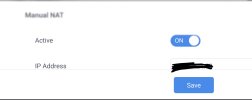
Thanks for responding. Here is an update. In the Yealink configuration under NAT I enabled it and entered the public IP of the Comcast Gateway where the phones are and it seems to have fixed it. I'm not sure what else in the firewall could be interfering. Sip ALG is turned off. By having to do this in the Yealink phone, can this give anymore insight in terms of what may be wrong on the router side?
 

Attachments

  • Screenshot_20240425-000959~3.jpg
    Screenshot_20240425-000959~3.jpg
    185.3 KB · Views: 5
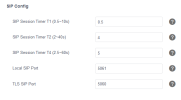
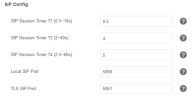
Does anyone know if this correct for Yealink? Originally it had Local SIP Port as 5060. But in the install directions it said pjsip is 5061. Just not sure it this is the area to adjust, we made it 5061 in registration tab, but this is under sip section, so I adjusted to 5061 also and made TLS SIP 5060? Can anyone provide guidance on this?

1714052489453.png
 

Attachments

  • 1714052423993.png
    1714052423993.png
    15.9 KB · Views: 0
Last edited:
Does anyone know if this correct for Yealink? Originally it had Local SIP Port as 5060. But in the install directions it said pjsip is 5061. Just not sure it this is the area to adjust, we made it 5061 in registration tab, but this is under sip section, so I adjusted to 5061 also and made TLS SIP 5060? Can anyone provide guidance on this?

View attachment 5365
Chan_PJSIP is listening on port 5061, so in your SIP server settings for the account you set the SIP server port to 5061. This part of the phone config is setting the phones listening port(s). It has nothing to do with the listening port of the PBX. The PBX can listen on 5061 and the phone can listen on 5060, they don't need to match.
 
Chan_PJSIP is listening on port 5061, so in your SIP server settings for the account you set the SIP server port to 5061. This part of the phone config is setting the phones listening port(s). It has nothing to do with the listening port of the PBX. The PBX can listen on 5061 and the phone can listen on 5060, they don't need to match.
Okay, thanks. I believe I understand. One more thing. If all Yealinks are at the same office and behind a NAT. Does the office firewall need to have ports 5060 and 5061 open for these services on the WAN?
 
Okay, thanks. I believe I understand. One more thing. If all Yealinks are at the same office and behind a NAT. Does the office firewall need to have ports 5060 and 5061 open for these services on the WAN?
No because you can't point a NAT rule to multiple destinations. When your phones register they will cause the firewall to create a NAT mapping of an external NAT port to the phones local port. The firewall will keep that external NAT open so the device can receive incoming connections. If you are using UDP, then there isn't really a connection to track so firewalls will cache the connection details, expecting a response in X amount of time. A lot of firewalls/routers have an issue with keeping a UDP NAT mapping cached for long periods of time.

The two work arounds for this are to do one or both: A) Make sure the phone is doing its own keepalives. This will have the phone send a keepalive to Asterisk every X seconds. This will refresh the timers on the UDP cache in the firewall for the NAT. B) Set the registration expire time to something like 300 seconds (5 minutes) or lower causing the phone to re-register and do the same thing...refresh the UDP cache in the firewall.

The other problem you were having was the router wasn't handling the SIP request well and left the local IPs untouched in the contact URI and most likely the SDP of the phone. By adding the external IP details in the phone, the phone is now adding that instead of local information.
 
No because you can't point a NAT rule to multiple destinations. When your phones register they will cause the firewall to create a NAT mapping of an external NAT port to the phones local port. The firewall will keep that external NAT open so the device can receive incoming connections. If you are using UDP, then there isn't really a connection to track so firewalls will cache the connection details, expecting a response in X amount of time. A lot of firewalls/routers have an issue with keeping a UDP NAT mapping cached for long periods of time.

The two work arounds for this are to do one or both: A) Make sure the phone is doing its own keepalives. This will have the phone send a keepalive to Asterisk every X seconds. This will refresh the timers on the UDP cache in the firewall for the NAT. B) Set the registration expire time to something like 300 seconds (5 minutes) or lower causing the phone to re-register and do the same thing...refresh the UDP cache in the firewall.

The other problem you were having was the router wasn't handling the SIP request well and left the local IPs untouched in the contact URI and most likely the SDP of the phone. By adding the external IP details in the phone, the phone is now adding that instead of local information.
Would it be better if I changed to TCP for pjsip?
 
This isn't about pjsip, this is about the router/firewall. You could change to TCP and it should stop the problem.
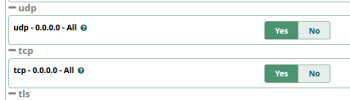
So I turned TCP on under Asterisk SIP Settings. And adjusted the registration in the Yealink to use TCP. However it will only register on 5060 and fails on 5061. Is that okay even though it is a PJSIP extension? Really appreciate all of your help!

1714063746244.png
 
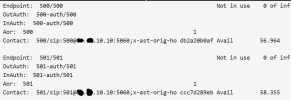
Can someone explain this, I am just trying to understand. I have a CrownCloud personal home PBX that shows my remote PJSIP extensions registering to port 5060 as indicated in this screenshot. Things register just fine on this PBX and extensions stay registered.

1714097182337.png

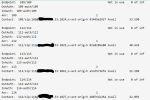
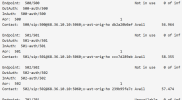
The vultr instance I am having issues with extension becoming unavailable show various ports after the ip address that are not 5060 or 5061. Do these port number even matter. In both instances the Yealink phones are set to register PJSIP on 5061 on the register TAB. I am just hoping someone can explain to me what causes this and if it even means anything? Here is a screenshot of the Vultr PBX with the random ports after the IP in the Contact: line.

1714097379272.png
 

Attachments

  • 1714097110601.png
    1714097110601.png
    75.8 KB · Views: 0
Last edited:
Can someone explain this, I am just trying to understand. I have a CrownCloud personal home PBX that shows my remote PJSIP extensions registering to port 5060 as indicated in this screenshot. Things register just fine on this PBX and extensions stay registered.

View attachment 5368

The vultr instance I am having issues with extension becoming unavailable show various ports after the ip address that are not 5060 or 5061. Do these port number even matter. In both instances the Yealink phones are set to register PJSIP on 5061 on the register TAB. I am just hoping someone can explain to me what causes this and if it even means anything? Here is a screenshot of the Vultr PBX with the random ports after the IP in the Contact: line.

View attachment 5369
Is the first one local to the phones in some way? The ports you're seeing on Vultr are the public NAT ports the router the devices are behind made.
 
Is the first one local to the phones in some way? The ports you're seeing on Vultr are the public NAT ports the router the devices are behind made.
No the first one is hosted on CrownCloud. Yealink phones are remote from my home.

The second hosted on Vultr. Yealink phones are remote from my office.
 
The PBX can listen on 5061 and the phone can listen on 5060, they don't need to match.
Agreed. Except for my Nortel 1140e phones. I expect that the Nortel phone is an outlier as you shouldn’t have to use the same port number for both ends of the connection. But that was the only way I could get the phones to stay connected.
 
Agreed. Except for my Nortel 1140e phones. I expect that the Nortel phone is an outlier as you shouldn’t have to use the same port number for both ends of the connection. But that was the only way I could get the phones to stay connected.
So you're saying that if you make chan_pjsip listen on 5082 you have to make the phone listen on 5082? Or are you saying you need to make the PBX listen on 5060 and the phones on 5060?

These phones are outliers in more than one way since they are proprietary phones for a proprietary system. Much like how the Cisco 79XX's could be used on a non-UCM system but they lost 50% of their features. Also how they weren't really designed for cloud use, (i.e. meant to have the phones/UCM on the same network). That's pretty much how those Nortel phones/system was done back in 2008.

Do you even have the 5.0 firmware on the phone that was released on 2020?
 
Yes.
My phones are running 4.0
Well according to the documents, 4.0 is from 2010. Released when that series was just two years old and the idea of the phones/PBX not being on the same network was not in the cards, I'm sure.

So on a phone that is 14 years old, not designed for over the Internet and running 14 year old firmware might be the issue. It's not really a viable comparison to modern phones.
 

Members online

No members online now.

Forum statistics

Threads
26,690
Messages
174,431
Members
20,262
Latest member
zvonex
Get 3CX - Absolutely Free!

Link up your team and customers Phone System Live Chat Video Conferencing

Hosted or Self-managed. Up to 10 users free forever. No credit card. Try risk free.

3CX
A 3CX Account with that email already exists. You will be redirected to the Customer Portal to sign in or reset your password if you've forgotten it.
Back
Top