TIPS T-mobile Blocking SIP?

f15radar

New Member
Joined
Apr 17, 2008
Messages
25
Reaction score
0
Hello. I just got t-mobile home internet and went to hook my grand stream phones and my Lin phone client. After much looking I realized t-mobile is blocking sip. I have several questions:

1) can I use TLS and if so I do I set that up on the pbxiaf side?
2) can I change ports and if so how do I set that up on the pbxiaf side?
3) how could I use OpenVPN on the pbxside to “host the phones”

Thanks in advance.
 
Hello. I just got t-mobile home internet and went to hook my grand stream phones and my Lin phone client. After much looking I realized t-mobile is blocking sip. I have several questions:

1) can I use TLS and if so I do I set that up on the pbxiaf side?
2) can I change ports and if so how do I set that up on the pbxiaf side?
3) how could I use OpenVPN on the pbxside to “host the phones”

Thanks in advance.
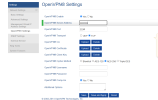
1) in gui
Settings > Asterisk Sip Settings > (tab to ) Sip Steeings [chan pjsip]
Scroll to o.o.o.o ( TLS or whatever )

You didn't say what chan you are using, now which version/platform. For current offerings (see Incredible Wiki) installs You should be using chan pjsip,
2) yes as above if you have access to the GUI
The default port however is not the traditional sip port (5060) but now using 5061. The provider ports shouldnt be a problem.

Incoming ports should be whitelisted but the following ports are already whitelisted for the listed providers, or when you add provider IPaddresses and FQDN via the linux CLI
Bash:
# add-ip name IPaddress  (no spaces in name nor in IPaddress)
add-ip
#Also use
add-fqdn
pick from ports 5060 to 5069

3) See wiki.Incrediblepbx.com Incredible Wiki
 
Last edited:
I have opted to go with the openvpn option. I installed it and generated the .opvn file. My grandstream DP752 has a configuration page that needed the CA, client CA, and key, so I used a program to get those and plugged them in, but its still not working. I think I could figure this out if the grandstream had some way of showing me why, how, if, or errors, but i dont have a syslog server and dont now how to debug. I know using the openvpn is probably the way to go but I dont know how to make it work with the grandstream phones. I have googled and googled but there is not a lot on this. Here is a screen shot of the grandsteam openvpn page.
 

Attachments

  • openvpn settings.PNG
    openvpn settings.PNG
    53.1 KB · Views: 9
I hate to be the bearer if bad news but Grandstream phones have a long history of not working with OpenVPN except to their own PBX. I tried countless variations of certificate/key/cipher combinations with no luck. I had support working on a trouble ticket for a GRP-2612 to make it work by uploading the standard OpenVPN .ovpn file. After six months, they released a new firmware that works. I doubt you having success with the DP752 without a modified firmware. They finally said that the phones wanted a user name and password in the .ovpn file but I could not make that work either so they modified the firmware and I gave them access to my VPN until they figured it out.

You can open a ticket with Grandstream support and see what you can get them to do. They are responsive but change takes months before they release a fix.
 
I have opted to go with the openvpn option. I installed it and generated the .opvn file. My grandstream DP752 has a configuration page that needed the CA, client CA, and key, so I used a program to get those and plugged them in, but its still not working. I think I could figure this out if the grandstream had some way of showing me why, how, if, or errors, but i dont have a syslog server and dont now how to debug. I know using the openvpn is probably the way to go but I dont know how to make it work with the grandstream phones. I have googled and googled but there is not a lot on this. Here is a screen shot of the grandsteam openvpn page.
OpenVPN by default uses UDP, unless you changed it to TCP
 
Ok, I tried lots of things including setting back to UDP and adding options and none worked. I opened a ticket with Grandstream but I dont think I will be able to make that work. I tried TCP (option 2 in original post) and i could nver get the grandstream phone to register. I tried changing ports but that didn't work either. What other options do I have to make this work with the Grandstream DP752? Thanks.
 
You have you look at the openVPN logs on the server? tcpdump to see if traffic is arriving?
 
I have. I only traffic i am seeing is 14 packets of udp but i cant see the actual packets.
 
Check with T-Mobile and see if you can switch to the business plan. I understand on that plan, you can request an IPV4 fixed IP for about $3/month more. It requires a different device from them.

No none at Grandstream could ever advise exactly how to set up OpenVPN to work the way they need. I also found no documentation. The new firmware on the GRP-2612 let me upload the ovpn file into the phone but it did not let me see how it populated the blanks after the upload. By that, I mean that the fields were still blank after the upload but the VPN would work.
 
Unfortunately tmobile left my area and says i can keep them but i cannot make any changes. In fact the service got so bad i had to put up an outside antenna. But i got the service for $25 a month. The next plan anyone offers is $120 so i have to keep what i have:(
 
I have. I only traffic i am seeing is 14 packets of udp but i cant see the actual packets.
And what about the OpenVPN logs?

I myself have set up some Grandstream phones without any trouble, so I am not sure why kenn10 has had trouble.
 
Hello. I just got t-mobile home internet and went to hook my grand stream phones and my Lin phone client. After much looking I realized t-mobile is blocking sip. I have several questions:

1) can I use TLS and if so I do I set that up on the pbxiaf side?
2) can I change ports and if so how do I set that up on the pbxiaf side?
3) how could I use OpenVPN on the pbxside to “host the phones”

Thanks in advance.
They do not block SIP. I use SIP over T-Mobile Home Internet daily. If you use UDP you will need to use frequent keepalives.

TLS will work fine. No need to rehash the how-to - there are plenty of tutorials about setting up TLS on the PBX and phones.

OpenVPN would be a waste of your time, in my opinion.
 
Here are the log files….apparently I am doing something wrong on the dp572

UDPv4 read returned 14
Jan 27 11:18:29 IncedPBX ovpn-server[606]: TLS-CRYPT UNWRAP FROM: 388968f8 c265d5a2 77000000 0000
Jan 27 11:18:29 IncedPBX ovpn-server[606]: tls-crypt unwrap error: packet too short
Jan 27 11:18:29 IncedPBX ovpn-server[606]: TLS Error: tls-crypt unwrapping failed from [AF_INET]
 
They do not block SIP. I use SIP over T-Mobile Home Internet daily. If you use UDP you will need to use frequent keepalives.

TLS will work fine. No need to rehash the how-to - there are plenty of tutorials about setting up TLS on the PBX and phones.

OpenVPN would be a waste of your time, in my opinion.

Apparently I am doing something wrong. I set the transport up, it registers, but inbound outbound calls don’t work. I think my best bet is with the OpenVPN.IMG_2530.jpeg
 
They do not block SIP. I use SIP over T-Mobile Home Internet daily. If you use UDP you will need to use frequent keepalives.

TLS will work fine. No need to rehash the how-to - there are plenty of tutorials about setting up TLS on the PBX and phones.

OpenVPN would be a waste of your time, in my opinion.
Re-opening a year-old thread because I have stumbled upon this problem.

I've been tinkering with the Computers 4 People "Shield" internet offering to see if it is viable for some lower income folks that I work with. I got a cheap ($35 delivered) used KVD21 gateway/router from eBay, popped in the C4P SIM, and it seemingly works fine for all mainstream Internet use.

In the case of one or two of the folks I have been helping, however, I'd previously set them up with simple VoIP calling to help them save phone money. In my testing, I have not been able to get the C4P service -- which I believe is comparable to T Mobile Home Internet service rather than T Mobile cell service -- to work with SIP, if at all. Can't get it to make calls via several VoIP vendors from a simple desktop client (Zoiper or MicroSIP) behind C4P. Can't even get it to work via C4P by installing various VoIP vendors as trunks (have tried both SIP and PJSIP trunks) on a cloud instance of IPBX, and using a PJSIP extension via Tailscale to access that IPBX.

Not sure what the secret sauce is to your comment above, @billsimon , that you are able to "use SIP over T-Mobile Home Internet daily." I have VoIP.MS, and read a comment by @wardmundy that he was able to use T Mobile Home via IAX, and will test that. But the folks I am concerned with already have put money in accounts with VoIP providers that do not support IAX and I'd like them to not waste that money.

Pointers welcome!
 
The KVD21 doesn't have configurable ALG control, so it may or may not work. You can try a different kind of router that might let you turn it off and see if that helps.
 
Just tested a SIP call using Groundwire with our Calyx SIM card on T-Mobile, and the call went through just fine with audio in both directions. We use GL-iNet’s new GL-XE3000 5G router with the Calyx SIM which is the best bargain on the planet for unlimited 5G mobile hotspot service at $500/year.
 
Last edited:
Thanks, @atsak and @wardmundy. Were it just for me, those options might be fine. But they are probably out-of-scope for what I'm trying to do here.

(1) True, the KVD21 doesn't have configurable ALG control. Doesn't have much of any control, even using the Hint Control app. But I don't know if that actually =is= the problem. Haven't ever read an "ALG is for sure the issue" confirmation -- happy to be pointed to that fact -- and @wardmundy said he used IAX and VoIP.MS without issue, suggesting it might be a SIP port blocking problem. I don't want to have to be buying new hardware to suss that out. I'll pop the C4P SIM into my iPhone and then my Moto G Power and either tether or hotspot each to the desktop to see if that gets around the problem.

(2) I'd be all over the GL-iNet router for me, but that's out-of-scope, price-wise, for the intended application. $500/year is a bit over the less than the $215 first year, $180/year thereafter price-point that the used KVD21 and C4P would cost the low income families that I'm intending this for. If it just doesn't work with VoIP, and there is no work around, it'd be cheaper for them to use something else for home telephoning.
 
Get 3CX - Absolutely Free!

Link up your team and customers Phone System Live Chat Video Conferencing

Hosted or Self-managed. Up to 10 users free forever. No credit card. Try risk free.

3CX
A 3CX Account with that email already exists. You will be redirected to the Customer Portal to sign in or reset your password if you've forgotten it.
Back
Top
