NEW The Taming of FusionPBX + Tutorial

pbxnerd

New Member
Joined
Apr 11, 2024
Messages
13
Reaction score
10
I used this tutorial on YouTube and had it working perfectly my first try:

Yes there's a definite plus to having everything fully open source as with IncrediblePBX. Main thing is, there are critical features I need that incredible PBX doesn't support but which are available for free with Fusion. Anyway, everyone will have their own custom needs, experience, and opinion in these things which I respect. The best option for one person may not always be the best option for another.

Fusion has some paid, closed-source modules. But that's no different than Sangoma. And at least with Fusion, you get a whole lot more functionality free and open source than you get with Sangoma. I was really put off by the DefCon security vulnerability that Sangoma took forever to patch and for which they had a really messed up response to the researcher who reported it, trying to not pay him his bounty, etc. And also by the despicably terrible way they treated their competition - the good ClearlyIP folks (who are an absolutely amazing team and I love working with them). And under the hood, I think Freeswitch is a lot better thought out in many ways than Asterisk in my opinion, though I am good with the many who will disagree with me there. And multi tenant is just a huge deal for some folks, including me. Fusion has an amazing free call center and queue functionality and agent monitoring out of the box, it has a much more sensible time conditions module than freepbx, it is far less resource hungry, it has great free endpoint management, it supports a huge number of phones for free, and I could go on. Oh... and did I mention it was multi tenant!?

I know people complain about the Fusion forums and the lack of documentation, but honestly I don't feel like that bad rap is totally warranted from my experience. In my experience, the documentation isn't always as bad as people make it out to be, and some is actually very helpful. If you don't buy a subscription, there's definitely more of a learning and research curve to get up to speed. But it's totally doable, and that phase doesn't last forever. Once you get all the features figured out that you need, it just runs with no further issues. I used a YouTube tutorial to set up my initial Fusion config, which gave me a perfectly working PBX easily and quickly. Then there were a bunch of advanced features I wanted to set up, which took some digging without paying for the full training, but I enjoyed the process. I too feel like the Fusion forums are generally unhelpful, but usually civil. And remember FreePBX forums can be pretty rude too…

And you gotta give it to the poor guy who runs Fusion, that he has to earn a living somehow. He already makes a huge amount of his work available for free, with the caveat that you have to be motivated and dig for advanced functionality if you want to do it on your own. If you want him to make it easy, a temporary subscription to his advanced training materials isn't very expensive. But with some googling and LLMing you can figure out all the advanced stuff out on your own, and get an incredibly functional system. I'm saving a ton of money compared to what I had set up in FreePBX including the commercial modules I had to use to make it functional for my needs. Honestly it only takes a few minutes to solve anything complex in Fusion using GPT o3. In fact, I'm actually planning to support the Fusion dev with a subscription, not because I need his material, but because I'm getting a lot of value out of his work and I feel like it's only fair to support him. In my opinion, I think he's a great guy who has done a great service to the PBX world and deserves a much better spirit than a lot of folks online give him. Anyway, that's just my experience, which will not mirror everyone else's.
 
Last edited by a moderator:
My attention span on this project is limited to ONE HOUR having already wasted dozens of hours with FusionPBX.
 
@pomology: Didn't make it to Part 3.

Code:
fixing permissions on existing directory /var/lib/postgresql/17/main ... ok
creating subdirectories ... ok
selecting dynamic shared memory implementation ... posix
selecting default "max_connections" ... 100
selecting default "shared_buffers" ... 128MB
selecting default time zone ... Etc/UTC
creating configuration files ... ok
running bootstrap script ... ok
performing post-bootstrap initialization ... ok
syncing data to disk ... ok
Processing triggers for man-db (2.9.4-2) ...
Processing triggers for libc-bin (2.31-13+deb11u12) ...
Error: cluster configuration already exists
 pg_reload_conf
----------------
 t
(1 row)

SET
CREATE DATABASE
CREATE ROLE
GRANT
ALTER ROLE
ERROR:  role "freeswitch" does not exist
INSERT 0 1

PHP Fatal error:  Uncaught Error: Cannot use object of type settings as array in /var/www/fusionpbx/app/sofia_global_settings/app_defaults.php:11
Stack trace:
#0 /var/www/fusionpbx/resources/classes/domains.php(654): include()
#1 /var/www/fusionpbx/core/upgrade/upgrade_domains.php(53): domains->upgrade()
#2 {main}
  thrown in /var/www/fusionpbx/app/sofia_global_settings/app_defaults.php on line 11

Fatal error: Uncaught Error: Cannot use object of type settings as array in /var/www/fusionpbx/app/sofia_global_settings/app_defaults.php:11
Stack trace:
#0 /var/www/fusionpbx/resources/classes/domains.php(654): include()
#1 /var/www/fusionpbx/core/upgrade/upgrade_domains.php(53): domains->upgrade()
#2 {main}
  thrown in /var/www/fusionpbx/app/sofia_global_settings/app_defaults.php on line 11
INSERT 0 1
ERROR:  invalid input syntax for type uuid: ""
LINE 1: ...b794d-f94a-453d-b15d-1f6529e661de', 'superadmin', '', '72493...
                                                             ^

Upgrade
-----------------------------------------

Database
        Schema:                 No Change

PHP Fatal error:  Uncaught Error: Cannot use object of type settings as array in /var/www/fusionpbx/app/sofia_global_settings/app_defaults.php:11
Stack trace:
#0 /var/www/fusionpbx/resources/classes/domains.php(654): include()
#1 /var/www/fusionpbx/core/upgrade/upgrade.php(280): domains->upgrade()
#2 {main}
  thrown in /var/www/fusionpbx/app/sofia_global_settings/app_defaults.php on line 11

Fatal error: Uncaught Error: Cannot use object of type settings as array in /var/www/fusionpbx/app/sofia_global_settings/app_defaults.php:11
Stack trace:
#0 /var/www/fusionpbx/resources/classes/domains.php(654): include()
#1 /var/www/fusionpbx/core/upgrade/upgrade.php(280): domains->upgrade()
#2 {main}
  thrown in /var/www/fusionpbx/app/sofia_global_settings/app_defaults.php on line 11
Job for freeswitch.service failed because the control process exited with error code.
See "systemctl status freeswitch.service" and "journalctl -xe" for details.
Created symlink /etc/systemd/system/multi-user.target.wants/email_queue.service -> /etc/systemd/system/email_queue.service.
Created symlink /etc/systemd/system/multi-user.target.wants/event_guard.service -> /etc/systemd/system/event_guard.service.
Reading package lists... Done
Building dependency tree... Done
Reading state information... Done
 
Last edited:
@pomology: Didn't make it to Part 3.

Code:
fixing permissions on existing directory /var/lib/postgresql/17/main ... ok
creating subdirectories ... ok
selecting dynamic shared memory implementation ... posix
selecting default "max_connections" ... 100
selecting default "shared_buffers" ... 128MB
selecting default time zone ... Etc/UTC
creating configuration files ... ok
running bootstrap script ... ok
performing post-bootstrap initialization ... ok
syncing data to disk ... ok
Processing triggers for man-db (2.9.4-2) ...
Processing triggers for libc-bin (2.31-13+deb11u12) ...
Error: cluster configuration already exists
 pg_reload_conf
----------------
 t
(1 row)

SET
CREATE DATABASE
CREATE ROLE
GRANT
ALTER ROLE
ERROR:  role "freeswitch" does not exist
INSERT 0 1

PHP Fatal error:  Uncaught Error: Cannot use object of type settings as array in /var/www/fusionpbx/app/sofia_global_settings/app_defaults.php:11
Stack trace:
#0 /var/www/fusionpbx/resources/classes/domains.php(654): include()
#1 /var/www/fusionpbx/core/upgrade/upgrade_domains.php(53): domains->upgrade()
#2 {main}
  thrown in /var/www/fusionpbx/app/sofia_global_settings/app_defaults.php on line 11

Fatal error: Uncaught Error: Cannot use object of type settings as array in /var/www/fusionpbx/app/sofia_global_settings/app_defaults.php:11
Stack trace:
#0 /var/www/fusionpbx/resources/classes/domains.php(654): include()
#1 /var/www/fusionpbx/core/upgrade/upgrade_domains.php(53): domains->upgrade()
#2 {main}
  thrown in /var/www/fusionpbx/app/sofia_global_settings/app_defaults.php on line 11
INSERT 0 1
ERROR:  invalid input syntax for type uuid: ""
LINE 1: ...b794d-f94a-453d-b15d-1f6529e661de', 'superadmin', '', '72493...
                                                             ^

Upgrade
-----------------------------------------

Database
        Schema:                 No Change

PHP Fatal error:  Uncaught Error: Cannot use object of type settings as array in /var/www/fusionpbx/app/sofia_global_settings/app_defaults.php:11
Stack trace:
#0 /var/www/fusionpbx/resources/classes/domains.php(654): include()
#1 /var/www/fusionpbx/core/upgrade/upgrade.php(280): domains->upgrade()
#2 {main}
  thrown in /var/www/fusionpbx/app/sofia_global_settings/app_defaults.php on line 11

Fatal error: Uncaught Error: Cannot use object of type settings as array in /var/www/fusionpbx/app/sofia_global_settings/app_defaults.php:11
Stack trace:
#0 /var/www/fusionpbx/resources/classes/domains.php(654): include()
#1 /var/www/fusionpbx/core/upgrade/upgrade.php(280): domains->upgrade()
#2 {main}
  thrown in /var/www/fusionpbx/app/sofia_global_settings/app_defaults.php on line 11
Job for freeswitch.service failed because the control process exited with error code.
See "systemctl status freeswitch.service" and "journalctl -xe" for details.
Created symlink /etc/systemd/system/multi-user.target.wants/email_queue.service -> /etc/systemd/system/email_queue.service.
Created symlink /etc/systemd/system/multi-user.target.wants/event_guard.service -> /etc/systemd/system/event_guard.service.
Reading package lists... Done
Building dependency tree... Done
Reading state information... Done
Sorry for all the trouble. I've installed it on a VM in proxmox, and an AWS EC2 instance, and it worked perfect out of the box for me. I never experienced any installer issues like this.

“cluster configuration already exists” would seem to indicate that the installer tried to create the default 17/main Postgres cluster even though one is already on disk. Was this a fresh Debian install?

Anyway, I'm still fairly new to it having been using and learning it just a few months, but my experience has been very positive. What's the backstory with the Fusion Dev? I'd be interested to know.

P.S, I have always done my initial install via the quick-install directions available here: https://docs.fusionpbx.com/en/latest/getting_started/quick_install.html

And then did my configuration via the YouTube video above.
 
Last edited by a moderator:
@pomology: Have to admit that our last clean install of FusionPBX was almost 7 years ago:


Having said that, we finally got a working install by creating a Proxmox container for Debian 12 and then:
1. Followed install instructions from here: https://docs.fusionpbx.com/en/latest/getting_started/quick_install.html
Code:
apt-get update && apt-get upgrade
apt-get install systemd
apt-get install systemd-sysv
apt-get install ca-certificates
reboot

wget -O - https://raw.githubusercontent.com/fusionpbx/fusionpbx-install.sh/master/debian/pre-install.sh | sh;
cd /usr/src/fusionpbx-install.sh/debian && ./install.sh
2. Copied down our admin credentials and IP address when the install finished
3. For Containers only, FreeSwitch will be dead when the install finishes. So issue the following commands and reboot:
Code:
sed -i 's|IOSched|#IOSched|' /lib/systemd/system/freeswitch.service
sed -i 's|CPUSched|#CPUSched|' /lib/systemd/system/freeswitch.service
systemctl daemon-reload
systemctl restart freeswitch
systemctl status freeswitch

Now everyone can finally play along starting at the Fail2Ban step here. The rest of the detailed tutorial is quite good.
 
Last edited:
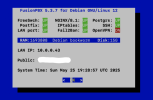
You can download the pbxstatus app for FusionPBX here. I recommend putting it in /usr/local/sbin on your server.

FusionPBX-pbxstatus.png
Code:
apt install dialog -y
cd /usr/local/sbin
wget https://filedn.com/lBgbGypMOdDm8PWOoOiBR7j/FusionPBX/pbxstatus
chmod +x pbxstatus
echo "pbxstatus -p" >> /root/.profile
 
Last edited:
I did an install on Rack Nerd on a 1GB VM with Debian 12 and PHP 8.1. Installed OK. Now I have to go through and create some gateways and extensions and devices. I haven't messed with this in 5 years or more so I'll have to relearn to test.

I wonder if it works with PHP 8.2.
 
I wanted to share my experience with FusionPBX. About five months ago, I completed an installation that went smoothly.
I then proceeded to set up seven subdomains and have successfully migrated five customers over the past four months.
I'm happy to report that the system has been remarkably stable.

As someone new to FusionPBX, I definitely encountered a learning curve, but the abundance of helpful YouTube videos made the process much more manageable.
While many of the videos are older, they still provide a solid understanding of the fundamentals.

Through my experience, I've found that configuring gateways on the main domain and managing everything else on the subdomains works best for my setup.
I'm also using Yealink phones, and the provisioning feature within each tenant has been working very well.

Overall, despite still being in the learning phase, I am very satisfied with FusionPBX.

On a related note, I recently came across information about a fork of an earlier FusionPBX version called FSpbx.
It features a new GUI interface that looks quite interesting, although I haven't had the chance to try it out yet.
You can find more details about it on pbxforums.com.

Gary.
 
I wanted to share my experience with FusionPBX. About five months ago, I completed an installation that went smoothly.
I then proceeded to set up seven subdomains and have successfully migrated five customers over the past four months.
I'm happy to report that the system has been remarkably stable.

As someone new to FusionPBX, I definitely encountered a learning curve, but the abundance of helpful YouTube videos made the process much more manageable.
While many of the videos are older, they still provide a solid understanding of the fundamentals.

Through my experience, I've found that configuring gateways on the main domain and managing everything else on the subdomains works best for my setup.
I'm also using Yealink phones, and the provisioning feature within each tenant has been working very well.

Overall, despite still being in the learning phase, I am very satisfied with FusionPBX.

On a related note, I recently came across information about a fork of an earlier FusionPBX version called FSpbx.
It features a new GUI interface that looks quite interesting, although I haven't had the chance to try it out yet.
You can find more details about it on pbxforums.com.

Gary.
Please supply some links to the tutorials you found most helpful. Thanks for the feedback.
 
I wanted to share my experience with FusionPBX. About five months ago, I completed an installation that went smoothly.
I then proceeded to set up seven subdomains and have successfully migrated five customers over the past four months.
I'm happy to report that the system has been remarkably stable.

As someone new to FusionPBX, I definitely encountered a learning curve, but the abundance of helpful YouTube videos made the process much more manageable.
While many of the videos are older, they still provide a solid understanding of the fundamentals.

Through my experience, I've found that configuring gateways on the main domain and managing everything else on the subdomains works best for my setup.
I'm also using Yealink phones, and the provisioning feature within each tenant has been working very well.

Overall, despite still being in the learning phase, I am very satisfied with FusionPBX.

On a related note, I recently came across information about a fork of an earlier FusionPBX version called FSpbx.
It features a new GUI interface that looks quite interesting, although I haven't had the chance to try it out yet.
You can find more details about it on pbxforums.com.

Gary.
Thanks for the heads up on FSpbx! Sounds interesting. I'm going to look into it.
 
OLD videos but will help


For sip trunking I use VoipMS & Telnyx set for ip authentication.
I create gateways in main domain and use them as global trunks. (No extensions in main domain)
In SubDomain use Dialplan/Destination to setup inbound DID routes.
If you plan to use Provisioning go to Advance/Default settings, use drop down and select Provision then search for yealink, check the boxes and copy to your subdomains and ajust them as needed.


VPS Debian 12

A record point to.
pbx1.mydomain.com


set time zone
timedatectl set-timezone Canada/Eastern

download fusionpbx (5.3)


run install script
cd /usr/src/fusionpbx-install.sh/debian
./install.sh


REBOOT SYSTEM


edit iptables to allow tcp (new ssh port)

edit ssh change port to (new ssh port)


All subdomains on server will be (xxx.mydomain.com)


Set Access Control Providers voipms (xxx.xxx.xxx.xxx)
Telnyx (xxx.xxx.xxx.xxx)


Add Gateway
VoipMS Proxy (xxx.xxx.xxx.xxx) make sure register is False
Telnyx Proxy (xxx.xxx.xxx.xxx) make sure register is False


On yealink phones set RPort (Enabled) in Account/Advanced !!

Gmail authentication
At my Gmail account settings, set this server ip to allow smtp

On FusionPBX set default settings for email

Email

address_type text add_address False
method text smtp True
smtp_auth text True False
smtp_crypto_method text STREAM_CRYPTO_METHOD_TLSv1_2_CLIENT False
smtp_from text [email protected] True
smtp_from_name text Voicemail True
smtp_host text smtp-relay.gmail.com True
smtp_hostname text False
smtp_password text False
smtp_port numeric 25 True
smtp_secure text tls False
smtp_username text False
smtp_validate_certificate boolean True False
 
Gateway registration works. Extension registration works. Outbound calls work after adding outbound route. Then you add an inbound route and gateway registration fails permanently.
Don't use inbound route, use Dialplan/Destination and it will auto create inbound route.
 
Last edited by a moderator:
Straight from the Inbound Routes documentation

Note: It is recommended to use Destinations tool and select where to route the call and have it build the inbound routes. There are many benefits to the destination select tool. Manually creating an inbound route is not recommended unless you need an advanced inbound route.
 
I could never get outbound registration to Bulkvs to work either. I've wasted over 8 hours on this. Its going back in mothballs for now.
 

Members online

Forum statistics

Threads
26,712
Messages
174,572
Members
20,281
Latest member
RP1SP
Get 3CX - Absolutely Free!

Link up your team and customers Phone System Live Chat Video Conferencing

Hosted or Self-managed. Up to 10 users free forever. No credit card. Try risk free.

3CX
A 3CX Account with that email already exists. You will be redirected to the Customer Portal to sign in or reset your password if you've forgotten it.
Back
Top