
You are using an out of date browser. It may not display this or other websites correctly.
You should upgrade or use an alternative browser.
You should upgrade or use an alternative browser.
NEW The Taming of FusionPBX + Tutorial
- Thread starter pbxnerd
- Start date

wardmundy
Nerd Uno
- Joined
- Oct 12, 2007
- Messages
- 20,424
- Reaction score
- 6,144
Here's what I see. If you start with a gateway that shows itself properly registered. And you set up a DID for that trunk, and then add an extension and an outbound route, calling out from a softphone works fine. When you add an inbound route pointed to that gateway, it either blows the gateway out of the water or you still get a busy when you call that DID. Usually you'll find the IP address of the provider's POP trying to connect has been blacklisted. But whitelisting it in IPtables still results in calls to the DID failing as BUSY.
I've tried this with numerous Proxmox VMs and containers as well as a Debian 12 setup at ColoCrossing.
I've tried this with numerous Proxmox VMs and containers as well as a Debian 12 setup at ColoCrossing.
Last edited:

kenn10
Well-Known Member
- Joined
- Dec 16, 2007
- Messages
- 4,714
- Reaction score
- 3,087
Well I was able to get it working with 5.3.8. I set up an extension. Then I set up a gateway (with registration) to BulkVS. Then I did my DID destination to the extension. Finally, I added North America dialplan to an outbound route and pointed it at the BulkVS gateway. I have 2-way audio on internal and external now.
At least this is something I can play with now.
The other key thing is to go to Advanced > Access Controls an select the Providers item. Add the three BulkVS ip addresses there. Its sort of like the Match field in a FreePBX trunk. You'd add in the IPs of whatever provider you're using.
At least this is something I can play with now.
You don't set up an inbound route for the DID. You just setup a destination for the DID. In the Action field, select your Ext.Here's what I see. If you start with a gateway that shows itself properly registered. And you set up a DID for that trunk, and then add an extension and an outbound route, calling out from a softphone works fine. When you add an inbound route pointed to that gateway, it either blows the gateway out of the water or you still get a busy when you call that DID. Usually you'll find the IP address of the provider's POP trying to connect has been blacklisted. But whitelisting it in IPtables still results in calls to the DID failing as BUSY.
I've tried this with numerous Proxmox VMs and containers as well as a Debian 12 setup at ColoCrossing.
The other key thing is to go to Advanced > Access Controls an select the Providers item. Add the three BulkVS ip addresses there. Its sort of like the Match field in a FreePBX trunk. You'd add in the IPs of whatever provider you're using.

ou812
Guru
- Joined
- Oct 18, 2007
- Messages
- 490
- Reaction score
- 87
All of this was in the tips I provided earlier.Well I was able to get it working with 5.3.8. I set up an extension. Then I set up a gateway (with registration) to BulkVS. Then I did my DID destination to the extension. Finally, I added North America dialplan to an outbound route and pointed it at the BulkVS gateway. I have 2-way audio on internal and external now.
At least this is something I can play with now.
You don't set up an inbound route for the DID. You just setup a destination for the DID. In the Action field, select your Ext.
The other key thing is to go to Advanced > Access Controls an select the Providers item. Add the three BulkVS ip addresses there. Its sort of like the Match field in a FreePBX trunk. You'd add in the IPs of whatever provider you're using.
I would go into your ColoCrossing account and destroy it. Their entire Cloud infrastructure has been compromised and has been publicly known since May 25th when the hackers started to post the entire Virtualizor database exposing full names, emails, usernames, passwords and they were all in plain text.as well as a Debian 12 setup at ColoCrossing.
At least 500+ servers where destroyed by the hackers and a huge amount of the systems were found to have files from the hackers added to them including crypto miners. On top of all that CC hasn't been truthful about the breach.
There's even a website for it: https://colocrossingbreach.com/
wardmundy
Nerd Uno
- Joined
- Oct 12, 2007
- Messages
- 20,424
- Reaction score
- 6,144
@Samot: Thanks for your post. We're aware of the breach. First, we NEVER retain the password stored in any Virtualizor. It's the first thing we change after logging into a new server as root. Second, as with all of our servers, we never use the same password in more than one place. Third, we always disable web access to our servers without a firewall whitelist match. Fourth, we typically require OpenVPN credentials to access anything on our servers including SSH. And finally, we always change the port for SSH access. Can our servers still be hacked? Probably, but we've never experienced it which is a far cry from the ColoCrossing situation. And it's also exactly why we only use ColoCrossing platforms for stuff that doesn't matter... like FusionPBX experimentation.
kenn10
Well-Known Member
- Joined
- Dec 16, 2007
- Messages
- 4,714
- Reaction score
- 3,087
I am making some progress with FusionPBX. I'm still looking for a way to extract the extension from the incoming block of DID's without having to create an individual destination for each DID. Google and ChatGPT have only provided REGEX solutions that don't work. The concept of "Custom Destination" from FreePBX eludes me so far in regards to dial plan manipulation.
You can create a destination of, for example, 182855572XX and it will create destinations of 18285557200 thru 7299 but then you still have to edit each one to point to an extension. Not very helpful.
You can create a destination of, for example, 182855572XX and it will create destinations of 18285557200 thru 7299 but then you still have to edit each one to point to an extension. Not very helpful.
wardmundy
Nerd Uno
- Joined
- Oct 12, 2007
- Messages
- 20,424
- Reaction score
- 6,144
Extra special thanks to @billsimon for sharing the secret sauce to get a basic system working. I'm reminded of the folks that used to ask my grandmother for a recipe. She would invariably offer one up, but, accidentally or on purpose, it always seemed to leave out one key ingredient. It also reminded me of the early Asterisk days when you typically had to hire one of about a half dozen developers that actually knew how all the pieces fit together.
And that brings us to FusionPBX. As it happens, there were three missing ingredients to get inbound calls flowing, not one.
First, for your SIP phone, because FusionPBX uses TCP instead of UDP, you need to increase the TTL timeout for incoming calls substantially.
Second, FusionPBX maintains its own whitelist of allowed providers' IP addresses. So these need to be entered into the ALLOW table buried in Advanced -> Access Controls.
Finally, you need to UNBLOCK incoming calls from Provider's IP in FusionPBX's firewall component: Status -> Event Guard.
Be sure to restart Fail2Ban to clear out any blocked IP addresses: systemctl restart fail2ban
And that brings us to FusionPBX. As it happens, there were three missing ingredients to get inbound calls flowing, not one.
First, for your SIP phone, because FusionPBX uses TCP instead of UDP, you need to increase the TTL timeout for incoming calls substantially.
Second, FusionPBX maintains its own whitelist of allowed providers' IP addresses. So these need to be entered into the ALLOW table buried in Advanced -> Access Controls.
Finally, you need to UNBLOCK incoming calls from Provider's IP in FusionPBX's firewall component: Status -> Event Guard.
Be sure to restart Fail2Ban to clear out any blocked IP addresses: systemctl restart fail2ban
Last edited:
Ringback is a local thing. You need to confirm that early media is being used when the call hits the ring group. Does the greeting playback? Are you seeing a 183 reply that indicates early media is happening? Some carriers also ignore early media.More FusionPBX issues today. Ring groups don't return any ringback to the caller regardless of what ringback tone you choose. I'll trudge along with proof of concept and see what else turns up.
kenn10
Well-Known Member
- Joined
- Dec 16, 2007
- Messages
- 4,714
- Reaction score
- 3,087
I'm not playing any announcement in the ring group. It has 5 extensions and one cell phone number. I deleted and recreated it and it does give ringback now to external callers but not if an internal extension calls it. Also, it isn't calling the cell phone and it isn't respecting the ring times set for the extensions.
kenn10
Well-Known Member
- Joined
- Dec 16, 2007
- Messages
- 4,714
- Reaction score
- 3,087
@wardmundy We know FusionPBX 5.3.7 didn't work for us. Now I don't know if its just FusionPBX 5.3.8 or what but its buggy. Call park will work for a time or two and then quit working. Ring group still won't dial an outside call. If an external call comes in and an extension answers, there is no audio from the extension. If you then put the extension on hold and pick up again, the audio is there.
Tying to figure out NAT on this system is a conundrum in itself. This very same VM ran IncrediblePBX-2025 with absolutely no issues so I'd say the issue is with FusionPBX. I'm taking another break and walking away from it for awhile.
Tying to figure out NAT on this system is a conundrum in itself. This very same VM ran IncrediblePBX-2025 with absolutely no issues so I'd say the issue is with FusionPBX. I'm taking another break and walking away from it for awhile.
wardmundy
Nerd Uno
- Joined
- Oct 12, 2007
- Messages
- 20,424
- Reaction score
- 6,144
I seem to have a stable platform at the moment so I think I'll quit for a bit. My Ring Group seems to work better than yours. I added an outside cell phone number, and it rings as well. Even calls in and out of our $100 tablet using Zoiper and the $10 T-Mobile Tablet Plan with VoIP.ms DID works like a champ. We'll leave it running on ColoCrossing and see if we get hacked. 
Last edited:
wardmundy
Nerd Uno
- Joined
- Oct 12, 2007
- Messages
- 20,424
- Reaction score
- 6,144
To use OpenVPN with FusionPBX, create an OpenVPN client named fusionpbx.ovpn and copy it to /etc.
Then do the following:
Then do the following:
Code:
apt install openvpn
cd /etc/systemd/system
wget https://filedn.com/lBgbGypMOdDm8PWOoOiBR7j/FusionPBX/openvpn.service
chmod +x openvpn.service
cd /etc
wget https://filedn.com/lBgbGypMOdDm8PWOoOiBR7j/FusionPBX/openvpn-start
chmod +x openvpn-start
reboot
Last edited:
wardmundy
Nerd Uno
- Joined
- Oct 12, 2007
- Messages
- 20,424
- Reaction score
- 6,144
To get Outbound Email Flowing with Postfix
Code:
cd /root
apt install postfix
wget https://filedn.com/lBgbGypMOdDm8PWOoOiBR7j/FusionPBX/enable-gmail-smarthost-with-postfix
chmod +x enable*
./enable*
# insert your gmail account name and APP password when prompted
wget https://filedn.com/lBgbGypMOdDm8PWOoOiBR7j/FusionPBX/mailtest
chmod +x mailtest
nano -w mailtest
# insert a destination email address for testing and save mailtest
./mailtest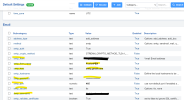
wardmundy
Nerd Uno
- Joined
- Oct 12, 2007
- Messages
- 20,424
- Reaction score
- 6,144
Another wrinkle appears to be usage by the proverbial traveling salesman. What we've found is that a change of IP address on a tablet that is being used as a SIP phone results in immediate blocking by FusionPBX. At least with Incredible PBX and FreePBX, this could be managed by whitelisting and using OpenVPN for the connections. That doesn't appear to work with FusionPBX which still sends the public IP address of the tablet rather than the OpenVPN address associated with the tablet. When we moved from Ponte Vedra to Charleston, the tablet's softphone was dead in the water until we manually unblocked the new IP address entry in EventGuard. Finally, creating an OpenVPN domain in FusionPBX with an OpenVPN IP address was easy, but we couldn't get a SIP softphone to register to an extension created in that domain using an OpenVPN connection.
As a footnote, the FusionPBX firewall is a good thing. Our public server got hammered with dozens of attacks the first couple days. Those now have almost all disappeared.
As a footnote, the FusionPBX firewall is a good thing. Our public server got hammered with dozens of attacks the first couple days. Those now have almost all disappeared.
Last edited:
kenn10
Well-Known Member
- Joined
- Dec 16, 2007
- Messages
- 4,714
- Reaction score
- 3,087
Another hiccup I found is regarding CODECs. I noticed some calls failing citing L16 CODEC. I'd never heard of that so I started looking at the default system parameters and there were a ton of active codecs. I deleted all except PCMU and G722 and that problem went away. Every call to a T-Mobile number was failing with the L16 codec. I didn't do a SIP trace but the logs showed the error. The ring group would hang when it encountered that error. The ring group now works.
Last edited:
markjcrane
New Member
- Joined
- Jun 2, 2025
- Messages
- 11
- Reaction score
- 15
There is an Import option. For importing multiple destinations.I am making some progress with FusionPBX. I'm still looking for a way to extract the extension from the incoming block of DID's without having to create an individual destination for each DID. Google and ChatGPT have only provided REGEX solutions that don't work. The concept of "Custom Destination" from FreePBX eludes me so far in regards to dial plan manipulation.
You can create a destination of, for example, 182855572XX and it will create destinations of 18285557200 thru 7299 but then you still have to edit each one to point to an extension. Not very helpful.
You are correct. This is the easiest way to do this. For email relay, I use smtp2go.com. What I like about them is that they are focused on providing a service for email relay. They support SMTP authentication or IP authentication.Or you can just edit the Advanced > Default Settings > Email and then you can input several settings and then it works as installed.
View attachment 5943

Reliable & Scalable Email Delivery Service & API
SMTP2GO is the scalable, reliable email deliverability solution. Worldwide servers, a robust API, and powerful reporting set us apart. Try our free plan!
FusionPBX Public Documentation
Recent improvements to the documentation
- Changed from RST format to Markdown format
- Ongoing work to update the screenshots
- Continued work on the content
Last edited:


Forum statistics
Get 3CX - Absolutely Free!
Link up your team and customers  Phone System Live Chat Video Conferencing
Hosted or Self-managed. Up to 10 users free forever. No credit card. Try risk free.

Verify your Email
Check your inbox!
We’ve sent you an email. Click on the button in the email body to verify your email address – (if you can not find it, check your spam folder).
Upon verification you will be directed to the 3CX setup wizard.