PIONEERS iPBX 2026 Queue Callback

I know the docs say the IVR can have only one option but multiple options on that IVR will work. Check it out.
The docs do not say that at all. The breakout IVR can only have single-digit options and only a single recording file.

This IVR must only contain single-digit “dialed options.” The recording set for the IVR will be played at intervals specified in “Repeat Frequency” below. The announcement for the selected IVR must be system recording comprised of a single sound file. IVRs that have announcements composed of compount recording files will not be presented as selections for this field.

One comment is that messing with the custom sounds file really screws up other things. I'd prefer to see the queue callback sounds in a separate directory and not mess with anything else existing in the sounds directory.
By default Asterisk uses /var/lib/asterisk/sounds along with the default/set language as the path. Therefore since Asterisk uses en by default, the default path is /var/lib/asterisk/sounds/en which is why you see Playback() and Backgound() calls do Playback(custom/filename) because it prepends the default path. Putting the files some place else means you have to provide the *full path* to the sound file in the Playback/Background calls. So that would also mean the IVR code would have to be overrided or updated to allow a non-standard path to be used.

yes i have always used more than one option in the breakout IVR...i think i need to re-record ALL my messages, maybe this is why i cannot hear the breakout message in the queue
Some logs would be very helpful. It would actually tell you why it's not playing.
 
The docs do not say that at all. The breakout IVR can only have single-digit options and only a single recording file.
I don't care what the docs say. I have a breakout IVR that accepts 0, 1, or 2 and it works just fine. Try it yourself or I can send you a test number to try out mine on IncrediblePBX-2026, Don't be so cock-sure if you haven't checked it out for yourself.
 
I don't care what the docs say. I have a breakout IVR that accepts 0, 1, or 2 and it works just fine. Try it yourself or I can send you a test number to try out mine on IncrediblePBX-2026, Don't be so cock-sure if you haven't checked it out for yourself.
Kenn10 you are correct! i have been using multiple entries in the breakout IVR for multiple destinations, i think SAMOT is getting confused on how the breakout works...................it gets activated with pressing a single digit, but the single digit you press can send to different destinations..................1 for callback, 2 for VM, etc. I actually set up my original IPBX connected to a vital 3 PBX and if you press 1, it actually activated the vital pbx 3's queue callback! very cool! using intercomapany trunks and ring groups with foe extensions.
 
I don't care what the docs say. I have a breakout IVR that accepts 0, 1, or 2 and it works just fine
Right because those are "single-digit options" not a single option. You can't use multi-digit options like 12 or 123 just only 0 thru 9 as those are single-digit numbers.
 
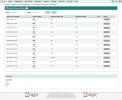
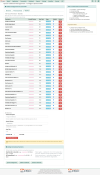
Queue Callback Beta 5 is now available...

IMPORTANT: Custom return-call recordings must instruct customers to press 1 to connect.


Also available for download here.

Code:
cd /var/www/html/admin/modules
mkdir qcallback
chown asterisk:asterisk qcallback
chmod 775 qcallback
cd qcallback
wget https://filedn.com/lBgbGypMOdDm8PWOoOiBR7j/IncrediblePBX2026/CONTRIBUTORS/qcallback-17.0.5.0_Beta_5.tgz
tar zxvf qcallback-17.0.5.0_Beta_5.tgz
cd agi-bin
cp -p * /var/lib/asterisk/agi-bin/.
fwconsole ma install qcallback
/root/sig-fix
/root/sig-fix
fwconsole reload

1794157792415.png

1794157840185.png
 
Last edited:
Queue Callback Beta 5 is now available...

IMPORTANT: Custom return-call recordings must instruct customers to press 1 to connect.


Also available for download here.

Code:
cd /var/www/html/admin/modules
mkdir qcallback
chown asterisk:asterisk qcallback
chmod 775 qcallback
cd qcallback
wget https://filedn.com/lBgbGypMOdDm8PWOoOiBR7j/IncrediblePBX2026/CONTRIBUTORS/qcallback-17.0.5.0_Beta_5.tgz
tar zxvf qcallback-17.0.5.0_Beta_5.tgz
cd agi-bin
cp -p * /var/lib/asterisk/agi-bin/.
fwconsole ma install qcallback
/root/sig-fix
/root/sig-fix
fwconsole reload

View attachment 6623

View attachment 6624
just finished testing, all works well, just one issue (not really an issue0 BUT if you put in an alternate callback number the recording says press 1 to accept, when you do this it repeats itself and again says to press 1 to accept, then it works. WE ALL SHOULD GIVE A BIG THANKS TO KNERD! I sent hin $500 for his efforts in making incredible PBX a real contender as a modern PBX!! P.S. i am having trouble having the PBX listen for faxes? i followed wards instructions for installing faxing on IPBX 2027 and then the additional script installation to modify it for IPBX 2026? but not answering faxes? any help would be appreciated!
 
If you're still stuck, test with a dedicated DID and watch the Asterisk CLI during an incoming fax call. That should help establish whether the fax tone is being detected or whether the call is failing to reach the custom fax context.
 

Forum statistics

Threads
26,857
Messages
175,599
Members
20,396
Latest member
SuperBricks
Get 3CX - Absolutely Free!

Link up your team and customers Phone System Live Chat Video Conferencing

Hosted or Self-managed. Up to 10 users free forever. No credit card. Try risk free.

3CX
A 3CX Account with that email already exists. You will be redirected to the Customer Portal to sign in or reset your password if you've forgotten it.
Back
Top