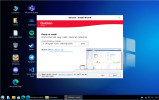
NEW Lindows OS 5 * * * * *

wardmundy

Nerd Uno
Joined
Oct 12, 2007
Messages
20,489
Reaction score
6,248
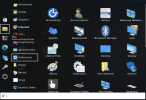
Move over Zorin. Since the cat is out of the bag, I wanted to give a tip of the hat to our very own @KNERD for his incredible new product, LindowsOS 5. In just a couple of weeks, it's already getting about 1,000 downloads a week on SourceForge based solely on word of mouth referrals. Based on Debian 13.5, you'll feel right at home especially if you're a Windows aficionado. Works great with Proxmox and VirtualBox, too.
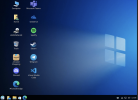
1792427974936.png
 
Last edited:
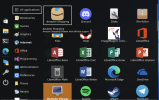
And another couple screenshots from the Lindows Start menu:

1792428316076.png

1792428780526.png
 
Last edited:
And another couple screenshots from the Lindows Start menu:
The clean look is amazing compared to Windows 11.


I had to upgrade a PC from windows 7 to Windows 11 this summer.
I was surprised to see ACTUAL advertising in the Start Menu.
It was as if I didn't pay for Windows and I was using a Trialware version of windows.
Well lo and behold, Microsoft has decided it can stick ads in my start menu - because they can !
 
Last edited by a moderator:
Not that anyone would want to waste a bunch of time getting Audio to work with Lindows OS5 on the Proxmox platform, but I thought I'd leave the Gemini instructions here just in case you need a weekend project. This solution uses a Panda Bluetooth 4.0 USB Nano Adapter with an external BolaBuddy Bluetooth speaker. Works flawlessly for music apps and YouTube, but it's a little scratchy with most of the Linux SIP phone apps.


1793736641093.png
 
Last edited:
Beta 5 is now out which replaces the weak ext4 partition with OpenZFS. However since OpenZFS needs more RAM, I am working on the installer to offer a choice between ext4 or OpenZFS
 
What's your cutoff point to default to ext4, systems with 4gb ram or less?
 
What's your cutoff point to default to ext4, systems with 4gb ram or less?
I am just going to put ext4 as the default partition. I guess I will have to put in notes in the installer when either or is selected to explain the pros and cons in a very compressed summary for those who do not know anything.
 
Got this in an email:
Congratulations! Lindows OS has just been recognized with a Rising Star award by SourceForge. This honor is awarded only to select projects that have reached significant milestones in terms of downloads and user engagement from the SourceForge community.

This is a big achievement, as your project has qualified for this award out of over 500,000 open source projects on SourceForge. SourceForge sees over 20 million users per month looking for, and developing, open source software. This award badge will now appear on your project page, and the award assets can be found in your project admin section.

To recognize Lindows OS's achievement, we've awarded you with the Rising Star award,
 
Safe to assume it's compatible with all windows binary application, including audio software and games?
What about microsoft teams and the m365 apps?
 
For Windows applications, it is a hit & miss. If you see in the screenshot of the desktop, it has MS Teams included.

It also includes Steam. In the Linux version there is a special "Tux" icon/tab which will show you which of the games will run in Linux natively. You will be surprised how many of them will do that.
 
For Windows applications, it is a hit & miss.
Current Quicken versions are one thing that keeps me from using a Linux desktop. Wine and other similar emulators never work with the current versions and the company has no interest in converting the product to run on Linux.
 
Current Quicken versions are one thing that keeps me from using a Linux desktop. Wine and other similar emulators never work with the current versions and the company has no interest in converting the product to run on Linux.
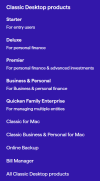
Which one are you using? I see there are a multitude of versions and types


1794575789372.png

I was visiting "special" site to see if I could get a copy to try to see what the problem is with getting it running on Lindows
 
Last edited:
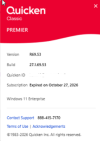
Which one are you using?
1794612288377.png

And the subscription was renewed. I don't know why it says expired. All Classic Quickens download the same executable but the licensing determines what gets turned on. The newer versions are cloud based but I'm not ready to push all my account data and passwords to a cloud.
 
I guess they changed everything now. It is now subscription based, and I guess the software features are enabled based on your subscription. My assumption is based on this single download link for it.


And pretty bad reviews on Walmart.

Since WINE is open source, should be easier to to try to figure out why it will not run on Linux
 
Since WINE is open source, should be easier to to try to figure out why it will not run on Linux
Quicken used to be an annual purchase with new releases just about every year but you could go a year or two without having to buy a newer version. Now they just send updates to all "Classic" versions and the licensing enables the features. Their web based version is very inferior to the desktop version. Older versions of Quicken prior to the "Classic" versions were sometimes made to work with Wine but never ran correctly. Things like download transactions from the banks and credit cards didn't work right. There were continual program freeze-ups and crashes making it essentially unusable. Now I suspect the license download/update will be another challenge.
 
I made some more progress getting it running. It appears to be just a web wrapper to their web site.
 
It appears to be just a web wrapper to their web site.
I'm not so sure of that. It is taking a substantial amount of space on disk. Nothing should be in the cloud unless the user lets it upload the datafile. I suspect it pulls licensed pieces from the cloud one authorized but everything seems to be running locally once installed.

There is a mostly view-only app as well: https://app.quicken.com/ which allows you to see uploaded data files and allows some manipulation but it is not directly attached to the PC's version of Quicken Classic,
 
Not had time to work on it today.

I have it partly working. One of the things it complained about at first was not having WebView2 from Microsoft installed. That gives a hint about it being a web wrapper.

In the menu bar so far, there are only two menu items and they both only have two selections.
For a moment I had it more functioning and saw the action going on in the middle of the application, not in the menu bar at top. Right now the middle of the screen is all black. It seems to want more .dll files on the system.

Maybe by Monday I will have it running.
 
Last edited:

Forum statistics

Threads
26,861
Messages
175,641
Members
20,400
Latest member
msrobi
Get 3CX - Absolutely Free!

Link up your team and customers Phone System Live Chat Video Conferencing

Hosted or Self-managed. Up to 10 users free forever. No credit card. Try risk free.

3CX
A 3CX Account with that email already exists. You will be redirected to the Customer Portal to sign in or reset your password if you've forgotten it.
Back
Top