Migrat LAN --> Wireless

newvoiper

Member
Joined
Nov 20, 2010
Messages
94
Reaction score
25
My PBXinaFlash server is working great on an Acer Revo 3610. I plugged it into ethernet LAN before beginning the installation to make sure the payloads would be available. Can anyone point me in the right direction to learn how to use the REVO's 802.11n wireless instead of the LAN connection? --Or-- is there a reason not to run PBXinaFlash server over wireless (not sure if I am asking for something nobody does for a reason)?

Had I not plugged in the LAN before the install, would the 1.7.5.5.2 32 bit distro had configured the wireless on the fly during installation? Or did I skip past an option to set that up during installation? (Just wondering if re-installation would be the easiest way to do this).
 
I would not run my phone server on a wireless connection. It is just not reliable enough for me. You could run into the situation where someone starts the microwave and all phone traffic stops. Stick to the wires.
 
My PBXinaFlash server is working great on an Acer Revo 3610. I plugged it into ethernet LAN before beginning the installation to make sure the payloads would be available. Can anyone point me in the right direction to learn how to use the REVO's 802.11n wireless instead of the LAN connection? --Or-- is there a reason not to run PBXinaFlash server over wireless (not sure if I am asking for something nobody does for a reason)?

Just curious what is the advantage you see in running it over wireless? The acer revo can be left beside the router or anywhere else there is a wired connection. For mobility you can use ip wi-fi capable phones or an ata with cordless phones.
 
Thanks for your advice, jmullinix. The main advantage I saw in runing it over wireless was to not permanently use up a port on the router, but will since there is a reason to stick with ethernet. The other, more immediate reason: I have been using the Revo in my living room, using the TV there as a monitor until I finish configuring. Router is in the next room. I temporarily borrowed the long ethernet cord from my HTPC, which isn't running very well without the ethernet. I was hoping to leave the REVO connected via wireless while I finish the setup...
 
Thanks for your advice, jmullinix. The main advantage I saw in runing it over wireless was to not permanently use up a port on the router, but will since there is a reason to stick with ethernet. The other, more immediate reason: I have been using the Revo in my living room, using the TV there as a monitor until I finish configuring. Router is in the next room. I temporarily borrowed the long ethernet cord from my HTPC, which isn't running very well without the ethernet. I was hoping to leave the REVO connected via wireless while I finish the setup...

IMHO, not a particularly good reason to switch to wireless. If you need more ports, buy more ports. The wired connection is far more appropriate for something you expect reliability from, like your telephones.
 
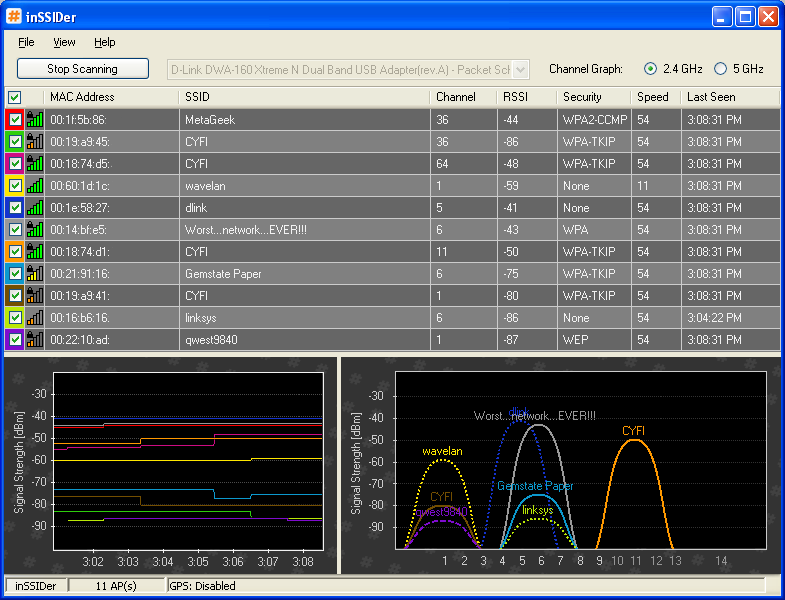
The wireless routers share (actually fight for) bandwidth on the free ISM band (industrial scientific medical) which is used by things like walkie talkies, some taxis, CB radios, microwave ovens, cordless phones, bluetooth, etc...

For the 2.4 Ghz range, there are 11 channels available (13 in Europe) but in reality for wireless LAN operation only channels 1,6 and 11 are useful due to the overlapping of the wireless channel. It takes about 3 channesl on either side - bit of a bandwidth hog.

There's a great free wireless bandwidth monitor program called inSSIDer that gives you an excellent picture of what your wireless air space is doing.

1255701759-1.png
 
The wireless routers share (actually fight for) bandwidth on the free ISM band (industrial scientific medical) which is used by things like walkie talkies, some taxis, CB radios, microwave ovens, cordless phones, bluetooth, etc

My mother in law had an older 2.4 GHz wireles phone that would absolutely squash their new Cradlepoint wireless router when she made a phone call. Not just a little interference, it would kill the network dead !! We made her buy a DECT phone.

Slighlty OT, but if one wants wifi in the house, it is best not to pollute the airwaves with 2.4 GHz 'wireless' keyboards and mice of unknown standards, or any other device that is 2.4 GHz 'wireless'. 2.4 GHz Bluetooth is OK, but anything else . . . don't use it.
 
Thank you for all the feedback, I am checking out issider now--so many wireless routers where I live...
Especially living in an apartment surrounded by who knows what kind of other wireless appliances that are not under my control, everyone definitely convinced me to go with ethernet for the asterisk server. For better reliability. & I did not know enough about networking to realize that more ports are always available by adding a switch--I was thinking switch might not work that well in series with the one already in the router....

From every one's remarks, it sounds like for mobility, a VOIP handset that uses ethernet to a base and then DECT to the handsets might be one of the more reliable choices, without trying to make the ata work? Or I might try a ata if I can find one people feel is reliable and easy to get working with PBIAF....
 
D-link makes an 8 port wireless 802N router (DIR-632) that is inexpensive. I picked up mine for $70 (Cdn) which is about two bags of peanuts and a pretezel in American dollars.

I found that I was running out of copper ports for my house.
 
From every one's remarks, it sounds like for mobility, a VOIP handset that uses ethernet to a base and then DECT to the handsets might be one of the more reliable choices, without trying to make the ata work? Or I might try a ata if I can find one people feel is reliable and easy to get working with PBIAF....

Yes, IP phones are to be preferred over an ATA. Gigaset makes some nice DECT IP phones. Read Michael Graves series on them.

Wifi voip phones, such as Android or iPhone smartphones are a solution that has worked very well for me, but you need a good wireless access point, centrally located, with good MIMO antennae (like the Engenius EAP 9550) to approach DECT phone performance.

Lastly, I don't know your budget but consider a 'smart' switch with QOS so you may prioritize your VoIP packets, anticipating the day when you plug something else into your switch. Of course, your router should have QOS also.
 

Members online

Forum statistics

Threads
26,686
Messages
174,406
Members
20,257
Latest member
Dempan
Get 3CX - Absolutely Free!

Link up your team and customers Phone System Live Chat Video Conferencing

Hosted or Self-managed. Up to 10 users free forever. No credit card. Try risk free.

3CX
A 3CX Account with that email already exists. You will be redirected to the Customer Portal to sign in or reset your password if you've forgotten it.
Back
Top